
1. Ro-ràdh
This manual provides instructions for the installation, operation, and maintenance of the Cisco CP-68KEM-3PCC Expansion Module. This module is designed to enhance the functionality of your Cisco IP Phone 6851 by providing additional programmable keys.
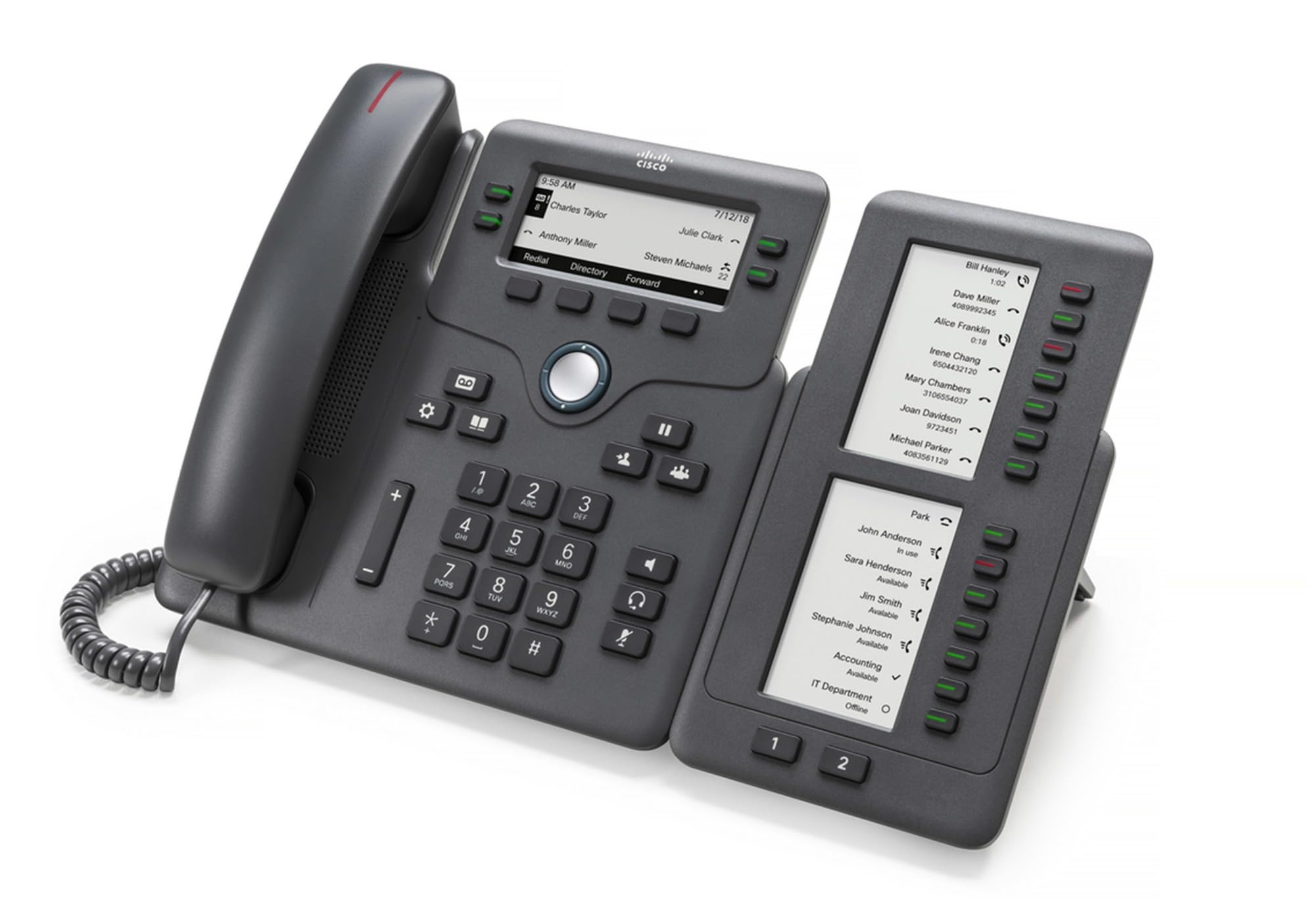
Figure 1: Cisco CP-68KEM-3PCC Expansion Module. This image shows the front view of the expansion module with its grayscale LCD screen and programmable keys.
The Cisco CP-68KEM-3PCC Expansion Module adds 14-line keys and 2-page keys, totaling 28 additional keys, with an easy-to-read grayscale LCD screen. It is ideal for monitoring and managing call status, directory numbers, and speed dial functions.
2. Dè tha sa bhogsa
Fosgail am bogsa gu faiceallach agus dèan cinnteach gu bheil a h-uile rud ann:
- Cisco CP-68KEM-3PCC Phone Expansion Module
- Connecting Cable (typically included for linking to the phone)
- Documentation (this user manual, safety information)
Ma tha rud sam bith a dhìth no air a mhilleadh, cuir fios chun t-solaraiche agad no taic Cisco sa bhad.
3. Stiùireadh Stèidheachaidh
Follow these steps to connect your Cisco CP-68KEM-3PCC Expansion Module to your Cisco IP Phone 6851.
- Prepare the IP Phone: Ensure your Cisco IP Phone 6851 is powered off and disconnected from the network.
- Connect the Expansion Module: Locate the expansion port on the back or side of your Cisco IP Phone 6851. Connect the provided connecting cable from the expansion module to this port.
- Dèan cinnteach à ceangal: Ensure the cable is securely fastened to prevent accidental disconnection.
- Cumhachd air: Reconnect your Cisco IP Phone 6851 to the network and power it on. The expansion module should be detected automatically.
- Dearbhaich comas-gnìomh: Once the phone has booted, check the expansion module's display and keys to ensure they are responsive.
For detailed visual instructions, refer to the official Cisco documentation or support weblàrach.
4. Operating the Expansion Module
The expansion module provides additional keys for various functions, enhancing your call management capabilities.
4.1 iuchraichean prògramaichte
The 28 programmable keys (14 keys across 2 pages) can be configured for:
- Directory Numbers (DNs): Assign specific phone lines or extensions.
- Dial Astair: Program frequently called numbers for quick access.
- Feature Keys: Assign functions like call transfer, conference, or call park.
- Call Status Monitoring: Monitor the status of other lines (e.g., busy, ringing).
4.2 Page Navigation
Use the dedicated page keys (usually located near the display) to switch between the two pages of programmable keys. The grayscale LCD screen will update to show the labels for the currently active page.
4.3 Rèiteachadh
Configuration of the programmable keys is typically managed through your organization's phone system administrator or via the web interface of the Cisco IP Phone 6851. Consult your IT department for specific configuration instructions.
5. Cumail suas
To ensure the longevity and optimal performance of your Cisco CP-68KEM-3PCC Expansion Module, follow these maintenance guidelines:
- Glanadh: Cleachd clò bog, tioram, gun lint airson na h-uachdaran a-muigh a ghlanadh. Airson comharran stòlda, beagan dampnigh an clò le uisge. Seachain ceimigean cruaidh, innealan-glanaidh sgrìobach no fuasglaidhean a chleachdadh, oir faodaidh iad sin milleadh a dhèanamh air a’ chrìochnachadh agus air na co-phàirtean dealain.
- Àrainneachd: Keep the module in a clean, dry environment, away from direct sunlight, excessive heat, and moisture.
- Làimhseachadh: Handle the module with care. Avoid dropping it or subjecting it to strong impacts.
- Riaghladh càbaill: Ensure connecting cables are not kinked, pinched, or under strain.
There are no user-serviceable parts inside the expansion module. Do not attempt to open or repair the device yourself.
6. A ’dèanamh trioblaid
If you encounter issues with your expansion module, try the following troubleshooting steps:
| Trioblaid | Adhbhar a dh’fhaodadh a bhith ann | Fuasgladh |
|---|---|---|
| Module not recognized by phone | Loose cable connection, phone not restarted, incompatible phone model. |
|
| Tha iuchraichean neo-fhreagairt | Software glitch, configuration issue. |
|
| Tha an taisbeanadh bàn no a’ priobadh | Cùis cumhachd, mearachd a-staigh. |
|
If these steps do not resolve the issue, please contact Cisco technical support or your authorized reseller.
7. Sònrachaidhean
| Feart | Mion-fhiosrachadh |
|---|---|
| Modail Àireamh | CP-68KEM-3PCC |
| Brand | Cisco |
| Innealan co-fhreagarrach | Fòn IP Cisco 6851 |
| Dath | Dubh |
| Stuth | Meatailt |
| Meudan nì (LxWxH) | 5.1 x 10.2 x 20.3 cm |
| Stòr cumhachd | Corded (powered via host IP Phone) |
| Àireamh de dh'Iuchraichean | 28 (14 keys across 2 pages) |
| Taisbeanadh | Grayscale LCD |
| GTIN/UPC | 889728068383 |
8. Fiosrachadh Barantais
The Cisco CP-68KEM-3PCC Expansion Module comes with a Barantas toraidh 2-bliadhna bho cheann-latha a’ cheannaich. Tha am barantas seo a’ còmhdach lochdan ann an stuthan agus obair-ciùird fo chleachdadh àbhaisteach. Chan eil e a’ còmhdach milleadh air adhbhrachadh le droch chleachdadh, tubaistean, atharrachaidhean gun chead, no adhbharan bhon taobh a-muigh.
For warranty claims or detailed terms and conditions, please refer to the official Cisco warranty policy available on their weblàrach-lìn no cuir fios chun àite ceannach agad.
9. Taic
For technical assistance, product information, or to report issues, please contact Cisco support:
- Taic Cisco Weblàrach: Tadhail air an oifigeach Taic Cisco weblàrach for documentation, downloads, and contact options.
- Authorized Reseller: Contact the reseller from whom you purchased the product.
When contacting support, please have your product model (CP-68KEM-3PCC) and serial number ready.