
Ro-ràdh
Thank you for choosing the SIMOLIO Kids Wireless Headphones Model JH-711. This manual provides essential information for the proper setup, operation, and maintenance of your headphones. Please read it carefully to ensure safe and optimal use.
Feartan toraidh
- 3-Level Volume Limiting: Protects children's hearing with switchable volume limits (75dB for toddlers, 85dB for kids, 94dB for adults). This feature is active in both wired and wireless modes.
- Iomallach fuaim: Over-ear design provides passive noise reduction, helping to block external sounds for improved listening focus.
- Wireless & Wired Modes: Offers Bluetooth connectivity for wireless use and includes a 3.5mm audio cable for wired connection when the battery is depleted or for non-Bluetooth devices.
- Micreofon togte: Enables hands-free calling and voice chat.
- Audio Sharing Port: Allows another headphone to connect and share audio from the same device.
- Durable & Flexible Design: Constructed with memory stainless steel strips in the headband for impressive durability and flexibility, designed to withstand active use. Earmuffs feature an anti-shedding design.
- Fillte & dlùth: Easy to fold and store in the included EVA carrying case, ideal for travel and school.
- Beatha bataraidh fada: Suas ri 15 uair a thìde de chluich air aon chosgais.

The headphones feature a 3-level volume limiter to protect hearing, adjustable for toddlers, kids, and adults.
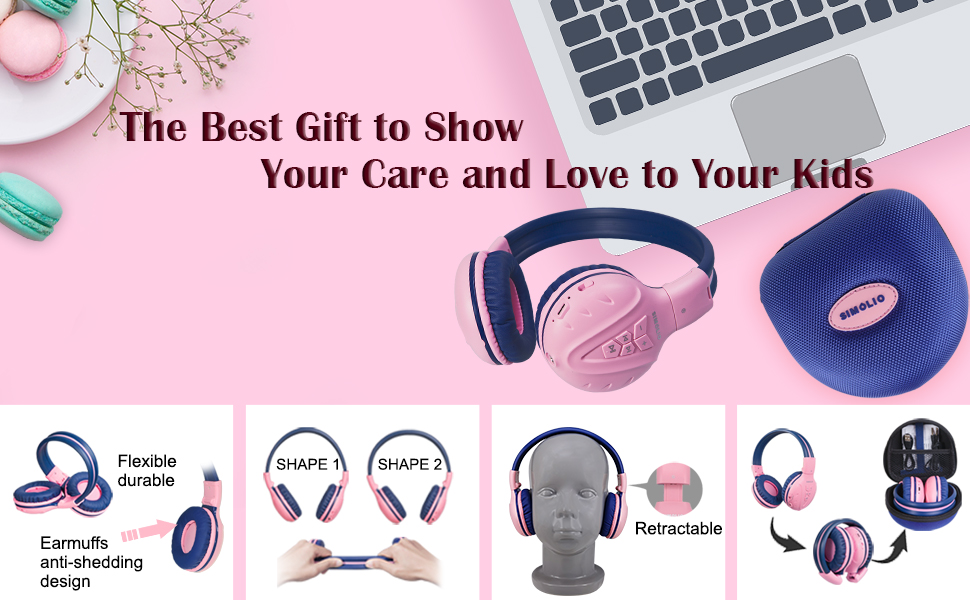
The flexible and durable design allows the headphones to withstand bending and twisting.
Dè th' anns a' Bhocsa
Tha na stuthan a leanas anns a’ phacaid:
- SIMOLIO Kids Wireless Headphones JH-711
- Càball Cosgais (USB)
- AUX Cable (3.5mm audio cable)
- Leabhar-làimhe cleachdaiche
- Carrying EVA Case
Suidhich
1. A 'cur cosgais air na fònaichean-làimhe
Before first use, fully charge the headphones. Connect the provided USB charging cable to the charging port on the headphones and to a USB power source (e.g., computer, wall adapter). The LED indicator will show charging status and turn off when fully charged.
2. Càraid Bluetooth
- Dèan cinnteach gu bheil na fònaichean-cluaise dheth.
- Press and hold the Multi-Function Button (MFB) until the LED indicator flashes blue and red alternately, indicating pairing mode.
- Air an inneal agad (fòn cliste, tablet, msaa.), cuir Bluetooth an gnìomh agus rannsaich airson innealan a tha rim faighinn.
- Select "SIMOLIO JH-711" from the list of devices.
- Aon uair ’s gu bheil e ceangailte, bidh an comharra LED a’ frasadh gorm gu slaodach.
3. Ceangal Modh Uèirle
To use the headphones in wired mode, connect one end of the 3.5mm AUX cable to the audio jack on the headphones and the other end to the audio output of your device. The headphones will automatically switch to wired mode, even if the battery is dead.

The headphones support both wireless Bluetooth mode and wired mode via the included AUX cable.
4. Volume Limiter Adjustment
Locate the 3-level volume limiter switch on the headphones. Adjust the switch to the desired maximum volume level:
- 75dB (S): Recommended for toddlers or very quiet environments.
- 85dB (M): Recommended for children in general listening environments.
- 94dB (L): Recommended for adults or noisy environments.

Adjust the physical switch to select the appropriate volume limit.
5. Using the Sharing Port
The headphones feature an additional sharing jack on the right side. To share audio, plug another headphone into this port. This allows two users to listen to the same audio source simultaneously.

Connect another headphone to the sharing port to share audio with a friend.
Stiùireadh Obrachaidh
1. Cumhachd air / dheth
- Cumhachd air: Press and hold the MFB for approximately 3 seconds until the LED indicator lights up.
- Cumhachd dheth: Press and hold the MFB for approximately 3 seconds until the LED indicator turns off.
2. Cluich Ciùil
- Cluich / Stad: Brùth air an MFB goirid.
- An ath cheum: Brùth goirid air a’ phutan “+”.
- Rian roimhe: Brùth goirid air a’ phutan “-”.
- Meud suas: Brùth fada air a’ phutan “+”.
- Meud sìos: Brùth fada air a’ phutan “-”.
3. Riaghladh Call
When connected via Bluetooth:
- Freagairt/Cuireadh Call: Brùth air an MFB goirid.
- Call a dhiùltadh: Brùth fada air an MFB.

Leigidh am micreofon togte leat gairmean gun làmhan a dhèanamh.
Cumail suas
- Glan na fònaichean-cluaise le clò bog, tioram. Na cleachd innealan-glanaidh sgrìobach no fuasglaidhean.
- Seachain na fònaichean-cluaise a nochdadh do theodhachd anabarrach, taiseachd no solas dìreach na grèine.
- Store the headphones in the provided EVA carrying case when not in use to protect them from dust and damage.
- Na feuaraich na fònaichean-cluaise a thoirt às a chèile no atharrachadh, oir cuiridh seo am barantas às a leth agus dh’ fhaodadh e milleadh adhbhrachadh.

The headphones fold compactly and fit into the included EVA case for easy storage and transport.
Fuasgladh thrioblaidean
| Trioblaid | Adhbhar a dh’fhaodadh a bhith ann | Fuasgladh |
|---|---|---|
| Chan eil fònaichean-cluaise a’ dol air. | Bataraidh ìosal. | Luchdaich a-nuas an làn chluasan. |
| Chan urrainnear paidhir a dhèanamh tro Bluetooth. | Fònaichean-cluaise gun a bhith ann am modh càraideachaidh; Bluetooth an inneil dheth; ro fhada bhon inneal. | Ensure headphones are in pairing mode (flashing red/blue). Turn on device Bluetooth. Move headphones closer to device (within 9 meters). |
| Gun fhuaim ann am modh gun uèir. | Tha an tomhas-fuaim ro ìosal; chan eil ceangal ann; tha an toradh claisneachd ceàrr air a thaghadh air an inneal. | Meudaich fuaim nam fònaichean-cluaise agus an inneil. Ath-phaidhir na fònaichean-cluaise. Thoir sùil air roghainnean claisneachd an inneil. |
| Gun fhuaim ann am modh uèirleasach. | AUX cable not fully inserted; cable damaged; device volume too low. | Ensure AUX cable is securely connected at both ends. Try a different AUX cable. Increase device volume. |
Sònrachaidhean
| Feart | Mion-fhiosrachadh |
|---|---|
| Ainm Modail | Kids Bluetooth Headphones JH-711 |
| Teicneòlas ceangail | Gun uèir (Bluetooth), Uèirle (3.5 mm Jack) |
| Tionndadh Bluetooth | 4.0 |
| Raon Bluetooth | 9 Meatair |
| Smachd fuaim | Iomallach fuaim |
| Cugallachd | 94 dB (Air a char as àirde) |
| Beatha bataraidh | 15 Uairean |
| Ùine cosgais | 3 Uairean |
| Cuideam nì | 187 gram (6.6 unnsa) |
| Meudan toraidh | 5.51 x 3.15 x 5.31 òirleach |
| Stuth | Nylon, Stainless Steel (headband) |
| Stuth Cùis Giùlain | EVA |
| Feartan sònraichte | 3 Adjustable Volume Limited, Microphone, Durable, Flexible, Foldable, Wired & Wireless, Share Port, EVA Case |
Bhidio Oifigeil Bathar
Tha am bhidio seo a’ toirt sealladh farsaingview of the SIMOLIO Bluetooth Headphones for Kids with Case JH-711, demonstrating its features and functionality.
Barantas agus Taic
SIMOLIO products are designed for quality and reliability. For specific warranty information, please refer to the warranty card included with your product or visit the official SIMOLIO website. If you encounter any issues or require technical assistance, please contact SIMOLIO customer support through their official channels.