
Ro-ràdh
The Xfinity HD 720p Wireless Indoor/Outdoor Home Security Camera allows you to monitor your home environment with live video accessible from anywhere. Designed for both indoor and outdoor use, this camera provides essential security features to keep you informed.
Dè th' anns a' Bhocsa
- Xfinity HD 720p Wireless Security Camera (Model: SCHC2AEW)
- Adapter cumhachd
- Càball USB
- Bathar-cruaidh stàlaidh (sgriuban agus acairean)

Image: Xfinity Home Security Camera and accessories neatly packaged in its box.
Stiùireadh rèiteachaidh
- Ceangal cumhachd: Connect the camera to the power adapter using the provided USB cable, then plug the adapter into a standard electrical outlet.
- Luchdaich sìos an aplacaid: Download the official Xfinity Home app from your smartphone's app store (iOS App Store or Android Google Play).
- Paidhir inneal: Open the Xfinity Home app and follow the on-screen instructions to add a new device. You will typically need to scan a QR code on the camera or manually enter its details to pair it with your home Wi-Fi network. Ensure your Wi-Fi network is 2.4 GHz for compatibility.

Image: The Xfinity Home Security Camera placed on a surface, ready for setup.
Stiùireadh Obrachaidh
Beò View and Basic Controls
Once paired, access the live video feed through the Xfinity Home app. The app provides controls for:
- Sruth beò: View foo fìor-ùinetage bhon chamara agad.
- Clàradh: Manually record video clips.
- Glacadh-sgrìn: Glac dealbhan fhathast bhon bhiadhadh beò.
- Fuaim dà-shligheach: Speak through the camera's speaker and hear audio from its microphone.
Sealladh na h-oidhche
The camera features night vision capabilities for clear monitoring in low-light conditions. This feature automatically activates when ambient light is insufficient, providing a black-and-white image. Some models may offer color night vision depending on ambient light and settings.
Brath gluasad agus rabhaidhean
Configure motion detection settings within the Xfinity Home app to receive alerts on your smartphone when activity is detected. You can customize sensitivity levels and notification preferences.
Roghainnean stòraidh
The camera supports local storage via a MicroSD card (not included). Insert a compatible MicroSD card into the designated slot to store recorded video clips directly on the device. Cloud storage options may also be available through your Xfinity Home service subscription.
Stàladh agus stàladh
The Xfinity Home Security Camera can be placed on a flat surface or mounted to a wall. Use the included mounting hardware for secure wall installation. Ensure the camera is positioned to cover the desired monitoring area.
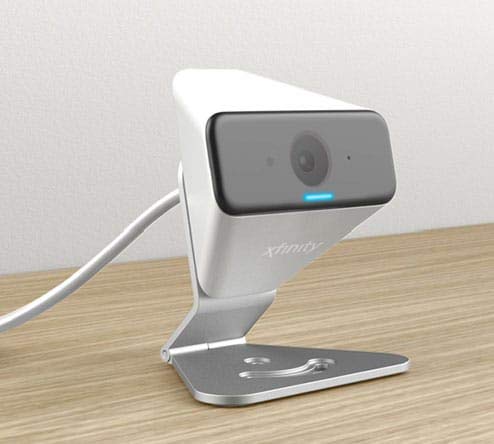
Image: The Xfinity Home Security Camera positioned on a desk, demonstrating its compact design.
Sònrachaidhean Bathar
| Feart | Mion-fhiosrachadh |
|---|---|
| Modail Àireamh | SCHC2AEW |
| Fuasgladh glacadh bhidio | 720p |
| Teicneòlas ceangail | Wireless (Wi-Fi) |
| Pròtacal ceangail | Wi-Fi (2.4 GHz compatible) |
| Cleachdadh a-staigh / a-muigh | A-staigh, a-muigh |
| Feartan sònraichte | Braitear Gluasad, Sealladh Oidhche |
| Stòr cumhachd | DC (12 Volts, 1 Watt) |
| Meudan (L x W x H) | 3 x 3 x 2 òirleach |
| Cuideam nì | 1.57 not |
| Ìre Dìon Eadar-nàiseanta | IP65 |
Fuasgladh thrioblaidean
- Gun chumhachd: Dèan cinnteach gu bheil an inneal-atharrachaidh cumhachd ceangailte gu tèarainte ris a’ chamara agus ri socaid dealain ag obair.
- Cùisean ceangail: Verify your Wi-Fi network is 2.4 GHz. Restart your router and the camera. Ensure the camera is within range of your Wi-Fi signal.
- App nach eil a’ freagairt: Close and reopen the Xfinity Home app. If the issue persists, try reinstalling the app.
- Càileachd bhidio truagh: Thoir sùil air neart comharra Wi-Fi. Dèan cinnteach gu bheil lionsa a’ chamara glan agus saor bho bhacaidhean.
Barantas agus Taic Luchd-cleachdaidh
For warranty information, please refer to the documentation included with your purchase or visit the official Xfinity support website. For technical assistance or customer service, please contact Xfinity customer support directly.