
1. Ro-ràdh
Thank you for choosing the LECLSTAR Motion Sensor Closet Light. This manual provides essential information for the safe and effective use of your new lighting product. Please read these instructions carefully before installation and operation, and retain them for future reference.
This wireless, battery-operated light features 51 LEDs, motion sensing capabilities, and is designed for various indoor applications such as closets, cabinets, kitchens, and stairs.
2. Fiosrachadh Sàbhailteachd
- Na cuir an inneal fo uisge no cus taiseachd.
- Do not attempt to disassemble, repair, or modify the light. This will void the warranty and may cause damage or injury.
- Cleachd dìreach an càball USB a chaidh a thoirt seachad airson cosgais.
- Avoid direct eye exposure to the LED light, as it can be very bright.
- Cùm a-mach à ruigsinn chloinne.
3. Pasgan-susbaint
Thoir sùil air a’ phacaid gus dèanamh cinnteach gu bheil a h-uile nì an làthair:
- 1 x LECLSTAR Motion Sensor Closet Light
- 1 x Magnetic Plastic Bracket
- 2 x 3M Adhesive Pads
- 4 x sgriothan cur suas
- 1 x càball cosgais USB
- 1 x Leabhar-làimhe Cleachdaiche
4. Toradh thallview
Familiarize yourself with the components of your LECLSTAR Motion Sensor Closet Light.

Figear 1: Product Components. This diagram illustrates the various parts of the light, including the USB charging port, magnetic strip for mounting, LED light board, durable aluminum alloy casing, ON/OFF switch, infrared motion sensor receiver, and protective ABS cover.
- Port USB: Airson a’ bhataraidh a-staigh a ghearradh.
- Stiall Magnetic: Allows for easy attachment to magnetic surfaces or the included bracket.
- LED Light Board: Contains 51 bright LEDs for illumination.
- Aluminum Alloy Material: Provides a durable and lightweight housing.
- Putan AIR / OFF: Controls the power and operating modes.
- Glacadair fo-dhearg: Detects signals from the remote control (if applicable).
- ABS Cover: Protects the LEDs and diffuses light.
5. Setup agus Stàladh
The LECLSTAR Motion Sensor Closet Light offers flexible installation options.
5.1 Charging Before First Use
Before installation, fully charge the light. Refer to Section 6 for detailed charging instructions.
5.2 Roghainnean sreap
You can install the light using the magnetic plastic bracket with 3M adhesive or screws.
- Magnetic Adhesion: Peel off the protective film from the 3M adhesive pads and attach them to the magnetic plastic bracket. Press the bracket firmly onto a clean, dry surface where you wish to install the light. The light can then be magnetically attached to the bracket.
- Stàladh sgriubha: Use the provided screws to secure the magnetic plastic bracket to a desired surface. Once the bracket is securely mounted, attach the light magnetically.

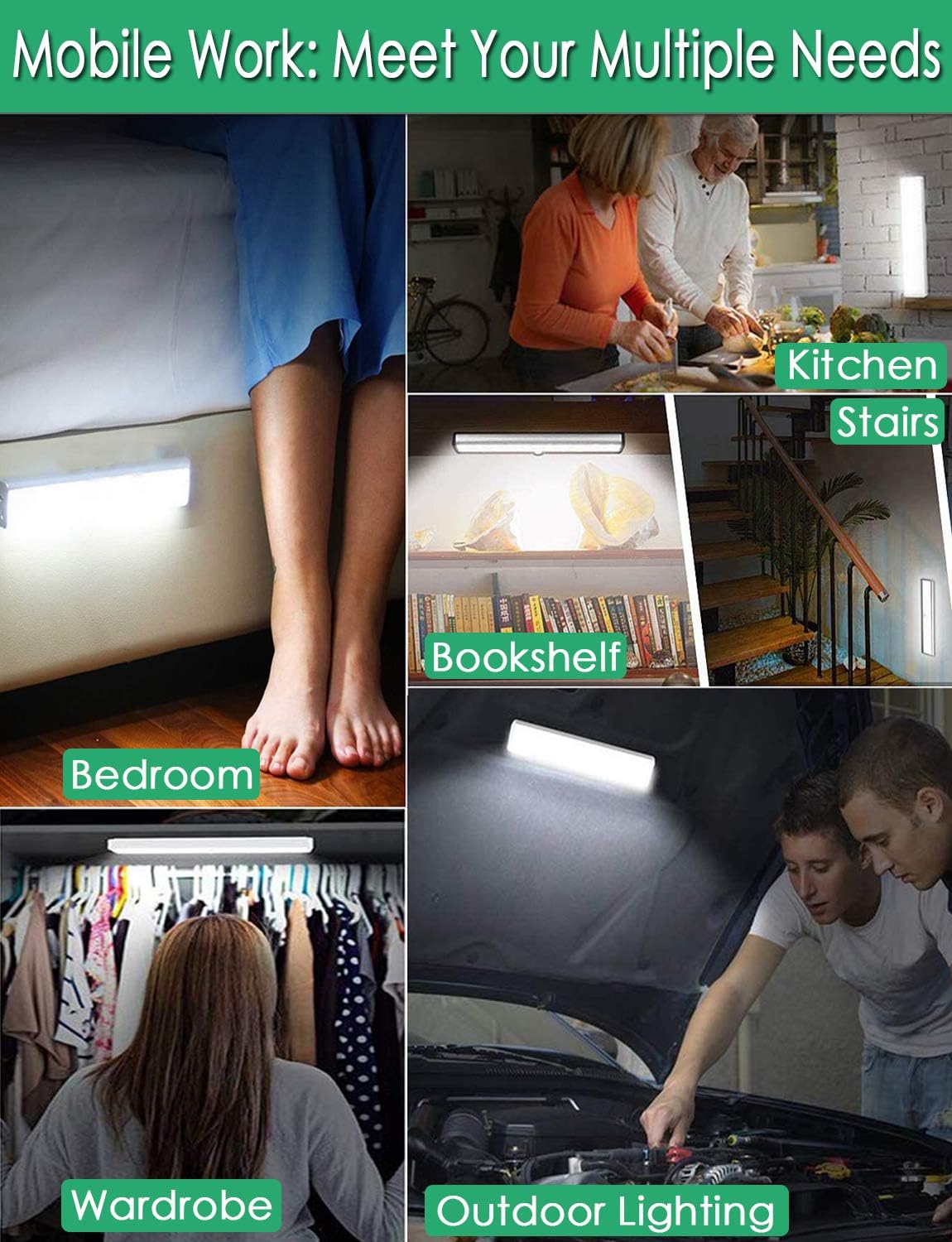
Figear 2: Versatile Installation. This image illustrates the light's adaptability, showing it mounted under a bed, in a kitchen, on a bookshelf, along stairs, inside a wardrobe, and providing illumination for outdoor tasks, highlighting its ease of placement in diverse environments.
5.3 Beachdachaidhean airson Suidheachadh
- For optimal motion detection, position the sensor ball to face the direction of expected movement.
- When using multiple motion sensor lights, avoid placing them too close together in motion-sensing mode, as they may interfere with each other's sensitivity.
- Ensure the installation surface is clean and dry for secure adhesion.
6. Stiùireadh mu chìsean
The LECLSTAR Motion Sensor Closet Light is equipped with a built-in 2400mAh lithium battery.
- Connect the provided USB charging cable to the light's USB port.
- Cuir ceann eile a’ chàball USB a-steach do inneal-atharrachaidh cumhachd USB àbhaisteach (nach eil air a ghabhail a-steach) no do phort USB coimpiutair.
- During charging, the indicator light on the device will be gorm.
- Once fully charged, the indicator light will turn dearg.
- Mar as trice bheir làn chosgais timcheall air 4 uairean a thìde.
Figear 3: Charging Status. This image demonstrates the charging process, showing the light connected to a power source. The indicator light is red when charging and turns blue when the battery is fully charged, indicating its status clearly.
7. Stiùireadh Obrachaidh
The light features multiple operating modes and can be controlled via its ON/OFF button or an optional remote control.
7.1 Mode Selection (ON/OFF Button)
Locate the ON/OFF button on the side of the light. Toggle the switch to select the desired mode:
- OFF: The light is completely off.
- AIR: Bidh an solas a’ fuireach air gu leantainneach.
- AUTO (Motion Sensor Mode): The light will automatically turn on when motion is detected in a dark environment. It will turn off approximately 30 seconds after no motion is detected.

Figear 4: Motion Sensor Operation. This image demonstrates how the motion sensor works: the light remains off in bright environments, automatically turns on when movement is detected in the dark within a 3-meter, 120-degree range, and then automatically turns off after 30 seconds of inactivity.
7.2 Motion Sensor Details
- Ceàrn lorgaidh: 120 ceum.
- A' lorg astar: Suas ri 3 meatairean (mu 10 troigh).
- The sensor is designed to activate only in low-light conditions to conserve battery life.
7.3 Remote Control Functions (Optional)
If your model includes a remote control, you can access additional features:

Figear 5: Remote Control Functions. This image displays the remote control, highlighting its various buttons: ON/OFF for power, 'S' for sensor mode, '1', '2', '3' for different light modes or brightness levels, '+' and '-' for adjusting brightness, and '15', '30', '60', '120' for setting a timer.
- AIR / OFF: Tionndaidh an solas air no dheth.
- S (Sensor Mode): Activates the motion sensor mode.
- 1, 2, 3 (Light Modes): Selects different light modes or brightness levels.
- 50%, 100%, +, - (Adjustable Brightness): Atharraich an dian solais.
- 15, 30, 60, 120 (Timer Function): Sets the light to turn off automatically after a specified duration.
8. Cumail suas
- Glanadh: Wipe the light with a soft, dry cloth. Do not use abrasive cleaners or solvents.
- Cùram Bataraidh: To prolong battery life, avoid fully discharging the battery frequently. Charge the light regularly, especially if it will not be used for an extended period.
9. A ’dèanamh trioblaid
- Solas gun a bhith a 'tionndadh air:
- Dèan cinnteach gu bheil am bataraidh air a ghearradh.
- Check that the light is switched to the 'ON' or 'AUTO' mode.
- Sensor gluasad nach eil ag obair:
- Dèan cinnteach gu bheil an solas ann am modh ‘AUTO’.
- Verify that the ambient light is dark enough for the sensor to activate.
- Check that the sensor is not obstructed and is facing the area of expected movement.
- If multiple motion sensor lights are nearby, they might interfere with each other. Try repositioning them.
- Bidh solas a’ priobadh no a’ crìonadh gun dùil:
- The battery level may be low. Recharge the light.
10. Sònrachaidhean
| Modail | B07JRBSJDR |
| Dath aotrom | Geal (6000K) |
| Meud LED | 51 LED |
| Toradh Lumen | 240 alm |
| Motion Detecting Angle | 120 ceum |
| Motion Detecting Distance | Suas gu 3 meatairean (10 troighean) |
| Ùine Beatha LED | Barrachd air 80,000 uair |
| Seòrsa bataraidh | Bataraidh lithium 2400mAh |
| Ùine cosgais USB | Mu 4 uair a thìde |
| Vol Obrachaidhtage | 4.2V |
| Dètage | 3W |
| Meudan | 15.3 x 0.8 x 0.8 òirleach |
| Stuth | Meatailt, plastaig |
| Stòr cumhachd | Cumhachd bataraidh |
| Feartan sònraichte | Instant On |
11. Barantas agus Taic
LECLSTAR provides a lifetime warranty for this product. If you encounter any issues or have questions regarding your Motion Sensor Closet Light, please contact the LECLSTAR service team for assistance. Our dedicated support team is ready to help you.
For warranty claims or technical support, please refer to the contact information provided on the product packaging or the official LECLSTAR weblàrach.