
AWEI T5
AWEI T5 True Wireless Earbuds User Manual
Ro-ràdh
This manual provides detailed instructions for the AWEI T5 True Wireless Earbuds. Please read this guide carefully before using the product to ensure proper operation and to maximize your listening experience.
Susbaint pacaid
Dearbhaich gu bheil na nithean gu lèir a tha air an liostadh gu h-ìosal an làthair sa phacaid agad:
- AWEI T5 True Wireless Earbuds (Left and Right)
- Cùis Cìse
- Càball cosgais USB
- Leabhar-làimhe cleachdaiche
- Iomadh meud de mholaidhean-cluaise

Image: AWEI T5 True Wireless Earbuds retail packaging, showing the brand logo and product model.
Bathar seachadview
Familiarize yourself with the components of your AWEI T5 True Wireless Earbuds and charging case.

Image: The AWEI T5 True Wireless Earbuds inside their charging case, with an additional image showing an earbud being worn by a user.

Ìomhaigh: Sealladh dlùth view of the AWEI T5 True Wireless Earbuds and their charging case resting on a laptop keyboard.
The earbuds are designed for a secure and comfortable fit, and the charging case provides both protection and power on the go.
Suidhich
1. Cosgais Tùsail
Mus cleachd thu iad an toiseach, cuir làn-chosgais air na fònaichean-cluaise agus air a’ chùis cosgais.
- Cuir an dà earbuds a-steach don chùis cosgais.
- Ceangail an càball cosgais USB ris a’ chùis cosgais agus ri stòr cumhachd.
- The indicator lights on the case and earbuds will show charging status.
- Aon uair ‘s gu bheil e làn chosgais, dì-cheangail an càball.
2. Paidhir le inneal
To connect your AWEI T5 earbuds to a Bluetooth-enabled device:
- Dèan cinnteach gu bheilear a’ cur cosgais air na earbuds.
- Fosgail a’ chùis cosgais agus thoir air falbh an dà chluas-cinn. Thèid iad a-steach don mhodh paidhreachaidh gu fèin-ghluasadach.
- Air an inneal agad (fòn cliste, tablet, msaa.), rach gu roghainnean Bluetooth agus cuir Bluetooth an gnìomh.
- Lorg airson innealan a tha rim faighinn agus tagh “AWEI T5” bhon liosta.
- Once connected, you will hear a confirmation tone, and the indicator lights on the earbuds will change.
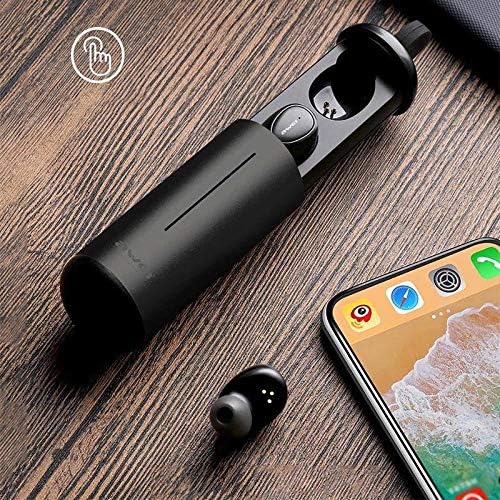
Image: AWEI T5 Earbuds in their charging case, positioned next to a smartphone, illustrating the pairing process.
Stiùireadh Obrachaidh
Smachdan bunaiteach
The AWEI T5 earbuds feature touch controls for various functions:
- Cluich / Stad: Tap air aon uair air earbud.
- An ath cheum: Dèan briogadh dùbailte air an earbud cheart.
- Rian roimhe: Dèan dà-tap air an earbud chlì.
- Freagairt/Cuireadh Call: Tap aon uair air gach cluais-fòn nuair a tha gairm a’ tighinn a-steach.
- Call a dhiùltadh: Brùth is cum sìos aon seach aon de na cluais-fònaichean airson 2 dhiog rè gairm a tha a’ tighinn a-steach.
- Cuir an gnìomh neach-taic guth: Tap trì-fhillte an dàrna cuid earbud.
Modh Earbud Singilte
You can use either the left or right earbud independently:
- Remove one earbud from the charging case. It will automatically connect to the last paired device.
- The other earbud can remain in the case or be turned off.
Modh Earbud dùbailte
For a stereo audio experience, use both earbuds:
- Remove both earbuds from the charging case. They will automatically connect to each other and then to the last paired device.
Cùram agus cumail suas
To ensure the longevity and optimal performance of your AWEI T5 earbuds:
- Glanadh: Glan na cluasan-cluaise agus a’ chùis cosgais gu cunbhalach le clò bog, tioram, gun lint. Na cleachd ceimigean cruaidh no stuthan sgrìobach.
- Stòradh: Nuair nach eilear gan cleachdadh, stòraich na fònaichean-cluaise anns a’ chùis cosgais aca gus an dìon bho dhuslach is milleadh.
- Cùram Bataraidh: Avoid fully discharging the battery frequently. Charge the earbuds and case regularly, even if not used for extended periods.
- Seasmhachd uisge: The earbuds are rated IPX4, meaning they are resistant to splashing water from any direction. Do not submerge them in water or expose them to heavy rain.

Image: AWEI T5 Earbuds with water droplets, indicating their IPX4 splash-resistant rating.
Fuasgladh thrioblaidean
If you encounter issues with your AWEI T5 earbuds, refer to the following common problems and solutions:
| Trioblaid | Fuasgladh |
|---|---|
| Chan eil na cluasan-cluaise a’ paidhreachadh leis an inneal. | Dèan cinnteach gu bheil na fònaichean-cluaise air an cur fo chasaid. Cuir Bluetooth dheth agus air air an inneal agad. Dìochuimhnich “AWEI T5” bho liosta Bluetooth an inneil agad agus ath-phaidhrich iad. |
| Chan eil ach aon earbud ag obair. | Place both earbuds back into the charging case, close the lid, then open and remove them together. Ensure both are charged. |
| Gun fhuaim no meud ìosal. | Thoir sùil air na h-ìrean fuaime air an inneal agad agus air na fònaichean-cluaise. Dèan cinnteach gu bheil na fònaichean-cluaise ceangailte gu ceart. |
| Chan eil a’ chùis cosgais a’ cur cosgais. | Verify the USB cable is securely connected to both the case and the power source. Try a different cable or power adapter. |
Sònrachaidhean
Technical details for the AWEI T5 True Wireless Earbuds:
| Feart | Mion-fhiosrachadh |
|---|---|
| Modail Àireamh | T5 |
| Ceangalachd | Bluetooth |
| Factor foirm | In-Earrach |
| Stuth | Plastaig |
| Dath | Dubh |
| Meudan (Bathar) | 4 x 10 x 16.5 cm |
| Cuideam (Bathar) | 4.54 g |
| Seòrsa bataraidh | 1 Lithium Ion (per earbud, typically) |
| Ìre an aghaidh uisge | IPX4 (Dìon-frasadh) |
Barantas agus Taic
Airson fiosrachadh barantais agus taic do luchd-cleachdaidh, thoir sùil air na sgrìobhainnean a chaidh a thoirt seachad leis a’ cheannach agad no cuir fios chun neach-reic. Cùm dearbhadh do cheannach airson tagraidhean barantais sam bith.
Ask a question about this manual
Ask about setup, troubleshooting, compatibility, parts, safety, or missing instructions. Manuals+ will review the question and use this page’s manual context to help answer it.