
1. Ro-ràdh
Thank you for choosing the KAIDI KD-904 Bluetooth Earphones. These wireless in-ear headphones are designed for comfort and stability, making them ideal for sports and daily use. Featuring Bluetooth connectivity and a built-in microphone, they allow for hands-free calls and high-quality audio playback. This manual provides essential information for the proper setup, operation, and maintenance of your earphones.
2. Pasgan-susbaint
- KAIDI KD-904 Bluetooth Earphones
- Càball cosgais USB
- Leabhar-làimhe cleachdaiche
3. Toradh thallview
The KAIDI KD-904 earphones feature an ergonomic design with ear hooks for a secure fit, especially during physical activity. The earbuds are magnetic, allowing them to clip together for convenient storage around your neck when not in use. An inline control module provides easy access to power, volume, and call functions.

Ìomhaigh: Dlùth-shealladh view of a single KAIDI KD-904 earphone, highlighting the in-ear bud and the flexible ear hook designed for stability.

Ìomhaigh: Mion-fhiosrachadh view of the earbud housing with the 'KAIDI' brand logo, showing the design and finish of the earphone unit.
4. Suidhich
4.1 A’ cur cosgais air na fònaichean-cluaise
- Connect the micro USB end of the charging cable to the charging port on the inline control module of the earphones.
- Ceangail ceann USB-A a’ chàball cosgais ri stòr cumhachd USB (me, port USB coimpiutair, inneal-atharrachaidh balla).
- The LED indicator on the control module will illuminate, typically red, during charging.
- Once fully charged (approximately 1-2 hours), the LED indicator will change color (e.g., blue) or turn off.
Note: Ensure the earphones are fully charged before first use for optimal battery life.
4.2 Pairing Bluetooth
- Cumhachd air: Press and hold the multi-function button (usually the center button on the inline control) for approximately 3-5 seconds until the LED indicator flashes blue and red alternately. This indicates the earphones are in pairing mode.
- Cuir an gnìomh Bluetooth: Air an fhòn-smart agad no inneal eile le comas Bluetooth, rach gu na roghainnean Bluetooth agus dèan cinnteach gu bheil Bluetooth air a thionndadh air.
- Lorg airson Innealan: Your device will scan for available Bluetooth devices. Look for "KD-904" or a similar name in the list.
- ceangail: Select "KD-904" from the list to initiate the connection. Once successfully paired, the LED indicator on the earphones will typically flash blue slowly or turn solid blue, and you may hear an audible confirmation.
- Ath-cheangal: After initial pairing, the earphones will automatically attempt to connect to the last paired device when powered on, provided the device's Bluetooth is active and within range.
5. Stiùireadh Obrachaidh
5.1 Gnìomhan Bunaiteach
- Cumhachd air: Brùth agus cum air a ’phutan ioma-ghnìomh airson 3 diogan.
- Cumhachd dheth: Brùth agus cum air a ’phutan ioma-ghnìomh airson 5 diogan.
- Cluich / Stad: Goirid brùth am putan ioma-ghnìomh.
- Meud suas: Brùth goirid air a’ phutan ‘+’.
- Meud sìos: Brùth goirid air a’ phutan ‘-’.
- An ath cheum: Brùth fada air a’ phutan ‘+’.
- Rian roimhe: Brùth fada air a’ phutan ‘-’.
5.2 Riaghladh Ghairmean
- Call Freagairt: Brùth goirid air a’ phutan ioma-ghnìomhach nuair a bhios gairm a-steach a’ bualadh.
- Call crìochnachaidh: Brùth goirid air a’ phutan ioma-ghnìomhach rè gairm.
- Call a dhiùltadh: Brùth fada air a’ phutan ioma-ghnìomhach nuair a bhios gairm a-steach a’ bualadh.
- Deasaich an àireamh mu dheireadh: Brùth dà uair air a’ phutan ioma-ghnìomhach.
6. Cumail suas
- Glanadh: Use a soft, dry cloth to clean the earphones. Do not use abrasive cleaners or immerse in water.
- Stòradh: Store the earphones in a cool, dry place away from direct sunlight and extreme temperatures. The magnetic earbuds help prevent tangling during storage.
- Cùram Bataraidh: To prolong battery life, avoid completely discharging the earphones frequently. Charge them regularly, even if not in use for extended periods.
- Seachain milleadh: Na leig às, na dì-sgaoil, agus na atharraich na fònaichean-cluaise. Cùm air falbh bho nithean biorach.
7. A ’dèanamh trioblaid
| Trioblaid | Adhbhar a dh’fhaodadh a bhith ann | Fuasgladh |
|---|---|---|
| Chan eil na fònaichean-cluaise a’ dol air. | Bataraidh ìosal. | Cuir cosgais iomlan air na fònaichean-cluaise. |
| Chan urrainnear paidhir a dhèanamh leis an inneal. | Earphones not in pairing mode; Bluetooth off on device; device out of range. | Ensure earphones are in pairing mode (flashing red/blue). Turn on Bluetooth on your device. Move device closer to earphones (within 10 meters). Try re-pairing. |
| Gun fhuaim no meud ìosal. | Tha an tomhas-fuaim ro ìosal; chan eil e ceangailte; tha an toradh claisneachd ceàrr air a thaghadh. | Increase volume on both earphones and connected device. Ensure earphones are successfully connected. Check audio output settings on your device. |
| Chan eil an cosgais ag obair. | Càball no stòr cumhachd lochtach. | Try a different USB charging cable and/or a different USB power source. |
8. Sònrachaidhean
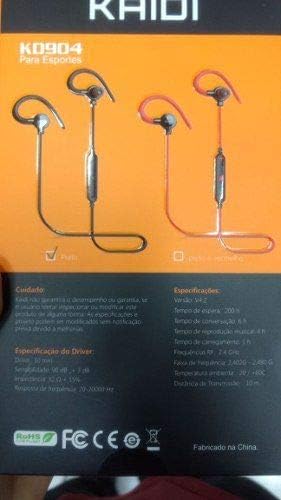
Image: Back of the KAIDI KD-904 product box, displaying detailed technical specifications and features in text.
- Modail: KD-904
- Tionndadh Bluetooth: v4.2
- Raon-obrachaidh: Suas gu 10 meatairean (33 troighean)
- Ùine ath-chluich ciùil: Mu 4 uair a thìde
- Am Fuireach: Mu 200 uair a thìde
- Ùine cosgais: Mu 1-2 uair a thìde
- Meud an dràibhear: 10 mm
- Mothachadh dràibhear: 98 dB
- Freagairt tricead: 20Hz - 20kHz
- Ceangal: Bluetooth gun uèir
- Suidheachadh cluais: In-ear (Intra-auricular)
- Cleachdaidhean sònraichte: Sports, Running
- Innealan co-fhreagarrach: Android, Samsung, iPhone
9. Barantas agus Taic
For warranty information or technical support, please refer to the purchase documentation or contact your retailer. Keep your proof of purchase for any warranty claims. KAIDI is committed to providing quality products and support.