
360 S6
360 Robot Vacuum and Mop Cleaner User Manual
Modail: S6
Ro-ràdh
Thank you for choosing the 360 Robot Vacuum and Mop Cleaner. This intelligent cleaning device is designed to provide efficient and thorough cleaning for your home, featuring advanced laser navigation, powerful suction, and smart app control. This manual will guide you through the setup, operation, and maintenance of your new robot vacuum to ensure optimal performance and longevity.

The 360 Robot Vacuum and Mop Cleaner, Model S6, shown with its companion mobile application interface.
Fiosrachadh Sàbhailteachd
- Leugh a h-uile stiùireadh gu faiceallach mus cleachd thu an inneal.
- Na leig le clann an inneal-glanaidh falamh a chleachdadh. Cùm sùil air clann is peataichean nuair a bhios an inneal-glanaidh ag obair.
- Ensure the charging dock is placed on a flat surface against a wall, with clear space around it.
- Na cleachd an inneal-glanaidh robotach ann an àrainneachdan fliuch no faisg air lionntan.
- Thoir air falbh càbaill sgaoilte, nithean beaga, no nithean brisg sam bith bhon làr mus glan thu e gus casg a chur air an glacadh no milleadh.
- Na cleachd an inneal-glanaidh robotach gus sprùilleach mòr, nithean biorach, no stuthan a tha a’ losgadh/a’ smocadh a thogail.
- Only use the original charger and battery provided by the manufacturer.
- Dèan obair-chàraidh cunbhalach mar a tha air a mhìneachadh san leabhar-làimhe seo gus dèanamh cinnteach à obrachadh sàbhailte agus èifeachdach.
Susbaint pacaid
Dèan cinnteach gu bheil na pàirtean uile anns a’ phacaid:
- 360 Robot Vacuum and Mop Cleaner (S6)
- Doc luchdadh a-nuas
- Adapter cumhachd
- Tanca uisge
- Aodach mop
- Bruisean Taobh (2 phaidhir)
- Inneal glanaidh
- Leabhar-làimhe cleachdaiche
- Bataraidh (ro-stàlaichte)
- Criathrag (ro-stàlaichte)
Bathar seachadview
Familiarize yourself with the main components of your 360 Robot Vacuum and Mop Cleaner.

Thairisview of the robot vacuum's intelligent features including anti-collision, anti-drop sensors, long-lasting battery, LDS laser navigation, and SLAM algorithm for mapping.
Barr View:
- Braitear Seòlaidh Leusair LDS: For accurate mapping and navigation.
- Putan Cumhachd / Glan: Press to start/pause cleaning, long press to turn on/off.
- Recharge Button: Brùth gus an inneal-fuadain a chur air ais chun an doca cosgais.
- Dustbin Compartment: Located under the top cover.
Bun View:
- Prìomh Bhruis: Airson glanadh domhainn air bratan-ùrlair agus làir chruaidh.
- Bruisean Taobh: To sweep debris from edges and corners.
- Cuibhlichean Dràibhidh: Airson gluasad thairis air diofar uachdaran.
- Omni-directional Wheel: For steering.
- Luchd-fios cosgais: To connect with the charging dock.
- Braitearan Creige: To prevent falling down stairs.
- Braitear Balla: To sweep along walls and corners effectively.
Suidhich
1. A’ cur cosgais air an inneal-glanaidh falamh
- Place the charging dock on a hard, level surface against a wall. Ensure there is at least 0.5 meters (1.6 feet) of clear space on both sides and 1.5 meters (4.9 feet) in front of the dock.
- Connect the power adapter to the charging dock and plug the other end into a power outlet.
- Place the robot vacuum onto the charging dock, ensuring the charging contacts align. The robot will announce that it is charging. For first use, fully charge the robot before operation.
2. Connecting to the 360 Robot App
- Download the "360 Robot" app from the App Store (iOS) or Google Play Store (Android).
- Fosgail an aplacaid agus cruthaich cunntas no log a-steach.
- Follow the in-app instructions to add your device. This typically involves selecting your robot model, connecting to its Wi-Fi hotspot, and then connecting the robot to your home Wi-Fi network (2.4GHz only).
- Aon uair ‘s gu bheil thu ceangailte, faodaidh tu smachd a chumail air an inneal-fuadain, view cleaning maps, set schedules, and access advanced features through the app.
Ag obrachadh
A’ tòiseachadh air cearcall glanaidh
- Tro phutan robot: Press the Power/Clean button on the robot once to start a cleaning cycle. Press again to pause.
- Tro App: Open the 360 Robot app and tap the "Clean" button. You can also select specific cleaning modes (e.g., Spot cleaning, Proximity cleaning) or set schedules.
- Via Voice Command (Alexa): If integrated with Alexa, you can use voice commands like "Alexa, ask 360 Robot to start cleaning."
Modhan glanaidh

The robot vacuum is capable of both sweeping (vacuuming) and mopping, utilizing its main brush, side brushes, and mop cloth.
- Glanadh fèin-ghluasadach: The robot intelligently maps your home and cleans systematically. It identifies carpet and automatically switches to Max Mode with 1800Pa suction power for deep cleaning.
- Glanadh Spot: Directs the robot to clean a specific small area intensively.
- Proximity Cleaning: Cleans a designated area around the robot.
- Modh mopaidh: Attach the water tank with a damp mop cloth. The robot will mop hard floors. Note: The mopping function is designed for light mopping and not for heavy stains.
Feartan App adhartach
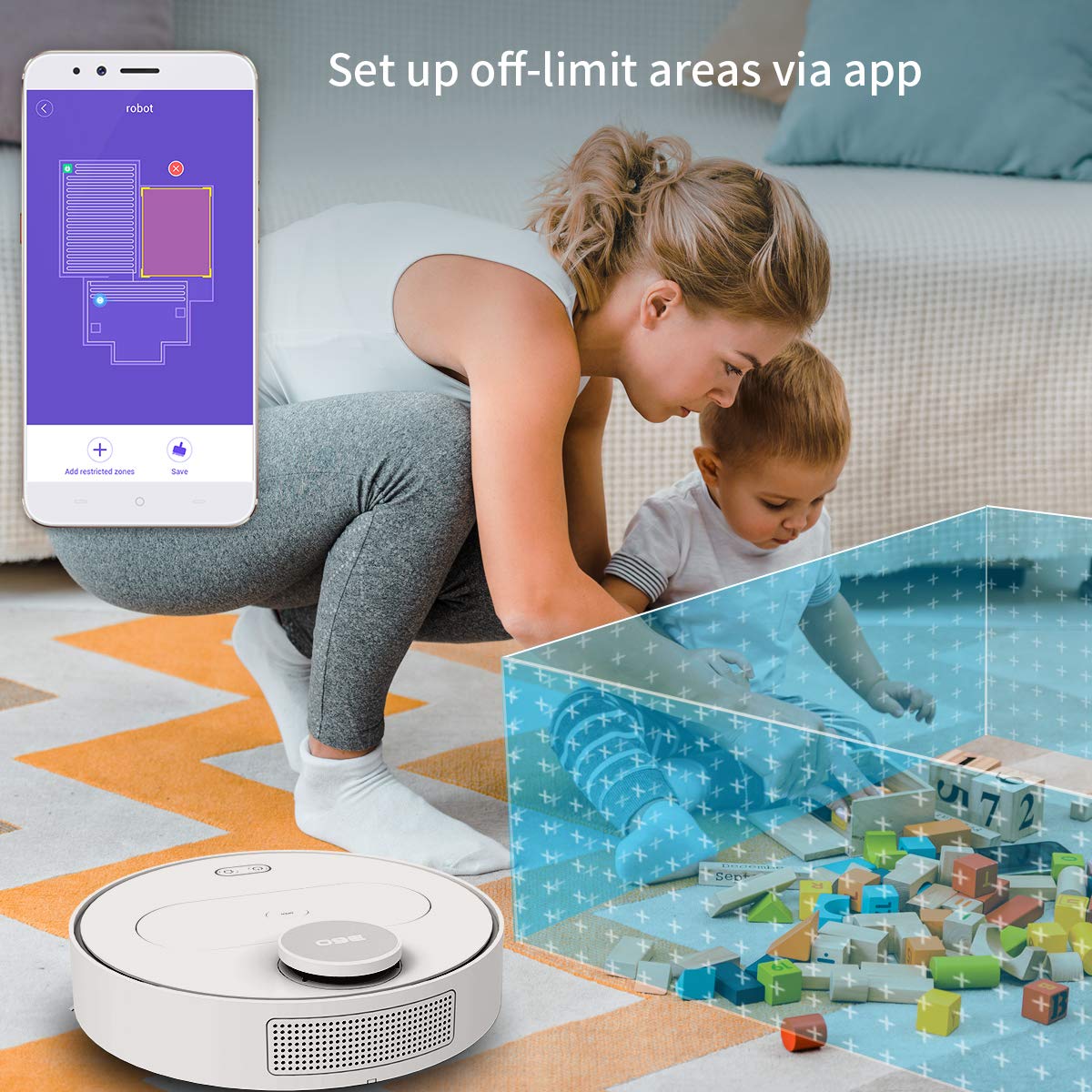
The 360 Robot app allows users to define and set up off-limit areas on the cleaning map, preventing the robot from entering specific zones.
- Multi-map Management: Save and manage multiple floor plans for different levels of your home.
- Off-limit Area: Draw virtual boundaries or no-go zones on the map to prevent the robot from entering specific areas.
- Clàradh: Suidhich amannan sònraichte airson an inneal-fuadain tòiseachadh air glanadh gu fèin-ghluasadach.
- Smachd air astar: Manually control the robot's movement using the app.
- Glanadh slighe: Monitor the robot's real-time cleaning path and progress on the map.
- Ìrean suidse: Adjust suction power (Quiet, Normal, Powerful, Max) according to your cleaning needs.
Automatic Recharge and Breakpoint Resume
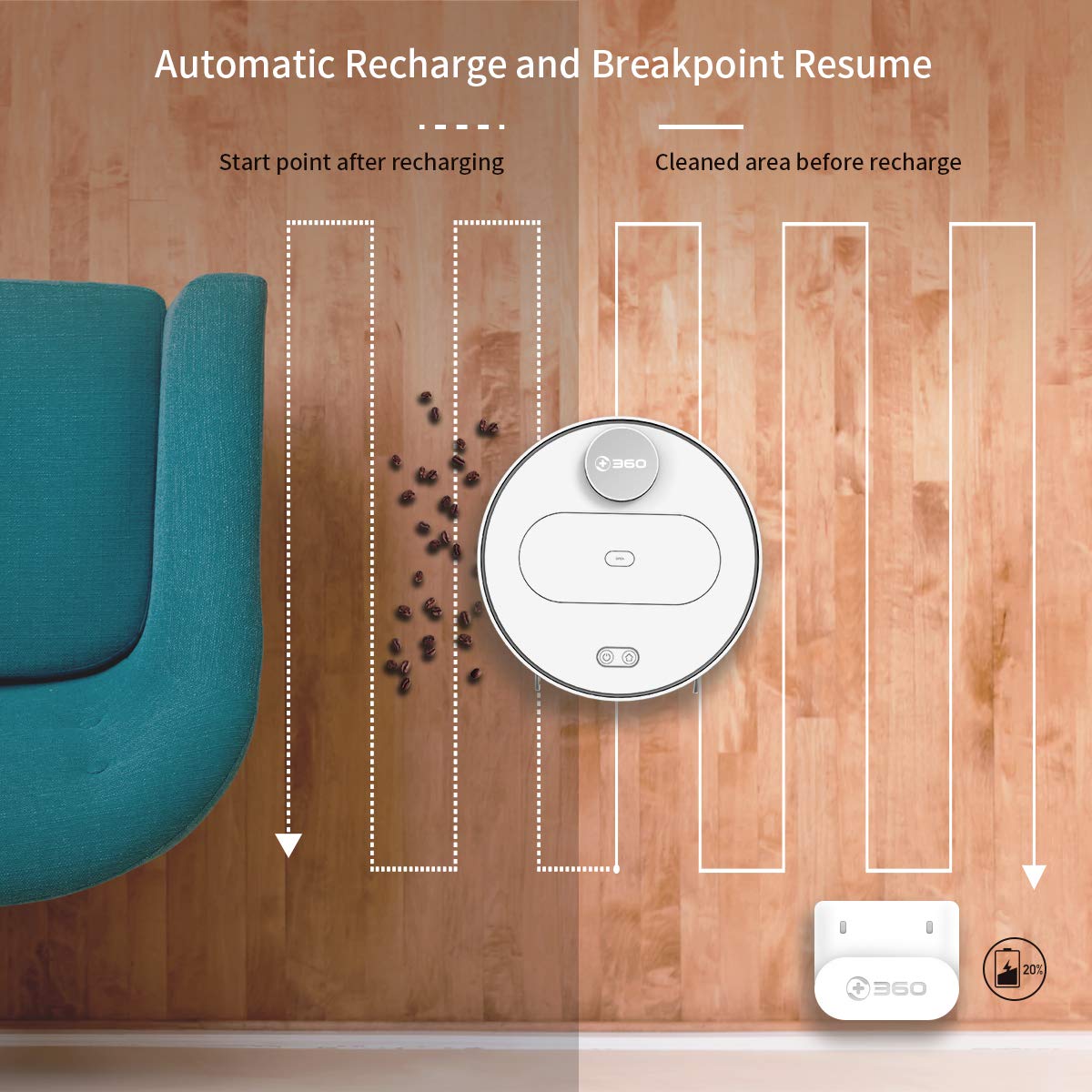
The robot automatically returns to its charging dock when the battery is low and resumes cleaning from the last uncleaned spot after recharging.
When the battery level is low during a cleaning cycle, the robot will automatically return to its charging dock. Once fully recharged, it will resume cleaning from where it left off, ensuring complete coverage of your home.
Cumail suas
Tha cumail suas cunbhalach deatamach airson coileanadh as fheàrr agus fad-beatha an inneal-glanaidh robotach agad.
1. A’ falmhachadh a’ bhin-sgudail
- Fosgail còmhdach àrd an inneal-fuadain agus thoir air falbh am biona-duslach.
- Fosgail còmhdach a’ bhiona-duslach agus falmhaich a shusbaint a-steach do bhiona sgudail.
- Thathar a’ moladh am bogsa-duslach a fhalamhachadh an dèidh gach cearcall glanaidh.
2. Glanadh an Filter

The 360 Robot Vacuum features a washable HEPA filter, which helps maintain high filtration efficiency and contributes to cleaner indoor air.
- Thoir an criathrag a-mach às a’ bhin-duslach.
- Tap the filter gently to remove loose dirt.
- Rinse the filter under running water. Ensure it is completely dry before reinserting it into the dustbin. Do not use a brush or other tools to clean the filter, as this may damage it.
- It is recommended to clean the filter weekly and replace it every 3-6 months, depending on usage.
3. Bruisean Glanaidh
- Prìomh Bhruis: Remove the main brush cover and then the main brush. Use the provided cleaning tool to remove hair and debris tangled around the brush. Reinstall the brush and cover. Clean weekly.
- Bruisean Taobh: Check side brushes for tangled hair or debris. If necessary, remove them (they can be pulled off) and clean. Reinstall, ensuring they click into place. Replace if worn or damaged. Clean monthly.
4. Glanadh mothachairean agus cheanglaichean cosgais
- Wipe the cliff sensors (on the bottom of the robot), wall sensor (on the side), and charging contacts (on the robot and charging dock) with a clean, dry cloth. This ensures proper navigation and charging. Clean monthly.
5. Cumail suas Tanca Uisge agus Clò Mop
- After mopping, remove the water tank and empty any remaining water.
- Remove the mop cloth and wash it thoroughly. Allow it to air dry completely before reattaching or storing.
- Do not leave water in the tank when the robot is not in use for extended periods.
Fuasgladh thrioblaidean
| Trioblaid | Adhbhar a dh’fhaodadh a bhith ann | Fuasgladh |
|---|---|---|
| Chan eil Robot a 'tionndadh air. | Tha am bataraidh ìosal no air a leigeil ma sgaoil. | Place the robot on the charging dock and ensure it is charging. |
| Chan urrainn dha robot ceangal a dhèanamh ri Wi-Fi. | Facal-faire Wi-Fi ceàrr; lìonra 5GHz; inneal-fuadain ro fhada bhon router. | Ensure correct 2.4GHz Wi-Fi password. Move robot closer to router. Restart robot and router. |
| Bidh robot a’ dol an sàs gu tric. | Obstacles on the floor; narrow spaces. | Clear obstacles. Use the app to set off-limit areas for problematic zones. |
| Droch choileanadh glanaidh. | Dustbin full; filter clogged; brushes tangled. | Falmhaich am bogsa-duslach. Glan no cuir criathar ùr na àite. Glan am prìomh bhruisean agus na bruisean taobh. |
| Cha bhith Robot a’ tilleadh gu doca cosgais. | Charging dock obstructed; charging contacts dirty. | Ensure clear space around the dock. Clean charging contacts on both robot and dock. |
Sònrachaidhean
| Feart | Mion-fhiosrachadh |
|---|---|
| Brand | 360 |
| Ainm Modail | S6 |
| Feartan sònraichte | Anti-Collision, Anti-Fall, Washable Filter |
| Dath | Ioma-dath |
| Seòrsa Filter | Aodach |
| Beatha bataraidh | 110 mionaid |
| Stòr cumhachd | Cumhachd bataraidh |
| Modh smachd | App |
| Innealan co-fhreagarrach | Alexa |
| Cuideam nì | 3 kg 490 g |
| Meudan nì (LxWxH) | 35 x 35 x 10 ceudameatairean |
Barantas agus Taic
For warranty information and technical support, please refer to the warranty card included in your product packaging or visit the official 360 SmartAI website. You can also contact customer service through the 360 Robot app for assistance.
Airson goireasan a bharrachd agus Ceistean Cumanta, tadhail air Bùth 360 air Amazon.