
1. Ro-ràdh
The SUNMI L2 SmartOrder is a rugged industrial terminal designed for various business applications requiring mobility and data capture. It features an Android 7.1 operating system, a 5-inch display, and an integrated 1D/2D Zebra scanner. This manual provides essential information for the proper setup, operation, and maintenance of your device.
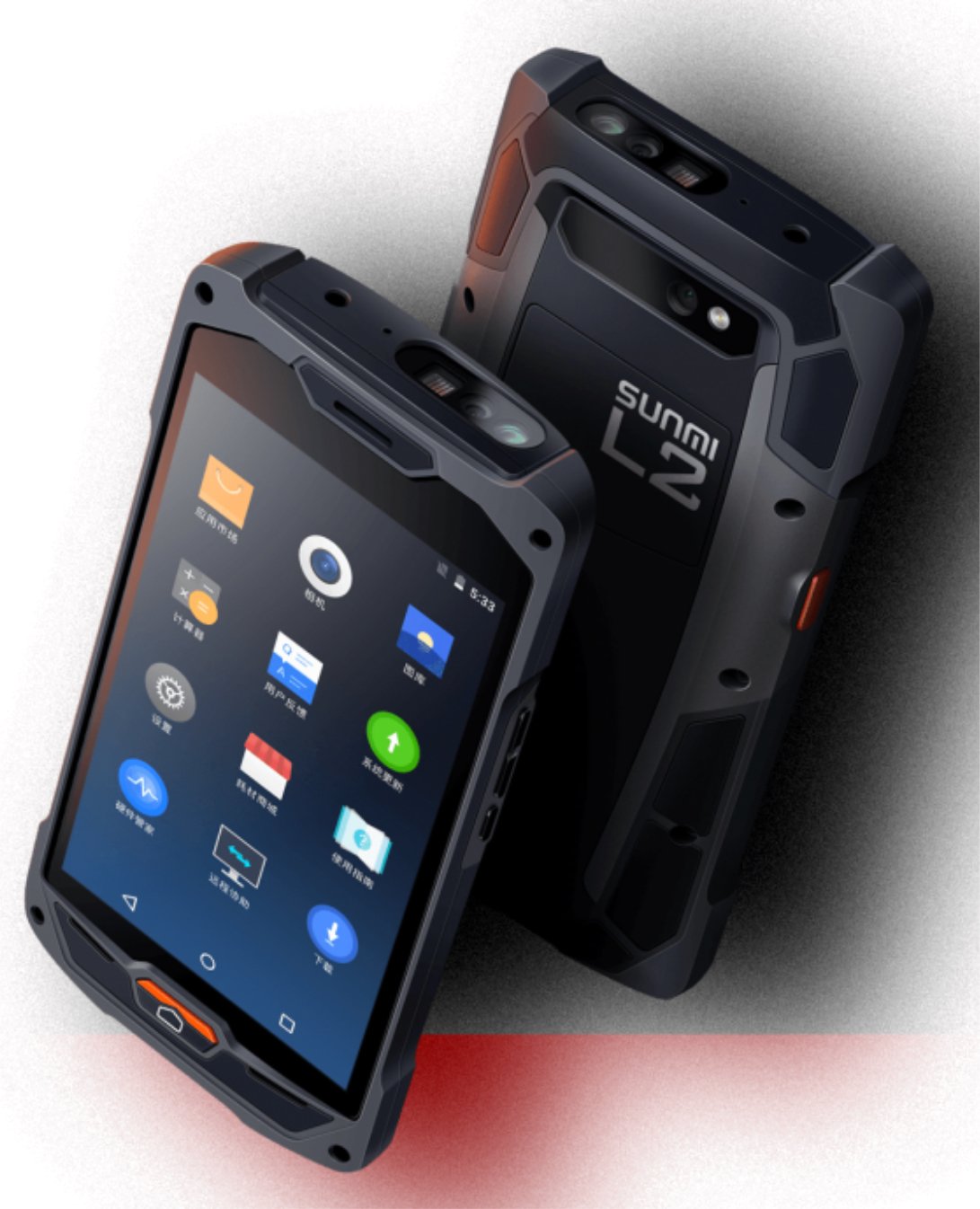
Figear 1: Aghaidh is cùl view of the Sunmi L2 SmartOrder industrial terminal.
2. Fiosrachadh Sàbhailteachd
Leugh a h-uile stiùireadh sàbhailteachd mus cleachd thu an inneal gus casg a chur air dochann no milleadh. Cùm an leabhar-làimhe seo airson fiosrachadh san àm ri teachd.
- Na cuir an inneal fo theodhachd anabarrach, solas dìreach na grèine, no taiseachd àrd.
- Use only SUNMI-approved accessories and power adapters.
- Avoid dropping or subjecting the device to severe impact, despite its rugged design.
- Na feuch ri an inneal a thoirt às a chèile no a chàradh thu fhèin. Cuir fios gu luchd-obrach seirbheis teisteanasach.
- Cùm an inneal air falbh bho innealan meidigeach, oir dh’fhaodadh e bacadh a chur air an obrachadh.
3. Inneal thairisview
The SUNMI L2 SmartOrder is designed for durability and functionality. Key features include:
- Taisbeanadh 5-òirleach: High-resolution touchscreen for clear visibility.
- 1D/2D Zebra Scanner: Integrated for efficient barcode and QR code scanning.
- Port USB-C: Airson cosgais agus gluasad dàta.
- Slot Cairt SIM: For cellular network connectivity.
- Slot cairt TF: Airson stòradh a ghabhas leudachadh.
- PSAM Card Slot (Optional): For enhanced security in professional applications.
- Raon Inntrigidh NFC: For near-field communication.

Figear 2: Cùl view showing SIM card slot, TF card slot, PSAM card slot, and NFC induction area.

Figure 3: Three different scanner options for the Sunmi L2: Zebra Code Scanner, Standard Code Scanner, and without scanner.
4. Suidhich
4.1. Stàladh is Cosgais Bataraidh
The device is equipped with a 5000mAh high-volume battery. Ensure the battery is fully charged before initial use.
- Ceangail an càball USB-C a tha air a thoirt seachad ris a’ phort USB-C air an inneal.
- Connect the other end of the USB-C cable to a compatible power adapter and plug it into a power outlet.
- The charging indicator will illuminate. Allow the device to charge completely before disconnecting.

Figure 4: Illustration of the 5000mAh high-volume battery with Quick Charge technology.
4.2. Stàladh Cairt SIM agus TF
To install SIM or TF cards:
- Locate the card slot cover on the rear of the device (refer to Figure 2).
- Fosgail an còmhdach gu faiceallach.
- Insert the SIM card into the designated SIM card slot with the gold contacts facing down.
- Insert the TF card (microSD) into the TF card slot if additional storage is required.
- Close the card slot cover securely to maintain the device's IP67 rating.
4.3. A’ chiad chumhachd air
After charging, press and hold the power button located on the side of the device until the screen illuminates and the SUNMI logo appears. The device will boot into the Android 7.1 operating system.
5. Stiùireadh Obrachaidh
5.1. Seòladh Bunaiteach
The SUNMI L2 operates on Android 7.1. Navigate the interface using the touchscreen. Swipe to unlock, tap icons to open applications, and use the navigation buttons (Home, Back, Recent Apps) as standard for Android devices.
5.2. Using the 1D/2D Zebra Scanner
The integrated Zebra scanner is located at the top of the device.
- Open the scanning application on your device.
- Point the scanner window at the barcode or QR code you wish to scan.
- Press the dedicated scan button (if available on your model) or trigger the scan via the software interface.
- Ensure the barcode is well-lit and within the scanner's optimal range for accurate reading.

Figear 5: Bun view of the Sunmi L2, highlighting its rugged design and integrated scanner.
5.3. Ceangalachd
Tha an inneal a’ toirt taic do dhiofar roghainnean ceangail:
- WLAN (Wi-Fi): Supports 2.4 GHz and 5 GHz bands. Access Wi-Fi settings from the Android system menu to connect to available networks.
- Bluetooth (BT): Pair with other Bluetooth-enabled devices such as printers or headsets via the Bluetooth settings.
- GPRS/LTE: Utilize cellular data by inserting a SIM card and configuring network settings.
- NFC: For short-range wireless communication, typically used for contactless payments or data exchange.
6. Cumail suas
6.1. A ’glanadh an inneal
Gus coileanadh agus coltas an inneil a chumail suas:
- Cleachd clò bog, gun lint beagan dampened with water or a mild screen cleaner.
- Avoid using harsh chemicals, abrasive cleaners, or solvents, as these can damage the device's surface and seals.
- Ensure all port covers are securely closed before cleaning to maintain water and dust resistance.
6.2. Cùram Bataraidh
Bidh cùram ceart bataraidh a’ leudachadh a bheatha:
- Seachain a bhith a’ leigeil às a’ bhataraidh gu tur gu tric.
- Na cuir an inneal fo theas no fuachd anabarrach, oir faodaidh seo coileanadh a’ bhataraidh a lughdachadh.
- Ma bhios tu a’ stòradh an inneil airson ùine mhòr, cuir cosgais air a’ bhataraidh gu timcheall air 50% agus stòraich e ann an àite fionnar, tioram.
6.3. Stòradh
When not in use, store the SUNMI L2 in a cool, dry environment, away from direct sunlight and corrosive materials.
7. A ’dèanamh trioblaid
This section addresses common issues you might encounter with your SUNMI L2 device.
- An uidheam nach eil a' cur cumhachd air: Ensure the battery is sufficiently charged. Connect the device to a power source and attempt to power it on again.
- Scanner not working: Verify that the scanning application is active and the scanner is enabled in the device settings. Ensure the barcode is clean, undamaged, and properly illuminated.
- Connectivity issues (Wi-Fi/Cellular): Check your Wi-Fi network connection or cellular data settings. Ensure the SIM card is correctly inserted. Try restarting the device.
- Sgrion-suathaidh gun fhreagairt: Ath-thòisich an inneal. Ma mhaireas an duilgheadas, cuir fios chun taic.
8. Sònrachaidhean
Key technical specifications for the SUNMI L2 SmartOrder:
| Modail Àireamh | Sunmi L2 Zebra T8900 |
| Siostam-obrachaidh | Android 7.1 |
| Taisbeanadh | 5-òirlich |
| CPU | Quad Core |
| RAM | 2 GB |
| ROM | 16 GB |
| Sganadair | 1D/2D Zebra Scanner |
| Ceangalachd | USB-C, WLAN 2.4/5 GHz, Bluetooth, GPRS, LTE, NFC |
| Bataraidh | 5000mAh (up to 2 days use, 30 days standby) |
| Seasmhachd | IP67 rated (dust-proof, water-resistant, drop-resistant) |
| Teòthachd Obrachaidh | -20 ° C gu +55 ° C |
| Cuideam | 349.27 g |
| Innealan co-fhreagarrach | Desktop computer, Laptop, POS, Smartphone, Tablet |

Figure 6: Sunmi L2 device partially submerged in water, demonstrating its IP67 dust-proof and water-resistant capabilities.
9. Barantas agus Taic
For detailed warranty information, technical support, or service inquiries, please refer to the official SUNMI website or contact your authorized SUNMI distributor. Please retain your purchase receipt as proof of purchase for any warranty claims.