
Fiosrachadh Sàbhailteachd Cudromach
Read all instructions carefully before using this product. Keep this manual for future reference.
- Seachain a bhith a’ nochdadh an headset gu fìor theodhachd no taiseachd.
- Na cuir às do chèile no na feuch ris an headset a chàradh thu fhèin.
- Clean the headset with a soft, dry cloth. Do not use liquid cleaners.
- Faodaidh èisteachd fada aig ìrean àrda milleadh milleadh a dhèanamh.
Susbaint pacaid
Dèan cinnteach gu bheil a h-uile nì anns a’ phacaid:
- NUBWO HW02 USB Computer Headset
- Càball USB
- Leabhar-làimhe cleachdaiche (an sgrìobhainn seo)
Suidhich
Connecting to a Computer (USB)
- Lorg port USB a tha ri fhaighinn air do choimpiutair.
- Plug the USB connector of the NUBWO HW02 headset into the USB port.
- The operating system will typically install the necessary drivers automatically. This may take a few moments.
- Once installed, the headset should be recognized as an audio input and output device.
- You may need to select the "NUBWO HW02" headset as your default audio device in your computer's sound settings.
Connecting to a Device (3.5mm Jack)
The NUBWO HW02 headset features a 3.5mm jack for broader compatibility.
- Locate the 3.5mm audio jack on your device (e.g., gaming console controller, smartphone, tablet).
- Insert the 3.5mm connector from the headset into the device's audio jack.
- Dèan cinnteach gu bheil an ceangal tèarainte.
- Adjust audio settings on your device as needed to select the headset for input and output.
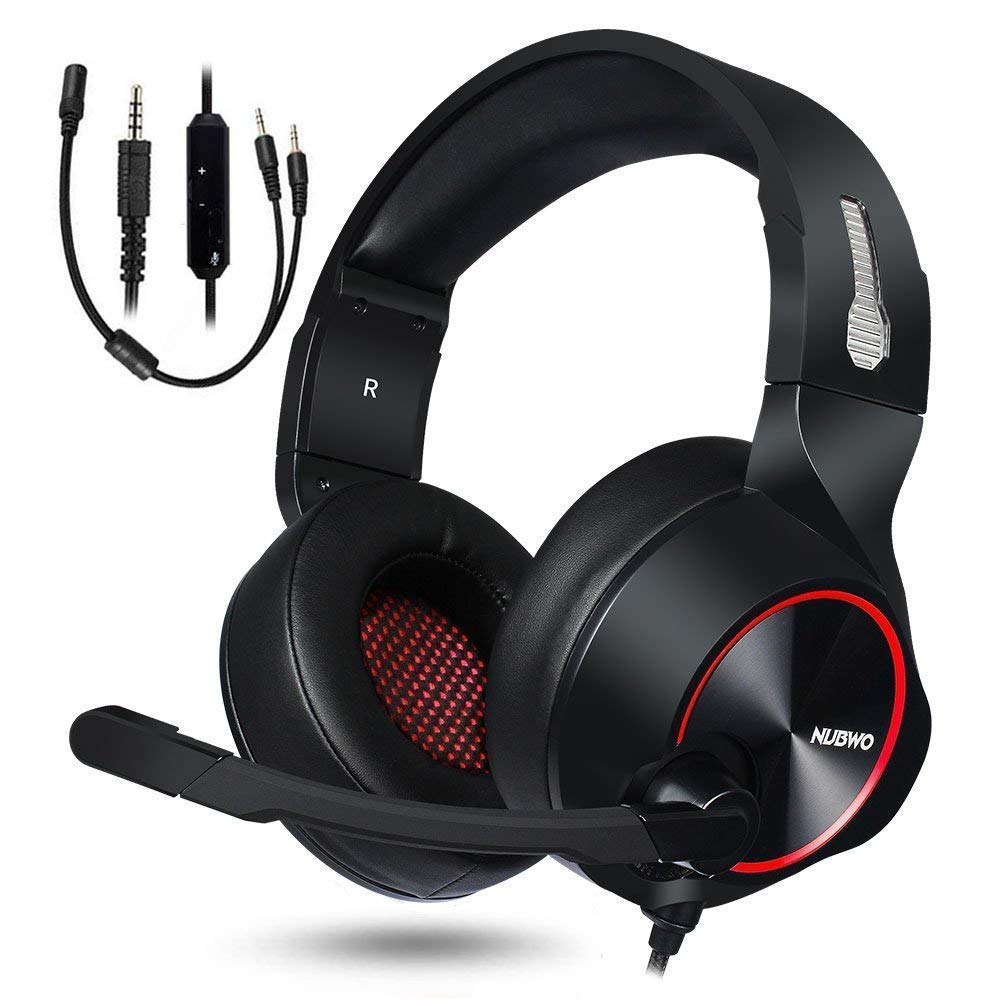
Image: NUBWO HW02 USB Computer Headset. This image displays the overall design of the headset, featuring orange accents on the earcups and headband, with a flexible microphone arm.
Stiùireadh Obrachaidh
Ag atharrachadh an headset
- Atharrachadh bann-cinn: Gently slide the earcups up or down along the headband to achieve a comfortable fit over your ears.
- Suidheachadh microfòn: Bend the flexible microphone arm to position the microphone approximately 1-2 inches from your mouth for optimal voice clarity.
Smachd tomhas-lìonaidh
The NUBWO HW02 headset features an in-line volume control.
- Meudaich tomhas-lìonaidh: Roll the volume wheel upwards.
- Lùghdaich tomhas-lìonaidh: Roll the volume wheel downwards.
Gnìomh Mùchadh Micreofoin
An in-line switch allows you to mute or unmute the microphone.
- Mute microfòn: Slide the switch to the "Mute" position.
- Cuir dheth am micreofon: Slide the switch to the "Unmute" position.
Cumail suas
- Glanadh: Use a soft, dry, lint-free cloth to wipe down the earcups and headband. Do not use abrasive cleaners, alcohol, or solvents.
- Stòradh: When not in use, store the headset in a clean, dry place away from direct sunlight and extreme temperatures.
- Cùram càball: Seachain lùban biorach no cus tarraing air a’ chàball gus casg a chuir air milleadh.
Fuasgladh thrioblaidean
| Trioblaid | Adhbhar a dh’fhaodadh a bhith ann | Fuasgladh |
|---|---|---|
| Gun fhuaim bhon chluas-cinn | Chan eil fònaichean-cluaise ceangailte gu ceart. Meud ro ìosal. Inneal toraidh claisneachd ceàrr air a thaghadh. | Ensure USB or 3.5mm jack is fully inserted. Increase volume using in-line control and computer/device settings. Select "NUBWO HW02" as the default playback device in your sound settings. |
| Microphone nach eil ag obair | Micreofon air a dhùsgadh. Inneal cuir a-steach claisneachd ceàrr air a thaghadh. Microphone positioned incorrectly. | Check the in-line mute switch. Select "NUBWO HW02" as the default recording device in your sound settings. Adjust microphone position closer to your mouth. |
| Tha càileachd fuaim truagh no air a shaobhadh | Meud ro àrd. Ceangal sgaoilte. Eadar-theachd. | Lùghdaich an tomhas-lìonaidh. Re-seat the USB or 3.5mm connection. Feuch ri ceangal ri port USB no inneal eadar-dhealaichte. |
Sònrachaidhean
- Modail: HW02
- Ceangal: Uèirleichte (USB, Jack 3.5mm)
- Suidheachadh cluais: Thar Cluas
- Smachd fuaim: Cur às do fhuaim gnìomhach
- Co-fhreagarrachd àrd-ùrlar: Consól Gèam, PC
- Stuth: sileaconach
- Cuideam nì: 1.11 not
- Meudan toraidh: 9 x 7 x 4 òirleach
Barantas agus Taic
For warranty information or technical support, please refer to the NUBWO official weblàrach-lìn no cuir fios chun t-seirbheis teachdaiche aca. Cùm do chuidhteas ceannach mar dhearbhadh ceannach.
NUBWO Official Weblàrach: Visit the NUBWO Store on Amazon