
Maxima 09300136
Maxima Ice Machine User Manual
Modail: 09300136
Ro-ràdh
Thank you for choosing the Maxima Ice Machine. This professional appliance is designed to produce high-quality crushed or flaked ice efficiently, making it an indispensable tool for various commercial applications. To ensure optimal performance, longevity, and safe operation, please read this manual thoroughly before installation, operation, or maintenance. Keep this manual for future reference.
Stiùireadh sàbhailteachd
- Always place the machine on a stable and secure surface to prevent tipping or movement during operation.
- Dèan cinnteach gu bheil an inneal not used in hot rooms, as this can affect its performance and lead to overheating.
- The drain hose must be connected to a drain point that is lower than the machine's outlet, as the unit does not have a drain pump.
- Na cuir bacadh air an rear air vents, as the machine is air-cooled from the rear. Adequate ventilation is crucial.
- Only connect the machine to a potable water supply using the provided hoses.
- In case of malfunction or warning indicators, refer to the troubleshooting section or contact qualified service personnel.
Suidhich
- A' dì-phapadh: Thoir an inneal gu faiceallach a-mach às a phacaid. Thoir sùil air a bheil milleadh sam bith ann rè na luingeis.
- Suidheachadh: Position the ice machine on a flat, stable, and secure countertop or bar. Ensure there is sufficient space around the rear of the unit for proper air circulation, as it is air-cooled. Avoid placing it near heat sources or in direct sunlight.
- Ceangal uisge: Connect the machine to a potable water supply using the provided inlet hose. The automatic water supply system ensures continuous ice production.
- Ceangal drèanaidh: Attach the provided drain hose to the machine's outlet. Ensure the drain hose is routed to a drain point that is physically lower than the machine's outlet to allow for gravity drainage. This model does not include a drain pump.
- Ceangal cumhachd: Plug the machine into a grounded electrical outlet that matches the voltage specifications (230 Volts).
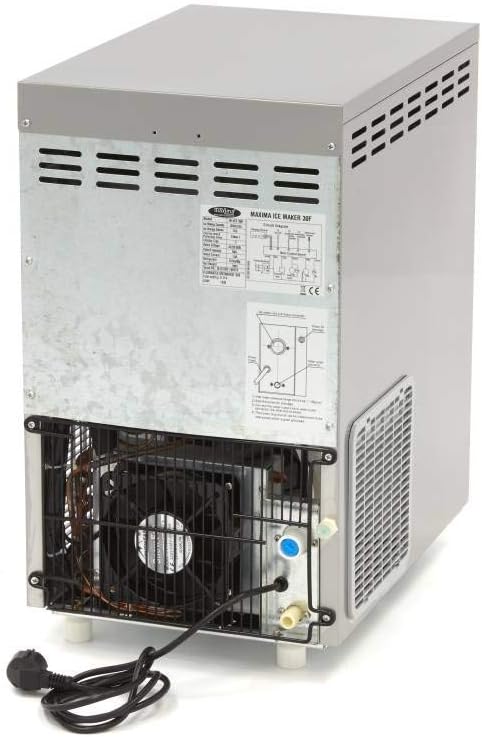
Figear 1: Cùl view of the ice machine with water inlet and outlet connections.

Figure 2: Included accessories: water inlet hose (white), drain hose (grey), and ice scoop.
Stiùireadh Obrachaidh
- Cumhachd air: Once properly set up and connected, turn on the machine using the power switch, typically located on the front panel.
- Riochdachadh deigh: The machine will automatically begin the ice-making cycle. It has a production capacity of up to 30 kg of crushed/flaked ice per 24 hours.
- Stòradh deigh: The internal storage bin can hold up to 7 kg of ice. The machine will automatically stop production when the bin is full and resume when ice is removed.
- Comharran Pannal Smachd: The control panel features several warning lights that indicate the machine's status:
- Malfunction Indicator: Lights up if there is an operational fault.
- Bin Làn-chomharra: Illuminates when the ice storage bin is at capacity.
- Comharra uisge ìosal: Signals that the water supply is insufficient.
- Dìon Overload: The machine is equipped with overload protection to prevent damage from excessive load or operation. If activated, the machine will temporarily shut down.
- Ice Retrieval: Cleachd an sgùp deighe a tha air a thoirt seachad gus deigh fhaighinn a-mach às a’ bhin stòraidh.
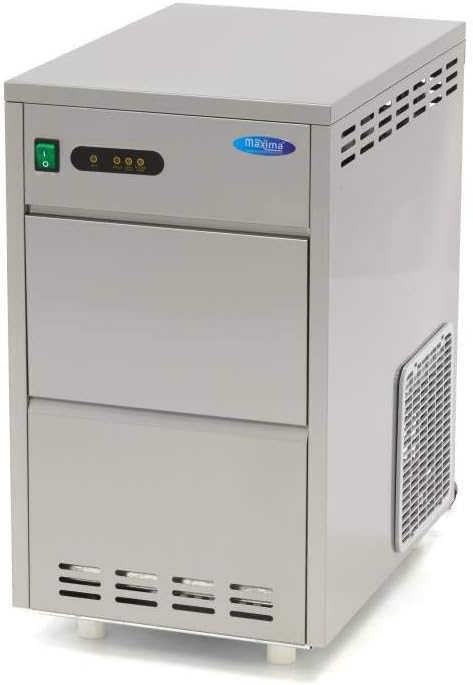
Figear 3: Ceàrnach view of the Maxima Ice Machine, showing the power switch and control panel.

Figear 4: Aghaidh view of the ice machine with the ice storage door open, revealing the bin.
Cumail suas
Regular cleaning and maintenance are crucial for the hygiene, efficiency, and longevity of your Maxima Ice Machine. The machine is designed for effortless cleaning.
- Glanadh làitheil:
- After each use or at the end of the day, remove any remaining ice from the storage bin.
- Wipe down the interior of the ice storage bin with a clean cloth dampened with a mild, food-safe cleaning solution. Rinse thoroughly with clean water.
- Clean the exterior surfaces of the machine with a damp aodach. Na cleachd innealan-glanaidh sgudail no ceimigean cruaidh.
- Weekly/Bi-Weekly Cleaning (or as needed):
- Disconnect the machine from the power supply before performing deeper cleaning.
- Clean the condenser fins located at the rear of the machine using a soft brush or vacuum cleaner to remove dust and debris. This ensures efficient air cooling.
- Inspect and clean the water inlet filter if accessible, to prevent mineral buildup.
- Lùghdachadh: Depending on your water hardness, periodic descaling may be necessary to remove mineral deposits from the water system. Consult a qualified technician for descaling procedures or if you notice reduced ice production due to scale buildup.
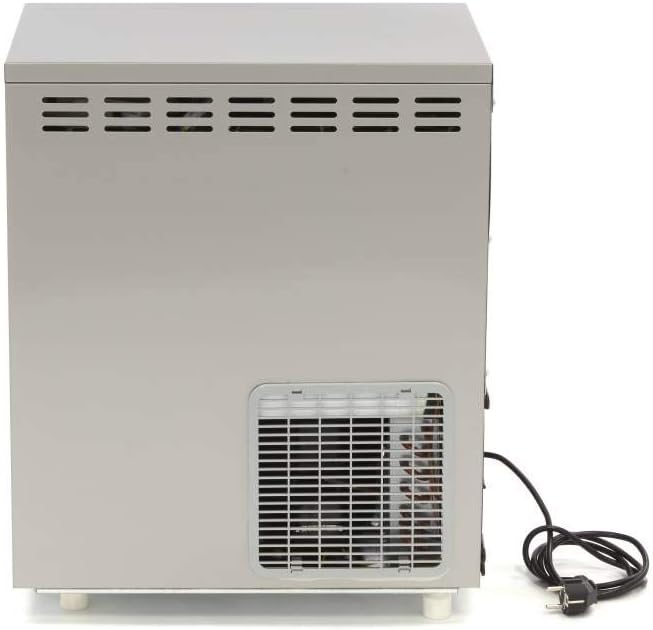
Figear 5: Taobh view of the ice machine, highlighting the ventilation grilles for air circulation.
Fuasgladh thrioblaidean
This section provides solutions to common issues you might encounter. If the problem persists, contact a qualified service technician.
| Trioblaid | Adhbhar a dh’fhaodadh a bhith ann | Fuasgladh |
|---|---|---|
| Machine not producing ice | No power; Low water level (Low Water indicator on); Water supply disconnected; Drain hose blocked or improperly connected; Overload protection activated. | Check power connection; Ensure water supply is connected and turned on; Verify drain hose is clear and positioned correctly (lower than outlet); Reset machine if overload protection was active. |
| Ice bin full indicator is on, but bin is not full | Sensor malfunction or obstruction. | Check for any ice or debris obstructing the ice level sensor. Clean the sensor area. |
| Malfunction indicator is on | Mearachd a-staigh; Cus teasachadh. | Turn off the machine, wait a few minutes, then restart. Ensure adequate ventilation around the machine. If the issue persists, contact service. |
| Machine is noisy or vibrating excessively | Unstable placement; Loose components; Fan obstruction. | Ensure the machine is on a stable, level surface. Check for any loose parts. Inspect the fan at the rear for obstructions. |
Sònrachaidhean
| Feart | Sònrachadh |
|---|---|
| Brand | Maxima |
| Modail Àireamh | 09300136 |
| Comas cinneasachaidh deigh | Suas ri 30kg / 24 uair a thìde |
| Comas stòraidh deigh | 7 kg |
| Seòrsa deigh | Crushed / Flaked Ice |
| Siostam fuarachaidh | Air Cooled (rear) |
| Reothadair | R290 |
| Cumhachd | 215 KW |
| Voltage | 230 Volt |
| Stuth | Stàilinn nach meirg |
| Meudan toraidh (L x W x H) | 33 x 4 x 58 cm |
| Cuideam nì | 29 cileagram |
| Dùthaich Tùs | Sìona |
Bathar seachadview
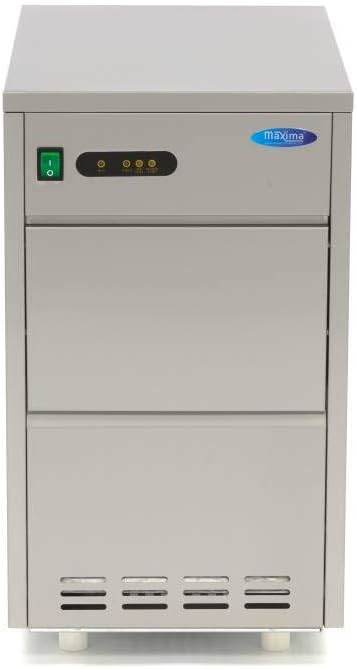
Figear 6: Aghaidh view of the Maxima Ice Machine, showcasing an dealbhadh teann aige.

Figure 7: A closer look at the front of the Maxima Ice Machine.

Figure 8: An additional perspective of the Maxima Ice Machine.
Ask a question about this manual
Ask about setup, troubleshooting, compatibility, parts, safety, or missing instructions. Manuals+ will review the question and use this page’s manual context to help answer it.