
Ro-ràdh
This manual provides detailed instructions for the setup, operation, and maintenance of your Zerone BN59-01179A Replacement Remote Control. Please read this manual carefully before using the product to ensure proper functionality and longevity.
Bathar seachadview
The Zerone BN59-01179A is a universal replacement remote control designed for compatible Smart TVs. It offers a compact design and a comprehensive set of buttons for various functions.
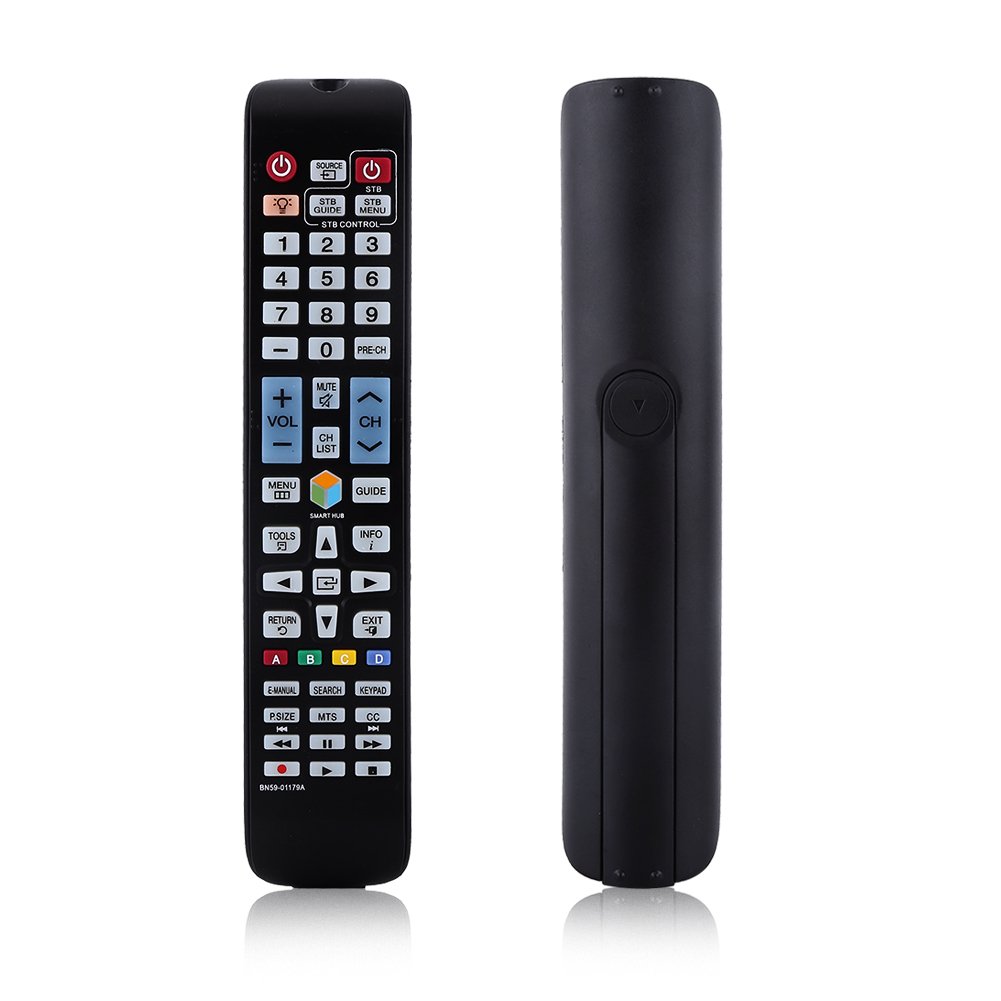
Ìomhaigh: Aghaidh view of the Zerone BN59-01179A remote control, showing its full layout and approximate dimensions (23cm length, 4.7cm width, 2cm thickness).
Suidhich
Stàladh bataraidh
- Lorg an roinn bataraidh air cùl an smachd iomallach.
- Sleamhnaich còmhdach a’ bhataraidh sìos no brùth air a’ ghlas agus tog suas e gus fhosgladh.
- Cuir a-steach dà (2) bataraidh AAA, a’ dèanamh cinnteach gu bheil na cinn-uidhe adhartach (+) agus àicheil (-) a’ freagairt gu ceart ris na comharran taobh a-staigh an roinn.
- Cuir còmhdach a’ bhataraidh air ais na àite le bhith ga shleamhnadh air ais gus an cliog e gu tèarainte.
Thoir an aire: Batteries are not included with the remote control. Please use new AAA batteries for optimal performance.

Image: The back of the remote control with the battery cover removed, showing the empty battery compartment ready for two AAA batteries.
Stiùireadh Obrachaidh
This remote control is designed for immediate use with compatible TVs without requiring programming. Simply insert batteries and point the remote towards your television.
Prìomh fheartan

Image: A hand holding the Zerone remote control, with inset close-ups highlighting the power/source buttons and the navigation/Smart Hub buttons.
- Cumhachd (Putan Dearg): Tionndaidh an telebhisean air no dheth.
- Stòr: A’ taghadh stòran cuir-a-steach (HDMI, AV, msaa.).
- STB/DTV: Switches between Set-Top Box and Digital TV modes.
- Putanan Àireamh (0-9): Taghadh sianal dìreach.
- RO-CH: Tilleadh chun t-seanail roimhe.
- Meud (+/-): Atharraich an ìre fuaim.
- Balbh: Cuiridh seo fuaim an telebhisean air no cuiridh e dheth e.
- Channel (CH Up/Down): Ag atharrachadh seanalan Tbh ann an sreath.
- LIOSRACHADH CH: A’ taisbeanadh liosta nan seanalan.
- Clàr-taice: A’ faighinn cothrom air prìomh chlàr-taice an telebhisean.
- Hub Smart: Opens the Smart Hub interface for apps and streaming services.
- STIÙIREADH: A’ taisbeanadh an iùl-stiùiridh prògraim dealanach.
- FIOSRACHADH: Shows information about the current program.
- Innealan: Accesses quick settings or contextual options.
- Putanan Seòlaidh (Suas/Sìos/Clì/Deas/Cuir a-steach): A’ seòladh tro chlàran-taice agus a’ taghadh roghainnean.
- Tilleadh: Thèid e air ais chun sgrion no clàr-taice roimhe.
- EXIT: A’ fàgail a’ chlàr-taice no an aplacaid làithreach.
- Putanan Dathte (A, B, C, D): Bidh comas-gnìomh ag atharrachadh a rèir modail agus aplacaid an telebhisean.
- LEABHAR-LÀIMHE-D: A’ faighinn cothrom air leabhar-làimhe dealanach an telebhisean.
- SEÒMAR: Opens the search function.
- KeyPAD: Displays an on-screen keypad.
- P.SIZE: Atharraichidh seo meud/co-mheas taobh an deilbh.
- MTS: Multi-channel Television Sound (SAP).
- CC: Fo-thiotalan dùinte.
- Putanan Smachd nam Meadhanan (Cluich, Stad, Stad, Ath-fhilleadh, Luath Air Adhart): A ’cumail smachd air ath-chluich meadhanan.
Cumail suas
- Glanadh: Cleachd clò bog, tioram airson an smachd iomallach a ghlanadh. Na cleachd innealan-glanaidh leaghaidh no stuthan sgrìobach.
- Ath-nuadhachadh bataraidh: Cuir bataraidhean ùra an àite an inneal-iarainn nuair a dh’fhàsas freagairt an iomallach slaodach no nuair a stadas e ag obair. Cuir bataraidhean ùra an àite an dà chuid aig an aon àm an-còmhnaidh.
- Stòradh: Mura tèid an smachd iomallach a chleachdadh airson ùine mhòr, thoir a-mach na bataraidhean gus casg a chur air aodion agus milleadh.
- Seachain leigeil ris: Cùm an inneal iomallach air falbh bho sholas dìreach na grèine, stòran teas agus taiseachd.
Fuasgladh thrioblaidean
- Chan eil an inneal-iomallach a’ freagairt:
- Dèan cinnteach gu bheil bataraidhean air an cur a-steach gu ceart leis a’ phoilearachd cheart.
- Cuir bataraidhean AAA ùra an àite seann bhataraidhean.
- Thoir sùil airson bacadh sam bith eadar an smachd iomallach agus mothachaire infridhearg an Tbh.
- Dèan cinnteach gu bheil an smachd iomallach ag amas gu dìreach air an telebhisean.
- Raon cuibhrichte:
- Cuir bataraidhean an àite.
- Ensure there are no strong light sources or electronic devices interfering with the signal.
- Putanan sònraichte nach eil ag obair:
- Glan an smachd iomallach, gu h-àraidh timcheall air na putanan nach eil a’ freagairt, gus salachar no sprùilleach sam bith a thoirt air falbh.
- Ma mhaireas an duilgheadas an dèidh bataraidh ùr agus glanadh, is dòcha gu bheil an inneal-smachd lochtach.
Sònrachaidhean
| Feart | Tuairisgeul |
|---|---|
| Brand | neoni |
| Ainm Modail | Zerone32687x9gqs (BN59-01179A compatible) |
| Teicneòlas ceangail | Fo-dhearg |
| Innealan co-fhreagarrach | Television (specifically for Samsung BN59-01179A compatible models) |
| An àireamh as motha de dh’ innealan le taic | 8 (Universal functionality) |
| Meud a' Phutain | 12 (referring to main function groups, actual count is higher) |
| Seòrsa Rianadair | Smachd putan |
| Raon as àirde | 8 Meatair |
| Seòrsa bataraidh | AAA |
| Àireamh de bataraidhean | 2 bataraidh AAA a dhìth (gun a thoirt a-steach) |
| Feart sònraichte | Ath-chur uile-choitcheann, gun fheum air prògramadh |
Barantas agus Taic
Zerone provides a service guarantee for this product. If you encounter any questions or issues regarding your remote control, please contact the seller or manufacturer for assistance. They will provide follow-up services to address your concerns.
For specific warranty details and support contact information, please refer to your purchase documentation or the retailer's weblàrach.