
1. Ro-ràdh
The Lumie Bodyclock Glow 150 is designed to improve your sleep and wake-up experience through light therapy. It gradually wakes you with light that simulates a natural sunrise, helping your body to gently transition from sleep. This increasing light intensity aids in reducing sleep hormones like melatonin and increasing wakefulness hormones like cortisol, promoting a more positive and energetic start to your day. The device also features a progressive sunset function to help you relax and fall asleep more naturally.

Ìomhaigh: Aghaidh view of the Lumie Bodyclock Glow 150, displaying the time 07:00 on its central digital clock. The device has a white, dome-shaped light diffuser on top and a dark base with speaker grilles.
2. Dè tha sa bhogsa
Upon unpacking your Lumie Bodyclock Glow 150, please ensure all components are present:
- Lumie Bodyclock Glow 150 Alarm Clock
- Adapter cumhachd
- Stiùireadh Cleachdaiche

Image: The Lumie Bodyclock Glow 150 device positioned next to its retail box. The box features the Lumie brand and product name, while the device itself shows the time 07:00.
3. Suidhich
- Suidheachadh: Position the Bodyclock Glow 150 on a stable surface, such as a bedside table, where the light can reach you effectively. Ensure it is within reach for easy interaction.
- Ceangal cumhachd: Connect the provided power adapter to the DC input port on the back of the Bodyclock and then plug it into a wall outlet. The display will illuminate.
- Suidheachadh Ùine Tùsail: Follow the on-screen prompts or refer to the included quick start guide to set the current time. This typically involves using the '+' and '-' buttons and the settings button.
4. Stiùireadh Obrachaidh
4.1. Sunrise Simulation Alarm
The sunrise simulation feature is designed to wake you gradually and naturally.
- A' suidheachadh an Alarm: Use the alarm button on the device to set your desired wake-up time.
- Fad na h-Èiridh: Choose a gradual sunrise duration of 20, 30, or 45 minutes. The light will begin to brighten gradually before your set alarm time.
- Solas dian: Select your preferred final light intensity for the sunrise.
- Fuaim rabhaidh: Choose one of the available wake-up sounds to accompany the light, or use light only.
- Dreuchd Snooze: Tap the device to activate the snooze function if you wish for a few extra minutes of sleep.
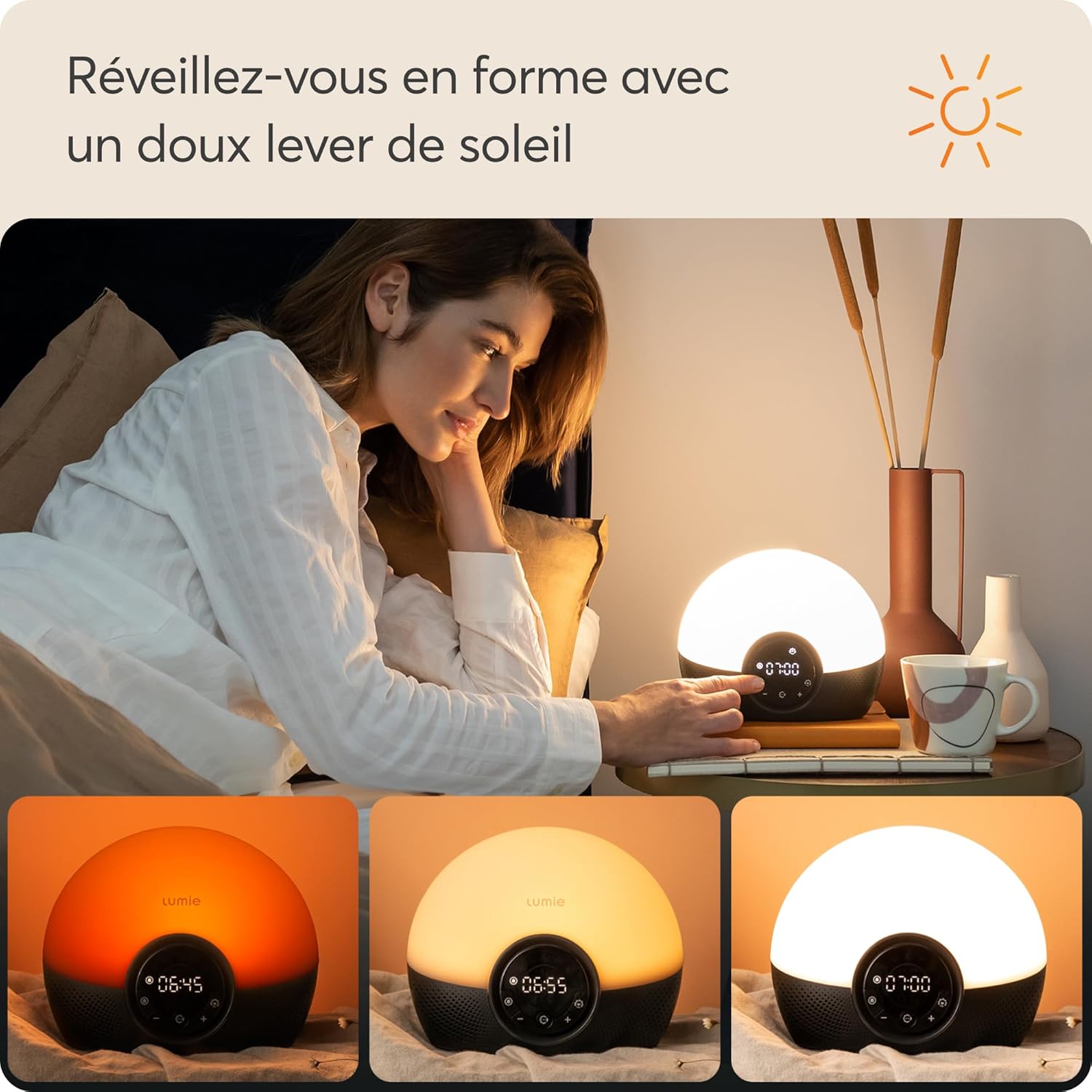
Image: A woman in bed, gently waking up as the Lumie Bodyclock Glow 150 progresses through its sunrise simulation. Three insets show the light changing from a dim orange (06:45) to a brighter yellow (06:55) and finally to a full white light (07:00).
4.2. Sunset Simulation for Sleep
The progressive sunset feature helps promote relaxation and prepare your body for sleep.
- Setting Sunset: Activate the sunset function and set your desired duration (20, 30, or 45 minutes).
- Fuaimean cadail: Select one of the calming sleep sounds to play as the light dims.
- Lùghdachadh Solais: The light will gradually dim over the chosen duration, either turning completely off or transitioning to a low-level nightlight.

Image: A woman is shown relaxing in bed with a small dog, while the Lumie Bodyclock Glow 150 on her bedside table emits a soft, dim light, indicating the sunset simulation feature is active. The display shows 22:30.
4.3. Sound Options
The Bodyclock Glow 150 includes a selection of sounds to enhance your wake-up and sleep routines.
- Wake-up Sounds: Choose from 9 different sounds to accompany your sunrise alarm, including natural sounds.
- Fuaimean cadail: Utilize the same selection of sounds for a calming audio experience during the sunset simulation.
- Smachd tomhas-lìonaidh: Adjust the volume of the selected sounds to your preference.
4.4. Display and Nightlight
The device offers flexible display and lighting options.
- Adjustable Room Light: The LED lights can be used as a general room light with adjustable brightness.
- Automatic Display Dimming: The digital display automatically dims in dark conditions to avoid disturbing your sleep.
- Gnìomh solais oidhche: The final brightness of the sleep light can be adjusted, allowing it to serve as a dim nightlight for children or to turn off completely for adults who prefer total darkness.
5. Cumail suas
To ensure the longevity and optimal performance of your Lumie Bodyclock Glow 150, follow these simple maintenance guidelines:
- Glanadh: Gently wipe the exterior of the device with a soft, dry, or slightly damp cloth. Avoid using abrasive cleaners, solvents, or harsh chemicals, as these can damage the surface.
- Dust: Regularly dust the device, especially the speaker grilles and light diffuser, to prevent accumulation that could affect performance or appearance.
- Stòradh: Ma tha thu a’ stòradh an inneil airson ùine mhòr, dì-phlugaich e agus cùm e ann an àite fionnar, tioram air falbh bho sholas dìreach na grèine.
Do not attempt to open the device or perform any internal maintenance. Refer to qualified service personnel for any repairs.
6. A ’dèanamh trioblaid
If you encounter issues with your Lumie Bodyclock Glow 150, please refer to the following common solutions:
- Inneal nach eil a’ cur cumhachd air: Ensure the power adapter is securely connected to both the device and a working wall outlet. Try plugging another device into the same outlet to confirm power availability.
- Alarm Not Sounding/Light Not Activating: Verify that the alarm is enabled and set correctly. Check the volume level for sounds and the light intensity setting for the sunrise simulation. Ensure the alarm time is not set for a past time.
- Display Flickering or Unresponsive: If the display flickers or becomes unresponsive, try unplugging the device from the power source for a few minutes, then plug it back in to reset it. Ensure the device is on a stable surface to avoid accidental activation of touch controls.
- Sounds are Too Loud/Quiet: Adjust the sound volume using the dedicated controls on the device. Note that some sounds may have a higher perceived loudness than others.
- Light Not Changing Color/Intensity: Confirm that the sunrise or sunset simulation feature is correctly activated and the duration is set. Ensure no settings are overriding the light progression.
If the problem persists after attempting these steps, please contact Lumie customer support for further assistance.
7. Sònrachaidhean
| Feart | Mion-fhiosrachadh |
|---|---|
| Ainm toraidh | Lumie Bodyclock Glow 150 Alarm Clock with Light, 9 Sounds, and Twilight Function |
| Brand | Lumie |
| Modail Àireamh | NBCGE-1000 |
| Meudan (L x W x H) | 12 x 19 x 16 cm |
| Cuideam | 565 gram |
| Stuth | Plastaig |
| Lamp Seòrsa | Solas Dùisg |
| Seòrsa Switch | Suathadh |
| Stòr cumhachd | Adaptor AC |
| Dùthaich Tùs | Sìona |
8. Barantas agus Taic
The Lumie Bodyclock Glow 150 comes with a Barantas 3-bliadhna bho cheann-latha a’ cheannaich, a’ còmhdach lochdan saothrachaidh agus mì-ghnìomhachd fo chleachdadh àbhaisteach. Cùm dearbhadh do cheannaich airson tagraidhean barantais.
This product is certified as a Clas 1 inneal meidigeach, indicating its compliance with health and safety requirements for medical products.
For technical support, warranty claims, or further inquiries, please visit the official Lumie weblàrach-lìn no cuir fios chun roinn seirbheis teachdaiche aca.