
Ro-ràdh
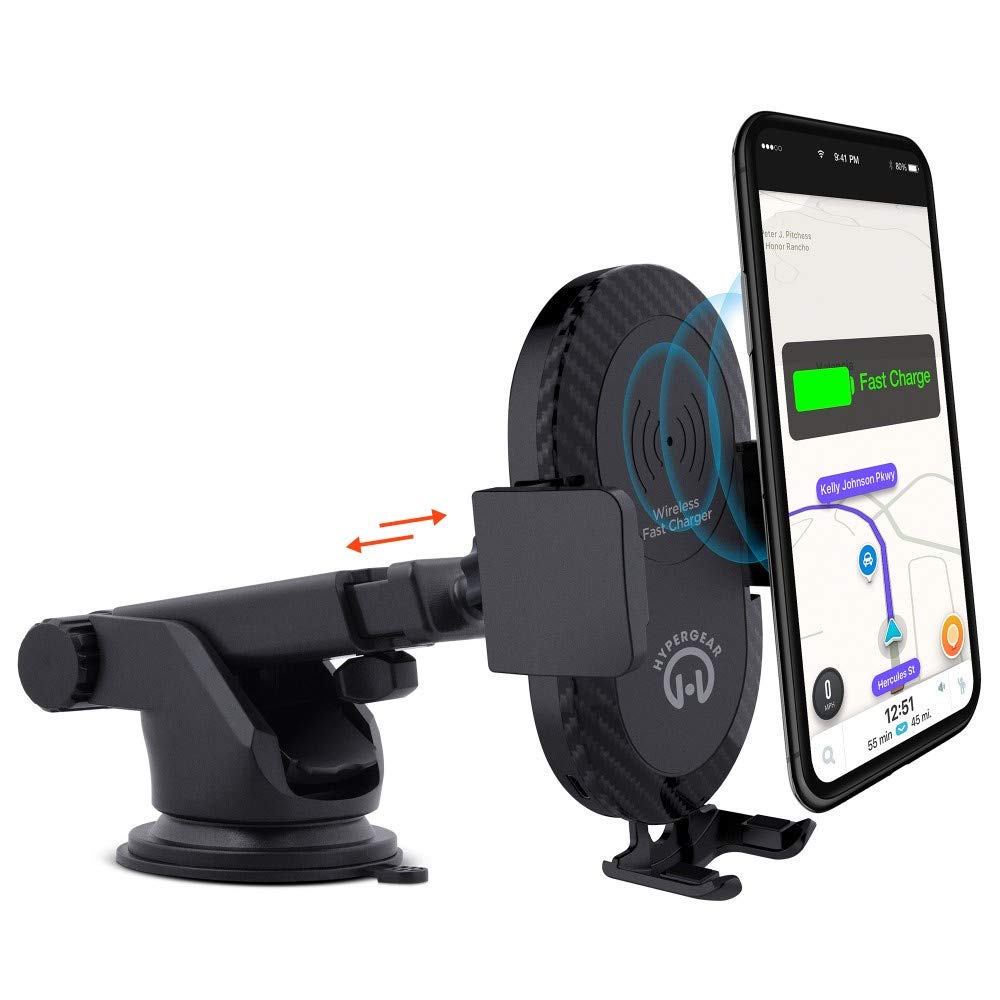
This manual provides instructions for the HyperGear HYG-14590 Wireless Fast Charging Car Dash Mount. This device is designed to securely hold and wirelessly charge Qi-enabled smartphones in your vehicle, offering hands-free navigation and communication.
Susbaint pacaid
Dèan cinnteach gu bheil a h-uile nì anns a’ phacaid:
- Telescopic Mount
- Fast Charge Car Adapter
- Càball meanbh USB
- Leabhar-làimhe cleachdaiche (an sgrìobhainn seo)
Stiùiridhean rèiteachaidh
- Tagh àite stàlaidh: Select a clean, flat surface on your dashboard or windshield. Ensure the location does not obstruct your view no bacadh a chur air smachdan carbaid.
- Ceangail an sliabh:
- Glan an uachdar taghte gu mionaideach.
- Remove the protective film from the sticky gel suction cup.
- Brùth an cupa suidse gu daingeann air an uachdar.
- Engage the 2-step locking lever to secure the mount in place.
- Ceangal cumhachd:
- Insert the Micro USB cable into the charging port on the mount.
- Plug the other end of the Micro USB cable into the Fast Charge Car Adapter.
- Insert the Fast Charge Car Adapter into your vehicle's 12V power outlet (cigarette lighter socket).
- Adjust the Mount:
- Extend the telescopic arm up to 8 inches as needed.
- Pivot the arm up to 230° to achieve the desired angle.
- Rotate the cradle head 360° to switch between portrait and landscape orientation.
Stiùireadh Obrachaidh
- A’ cur an inneil agad: Gently open the adjustable padded cradle grips and place your Qi-enabled smartphone into the mount. The grips will automatically secure the device.
- Cìs gun uèir: Once your device is placed in the mount and the mount is powered, wireless charging will begin automatically. Ensure your device is centered on the charging pad for optimal performance.
- A' toirt air falbh an inneal agad: To remove your device, gently open the cradle grips and lift your smartphone out.
- Cleachdadh gun làmhan: The mount allows for hands-free use of navigation, calls, and other applications while driving. Always ensure your device is positioned safely and does not obstruct your view den rathad.
Cumail suas
- Glanadh: Cleachd clò bog, tioram airson an t-sleibhte a ghlanadh. Na cleachd innealan-glanaidh sgrìobach no fuasglaidhean.
- Cùram cupa suidse: If the sticky gel suction cup loses adhesion, rinse it with warm water and let it air dry. This can help restore its stickiness.
- Stòradh: Nuair nach eilear ga chleachdadh airson ùine mhòr, stòraich am beinn ann an àite fionnar, tioram air falbh bho sholas dìreach na grèine.
Fuasgladh thrioblaidean
- Inneal nach eil a’ cur cosgais gun uèir:
- Ensure your smartphone is Qi-enabled or has a Qi-enabled receiver.
- Verify the Micro USB cable is securely connected to both the mount and the car adapter.
- Check that the car adapter is firmly seated in the vehicle's 12V power outlet.
- Ensure your phone is centered on the charging pad of the mount.
- Thoir air falbh cùisean tiugh fòn sam bith a dh’ fhaodadh bacadh a chur air cosgais gun uèir.
- Mount not sticking to surface:
- Clean the dashboard or windshield surface thoroughly before attachment.
- Ensure the 2-step locking lever is fully engaged.
- Rinse the sticky gel suction cup with warm water and air dry to restore adhesion.
- Avoid mounting on textured or porous surfaces.
- Phone not held securely:
- Ensure the adjustable padded cradle grips are properly closed around your device.
- Verify that your phone's size is compatible with the mount's adjustable range.
Sònrachaidhean
| Modail Àireamh | HYG-14590 |
| Brand | HyperGear |
| Teicneòlas ceangail | Uèirleas |
| Seòrsa ceangail | USB, gun uèir |
| Innealan co-fhreagarrach | Cellular Phones (Qi-enabled) |
| Modalan fòn co-fhreagarrach | iPhone X/8/8 Plus, Samsung Galaxy S9/S9+, S8/S8+, Note 8, and other Qi-enabled devices |
| Feart sònraichte | Fast Charging, Wireless Charging |
| Dètage | 10 watt |
| Stòr cumhachd | Vehicle 12V Power Outlet |
| Prìomh Seòrsa Power Connector | USB Type C (for car adapter) |
| Cuideam nì | 11.84 unnsa |
| Stuth cuairteachaidh | Gel (suction cup) |
| Dath | Dubh |
| UPC | 633755145902 |
Fiosrachadh Barantais
This HyperGear product comes with a Barantas 30-latha from the date of purchase. This warranty covers manufacturing defects. Please retain your proof of purchase for warranty claims. For further details or to initiate a claim, please refer to the HyperGear official weblàrach-lìn no cuir fios chun taic teachdaiche aca.
Taic Luchd-cleachdaidh
For technical assistance, product inquiries, or warranty support, please visit the official HyperGear weblàrach-lìn no cuir fios chun roinn seirbheis teachdaiche aca. Mar as trice gheibhear fiosrachadh conaltraidh air pacaigeadh an toraidh no air làthaireachd oifigeil air-loidhne a’ bhrand.