
Ro-ràdh
This manual provides detailed instructions for the setup, operation, maintenance, and troubleshooting of your Jaycar Composite AV to HDMI Converter (Model AC-1722). Please read this manual thoroughly before using the device to ensure proper functionality and to prevent damage.
Prìomh fheartan
- Converts Composite Video and Stereo Audio (RCA) to HDMI output.
- Supports HDMI 1080p or 720p output resolutions.
- Compatible with NTSC and PAL video systems.
- Plug and play operation.
Susbaint pacaid
Dèan cinnteach gu bheil a h-uile nì an làthair sa phacaid agad:
- Jaycar Composite AV to HDMI Converter (AC-1722)
- Adaptor Cumhachd (5V DC)
- Leabhar-làimhe cleachdaiche (an sgrìobhainn seo)
Bathar seachadview
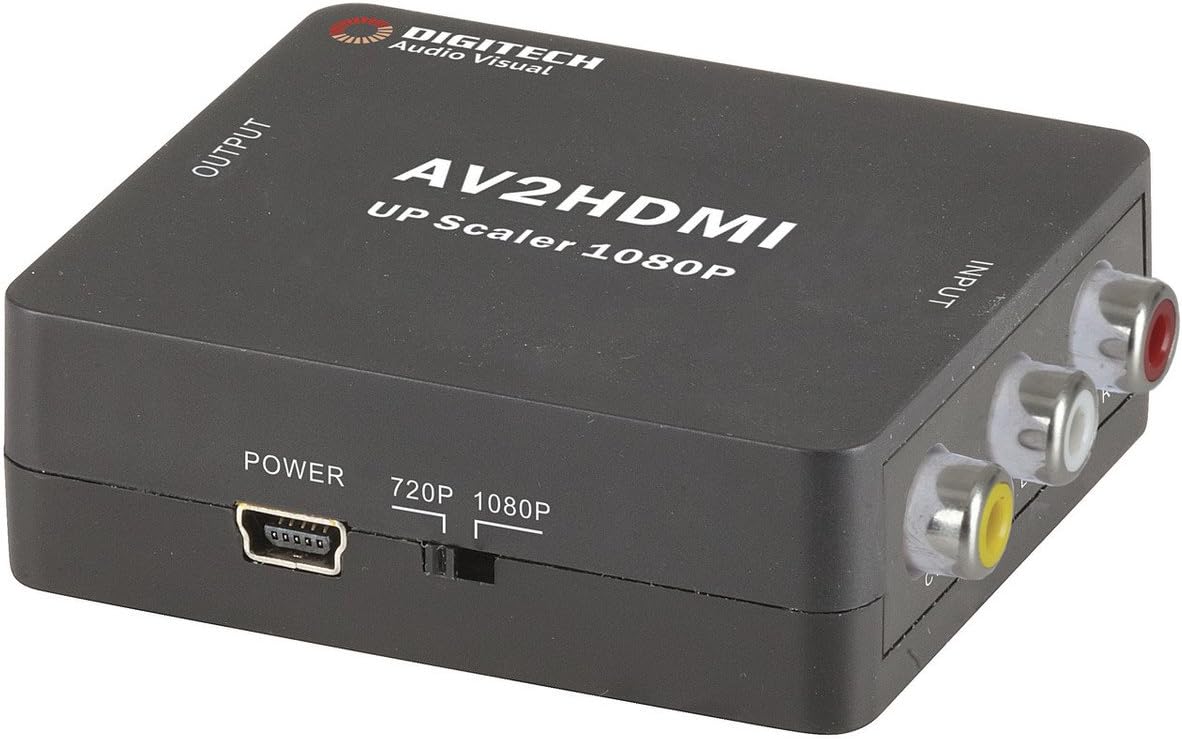
Dealbh 1: Aghaidh view of the Jaycar Composite AV to HDMI Converter. This image displays the top and front of the converter, showing the "AV2HDMI UP Scaler 1080P" label, "OUTPUT" and "INPUT" indicators, the power input, and the 720p/1080p resolution switch. The Composite AV input ports (yellow, white, red) are visible on the right side.

Dealbh 2: Taobh view of the converter showing the HDMI output port. This port is labeled "HDMI" and is where the HDMI cable connects to your display device.

Dealbh 3: Taobh view of the converter showing the Composite AV input ports. These ports are labeled "CVBS" (yellow for video), "L" (white for left audio), and "R" (red for right audio).

Dealbh 4: Taobh view of the converter showing the power input port and the 720p/1080p resolution switch. The power port is a mini-USB type, and the switch allows selection between 720p and 1080p output resolutions.
Stiùiridhean rèiteachaidh
- Ceangail inneal stòr: Connect your Composite AV source device (e.g., DVD player, VCR, game console) to the converter's input ports. Match the yellow RCA cable to the "CVBS" port, the white RCA cable to the "L" (Left Audio) port, and the red RCA cable to the "R" (Right Audio) port.
- Connect Display Device: Connect an HDMI cable from the converter's "HDMI" output port to an available HDMI input on your display device (e.g., TV, monitor, projector).
- Select Output Resolution: Use the 720p/1080p switch on the converter to select your desired output resolution. For most modern displays, 1080p is recommended. If you experience issues, try 720p.
- Ceangal cumhachd: Connect the provided 5V DC power adapter to the converter's "POWER" input port, then plug the adapter into a wall outlet. The converter will power on automatically.
- Tagh Cuir a-steach air an Taisbeanadh: Turn on your display device and select the corresponding HDMI input channel to view the converted signal.
Stiùireadh Obrachaidh
The Jaycar Composite AV to HDMI Converter is designed for plug-and-play operation. Once all connections are made and power is supplied, the converter will automatically scale the analog AV signal to the selected HDMI output resolution (720p or 1080p).
- Ensure your source device is powered on and outputting a Composite AV signal.
- Verify your display device is set to the correct HDMI input.
- If no image appears, check all cable connections and the power supply.
- Experiment with the 720p/1080p switch if the image is distorted or not displayed correctly.
Cumail suas
The converter requires minimal maintenance. Follow these guidelines to ensure longevity:
- Keep the device in a dry, well-ventilated area, away from direct sunlight, high temperatures, and humidity.
- Seachain a bhith a’ leigeil às no fo smachd an inneal gu buaidhean làidir.
- Glan an taobh a-muigh le clò bog, tioram. Na cleachd innealan-glanaidh leaghaidh no fuasglaidhean.
- Ensure all cables are securely connected but do not force them.
Fuasgladh thrioblaidean
| Trioblaid | Adhbhar a dh’fhaodadh a bhith ann | Fuasgladh |
|---|---|---|
| Gun toradh bhidio no claisneachd. |
|
|
| Ìomhaigh shaobhadh no a’ priobadh. |
|
|
| No audio, but video is present. |
|
|
Sònrachaidhean
| Seòrsa cuir a-steach | Composite Video and Audio (3 RCA) |
| Seòrsa Toraidh | HDMI Seòrsa-A |
| Rùintean le taic | 1080p (1920 x 1080), 720p |
| Siostaman bhidio | NTSC, PAL |
| Riatanas cumhachd | 5V DC (Power adapter included) |
| Meudan toraidh (L x W x H) | 54mm x 60mm x 20mm (mu 2.13" x 2.36" x 0.79") |
| Cuideam toraidh | 80g |
Fiosrachadh Barantais
This Jaycar product comes with a Barantas 1-bliadhna bho cheann-latha a’ cheannaich. Tha am barantas seo a’ còmhdach lochdan ann an stuthan agus obair-ciùird fo chleachdadh àbhaisteach. Chan eil e a’ còmhdach milleadh air adhbhrachadh le droch chleachdadh, tubaist, atharrachadh gun chead, no stàladh neo-iomchaidh.
For warranty claims, please retain your proof of purchase and contact Jaycar customer support.
Taic Luchd-cleachdaidh
If you require further assistance or have questions not covered in this manual, please contact Jaycar customer support through their official weblàrach no an neach-reic far an do cheannaich thu an toradh.
For the latest support information, please visit the official Jaycar weblàrach: www.jaycar.com.au