
Ro-ràdh
This manual provides detailed instructions for the Sony BRAVIA KJ-43X8500F 43-inch 4K Android LCD TV. This high-quality television features a vibrant 4K display, a double-speed drive panel for smooth motion, and integrated Android TV functionality. It is also compatible with "Works with Alexa" for convenient voice control.
Prìomh fheartan
- Android TV(TM) functionality: Easily search for TV broadcasts, recorded programs, and online video content by speaking into the remote control. Enjoy desired content effortlessly.
- Ag obair le Alexa: Link with Amazon Echo series for hands-free BRAVIA operation. Voice commands include "TV power on/off," "channel and input switching," and "playback/rewind/stop of recorded content."
- PS4 software "Kingdom Hearts III" certified image quality: High-definition processing ensures optimal image representation. Colors are faithfully reproduced (when game mode is set).
- Smooth motion display: Sports scenes and other fast-moving images are displayed smoothly. The TV predicts image movement and inserts new frames between existing ones, reducing afterimages by rendering 120 frames per second.
- 4K high-definition processor "HDR X1": Enhances the three major image quality elements: detail, color vibrancy, and contrast. Each high-quality function is precisely controlled.
- Supports 4K streaming services: Compatible with services like "Prime Video" and "Netflix," allowing you to enjoy desired content from a wide range of services.
- External HDD recording: Connect a separately sold USB hard disk (HDD) to BRAVIA to record programs while watching another, enabling "external HDD simultaneous recording."
- High-contrast 4K image quality: Enhances contrast for each subject in the image, enabling HDR-equivalent bright and dark rendering. All images, including terrestrial digital broadcasts, Blu-ray software, and online videos, are transformed into high-contrast, high-definition 4K quality.
- HDR (High Dynamic Range) signal compatible: Utilizes maximum image information closer to reality, reproducing brightness and vibrant colors that could not be expressed by previous TVs.
- "Voice Zoom" function: Adjusts the volume of voices without changing the overall sound volume.
Suidhich
Suidheachadh tòiseachaidh
Follow these steps for the initial setup of your Sony BRAVIA KJ-43X8500F television.
- Unpack the TV and accessories carefully.
- Attach the stand securely to the television. Refer to the diagram below for proper attachment.
- Ceangail an càball cumhachd ris an telebhisean agus an uair sin ri socaid cumhachd.
- Connect your antenna or cable to the appropriate input on the TV.
- Connect any external devices (e.g., Blu-ray player, game console) to the HDMI ports.
- Cuir cumhachd air an telebhisean leis an smachd iomallach.
- Follow the on-screen instructions to complete the initial setup, including network connection and channel scanning.
A ’ceangal an stand Tbh
The TV stand provides stable support. Ensure it is correctly attached before placing the TV on a flat surface.
This image shows the rear of the television with the stand attached. Ensure all screws are tightened to prevent instability.
A 'ceangal innealan taobh a-muigh
Your BRAVIA TV offers multiple connectivity options.
- Puirt HDMI: 4 ports available for high-definition devices.
- Puirt USB: 3 ports for connecting USB storage devices.
- Composite Input: 1 port airson innealan nas sine.
- LAN gun uèir: IEEE802.11ac/a/b/g/n for network connectivity.

This image illustrates the various input and output ports located on the back of the television.
Stiùireadh Obrachaidh
A 'cleachdadh an Remote Control
The remote control provides access to all TV functions, including smart features and voice control.

This image displays the remote control, highlighting buttons for power, volume, channel, and direct access to streaming services like Netflix and YouTube.
Smachd guth le Alexa
Your BRAVIA TV supports "Works with Alexa" for convenient voice commands.
- "A Alexa, cuir an telebhisean air."
- "Alexa, switch to Channel 1."
- "Alexa, play [content name] on the TV."
- "Alexa, rewind/fast forward/stop the recording."

This image demonstrates how to use Alexa voice commands to control your television, such as turning it on or changing channels.
Amalachadh nam Meadhanan
Streaming Services and Content
The Android TV platform provides access to a wide array of streaming services.
- Amazon Prime Video
- Netflix
- YouTube
- Hulu
- AbemaTV
- U-NEXT
- VideoMarket
- Filmichean & Tbh Google Play
- Spotify
- Niconico
- DAZN
- Agus mòran eile.

This image illustrates the variety of streaming applications available on your BRAVIA TV, allowing you to enjoy movies, music, and games.
External HDD Recording
Connect a USB hard disk (sold separately) to enable recording of TV programs. You can record one program while watching another.
Cumail suas
Cleaning the TV Screen and Cabinet
- Thoir a-mach am pluga bhon telebhisean an-còmhnaidh mus glan thu e.
- For the screen, gently wipe with a soft, dry, lint-free cloth. For stubborn marks, lightly dampnigh an clò le uisge no le inneal-glanaidh sgrion tlàth, neo-sgrìobach. Na spraeadh leaghan gu dìreach air an sgrion.
- For the cabinet, use a soft, dry cloth. Avoid using abrasive pads, harsh chemicals, or solvents as they can damage the finish.
Cùram Coitcheann
- Seachain an telebhisean a chur ann an solas dìreach na grèine no faisg air stòran teas.
- Dèan cinnteach gu bheil fionnarachadh iomchaidh ann timcheall air an telebhisean gus casg a chur air cus teasachadh.
- Do not block the ventilation openings on the back or sides of the TV.
Fuasgladh thrioblaidean
Gun chumhachd
- Ensure the power cord is securely connected to both the TV and the power outlet.
- Thoir sùil a bheil an socaid cumhachd ag obair le bhith a’ cur inneal eile a-steach.
- Brùth am putan cumhachd air an telebhisean fhèin, chan ann a-mhàin air an smachd iomallach, gus cùisean leis an smachd iomallach a dhiùltadh.
Gun Dealbh/Fuaim
- Verify that the correct input source is selected. Press the "Input" button on your remote.
- Thoir sùil air a h-uile ceangal càball (HDMI, antenna) gus dèanamh cinnteach gu bheil iad tèarainte.
- If using external devices, ensure they are powered on and functioning correctly.
- Adjust volume levels on both the TV and any connected audio systems.
Iomallach smachd nach eil ag obair
- Cuir na bataraidhean an àite an smachd iomallach.
- Dèan cinnteach nach eil bacadh sam bith eadar an smachd iomallach agus mothachaire IR an Tbh.
- Stiùirich an smachd iomallach gu dìreach ris an telebhisean.
Cùisean Ceangal Lìonra
- Ath-thòisich an router agus am modem agad.
- Rach gu roghainnean lìonra an telebhisean agus feuch ri ath-cheangal ris an lìonra Wi-Fi agad.
- Dèan cinnteach gu bheil am facal-faire Wi-Fi agad air a chuir a-steach gu ceart.
- If the issue persists, try connecting the TV directly to your router via an Ethernet cable.
Sònrachaidhean
| Meud sgrion | 43 òirlich |
| Brand | Sony |
| Teicneòlas taisbeanadh | LCD |
| Fuasgladh | 4K |
| Feartan | Android TV, Works with Alexa, Double Speed Drive, 4K HDR, External HDD Recording, Wi-Fi Wireless LAN |
| Teicneòlas ceangail | IEEE802.11ac/a/b/g/n |
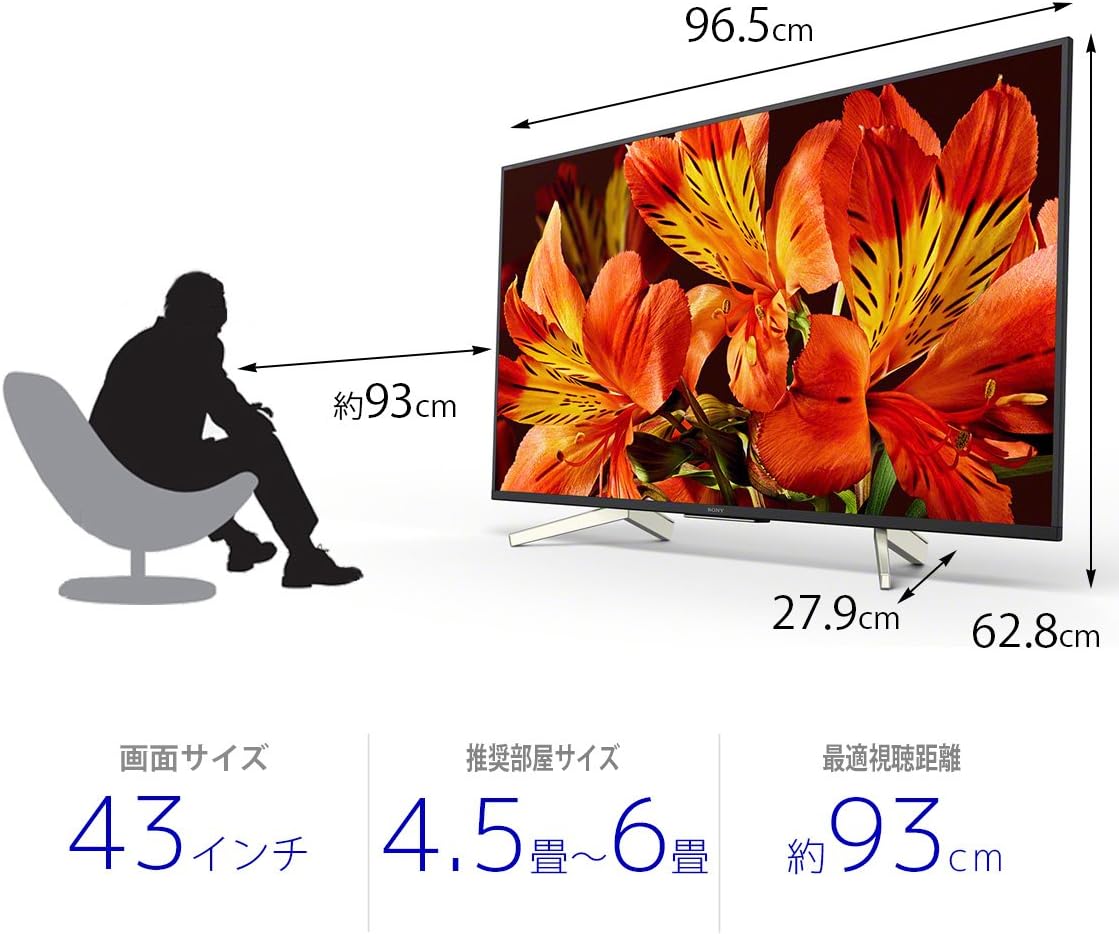
| Meudan toraidh (D x W x H) | 27.9 x 96.5 x 62.8 cm |
| Seirbheisean Eadar-lìn le taic | Amazon Prime Video, Netflix |
| Ainm Modail | KJ-43X8500F |
| Dath | Dubh |
| Cuideam nì | 11.3 cileagram |
| puirt HDMI | 4 |
| Eadar-aghaidh bathar-cruaidh | USB |
| Composite Input Count | 1 |
| USB Port Count | 3 |
| Seòrsa stàladh | Sliabh Clàr |
| Seòrsa tuner | Terrestrial Digital, BS Digital, 110-degree CS Digital |
| Siostam-obrachaidh | Android |
| Modh smachd | Iomallach, Guth |
Barantas agus Taic
Airson fiosrachadh mionaideach mun bharantas, thoir sùil air a’ chairt barantais a tha air a ghabhail a-steach leis an toradh agad no tadhail air taic oifigeil Sony weblàrach.
For technical assistance or customer support, please contact Sony customer service or visit their online support portal.