
Ro-ràdh
Thank you for choosing the Awei B923BL Wireless Magnetic Sports Bluetooth Earphones. This manual provides essential information for setting up, operating, maintaining, and troubleshooting your new earphones. Please read it carefully before use to ensure optimal performance and longevity of your device.
Susbaint pacaid
Thoir sùil air a’ phacaid airson nan nithean a leanas:
- Awei B923BL Wireless Magnetic Sports Bluetooth Earphones
- Càball cosgais USB
- Iomadh Meud de Mholaidhean-cluaise
- Leabhar-làimhe cleachdaiche
Bathar seachadview
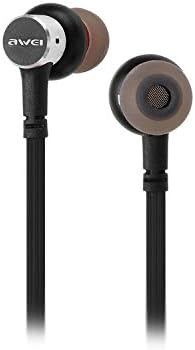
The Awei B923BL earphones are designed for active lifestyles, featuring a wireless Bluetooth connection and a magnetic design for convenient storage around your neck when not in use. They include an integrated microphone for hands-free calling.

Suidhich
1. A’ cur cosgais air na fònaichean-cluaise
Before first use, fully charge your earphones. Connect the provided USB charging cable to the charging port on the earphones and the other end to a USB power source (e.g., computer USB port, wall adapter). The indicator light will show charging status and turn off or change color when fully charged.
2. Càraid Bluetooth
- Dèan cinnteach gu bheil na fònaichean-cluaise dheth.
- Press and hold the multi-function button (usually the power button) until the indicator light flashes red and blue alternately, indicating pairing mode.
- Air an fhòn-làimhe no an inneal agad le comas Bluetooth, rach gu na roghainnean Bluetooth agus cuir Bluetooth an comas.
- Lorg airson available devices. You should see "Awei B923BL" or a similar name in the list.
- Select "Awei B923BL" to connect. Once connected, the indicator light will usually flash blue slowly or turn off, and you may hear a confirmation tone.
- Ma thèid iarraidh ort facal-faire a thoirt seachad, cuir a-steach “0000”.
Once paired, the earphones will automatically connect to the last paired device when turned on, if the device's Bluetooth is active and within range.
Stiùireadh Obrachaidh
Cumhachd air / dheth
- Cumhachd air: Brùth agus cum sìos am putan ioma-ghnìomhach airson timcheall air 3 diogan gus an las an solas comharrachaidh gorm.
- Cumhachd dheth: Brùth agus cum sìos am putan ioma-ghnìomhach airson timcheall air 5 diogan gus an tèid an solas comharrachaidh dearg a lasadh agus an uairsin a dhol dheth.
Dealbh-chluich Ciùil
- Cluich / Stad: Brùth am putan ioma-ghnìomh aon uair.
- An ath cheum: Brùth is cum sìos am putan Meud +.
- Rian roimhe: Brùth is cum sìos am putan Meud -.
Stiùireadh Call
- Freagairt/Cuireadh Call: Brùth am putan ioma-ghnìomh aon uair.
- Call a dhiùltadh: Brùth agus cum sìos am putan ioma-ghnìomhach airson timcheall air 2 diogan.
- Deasaich an àireamh mu dheireadh: Brùth dà uair air a’ phutan ioma-ghnìomhach.
Smachd tomhas-lìonaidh
- Meudaich tomhas-lìonaidh: Brùth am putan Volume +.
- Lùghdaich tomhas-lìonaidh: Brùth am putan Meud -.
Cumail suas
- Clean the earphones regularly with a soft, dry cloth. Do not use harsh chemicals or abrasive materials.
- Thoir air falbh cinn-cluaise agus glan iad le siabann tlàth is uisge ma tha sin riatanach, a’ dèanamh cinnteach gu bheil iad gu tur tioram mus cuir thu iad air ais.
- Stòraich na fònaichean-cluaise ann an àite fionnar, tioram air falbh bho sholas dìreach na grèine agus teòthachd anabarrach.
- Avoid exposing the earphones to water or excessive moisture.
- Do not attempt to disassemble or modify the earphones, as this will void the warranty.
Fuasgladh thrioblaidean
- Earphones not turning on: Dèan cinnteach gu bheil na fònaichean-cluaise làn-chosgais.
- Chan urrainnear paidhir a dhèanamh leis an inneal:
- Make sure the earphones are in pairing mode (flashing red and blue).
- Dèan cinnteach gu bheil Bluetooth air a chomasachadh air an inneal agad.
- Gluais na fònaichean-cluaise nas fhaisge air an inneal agad.
- Try restarting both the earphones and your device.
- Glan ceanglaichean Bluetooth roimhe air an inneal agad ma tha cus agad.
- Gun fhuaim no meud ìosal:
- Thoir sùil air na h-ìrean fuaime air na fònaichean-cluaise agus an inneal ceangailte agad.
- Dèan cinnteach gu bheil na fònaichean-cluaise ceangailte gu ceart ris an inneal agad.
- Feuch ri diofar thùsan claisneachd a chluich.
- Cùisean càileachd gairm:
- Dèan cinnteach nach eil bacadh air a’ mhaicreafòn.
- Gluais gu àite le nas lugha de bhuaireadh.
Sònrachaidhean
| Feart | Mion-fhiosrachadh |
|---|---|
| Ainm Brand | Awei |
| Modail Àireamh | B923BL |
| Dath | Dubh |
| Factor foirm headphone | Anns an Ear |
| Teicneòlas ceangail | Uèirleas |
| Teicneòlas conaltraidh gun uèir | Uèirleas |
| Tuairisgeul Raon Aois | Inbheach |
| Stuth | Rubair |
| Innealan co-fhreagarrach | Fònaichean-làimhe |
| Feart càball | Às aonais càball |
| Modh smachd | Suathadh |
| Àireamh de nithean | 1 |
| Dèanadair | Awei |
| Feartan sònraichte | Microphone Included (Note: This model does not feature active noise cancellation as per product description.) |
Barantas agus Taic
Fiosrachadh Barantais
This product comes with a 1-year manufacturer's warranty from the date of purchase. For warranty claims or service, please contact the manufacturer or their authorized service agent. For further details, you may also contact the retailer where the product was purchased.
Taic Luchd-cleachdaidh
If you encounter any issues not covered in this manual or require further assistance, please refer to the contact information provided with your product packaging or visit the official Awei weblàrach-lìn airson goireasan taic.