
1. Ro-ràdh
This manual provides essential information for the safe and efficient operation, installation, and maintenance of your Carrier Estrella Pro 2018 1.0 Ton 3 Star Window Air Conditioner. Please read this manual thoroughly before using the appliance and retain it for future reference. This air conditioner is designed to provide comfortable cooling for your indoor environment, featuring a 1.0 ton capacity and a 3-star energy rating.
2. Fiosrachadh Sàbhailteachd
Gus casg a chuir air dochann don neach-cleachdaidh no do dhaoine eile agus milleadh thogalaichean, feumar an stiùireadh a leanas a leantainn. Faodaidh obrachadh ceàrr mar thoradh air a bhith a ’seachnadh stiùiridhean cron no milleadh a dhèanamh.
- Dèan cinnteach gu bheil an solar cumhachd a’ freagairt ris an leubail rangachaidh air an aonad.
- Na obraich an inneal-adhair le làmhan fliuch.
- Na cuir a-steach corragan no nithean cèin a-steach don t-slighe a-steach no a-mach.
- Cùm stuthan lasanta air falbh bhon aonad.
- Always disconnect power before cleaning or servicing the unit.
- Feumaidh luchd-obrach teisteanasach an stàladh a dhèanamh a rèir còdan dealain ionadail.
- Na feuch ri an aonad a chàradh thu fhèin. Cuir fios gu luchd-obrach seirbheis ùghdarraichte.
3. Feartan toraidh
Your Carrier Estrella Pro 2018 air conditioner is equipped with several features designed for enhanced comfort and efficiency:
- Vitamin C Filter: Disperses minute particles of Vitamin C into the air, which may help soften skin and reduce stress.
- Glanadh furasta: Extra sensors built into the remote control inform the unit of the temperature in various parts of the room, ensuring optimal temperature delivery.
- Diagnosis glic: In case of a fault, this function diagnoses the issue immediately, turns off the AC to protect it, and indicates a protection or error code for faster service.
- Modh cadail: An energy-saving mode that gradually increases the temperature while you sleep, maintaining comfort while reducing energy consumption.
- Exhaust Command: Ensures a constant supply of fresh and healthy air in your room.
- Ath-thòiseachadh Auto: Retains settings and temperature levels during unexpected power outages, restarting with previous settings automatically when power resumes.
- Swing fèin-ghluasadach: Evenly cools or heats every part of the room by automatically rotating/swinging the air deflector.
- Nexgen Dehumidifier: Reduces humidity in a specific room while retaining cooling capability, maintaining a comfortable temperature and preventing mold/mildew.
- Taisbeanadh LED: Bright LED display included in the control panel.
- Built-in Slinger: Condensed water is absorbed and recycled by the heat condenser for minimum energy use and zero drainage problems.
- Hydrophilic Blue Fins: Improve heat exchange by absorbing and spreading water on their surface, preventing droplet formation. The anti-corrosive epoxy coating improves heat transfer and prevents corrosion.
- 24hr Timer: Allows the unit to run on automatic mode, programming it to start and stop at a pre-assigned time.
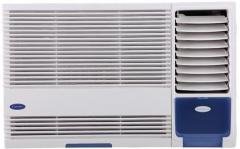
Figear 3.1: Aghaidh view of the Carrier Estrella Pro 2018 Window Air Conditioner, showcasing an dealbhadh teann aige.
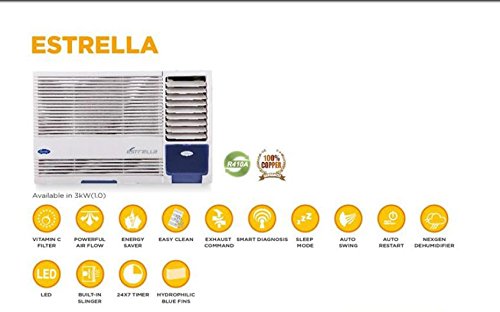
Figear 3.2: Tharview of the Estrella Pro's key features, including Vitamin C filter, powerful airflow, energy saver, easy clean, exhaust command, smart diagnosis, sleep mode, auto swing, auto restart, Nexgen dehumidifier, LED, built-in slinger, 24x7 timer, and hydrophilic blue fins.
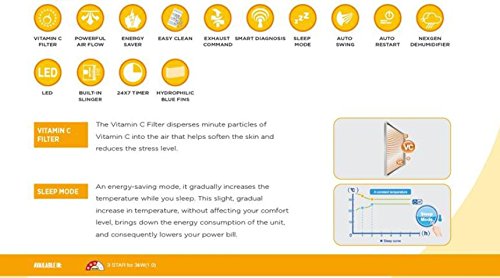
Figure 3.3: Detailed explanation of the Vitamin C Filter and Sleep Mode functionalities, including a graph illustrating temperature changes during Sleep Mode.
4. Suidhich
Proper installation is crucial for the performance and longevity of your air conditioner. It is recommended that installation be carried out by a certified technician.
4.1 A’ taghadh àite
- Select a window that can support the weight of the unit.
- Ensure there are no obstructions to airflow both inside and outside the room.
- Bu chòir an aonad a stàladh le claonadh beag sìos a dh’ionnsaigh an taobh a-muigh gus leigeil le drèanadh ceart den dùmhlachd.
4.2 Feumalachdan Dealain
- Connect the unit to a dedicated power outlet with the correct voltage agus ampmar a tha air a shònrachadh air leubail an toraidh.
- Na cleachd cordaichean leudachaidh no innealan-atharrachaidh ioma-socaid.
- Dèan cinnteach gu bheil an t-socaid cumhachd ceangailte ri talamh gu ceart.
4.3 Ceumannan Stàlaidh (Coitcheann)
- Ullaich fosgladh na h-uinneige, a’ dèanamh cinnteach gu bheil e glan agus saor bho sprùilleach.
- Carefully lift and place the air conditioner into the window opening.
- Daingnich an aonad le bhith a’ cleachdadh na camagan sreap agus na sgriothan a tha air an toirt seachad.
- Install the side panels to seal the gap between the unit and the window frame.
- Ensure all seals are tight to prevent air leakage.
5. Stiùireadh Obrachaidh
Your air conditioner can be operated using the control panel on the unit or the provided remote control.
5.1 Gnìomh Bunaiteach
- Cumhachd air / dheth: Brùth an CUMHACHD putan gus an aonad a thionndadh air no dheth.
- Taghadh Modh: Brùth an MODE putan gus gluasad tro na modhan a tha rim faighinn: Fuarachadh, Fan, Tiormachadh (Dì-taiseadair).
- Atharrachadh teòthachd: Cleachd an UP agus DOWN putanan saighead gus an teòthachd a tha thu ag iarraidh a shuidheachadh.
- Luas an neach-leantainn: Brùth an LAOIDH FAN putan gus astar an neach-leantainn atharrachadh (Ìosal, Meadhanach, Àrd, Fèin-ghluasadach).
5.2 Gnìomhan Sònraichte
- Modh cadail: Activate this mode for quiet, energy-efficient operation during sleep. The temperature will gradually increase over time.
- Gnìomh timer: Cleachd an TIMER button to set a specific time for the unit to turn on or off automatically within a 24-hour period.
- Swing fèin-ghluasadach: Brùth an SWING button to activate or deactivate the automatic louver movement for even air distribution.
- Dehumidifier (Dry) Mode: Select this mode to reduce humidity in the room without significant cooling.
6. Cumail suas
Nì cumail suas cunbhalach cinnteach à coileanadh as fheàrr agus leudaichidh e fad-beatha an inneal-adhair agad.
6.1 Glanadh Criathrag Adhair
- Tricead: Clean the air filter every two weeks, or more often if the unit is used frequently or in dusty environments.
- Ceumannan:
- Dì-cheangail cumhachd ris an aonad.
- Fosgail am pannal aghaidh agus thoir air falbh an criathrag adhair.
- Nigh an criathrag le uisge blàth agus inneal-glanaidh tlàth.
- Sruthlaich gu mionaideach agus leig leis tiormachadh gu tur san adhar mus cuir thu a-steach e a-rithist.
6.2 Glanadh a-muigh
- Sguab taobh a-muigh an aonaid le bog, damp aodach.
- Na cleachd ceimigean cruaidh, stuthan sgrìobach, no fuasglaidhean.
6.3 Cumail suas ràitheil
- Before long periods of non-use (e.g., winter), run the unit in fan-only mode for a few hours to dry the internal components.
- Clean the air filter and cover the unit to protect it from dust.
7. A ’dèanamh trioblaid
If you encounter issues with your air conditioner, refer to the following common problems and solutions. For more complex issues, utilize the Diagnosis glic feature or contact customer support.
| Trioblaid | Adhbhar a dh’fhaodadh a bhith ann | Fuasgladh |
|---|---|---|
| Chan eil an aonad a’ tionndadh air | No power supply; Power cord unplugged; Blown fuse/tripped breaker | Check power connection; Reset breaker/replace fuse. |
| Fuarachadh gu leòr | Dirty air filter; Room too large; Doors/windows open; Temperature setting too high | Clean air filter; Close doors/windows; Lower temperature setting. |
| Fuaim cus | Loose installation; Fan hitting obstruction; Unit not level | Ensure secure installation; Check for obstructions; Level the unit. |
| Aodion uisge | Unit not tilted correctly; Drain pan clogged | Adjust unit tilt; Clear drain pan. |
If the problem persists after attempting these solutions, please contact Carrier customer service for assistance. The Smart Diagnosis feature can provide error codes to help service technicians identify the issue quickly.
8. Sònrachaidhean
The following table outlines the key specifications for the Carrier Estrella Pro 2018 1.0 Ton 3 Star Window Air Conditioner:
| Feart | Mion-fhiosrachadh |
|---|---|
| Brand | Fear-giùlain |
| Èifeachdas Lùth | Rangachadh 3 rionnagan |
| Comas | 1 Tonna |
| Seòrsa stàlaidh | Uinneag |
| Feartan sònraichte | Auto Restart, Dehumidifier, Sleep Mode, Vitamin C Filter, Easy Clean, Smart Diagnosis, Exhaust Command, Auto Swing, Nexgen Dehumidifier, LED, Built-in Slinger, Hydrophilic Blue Fins, 24hr Timer |
| Dath | geal |
| Console smachd | smachd iomallach |
| Teisteanas | rionnag lùth |
| Reothadair | R-32 |
| ASIN | B07BFXPZ2T |
| Ceann-latha Ri fhaighinn an-toiseach | 13 Màrt 2018 |
9. Barantas agus Taic
Your Carrier Estrella Pro 2018 air conditioner comes with a comprehensive warranty:
- Barantas Bathar: 1 year on the entire product.
- Barantas compressor: 5 bliadhna air an compressor.
For warranty claims, technical support, or service requests, please contact Carrier customer service. Ensure you have your product model number and purchase date available when contacting support.
You can find contact information for Carrier customer support on the official Carrier weblàrach no ann am pasgan an toraidh agad.