
Ro-ràdh
Thank you for choosing the Butterfly Eco Smart Plus 25-Litre Air Cooler. This manual provides essential information for the safe and efficient operation, maintenance, and troubleshooting of your new appliance. Please read these instructions carefully before use and retain them for future reference.
Stiùireadh sàbhailteachd cudromach
Gus cunnart teine, clisgeadh dealain no leòn a lùghdachadh, lean ceumannan sàbhailteachd bunaiteach an-còmhnaidh nuair a bhios tu a’ cleachdadh innealan dealain. Tha seo a’ gabhail a-steach:
- Dèan cinnteach gu bheil an solar cumhachd voltage matches the cooler's requirements (220-240 volts).
- Na cuir am fuaradair, an corda no am pluga ann an uisge no leaghan eile.
- Unplug the cooler from the outlet when not in use, before filling with water, or before cleaning.
- Na obraich inneal sam bith le sreang no pluga millte, no às deidh don inneal a dhol ceàrr no a bhith air a mhilleadh ann an dòigh sam bith.
- Keep the cooler on a stable, level surface to prevent tipping.
- Do not block air inlets or outlets. Maintain adequate clearance around the cooler for proper airflow.
- Cùm clann is peataichean air falbh bhon fhuaradair fhad ’s a tha e ag obair.
- Do not use the cooler in areas where flammable liquids or gases are stored.
Bathar seachadview
Familiarize yourself with the components of your Butterfly Eco Smart Plus Air Cooler.

Figear 1: Aghaidh view of the Butterfly Eco Smart Plus 25-Litre Air Cooler. This image shows the main body, front louvers, digital display control panel at the top, and castor wheels at the base.
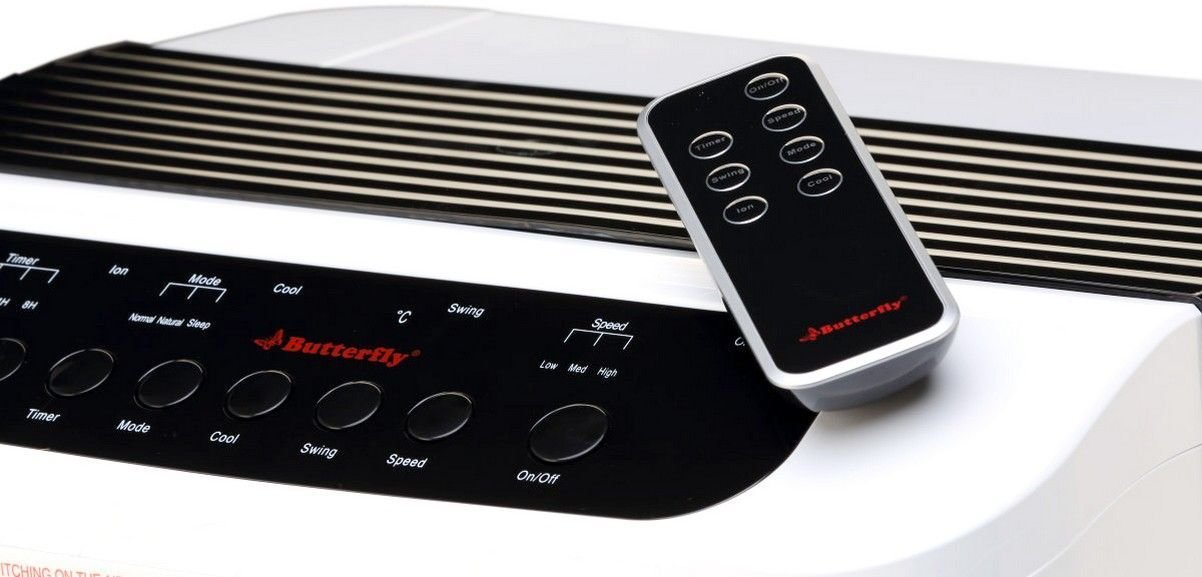
Figear 2: Cearcallach view of the air cooler, highlighting the top control panel and the included remote control placed on top. The side profile with vertical vents is also visible.

Figear 3: Close-up of the remote control for the air cooler, showing buttons for On/Off, Speed, Mode, Timer, Swing, Ion, and Cool functions.

Figear 4: Cùl view of the air cooler with the back panel removed, revealing the honeycomb cooling media. This section is where air is drawn in and cooled by evaporating water.
Prìomh cho-phàirtean:
- Pannal Smachd Taisbeanaidh Didseatach: Located on the top, for manual operation.
- Front Louvers: Adjustable for directing airflow. Features both horizontal and vertical louvers for wide air distribution.
- Tanca uisge: 25-litre capacity, located at the bottom for water storage.
- Meadhanan fuarachaidh Honeycomb: Located at the rear, responsible for evaporative cooling.
- Cuibhlichean Castor: Airson gluasad furasta an aonaid.
- Smachd air astar: Airson goireasach obrachadh bho astar.
Suidhich
- A' dì-phapadh: Thoir an inneal-fuarachaidh adhair a-mach às a phacaid gu faiceallach. Cùm a h-uile stuth pacaidh airson stòradh no còmhdhail san àm ri teachd.
- Suidheachadh: Place the air cooler on a firm, level surface. For optimal cooling, position the cooler near an open window or door to allow fresh air intake and proper ventilation. Ensure there is at least 20 cm of space around the unit for unobstructed airflow.
- Lìonadh uisge: Open the water inlet cap, typically located at the top or side. Fill the water tank with clean, fresh water up to the 'MAX' level indicator. Do not overfill. The cooler has a 25-litre capacity.
- Ceangal cumhachd: Ensure the cooler is switched off before plugging it into a standard 220-240V AC power outlet.
Stiùireadh Obrachaidh
Your air cooler can be operated using the control panel on the unit or the remote control.
Pannal Smachd / Gnìomhan Smachd Iomallach:
- Putan air / dheth: Press to turn the cooler on or off.
- Putan Astair: Cycles through 3 fan speeds: Low, Medium, High.
- Putan Fionnar: Activates the water pump to circulate water over the honeycomb pads for evaporative cooling.
- Putan Swing: Activates or deactivates the automatic oscillation of the vertical louvers to distribute air across a wider area. Horizontal louvers can be adjusted manually.
- Putan Modh: Selects different operating modes (e.g., Normal, Natural, Sleep, if available).
- Putan Timer: Sets an operating duration after which the cooler will automatically turn off.
- Ion Button: Activates the ionizer function (if available) for air purification.
Gnìomh tòiseachaidh:
- Plug an sreang cumhachd a-steach gu ionad dealain iomchaidh.
- Brùth an Air / dheth button on the control panel or remote. The unit will start in a default fan speed.
- Brùth an Luas button to select your desired fan speed (Low, Medium, High).
- For cooling, press the Tarraingeach button. You will hear the water pump activate.
- Brùth an swing button to activate the automatic swing function for wider air distribution.
Cumail suas
Bidh cumail suas cunbhalach a’ dèanamh cinnteach à coileanadh as fheàrr agus fad-beatha an fhuaradair adhair agad.
Daily/Weekly Maintenance:
- Tanca uisge: Regularly check the water level. For best performance and hygiene, drain and refill the water tank with fresh water every few days, especially if the cooler is used frequently.
- Glanadh a-muigh: Sguab na h-uachdaran a-muigh le bog, damp aodach. Na cleachd luchd-glanaidh sgudail no solventan.
Monthly/Seasonal Maintenance:
- Honeycomb Cooling Pads: The honeycomb pads can accumulate dust and mineral deposits. To clean, first unplug the cooler. Remove the back panel (refer to Figure 4 for location). Carefully slide out the honeycomb pads. Rinse them under running water to remove dust and deposits. For stubborn deposits, soak them in a mild descaling solution (e.g., vinegar and water) for 30 minutes, then rinse thoroughly. Ensure pads are completely dry before reinserting.
- Pumpa uisge: Inspect the water pump and its tubing for any blockages or damage. Clean any debris that may have accumulated.
- Drèanadh: Completely drain the water tank before long periods of non-use or storage.
Stòradh:
Before storing the cooler for an extended period, ensure the water tank is empty and clean, and the honeycomb pads are dry. Store the unit in a dry, cool place, preferably in its original packaging.
Fuasgladh thrioblaidean
Ma thachras tu ri duilgheadasan leis an fhuaradair adhair agad, thoir sùil air na duilgheadasan agus na fuasglaidhean cumanta a leanas:
| Trioblaid | Adhbhar a dh’fhaodadh a bhith ann | Fuasgladh |
|---|---|---|
| Chan eil an fhuaradair a’ tionndadh air. | Gun sholar cumhachd; Càball cumhachd gun a bhith air a phlugaigeadh a-steach; Putan cumhachd gun a bhith air a bhrùthadh. | Check power outlet; Ensure cord is securely plugged in; Press the On/Off button. |
| No cool air / Only hot air. | Water tank empty; Cool function not activated; Honeycomb pads clogged; Water pump malfunction. | Fill water tank; Press the Cool button; Clean honeycomb pads; Check water pump for blockages or contact customer service if damaged. |
| Water is not pumping. | Water tank empty; Water pump or tubing blocked/damaged; Cool function not activated. | Ensure water tank is filled; Inspect pump and tubing for blockages; Press the Cool button. If pump is damaged, contact customer service. |
| Cool button blinking. | Low water level indicator. | Refill the water tank to the 'MAX' level. The blinking should stop once sufficient water is detected. |
| Fuaim neo-àbhaisteach rè obrachadh. | Low water level; Obstruction in fan or pump; Unit not on a level surface. | Check water level and refill if low; Inspect for foreign objects in fan or pump area (unplug first); Ensure cooler is on a stable, flat surface. |
| Smachd iomallach gun a bhith ag obair. | Batteries depleted; Obstruction between remote and cooler; Remote not pointed correctly. | Replace batteries; Remove any obstructions; Point remote directly at the cooler's receiver. |
Ma mhaireas an duilgheadas às dèidh dhut na fuasglaidhean seo fheuchainn, cuir fios gu taic luchd-cleachdaidh.
Sònrachaidhean
- Brand: Dealan-dè
- Ainm a' mhodail: Eco Smart Plus
- Comas: 25 liotair
- Caitheamh cumhachd: 200 watt
- Vol Obrachaidhtage: 220 - 240 Volt
- Àireamh de Luas: 3 (Ìosal, Meadhanach, Àrd)
- Seòrsa stàladh: Saorsa
- Feartan sònraichte: Compact design, Remote Control, Horizontal and Vertical Louvers, Honeycomb Cooling Media, Digital Display Control Panel
- Dath: Geal
Barantas
This Butterfly Eco Smart Plus Air Cooler comes with a Barantas 1-bliadhna on the product from the date of purchase. Please retain your purchase receipt as proof of purchase for warranty claims. The warranty covers manufacturing defects under normal use. It does not cover damage caused by misuse, accidents, unauthorized repairs, or normal wear and tear.
Taic Luchd-cleachdaidh
For any queries, service requests, or technical assistance regarding your Butterfly Eco Smart Plus Air Cooler, please contact Butterfly customer support. Refer to the warranty card or the official Butterfly weblàrach-lìn airson an fhiosrachadh conaltraidh as ùire.
Thoir an aire: Always provide your product model number (Eco Smart Plus) and purchase details when contacting support.