
1. Ro-ràdh
This manual provides detailed instructions for the installation, operation, and maintenance of your Thomson SB260IBT 2.1 Channel Soundbar. Please read this manual thoroughly before using the product and retain it for future reference.
1.1 Fiosrachadh Sàbhailteachd
- Dèan cinnteach gu bheil an solar cumhachd voltagtha e a’ coinneachadh ris na riatanasan a tha air an sònrachadh air leubail an toraidh.
- Do not expose the soundbar or subwoofer to rain, moisture, or extreme temperatures.
- Seachain an aonad a chur faisg air stòran teas no ann an solas dìreach na grèine.
- Dèan cinnteach gu bheil fionnarachadh ceart timcheall an aonaid gus casg a chuir air cus teasachadh.
- Na fosgail an casing; cuir a h-uile seirbheiseachadh gu luchd-obrach teisteanasach.
- Glan an aonad a-mhàin le clò bog, tioram.
2. Pasgan-susbaint
Dèan cinnteach gu bheil a h-uile nì anns a’ phacaid:
- Thomson SB260IBT Soundbar
- Subwoofer
- Smachd Iomallach
- Càball cumhachd
- Audio Cables (e.g., Optical, AUX - may vary by region)
- Leabhar-làimhe cleachdaiche
3. Toradh thallview
3.1 Bàr-fuaim agus Subwoofer

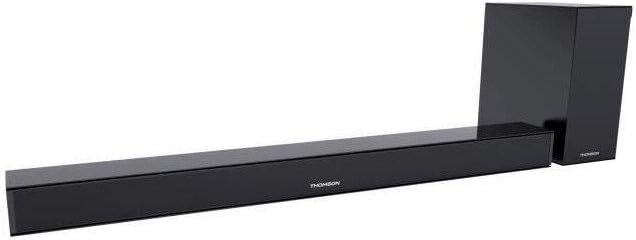
This image displays the Thomson SB260IBT soundbar unit alongside its accompanying subwoofer. The soundbar is a long, slender black unit, and the subwoofer is a compact black cube, both designed to complement modern home entertainment systems.
3.2 Pannal Smachd agus Puirt
This image shows a close-up of the soundbar's side panel, revealing various control buttons and input/output ports. These include buttons for power, mode selection, volume control, and ports such as USB, SD card slot, and auxiliary input.
3.2.1 Pannal aghaidh
- Comharra LED: A’ taisbeanadh modh no inbhe làithreach.
- Glacadair IR: Airson comharran smachd iomallach.
3.2.2 Cùl Pannal
- Cur a-steach cumhachd: A’ ceangal ris a’ chàball cumhachd AC.
- Cuir a-steach OPTICAL: Airson ceangal claisneachd didseatach bho Tbh no inneal eile.
- Input AUX: For analog audio connection using a 3.5mm cable.
3.2.3 Pannal Taobh
- Port USB: Airson claisneachd a chluich files bho draibh USB.
- Slot cairt SD: Airson claisneachd a chluich files bho chairt SD.
- Putanan smachd: Power, Mode, Volume Up/Down.
3.2.4 Smachd Iomallach
The remote control provides full functionality for power, input selection, volume adjustment, and playback controls.
4. Suidhich
4.1 Suidheachadh
Place the soundbar on a stable, flat surface directly in front of your television. Position the subwoofer on the floor near the soundbar for optimal bass response. Ensure adequate ventilation around both units.
4.2 A ’ceangal ri cumhachd
- Connect the power cable to the soundbar's power input.
- Cuir ceann eile a’ chàball cumhachd a-steach do shocaid balla.
- Connect the subwoofer to its power source (if separate).
4.3 Ceanglaichean claisneachd
4.3.1 Ceangal Optaigeach
For high-quality digital audio, connect an optical cable from your TV's optical output to the soundbar's OPTICAL input. Select 'Optical' mode on the soundbar.
4.3.2 Ceangal AUX
Use a 3.5mm audio cable to connect your device's audio output (e.g., smartphone, MP3 player) to the soundbar's AUX input. Select 'AUX' mode on the soundbar.
4.3.3 Ceangal Bluetooth
For wireless audio, select 'Bluetooth' mode on the soundbar. Refer to section 5.4 for detailed pairing instructions.
5. Stiùireadh Obrachaidh
5.1 Cumhachd air / dheth
Brùth an Cumhachd putan air a’ bhàr-fuaime no air an smachd iomallach gus an aonad a thionndadh air no dheth.
5.2 Taghadh a-steach
Brùth an Modh button on the soundbar or remote control to cycle through available input sources: Bluetooth, Optical, AUX, USB, SD Card. The LED indicator will show the selected mode.
5.3 Smachd tomhas-lìonaidh
Cleachd an Meud + agus Leabhar - buttons on the soundbar or remote control to adjust the master volume level.
5.4 Pairing Bluetooth
- Tionndaidh air a 'bhàr-fuaim agus brùth air a' phutan Modh button to select Bluetooth mode. The LED indicator will flash, indicating it is in pairing mode.
- Air an inneal agad le comas Bluetooth (me, fòn cliste, tablet), cuir Bluetooth an gnìomh agus rannsaich airson innealan a tha rim faighinn.
- Select "SB260IBT" from the list of found devices to pair.
- Once successfully paired, the soundbar's LED indicator will stop flashing and remain solid. You can now play audio from your device through the soundbar.
5.5 Ath-chluich Cairt USB/SD
Insert a USB drive or SD card (containing compatible audio files) into the corresponding port on the soundbar's side panel. The soundbar will automatically switch to USB/SD mode and begin playback. Use the remote control for playback functions such as Play/Pause, Next Track, and Previous Track.
6. Cumail suas
6.1 Glanadh
Disconnect the soundbar from the power supply before cleaning. Use a soft, dry cloth to gently wipe the surfaces. Do not use liquid cleaners, abrasive materials, or chemical solvents, as these may damage the finish.
6.2 Stòradh
If storing the unit for an extended period, disconnect it from power and store it in a cool, dry place, away from direct sunlight and extreme temperatures. It is recommended to keep the original packaging for storage.
7. A ’dèanamh trioblaid
| Trioblaid | Fuasgladh |
|---|---|
| Gun chumhachd | Check if the power cable is securely connected to the soundbar and the wall outlet. Ensure the wall outlet is functional. |
| Gun Fhuaim | Ensure the correct input source (e.g., Optical, AUX, Bluetooth) is selected. Check all audio cable connections. Increase the volume on both the soundbar and the connected device. |
| Bluetooth Disconnection or Failure to Pair | Ensure the device is within the Bluetooth operating range (approximately 10 meters). Turn off and on Bluetooth on your device, then try re-pairing. Ensure no other devices are actively connected to the soundbar. |
| Iomallach smachd nach eil ag obair | Check the battery in the remote control and replace if necessary. Ensure there are no obstacles between the remote control and the soundbar's IR receiver. |
8. Sònrachaidhean
- Ainm a' mhodail: SB260IBT
- Brand: MacThòmais
- Suidheachadh sianal: 2.1 Seanail
- Cumhachd toraidh as àirde: 200 watt
- Teicneòlas ceangail: Bluetooth, Wired/Wireless
- Seòrsa a-steach: Multiple (Optical, AUX, USB, SD Card)
- Stòr cumhachd: Electric Corded
- Modh smachd: Via App, Remote Control, On-unit Buttons
- Feartan sònraichte: Bluetooth
- Cleachdaidhean a thathar a’ moladh: Airson coimpiutairean, consoles geama, cluicheadairean ciùil, fònaichean sgairteil no tablaidean, telebhiseanan
- Meudan toraidh: 100 x 15 x 7 cm (bàr-fuaim)
- Cuideam toraidh: Approximately 3 kg (Soundbar and Subwoofer combined)
- Àireamh de dh'aonadan: 2 (Soundbar and Subwoofer)
- Seasmhach uisge: Chan eil
- Seòrsa stàladh: Clàr-bùird
9. Barantas agus Taic
9.1 Fiosrachadh Barantais
This product comes with a limited warranty. Please refer to the warranty card included in your package for specific terms and conditions, including the warranty period and coverage details. Retain your proof of purchase for warranty claims.
9.2 Taic teachdaiche
For technical assistance, troubleshooting, or service inquiries, please contact Thomson customer support. Contact details can typically be found on the manufacturer's official website or in your product documentation. Please have your model number (SB260IBT) and purchase information ready when contacting support.