
Ro-ràdh
This manual provides comprehensive instructions for the setup, operation, maintenance, and troubleshooting of your Thomson Universal 2-in-1 Zapper Remote Control ROC Z107. Please read this manual carefully before using the device to ensure optimal performance and longevity.
Bathar seachadview
The Thomson ROC Z107 is a universal remote control designed to operate two devices, typically a Television (TV) and a Set-Top Box (STB). It features large buttons for ease of use and includes a learning function for expanded compatibility.
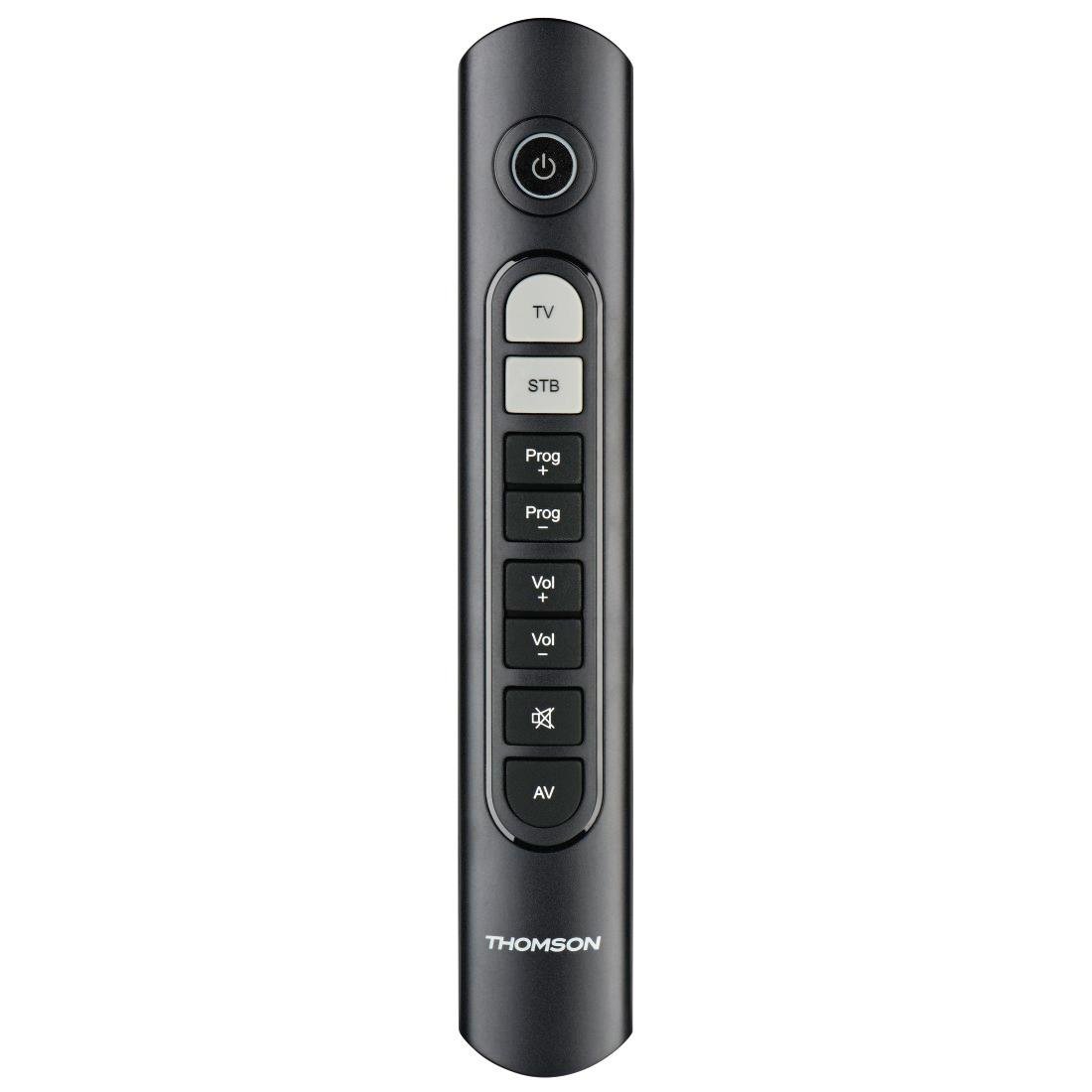
Image: Thomson Universal 2-in-1 Zapper Remote Control ROC Z107. This image displays the remote control from a slightly angled top-down perspective, highlighting its ergonomic design and the layout of its primary buttons.
Suidhich
1. Stàladh bataraidh
- Fosgail an còmhdach cuibhreann bataraidh air cùl an smachd iomallach.
- Insert two AAA batteries, ensuring correct polarity (+ and -). Two AAA batteries are included with your purchase.
- Dùin an còmhdach roinn bataraidh gu tèarainte.
2. Initial Programming (Pre-programmed Devices)
The remote control is pre-programmed for many popular brands such as LG, Sony, Samsung, Sharp, and Philips. For these brands, the remote may function immediately after battery installation without further setup. Test the remote with your TV and STB.
3. Learning Function (For Unlisted or Specific Functions)
If your device is not immediately compatible or if you wish to add specific functions from your original remote, use the learning function:
- Place the Thomson remote and your original remote control head-to-head, approximately 2-5 cm apart.
- Press and hold the desired device button (TV or STB) on the Thomson remote until the indicator light blinks.
- Press the button on the Thomson remote that you wish to program. The indicator light will blink slowly.
- Press the corresponding button on your original remote control. The indicator light on the Thomson remote will blink rapidly to confirm successful learning.
- Repeat for other buttons as needed.
- Press the device button (TV or STB) again to exit learning mode.
4. Master Volume and Program Selection
This feature allows you to designate which device (TV or STB) controls the volume and program channels, regardless of which device mode the remote is currently in. Refer to the full user manual for specific steps on setting up master control functions.
Stiùireadh Obrachaidh
The Thomson ROC Z107 remote control features a simplified button layout for essential functions.

Image: Close-up of Thomson ROC Z107 remote control buttons. This image provides a detailed view of the remote's buttons, including Power, TV, STB, Program Up/Down, Volume Up/Down, Mute, and AV input selection.
- Putan Cumhachd (⏻): Turns the selected device (TV or STB) on or off.
- TV Button: Selects the Television control mode.
- STB Button: Selects the Set-Top Box control mode.
- Prog + / Prog - Buttons: Changes the program/channel up or down.
- Vol + / Vol - Buttons: Meudaich no lughdaich an tomhas-lìonaidh.
- Putan Mute (🔇): A’ cuir dheth no a’ cuir dheth an fhuaim.
- AV Button: Switches the input source on the TV (e.g., HDMI 1, HDMI 2, AV).
Cumail suas
Ath-nuadhachadh bataraidh
When the remote control's performance degrades or the indicator light does not respond, it is time to replace the batteries. Follow the battery installation steps outlined in the Setup section.
Glanadh
Gus an smachd iomallach a ghlanadh, cleachd clò bog, tioram. Na cleachd innealan-glanaidh leaghaidh no stuthan sgrìobach, oir faodaidh iad sin uachdar no pàirtean a-staigh an smachd iomallach a mhilleadh.
Fuasgladh thrioblaidean
- Chan eil an inneal-iomallach a’ freagairt:
- Thoir sùil a bheil na bataraidhean air an cur a-steach gu ceart agus nach eil iad air an leigeil ma sgaoil. Cuir an àite iad ma tha sin riatanach.
- Dèan cinnteach nach eil bacadh sam bith eadar an smachd iomallach agus glacadair IR an inneil.
- Verify that the remote is in the correct device mode (TV or STB).
- Gnìomhan sònraichte nach eil ag obair:
- If a specific button does not work, it may not be programmed for your device or the device may not support that function. Use the learning function to program the button from your original remote.
- Some older devices may have limited compatibility with universal remotes.
- Remote range is limited:
- Dèan cinnteach gu bheil na bataraidhean ùr.
- The maximum operating range is 10 meters. Operating beyond this distance may result in unreliable performance.
Sònrachaidhean
| Brand | MacThòmais |
| Ainm Modail | ROC Z107 |
| Modail Àireamh | 00132672 |
| Stuth | Plastaig |
| Dath | Dubh |
| Tar-chur | Infridhearg (IR gun uèir) |
| Àireamh de dh'innealan a tha a 'faighinn taic | 2 (TV, STB) |
| Innealan-iomaill Co-chòrdail | Television, DTH, Set-Top Box |
| Stòr cumhachd | 2 x Bataraidh AAA (air a ghabhail a-steach) |
| Raon as àirde | 10 meatairean |
| Meudan toraidh | 31.5 x 15.5 x 4 cm |
| Cuideam nì | 170 gram |
| Àireamh de phutanan | 9 |
Barantas
This product is covered by a manufacturer's warranty. Please refer to the warranty card included in the product packaging or contact Thomson customer support for detailed warranty information and terms.
Taic
For further assistance, technical support, or inquiries regarding your Thomson Universal 2-in-1 Zapper Remote Control ROC Z107, please visit the official Thomson weblàrach-lìn no cuir fios chun roinn seirbheis teachdaiche aca. Mar as trice gheibhear fiosrachadh conaltraidh air pacaigeadh an toraidh no air làthaireachd oifigeil air-loidhne a’ bhrand.