
Ro-ràdh
This manual provides essential instructions for the Jam Audio Out There Active Noise Cancelling On-Ear Bluetooth Headphones. Please read this guide thoroughly to ensure proper use, maintenance, and to maximize your listening experience. These headphones offer active noise cancellation, Bluetooth connectivity, hands-free calling, and a comfortable on-ear design.
Dè th' anns a' Bhocsa
Dèan cinnteach gu bheil a h-uile nì anns a’ phacaid:
- Out There Headphones
- Càball AUX (3.5mm)
- Càball cosgais USB
- Stiùireadh Tòiseachaidh Luath (faic an leabhar-làimhe seo airson stiùireadh mionaideach)

Image: Contents of the Jam Audio Out There headphone package, including the headphones, AUX cable, and USB charging cable.
Bathar seachadview agus Smachdan
Familiarize yourself with the headphone's layout and controls for optimal use.
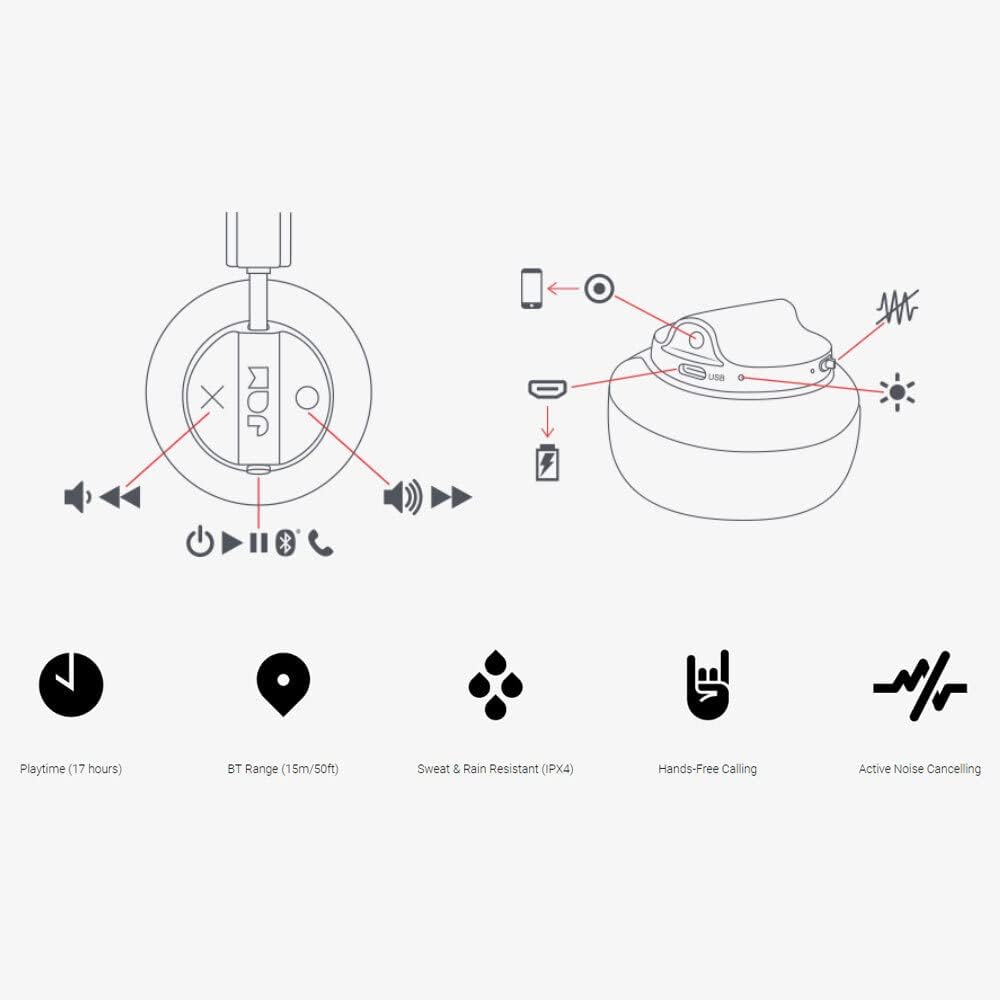
Image: Detailed diagram illustrating the control buttons and ports on the Jam Audio Out There headphones, including power, volume, track navigation, call management, and the charging port.
- Putan Cumhachd: Brùth agus cum gus cumhachd air / dheth.
- Volume Up / Next Track: Brùth goirid airson an tomhas-lìonaidh a mheudachadh, brùth fada airson an ath òran.
- Volume Down / Rian roimhe: Brùth goirid airson an tomhas-lìonaidh a lùghdachadh, brùth fada airson an trac roimhe.
- Cluich/Pause/Freagair Call: Single press to play/pause music or answer/end a call.
- Active Noise Cancelling (ANC) Switch: Toggle to activate or deactivate noise cancellation.
- Port cosgais: Port micro USB airson cosgais.
- Port AUX-in: Seac 3.5mm airson ceangal claisneachd uèirleas.
Suidhich
1. A 'cur cosgais air na fònaichean-làimhe
Before first use, fully charge your headphones. Connect the provided USB charging cable to the charging port on the headphones and the other end to a USB power source. The LED indicator will show charging status and turn off when fully charged. A full charge takes approximately 2 hours and provides up to 17 hours of playtime.

Image: The Jam Audio Out There headphones provide up to 17 hours of playtime on a single charge.
2. A ’toirt cumhachd air / dheth
- To power on: Press and hold the Power button for 3 seconds. The LED indicator will flash.
- Gus an cumhachd a chuir dheth: Brùth is cum sìos am putan Cumhachd airson 3 dhiog. Cuiridh an comharra LED dheth.
3. Càraid Bluetooth
- Dèan cinnteach gu bheil na fònaichean-cluaise air an cuir dheth.
- Press and hold the Power button for 5 seconds until the LED indicator flashes red and blue, indicating pairing mode.
- Air an inneal agad (fòn cliste, tablet, coimpiutair), cuir Bluetooth an gnìomh agus rannsaich airson innealan a tha rim faighinn.
- Select "JAM Out There" from the list of devices.
- Once paired, the LED indicator on the headphones will turn solid blue.
- Tha raon Bluetooth suas ri 15 meatairean (50 troigh) aig na fònaichean-cluaise.

Image: The Jam Audio Out There headphones offer Bluetooth compatibility, allowing a range of up to 15 meters or 50 feet from your connected device.
Stiùireadh Obrachaidh
Dealbh-chluich Ciùil
- Cluich / Stad: Brùth am putan Play/Pause aon uair.
- An ath cheum: Brùth fada air a’ phutan Meudaich.
- Rian roimhe: Brùth fada air a’ phutan Lùghdaich an tomhas-lìonaidh.
- Atharrachadh tomhas-lìonaidh: Brùth goirid air na putanan Meud suas no Meud sìos.
Glaodh gun làmhan
- Freagairt/Cuireadh Call: Brùth am putan Play/Pause aon uair.
- Call a dhiùltadh: Brùth is gleidh am putan Cluich/Pause airson 2 dhiog.
- Dèan gairm: Initiate the call from your connected device. The audio will automatically transfer to the headphones.
- Music will automatically pause during a call and resume after the call ends.
Cur às do fhuaim gnìomhach (ANC)
- To activate ANC: Slide the ANC switch to the ON position. The ANC indicator light will illuminate.
- To deactivate ANC: Slide the ANC switch to the OFF position. The ANC indicator light will turn off.
- Using ANC can reduce ambient noise, enhancing your listening experience. Note that ANC can be used independently or with Bluetooth audio.
Wired Connection (AUX-in)
For a wired connection, use the provided 3.5mm AUX cable. Plug one end into the headphone's AUX-in port and the other into your audio device. This allows you to continue listening even if the headphone battery is depleted or if Bluetooth is not available.
Cumail suas
- Glanadh: Sguab na fònaichean-cluaise le clò bog, tioram. Na cleachd ceimigean cruaidh no stuthan sgrìobach.
- Stòradh: Stòraich na fònaichean-cluaise ann an àite fionnar, tioram air falbh bho theodhachd anabarrach.
- Seasmhachd uisge: These headphones are IPX4 rated, meaning they are resistant to sweat and light splashes of water. Do not submerge them in water or expose them to heavy rain. Ensure the charging port cover is securely closed when not charging to maintain water resistance.
- Cùram Bataraidh: Gus beatha a’ bhataraidh a leudachadh, seachain na fònaichean-cluaise a dhì-luchdachadh gu tur gu tric. Cuir cosgais orra gu cunbhalach, eadhon ged nach eilear gan cleachdadh airson ùine mhòr.
Fuasgladh thrioblaidean
| Trioblaid | Fuasgladh |
|---|---|
| Cluais-cinn nach eil a’ tionndadh air | Dèan cinnteach gu bheil na fònaichean-cluaise air an cur fo chasaid. Ceangail ri stòr cumhachd leis a’ chàball USB. |
| Chan urrainnear paidhreachadh tro Bluetooth |
|
| Gun fhuaim no tomhas-lìonaidh ìosal |
|
| Active Noise Cancelling not working | Ensure the ANC switch is in the ON position and the ANC indicator light is illuminated. |
| Headphones falling apart or breaking | While the product is designed for durability, excessive force or improper handling can cause damage. Handle with care. If issues persist, refer to warranty information. |
Sònrachaidhean
- Ainm a' mhodail: A-mach an sin
- Àireamh Modail: HX-HP303BK
- Ceangal: Bluetooth, 3.5 mm Jack (AUX-in)
- Raon gun uèir: Suas gu 15 meatairean (50 troighean)
- Beatha bataraidh: Suas ri 17 uairean a thìde
- Smachd fuaim: Cur às do fhuaim gnìomhach
- Seasmhachd uisge: IPX4 Rated (Sweat and Rain Resistant)
- Suidheachadh cluais: Air Cluas
- Stuth: Rubair, Silicone
- Cuideam nì: 5.1 unnsa (0.32 not)
- Meudan toraidh: 8.58 x 3.19 x 8.66 òirleach
- Co-phàirtean air an toirt a-steach: Headphones, Charging Cord, AUX Cable
Bhidio Bathar Tharview
Coimhead air a’ bhidio toraidh oifigeil seo airson sealladh farsaingview of the Jam Audio product line, including the Out There headphones.
Video: An official Jam Audio sizzle video showcasing various products, including the Out There headphones, highlighting their design and features.
Barantas agus Taic
For warranty information, product registration, or technical support, please refer to the official Jam Audio weblàrach-lìn no cuir fios chun t-seirbheis teachdaiche aca. Cùm dearbhadh do cheannach airson tagraidhean barantais.