
1. Ro-ràdh
Tapadh leibh airson ceannachasing the Capello Play it All Bluetooth Wireless Home Stereo Speaker CI302. This device offers versatile audio playback options including Bluetooth wireless streaming, CD player functionality, and FM digital radio. This manual provides detailed instructions for setup, operation, maintenance, and troubleshooting to ensure optimal performance and longevity of your speaker system.
2. Fiosrachadh Sàbhailteachd Cudromach
- Leugh a h-uile stiùireadh mus obraich thu an inneal.
- Cùm an leabhran seo airson iomradh san àm ri teachd.
- Na cuir uisge no taiseachd san aonad gus casg a chuir air cunnartan teine no clisgeadh.
- Dèan cinnteach gu bheil fionnarachadh ceart ann; na cuir bacadh air fosglaidhean fionnarachaidh sam bith.
- Cuir an aonad air uachdar seasmhach, còmhnard.
- Na cleachd ach ceanglachan / goireasan a chaidh a shònrachadh leis an neach-dèanamh.
- Unplug an aonad aig àm stoirmean dealanach no nuair nach eilear ga chleachdadh airson amannan fada.
- Thoir iomradh air a h-uile seirbheis gu luchd-seirbheis le teisteanas.
3. Pasgan-susbaint
Feuch an dèan thu cinnteach gu bheil na nithean uile an làthair:
- Capello Play it All Bluetooth Wireless Home Stereo Speaker CI302
- Smachd Iomallach
- Adaptor Cumhachd AC
- Leabhar-làimhe cleachdaiche (an sgrìobhainn seo)
4. Toradh thallview
Familiarize yourself with the main components and controls of your Capello Play it All speaker.
Aghaidh View

Figear 4.1: Aghaidh view of the Capello Play it All speaker, showing the speaker grille, digital clock display, and subtle branding.
Smachdan pannal as àirde

Figear 4.2: Top panel of the Capello Play it All speaker, illustrating the CD compartment, 'capello' logo, and various control buttons including PRESET, MODE, PAIRING, PROGRAM/CLOCK SET, SKIP, PLAY/PAUSE, STOP, REPEAT, and VOLUME.
- RO-SHUIDHEADH +/-: Navigate through saved FM radio stations.
- stiùiridhean: Switch between Bluetooth, CD, FM Radio, and Line-In modes.
- CÒRRADH: Tòisich modh paidhreachaidh Bluetooth.
- PROGRAM/CLOCK SET: Program CD tracks or set the clock.
- SKIP ◀◀ / ▶▶: Skip tracks on CD or adjust FM frequency.
- PLAY/PAUSE ▶▶: Play or pause CD playback.
- STOP ■: Stop CD playback.
- ATH-LEASACHADH: Repeat current track or all tracks on CD.
- VOL +/-: Atharraich ìre an lìonaidh.
- FOSGAILTE/DÙIN: Open or close the CD compartment.
- BI FEITHEAMH: Power on/off the unit.
Rear Panel (Typical)
The rear panel typically includes the AC power input, FM antenna connection, and Line-In jack.
5. Suidhich
5.1 Ceangal cumhachd
- Connect the AC power adapter to the DC IN jack on the rear of the speaker.
- Plug ceann eile an inneal-atharrachaidh a-steach do raon balla àbhaisteach.
- The unit will enter standby mode, and the digital clock display will illuminate.
5.2 Suidheachadh Antenna FM
For optimal FM radio reception, extend the FM wire antenna fully and position it for the best signal. Avoid placing it near other electronic devices that may cause interference.
5.3 A’ suidheachadh a’ ghleoc
- Ann am modh cùl-taic, brùth is gleidh an PROGRAM/CLOCK SET putan.
- The hour digits will begin to flash. Use the SKIP ◀◀ / ▶▶ putanan gus an uair a rèiteachadh.
- Brùth PROGRAM/CLOCK SET a-rithist gus an uair a dhearbhadh.
- Bidh na figearan mionaid a’ priobadh. Cleachd an SKIP ◀◀ / ▶▶ putanan gus na geàrr-chunntasan atharrachadh.
- Brùth PROGRAM/CLOCK SET one last time to save the setting.
6. Stiùireadh Obrachaidh
6.1 Cumhachd Air/Dheth agus Taghadh Modh
- Brùth an BI FEITHEAMH button on the unit or the remote control to turn the speaker on or off.
- Brùth an MODE button repeatedly to cycle through available modes: Bluetooth, CD, FM Radio, and Line-In.
6.2 Bluetooth Wireless Streaming
- Cuir an neach-labhairt air agus tagh modh Bluetooth a’ cleachdadh an iuchair MODE button. The display will show 'BT' and flash, indicating it's in pairing mode.
- Air an inneal agad le comas Bluetooth (fòn cliste, tablet, coimpiutair), cuir Bluetooth an gnìomh agus rannsaich airson innealan a tha rim faighinn.
- Select 'Capello CI302' (or similar) from the list of devices.
- Once paired, the speaker will emit a confirmation tone, and 'BT' on the display will stop flashing.
- You can now play audio from your device through the speaker. Use your device or the speaker's controls for volume and track navigation.
6.3 Ath-chluich CD
- Brùth an FOSGAILTE/DÙTHCHAIL putan gus roinn an CD fhosgladh.
- Carefully place an audio CD (CD, CD-R/-RW) with the label side facing up into the compartment.
- Dùin roinn a’ CD. Leughaidh an aonad an diosc.
- If not already in CD mode, press the MODE putan gus modh CD a thaghadh.
- Brùth an CLÀR/stad putan gus ath-chluich a thòiseachadh.
- Cleachd SKIP ◀◀ / ▶▶ to skip tracks, STOP ■ to stop, and ATH-LEASACHADH to cycle through repeat options.
6.4 FM Digital Radio
- Brùth an MODE button to select FM radio mode. The current frequency will be displayed.
- Sgan Auto: Brùth agus cùm an CLÀR/stad button to automatically scan and save available FM stations as presets.
- Tuning Stiùireadh: Brùth SKIP ◀◀ / ▶▶ briefly to fine-tune the frequency. Press and hold to scan for the next strong station.
- A’ faighinn cothrom air ro-shuidheachaidhean: Cleachd an RO-SHEITICHTE +/- putanan gus gluasad tro stèiseanan a chaidh a shàbhaladh.
6.5 Line-In Operation
- Connect an audio cable (not included) from the headphone jack or line-out of an external audio device to the LINE-IN jack on the speaker.
- Brùth an MODE putan gus modh Loidhne-a-steach a thaghadh.
- Play audio from your connected device. Volume can be controlled via the speaker or the external device.
6.6 Cìs USB
The speaker features a USB port for charging compatible devices (e.g., smartphones, tablets). Connect your device's USB charging cable (not included) to the USB port on the speaker. The speaker does not need to be in a specific mode for USB charging to function.
6.7 Cleachdadh Smachd Iomallach
The included remote control provides convenient access to all functions. Ensure the remote has working batteries and is pointed towards the front of the speaker.
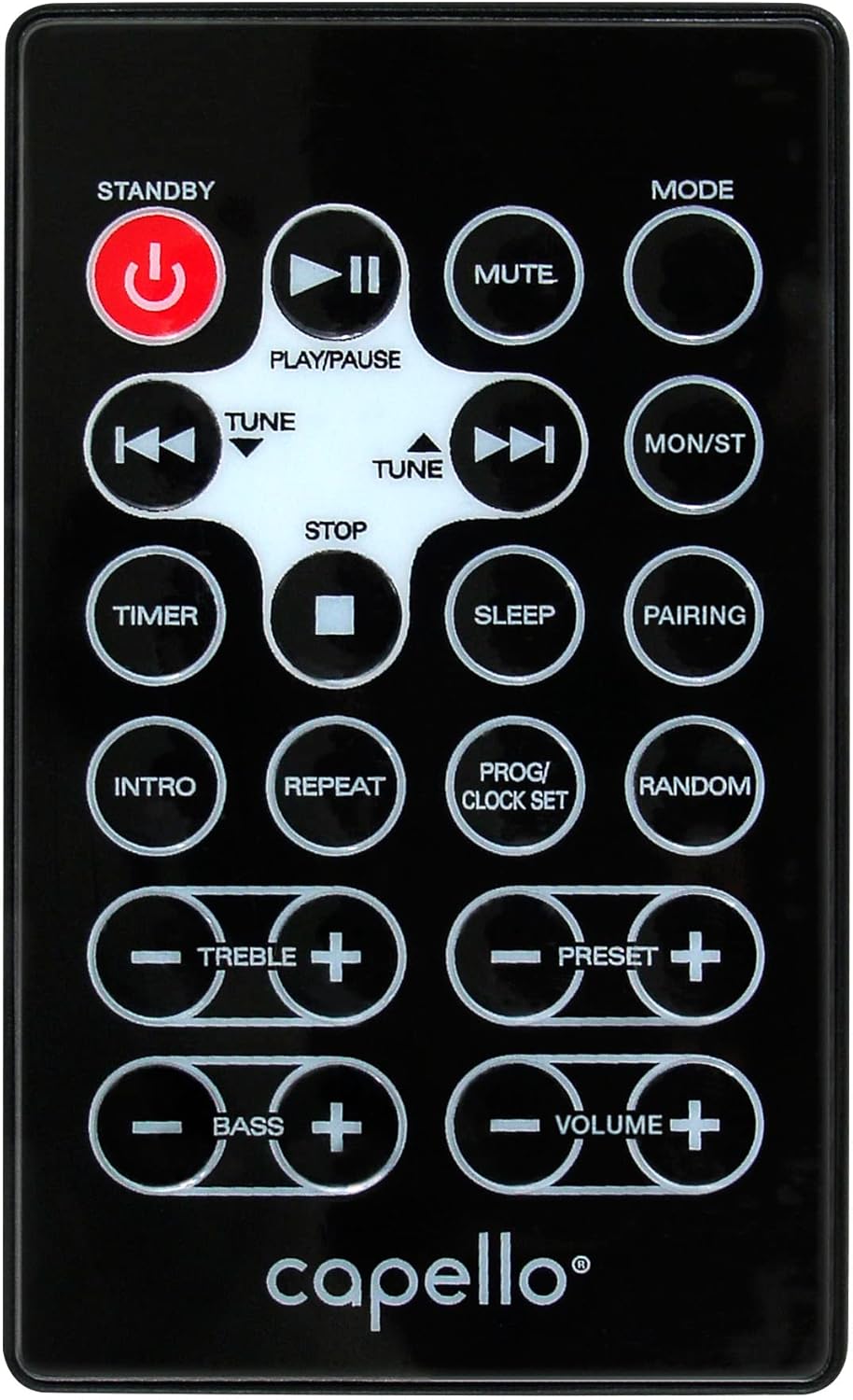
Figear 6.1: Layout of the remote control for the Capello Play it All speaker, showing buttons for Standby, Play/Pause, Mute, Mode, Skip/Tune, Stop, Timer, Sleep, Pairing, Intro, Repeat, Program/Clock Set, Random, Treble, Bass, and Volume controls.
- BI FEITHEAMH: Cumhachd air / dheth.
- PLAY/PAUSE: Cluich no stad air claisneachd.
- MUTE: Cuir fuaim sàmhach no cuir às.
- stiùiridhean: Rothaich tro mhodhan cuir-a-steach.
- SKIP/TUNE ◀◀ / ▶▶: Skip tracks or tune radio frequency.
- STOP: Cuir stad air ath-chluich.
- TIMER: Suidhich timer cadail.
- SALEP: Activate sleep function.
- CÒRRADH: Tòisich paidhreachadh Bluetooth.
- INTRO: Play the first few seconds of each CD track.
- ATH-LEASACHADH: Ath-aithris an trac làithreach no na tracaichean uile.
- PROG/CLOCK SET: Program CD tracks or set clock.
- RANNSACHADH: Play CD tracks in random order.
- TREBLE +/-: Atharraich ìrean treble.
- BASS +/-: Atharraich ìrean a’ bhais.
- TOIRT +/-: Atharraich an tomhas-lìonaidh iomlan.
7. Cumail suas
7.1 Glanadh
- Thoir air falbh an aonad bhon ionad cumhachd an-còmhnaidh mus glan thu e.
- Cleachd clò bog, tioram gus na h-uachdaran a-muigh a sguabadh.
- Na cleachd innealan-glanaidh sgrìobach, cèir no fuasglaidhean oir dh’ fhaodadh iad milleadh a dhèanamh air a’ chrìochnachadh.
- Airson lionsa an CD, cleachd diosc sònraichte airson lionsa CD a ghlanadh.
7.2 Stòradh
If storing the unit for an extended period, unplug it from the power source and store it in a cool, dry place away from direct sunlight and extreme temperatures.
8. A ’dèanamh trioblaid
| Trioblaid | Adhbhar a dh’fhaodadh a bhith ann | Fuasgladh |
|---|---|---|
| Gun chumhachd | Corda cumhachd gun cheangal; socaid gun obrachadh. | Ensure power cord is securely plugged in; try a different outlet. |
| Gun fhuaim | Volume too low; incorrect mode selected; external device muted. | Increase volume; select correct input mode; check external device volume/mute. |
| Bidh CD a’ leum no chan eil e a’ cluich | Dirty or scratched CD; CD inserted incorrectly; dirty CD lens. | Clean or replace CD; insert CD label-side up; use a CD lens cleaner. |
| Dh'fhàillig am paidhir Bluetooth | Device too far; Bluetooth not enabled on device; speaker not in pairing mode. | Move device closer; enable Bluetooth; ensure speaker is in BT pairing mode. |
| Fàilteachas FM bochd | Antenna gun a bhith air a shìneadh a-mach; bacadh. | Fully extend and reposition FM antenna; move away from other electronics. |
| Chan eil smachd iomallach ag obair | Batteries depleted; obstruction; not pointed at sensor. | Replace batteries; remove obstructions; point remote directly at the unit. |
9. Sònrachaidhean
| Feart | Sònrachadh |
|---|---|
| Brand | Caibeal |
| Modail Àireamh | CI302 |
| Teicneòlas ceangail | Bluetooth |
| Seòrsa neach-labhairt | Stereo |
| Modh Toraidh Fuaim | Stereo |
| Cruthan claisneachd le taic | CD, MP3 |
| Cumhachd Toraidh Ainmeil Luchd-labhairt | 10 watt |
| Luchd-labhairt an cumhachd toraidh as àirde | 10 watt |
| Rèiteachadh Sianal Fuaim Timcheall Luchd-labhairt | 2.0 |
| Seòrsa stòr cumhachd | Electric Corded |
| Innealan co-fhreagarrach | Laptop, Fòn-làimhe, Clàr |
| Feartan sònraichte | Digital Display, Portable, USB Port |
| Seòrsa Stuth | Plastaig |
| Seòrsa stàladh | Clàr-mullaich |
| Cuideam nì | 2.57 cileagram |
| Meud pacaid | 38.3 x 24.2 x 18.5 cm |
| Bataraidhean air an toirt a-steach | Chan eil |
| Bataraidhean a dhìth | Chan eil |
10. Barantas agus Taic
This product is covered by a limited warranty. Please refer to the warranty card included in your package for specific terms and conditions. For technical support or customer service inquiries, please contact Capello customer support through their official weblàrach-lìn no am fiosrachadh conaltraidh a chaidh a thoirt seachad leis na sgrìobhainnean ceannach agad.