
Sephia A11
Sephia A11 Portable Bluetooth Speaker
Leabhar-làimhe cleachdaiche
Ro-ràdh
Thank you for choosing the Sephia A11 Portable Bluetooth Speaker. This manual provides essential information for setting up, operating, and maintaining your speaker to ensure optimal performance and longevity. The Sephia A11 offers versatile connectivity options, including Bluetooth, USB, Micro SD, and AUX input, delivering clear and powerful audio in a compact design.
Dè th' anns a' Bhocsa
- Sephia A11 Bluetooth Speaker
- Càball cosgais
- Càball Aux
- Leabhar-làimhe cleachdaiche (an sgrìobhainn seo)

Image: The Sephia A11 Portable Bluetooth Speaker, showcasinan dealbhadh dubh caol agus an griola aghaidh aige.
Bathar seachadview
Familiarize yourself with the buttons and ports on your Sephia A11 speaker.
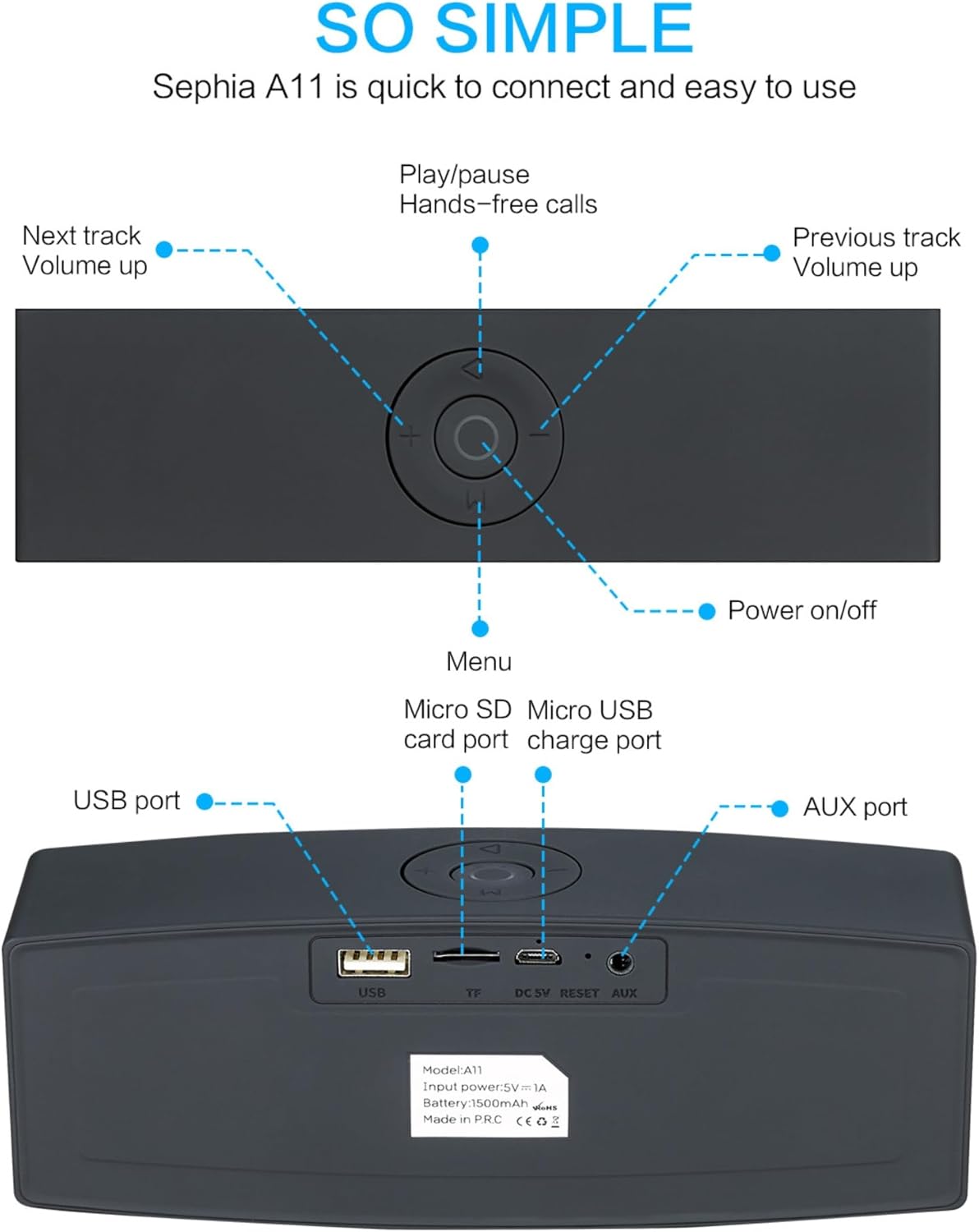
Image: Detailed diagram illustrating the top control panel and rear input/output ports of the Sephia A11 speaker.
Top Controls:
- Putan Cumhachd Air / Off: Brùth is cum sìos gus an neach-labhairt a thionndadh air no dheth.
- Putan Cluich/Pause: Press to play or pause audio. Also used for hands-free calls (answer/end).
- Previous Track / Volume Down Button (-): Brùth goirid airson an òrain roimhe, brùth fada gus an fhuaim a lùghdachadh.
- Next Track / Volume Up Button (+): Brùth goirid airson an ath òran, brùth fada gus an fhuaim a mheudachadh.
- Putan Clàr-taice (M): Press to switch between input modes (Bluetooth, USB, Micro SD, AUX).
Puirt cùil:
- Port USB: For playing audio from a USB drive or charging external devices.
- Micro SD Card Slot (TF): Airson claisneachd a chluich bho chairt Micro SD.
- Micro USB Charge Port (DC 5V): Airson neach-labhairt a luchdadh a-nuas.
- Putan Ath-shuidheachadh: Small pinhole for resetting the device if needed.
- Port AUX: For wired audio connection using the provided 3.5mm AUX cable.
Suidhich
1. A ’cur cosgais air an Labhraiche
- Connect the supplied charging cable to the Micro USB Charge Port (DC 5V) on the rear of the speaker.
- Ceangail ceann eile a’ chàball cosgais ri inneal-atharrachaidh cumhachd USB (nach eil air a ghabhail a-steach) no ri port USB coimpiutair.
- The charging indicator light will illuminate. Once fully charged, the light will change or turn off (refer to specific model behavior if indicated by LED). A full charge provides up to 8 hours of playtime.
2. A ’toirt cumhachd air / dheth
- To power on, press and hold the Power On/Off button on the top panel until you hear an audible prompt or see an indicator light.
- To power off, press and hold the Power On/Off button again until the speaker shuts down.
3. Càraid Bluetooth
- Ensure the speaker is powered on and in Bluetooth mode. If not, press the 'M' (Menu) button to switch to Bluetooth mode. The speaker will enter pairing mode, indicated by a flashing LED light and an audible prompt.
- Air an inneal gluasadach agad (fòn cliste, tablet, laptop), cuir Bluetooth an gnìomh agus rannsaich airson innealan a tha rim faighinn.
- Select "Sephia A11" from the list of found devices.
- Once successfully paired, the speaker will provide an audible confirmation, and the LED indicator will stop flashing.
- Tha raon Bluetooth aig an neach-labhairt suas ri 10 meatairean (33 troigh).
4. Wired Connections (AUX, USB, Micro SD)
- Input AUX: Connect one end of the supplied 3.5mm AUX cable to the AUX port on the speaker and the other end to the audio output of your device (e.g., MP3 player, computer). The speaker will automatically switch to AUX mode or can be selected using the 'M' button.
- Ath-chluich USB: Cuir a-steach draibhear USB flash anns a bheil claisneachd filea-steach don phort USB. Lorgaidh an neach-labhairt an claisneachd gu fèin-ghluasadach agus cluichidh e i. files.
- Ath-chluich Cairt Micro SD: Cuir a-steach cairt Micro SD anns a bheil claisneachd files into the Micro SD (TF) slot. The speaker will automatically detect and play the audio files.
Ag obrachadh an Labhraiche
Ath-chluich Fuaim
- Cluich / Stad: Press the Play/Pause button to toggle between playing and pausing audio.
- Atharrachadh tomhas-lìonaidh: Long press the '+' button to increase volume, and long press the '-' button to decrease volume.
- An ath cheum / an t-slighe roimhe: Short press the '+' button for the next track, and short press the '-' button for the previous track.

Image: A hand demonstrating how to interact with the top control buttons of the Sephia A11 speaker.
Glaodh gun làmhan
- When a call comes in while connected via Bluetooth, press the Play/Pause button to answer the call.
- Brùth am putan Cluich/Stad a-rithist gus crìoch a chur air a’ ghairm.
- Leigidh am micreofon togte le conaltradh soilleir.
Cumail suas
- Glanadh: Cleachd clò bog, tioram gus uachdar an neach-labhairt a ghlanadh. Na cleachd innealan-glanaidh sgrìobach, deoch làidir, no fuasglaidhean ceimigeach, oir dh’ fhaodadh iad sin milleadh a dhèanamh air a’ chrìochnachadh.
- Stòradh: Stòraich an neach-labhairt ann an àite fionnar, tioram air falbh bho sholas dìreach na grèine agus teòthachd anabarrach.
- Cùram Bataraidh: Gus beatha a’ bhataraidh a leudachadh, seachain an neach-labhairt a dhì-luchdachadh gu tur gu tric. Cuir cosgais air an neach-labhairt gu cunbhalach, eadhon ged nach eilear ga chleachdadh airson ùine mhòr.
- Seasmhachd uisge: Chan eil an neach-labhairt seo dìonach bho uisge. Seachain a bhith fosgailte do uisge no cus taiseachd.
Fuasgladh thrioblaidean
| Trioblaid | Adhbhar a dh’fhaodadh a bhith ann | Fuasgladh |
|---|---|---|
| Chan eil an neach-labhairt a’ tionndadh air. | Bataraidh ìosal; Cha deach am putan cumhachd a chumail fada gu leòr. | Cuir làn-chosgais air an neach-labhairt. Brùth is cum sìos am putan Cumhachd airson 3-5 diogan. |
| Gun fhuaim bhon neach-labhairt. | Tha an tomhas-lìonaidh ro ìosal; Modh cuir-a-steach ceàrr; Chan eil an inneal ceangailte gu ceart. | Increase speaker and device volume. Press 'M' button to select correct input mode. Re-pair Bluetooth or re-connect AUX/USB/SD. |
| Tha pairing Bluetooth a ’fàilligeadh. | Chan eil an neach-labhairt ann am modh càraideachaidh; Inneal ro fhada air falbh; Bacail. | Ensure speaker is in Bluetooth pairing mode (flashing LED). Move speaker closer to device. Turn off other Bluetooth devices. Try forgetting "Sephia A11" on your device and re-pairing. |
| Càileachd fuaim dona. | Low battery; Device volume too high (distortion); Interference. | Charge the speaker. Adjust volume on both speaker and device. Move away from sources of interference. |
Sònrachaidhean
| Ainm Modail | A11 |
| Meudan | 18 x 7 x 5 cm |
| Cuideam | 426 g |
| Teicneòlas ceangail | Bluetooth, USB, Micro SD, AUX |
| Cumhachd toraidh neach-labhairt | 6 Watts (2 x 3W drivers) |
| Freagairt Tricead | 20 Hz - 20 kHz |
| Seòrsa bataraidh | Ion Lithium |
| Ùine cluiche | Suas ri 8 uairean a thìde |
| Raon Bluetooth | Suas gu 10 meatairean (33 troighean) |
| Feartan sònraichte | Bass Boost, Portable, Hi-Res Audio, Built-in Microphone, Shockproof |

Image: Visual representation of the Sephia A11 speaker's dimensions.
Barantas agus Taic
The Sephia A11 Portable Bluetooth Speaker comes with a Barantas 12 mìosan bho cheann-latha a’ cheannaich, a’ còmhdach lochdan saothrachaidh. Cùm dearbhadh do cheannaich airson tagraidhean barantais.
For technical support, warranty inquiries, or further assistance, please refer to the contact information provided with your purchase or visit the official Sephia weblàrach.
Ask a question about this manual
Ask about setup, troubleshooting, compatibility, parts, safety, or missing instructions. Manuals+ will review the question and use this page’s manual context to help answer it.