
1. Ro-ràdh
This manual provides instructions for the installation, operation, and maintenance of the Nexxt Solutions Naxos800 8-Port Fast Ethernet Network Switch. The Naxos800 is an unmanaged compact desktop switch designed for small office/home office (SOHO) environments, student dormitories, and small enterprises, offering reliable network connectivity.
2. Prìomh fheartan
- 8 Fast Ethernet Ports: Provides 8 UTP/STP 10/100Mbps ports with auto MDI/MDIX.
- Plug and Play: Simple setup requiring no software configuration.
- Switch gun riaghladh: Operates without requiring complex management interfaces.
- Store-and-Forward Technology: Ensures efficient packet transmission.
- Ionnsachadh seòladh MAC: Supports auto-learning and aging with a built-in 1000 MAC address table.
- Dealbhadh Compact: Suitable for desktop or wall mounting.
- Sàbhaladh lùtha: Dealbhadh caitheamh cumhachd ìosal.
- Smachd sruth: Full duplex and half duplex back pressure flow control.
- Seasmhachd: Integrated lightning protection and a sturdy metal case.
- Obrachadh sàmhach: Fanless design for silent performance.
3. Pasgan-susbaint
Dèan cinnteach gu bheil na nithean a leanas anns a’ phacaid agad:
- One (1) Nexxt Solutions Naxos800 8-Port Fast Ethernet Switch
- Aon (1) Adaptor Cumhachd

Image: The Nexxt Solutions Naxos800 switch, its power adapter, and product packaging.
4. Toradh thallview

Ìomhaigh: Aghaidh view of the Naxos800 switch, showing the Nexxt logo and eight green LED indicators for port activity.
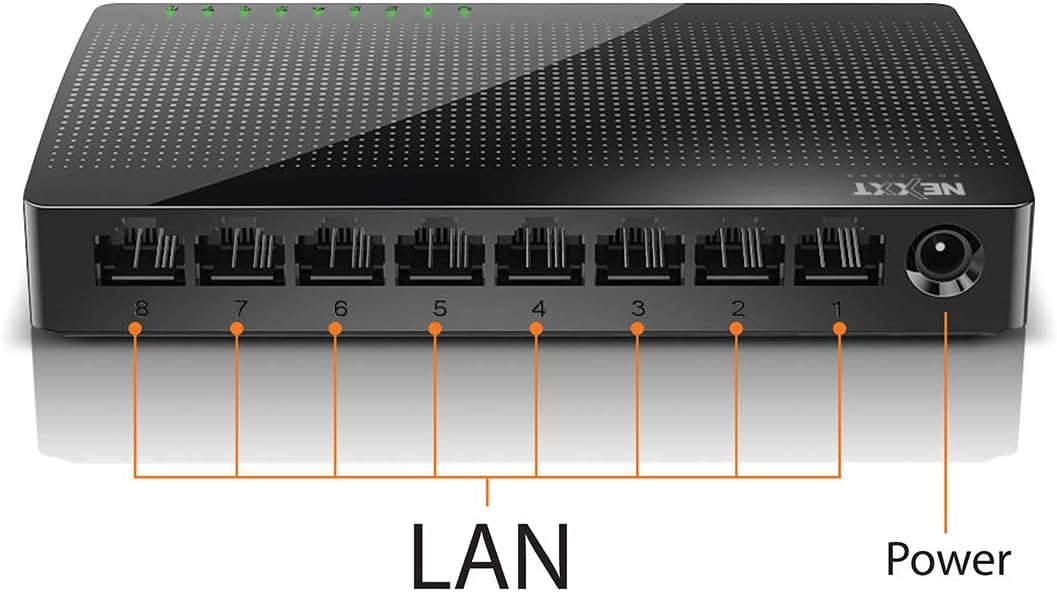
Ìomhaigh: Cùl view of the Naxos800 switch, highlighting the eight LAN ports (numbered 1-8) and the power input port.
Comharran LED
The front panel features LED indicators for each port, providing visual status:
- LED Uaine (Soladach): Indicates a stable link connection.
- LED uaine (Flashing): Indicates data activity on the corresponding port.
- LED dheth: No link or connection detected.
5. Setup agus Stàladh
The Naxos800 switch is designed for simple plug-and-play installation. No software or complex configuration is required.
- Suidheachadh: Place the switch on a stable, flat surface or mount it on a wall using appropriate hardware (not included). Ensure adequate ventilation around the device.
- Ceangail ri cumhachd: Connect the provided power adapter to the power input port on the switch and then plug the adapter into a standard electrical outlet. The power LED (if present, or the port LEDs will light up) should illuminate.
- Ceangail ris an Lìonra:
- Connect your router or modem to any of the 8 LAN ports on the Naxos800 switch using an Ethernet cable.
- Connect your network devices (e.g., computers, gaming consoles, IP cameras, Smart TVs, printers) to the remaining LAN ports on the Naxos800 switch using an Ethernet cable.
- Dearbhaich an ceangal: Once devices are connected, the corresponding LED indicators on the switch's front panel should light up green (solid for link, flashing for activity).

Image: Diagram illustrating a typical network setup. An ADSL or Cable Modem connects to a Router, which then connects to the Naxos800 switch. Various devices like laptops, media players, game consoles, IP cameras, Smart TVs, and IP phones are connected to the Naxos800 switch.
6. Ag Obrachadh an Suidse
The Naxos800 is an unmanaged switch, meaning it operates automatically without user intervention once connected. It functions as an internet splitter, expanding the number of wired network connections available from your router or modem.
- Automatic Speed Detection: Each port automatically detects the speed of the connected device (10Mbps or 100Mbps) and adjusts accordingly.
- MDI/MDIX fèin-ghluasadach: Eliminates the need for crossover cables; the switch automatically detects and corrects for straight-through or crossover cable types.
- Tar-chuir dàta: Data packets are forwarded between connected devices at Fast Ethernet speeds. The store-and-forward architecture ensures data integrity.
7. Cumail suas
The Naxos800 switch requires minimal maintenance.
- Glanadh: Cleachd clò bog, tioram gus taobh a-muigh an t-suidse a ghlanadh. Na cleachd innealan-glanaidh leaghaidh no aerosol.
- Fionnarachadh: Dèan cinnteach nach tèid na fosglaidhean fionnarachaidh a bhacadh gus casg a chuir air cus teasachadh.
- Cearcall cumhachd: If the device experiences issues, a simple power cycle (unplugging and replugging the power adapter) can often resolve minor problems.
8. A ’dèanamh trioblaid
If you encounter issues with your Naxos800 switch, refer to the following common problems and solutions:
| Trioblaid | Adhbhar a dh’fhaodadh a bhith ann | Fuasgladh |
|---|---|---|
| Gun chumhachd / Chan eil an inneal a’ tionndadh air. | Chan eil an inneal-atharrachaidh cumhachd ceangailte no lochtach; chan eil an socaid cumhachd ag obair. | Ensure the power adapter is securely connected to the switch and a working electrical outlet. Try a different outlet. |
| No link light for a connected device. | Càball Ethernet lochtach no ceangailte gu ceàrr; inneal gun chumhachd no lochtach; port ceàrr. |
|
| Astaran lìonra slaodach. | Network congestion; faulty cable; device limitations. |
|
9. Sònrachaidhean
| Feart | Luach |
|---|---|
| Modail Àireamh | ASIDT084U3 |
| Puirt | 8 x 10/100Mbps Fast Ethernet (UTP/STP) |
| Bandwidth Backplane | 1.6 Gbps |
| Clàr seòlaidh MAC | 1000 a-steach |
| Smachd Ruigsinneachd | CDMA |
| Smachd sruth | Full duplex and half duplex back pressure |
| Meudan (L x W x H) | 12.4 x 5.9 x 2.3 cm |
| Cuideam | 140 g |
| Cuir a-steach cumhachd | Adaptor Cumhachd Taobh a-muigh (air a ghabhail a-steach) |
Nota: Faodaidh mion-chomharrachadh atharrachadh gun rabhadh ro-làimh.
10. Barantas agus Taic
The Nexxt Solutions Naxos800 8-Port Fast Ethernet Network Switch comes with a Barantas cuibhrichte 5-bliadhna. For warranty claims or technical support, please contact Nexxt Solutions customer service. Refer to the official Nexxt Solutions weblàrach-lìn airson an fhiosrachadh taic is fiosrachadh conaltraidh as ùire.
Nexxt Solutions is a US company committed to quality and customer service.