
1. Ro-ràdh
This manual provides essential information for the safe and efficient operation of your Lenco L-30BK Belt Drive Turntable. Please read these instructions thoroughly before using the device and retain them for future reference. The Lenco L-30BK is designed for playing vinyl records at 33 and 45 RPM, featuring a built-in preamplifier and USB connectivity for digitizing your vinyl collection.
2. Fiosrachadh Sàbhailteachd
- Stòr cumhachd: Dèan cinnteach gu bheil an solar cumhachd voltagTha e a’ freagairt ris na riatanasan a tha air an sònrachadh air an aonad. Cleachd an inneal-atharrachaidh cumhachd a tha air a thoirt seachad a-mhàin.
- Uisge agus Taiseachd: Na cuir an aonad fosgailte do uisge, taiseachd, no lionntan a’ sileadh/a’ frasadh. Na cuir nithean làn lionntan, leithid vasaichean, air an aonad.
- Fionnarachadh: Dèan cinnteach gu bheil fionnarachadh iomchaidh ann. Na cuir bacadh air fosglaidhean fionnarachaidh.
- Teas: Cùm an aonad air falbh bho thùsan teas leithid rèididheatoran, clàran teas, stòbhaichean, no innealan eile (a’ gabhail a-steach ampliifiers) a bheir teas.
- Glanadh: Tarraing am pluga a-mach às an t-socaid mus glan thu e. Cleachd clò bog, tioram. Na cleachd innealan-glanaidh leaghaidh no innealan-glanaidh aerosol.
- Seirbheis: Na feuch ris an toradh seo a sheirbheis dhut fhèin. Thoir sùil air gach seirbheis gu luchd-obrach le teisteanas.
- Suidheachadh: Place the turntable on a stable, level surface to prevent vibrations and ensure proper playback.
3. Pasgan-susbaint
Dèan cinnteach gu bheil na nithean gu lèir a tha air an liostadh gu h-ìosal air an toirt a-steach don phacaid:
- Lenco L-30BK Turntable Unit
- Còmhdach Dust
- Platter
- Belt draibhidh
- Slipmat
- Adaptor Cumhachd AC
- Càball USB
- Càball claisneachd RCA
- Leabhar-làimhe stiùiridh
- Pick-up Needle (pre-installed on cartridge)
4. Toradh thallview
Familiarize yourself with the components of your Lenco L-30BK turntable.

Figear 4.1: Aghaidh view of the Lenco L-30BK Turntable with the dust cover open, revealing the main components including the platter, tonearm, and control buttons.

Figear 4.2: Rear panel connections of the Lenco L-30BK, including RCA audio outputs (L/R), USB port, DC12V power input, and the main power switch.
Prìomh cho-phàirtean:
- Platter: The circular platform where records are placed.
- Tonearm: Holds the cartridge and stylus, which reads the grooves of the record.
- Cartridge and Stylus: Converts physical vibrations into electrical signals. The L-30BK features a Movable Magnet Sensor (MMC) with an individually replaceable stylus.
- Tagraiche astair: Switch to select between 33 and 45 RPM playback speeds.
- Cuir dheth gu fèin-ghluasadach: Automatically stops the platter rotation at the end of a record.
- Còmhdach dust: A’ dìon a’ chlàr-tionndaidh bho dhuslach nuair nach eilear ga chleachdadh.
- RCA Audio Outputs (L/R): Airson ceangal ri inneal taobh a-muigh ampluchd-labhairt no luchd-labhairt gnìomhach.
- Port USB: For connecting to a computer to digitize vinyl records.
- Cuir a-steach Cumhachd DC12V: Airson an adapter cumhachd a cheangal.
5. Suidhich
5.1 Dì-phapadh agus suidheachadh
- Thoir an clàr-tionndaidh a-mach às a phacaid gu faiceallach.
- Place the unit on a stable, level surface, away from direct sunlight, heat sources, and excessive dust or vibrations.
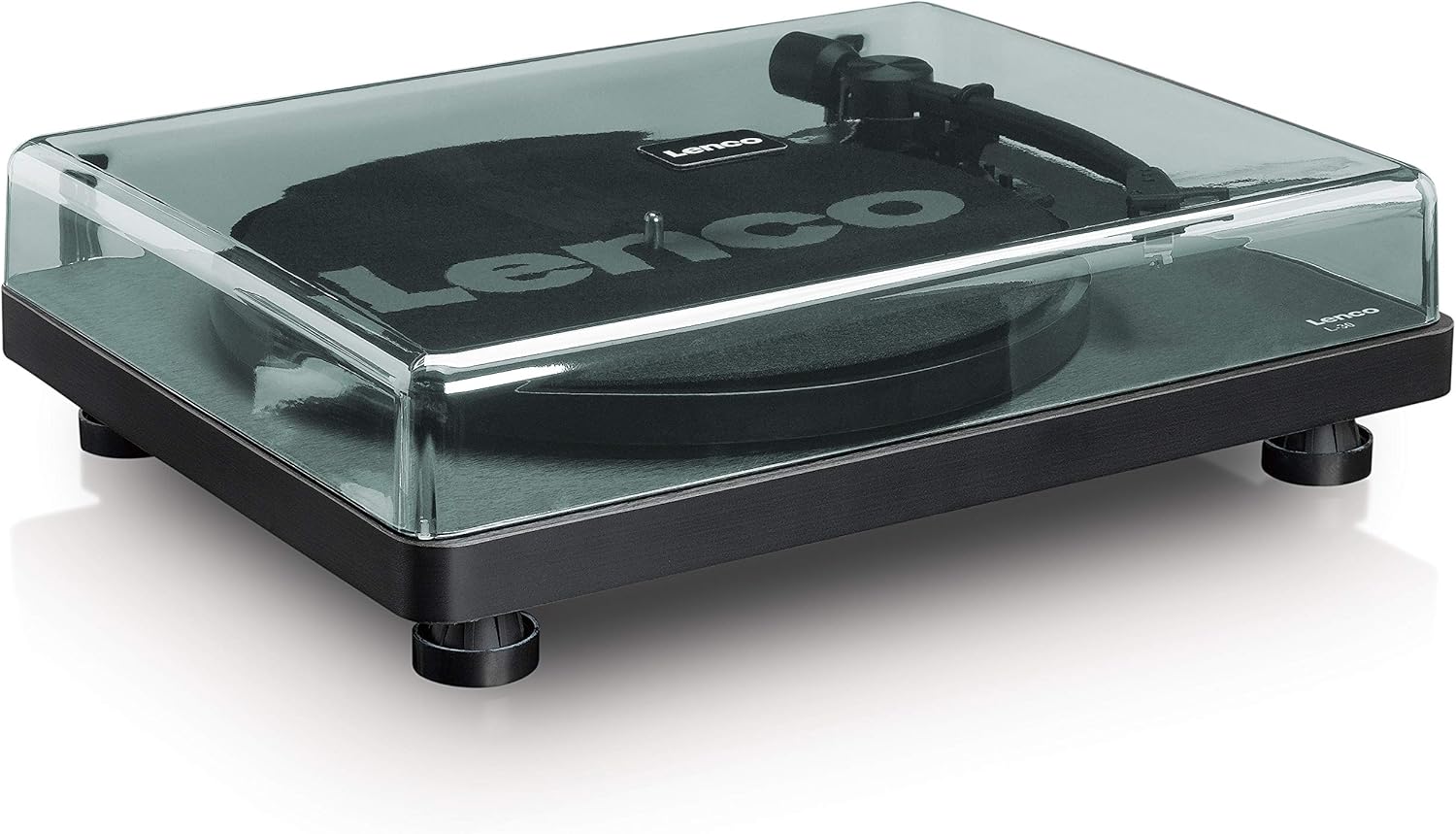
- Stàlaich an còmhdach duslach le bhith a’ co-thaobhadh a lùdagan ris na sliotan air cùl a’ chlàr-tionndaidh.

Figear 5.1: The Lenco L-30BK Turntable with its protective dust cover closed, ready for placement.
5.2 Stàladh Plàta is Crios
- Cuir am truinnsear air snìomhag a’ chlàr-tionndaidh.
- Locate the drive belt, typically found underneath the platter or separately packaged.
- Carefully stretch the drive belt around the motor pulley and the inner rim of the platter. Ensure the belt is not twisted.
- Cuir an slipmat air mullach a’ phlàta.
5.3 Ceangal Fuaim
The L-30BK has a built-in preamplifier, allowing direct connection to most audio systems.
- Connect the RCA audio cable (red for right channel, white for left channel) from the AUDIO OUT jacks on the rear of the turntable to the LINE IN or AUX IN jacks on your ampluchd-labhairt no luchd-labhairt gnìomhach.
5.4 Ceangal cumhachd
- Connect the DC12V power adapter to the DC12V POWER input on the rear of the turntable.
- Cuir an inneal-atharrachaidh cumhachd a-steach do socaid balla freagarrach.
5.5 USB Connection (for Digitization)
- To digitize your vinyl records, connect the USB cable from the USB port on the rear of the turntable to an available USB port on your computer (PC or Mac).
6. Stiùireadh Obrachaidh
6.1 A’ cur cumhachd air/dheth
- Flip the ON/OFF switch on the rear panel to the 'ON' position to power on the turntable.
- Flip the switch to 'OFF' when not in use.
6.2 A’ cluich clàr
- Cuir clàr air a’ phlàta, a’ dèanamh cinnteach gu bheil e sa mheadhan.
- Select the appropriate speed (33 or 45 RPM) using the speed selector switch. For 45 RPM singles, place the included adapter on the spindle if needed.
- Tog suas a’ ghàirdean-tòin le bhith a’ cleachdadh luamhan a’ chiù.
- Manually position the tonearm over the desired starting groove of the record.
- Gently lower the tonearm using the cueing lever. The stylus will descend onto the record, and playback will begin.
- At the end of the record, the auto shut-off function will stop the platter rotation. Lift the tonearm and return it to its rest.

Figear 6.1: Proper technique for lowering the tonearm onto a record for playback.
Figear 6.2: Gu mionaideach view of the Movable Magnet Sensor (MMC) cartridge and stylus assembly.
6.3 Digitizing Records via USB
The L-30BK allows you to convert your vinyl records into digital audio files a’ cleachdadh coimpiutair.
- Ceangail an clàr-tionndaidh ris a’ choimpiutair agad a’ cleachdadh a’ chàball USB a tha air a thoirt seachad.
- Download and install audio recording software such as Audacity (available online for free) on your computer.
- Open the recording software and select the USB Audio Device as the input source.
- Start recording in the software, then begin playing your record on the turntable as described in section 6.2.
- Once the record finishes, stop the recording in the software and save your digitized audio file.
7. Cumail suas
7.1 Glanadh a’ Chlàir-thionndaidh
- Tarraing am pluga bhon chlàr-tionndaidh a-mach às a’ chumhachd an-còmhnaidh mus glan thu e.
- Use a soft, dry, lint-free cloth to wipe the cabinet and dust cover.
- Na cleachd innealan-glanaidh sgrìobach, cèir no fuasglaidhean oir dh’ fhaodadh iad milleadh a dhèanamh air a’ chrìochnachadh.
7.2 Stylus Care and Replacement
- The stylus is a delicate component. Avoid touching it with your fingers.
- Clean the stylus regularly using a soft brush, gently brushing from back to front.
- The stylus should be replaced after approximately 300-500 hours of playback, or if you notice a degradation in sound quality.
- To replace the stylus, carefully pull the old stylus assembly forward and down from the cartridge. Insert the new stylus assembly by pushing it upwards and backwards into the cartridge until it clicks into place.
8. A ’dèanamh trioblaid
If you encounter problems with your turntable, refer to the following common issues and solutions:
| Trioblaid | Adhbhar a dh’fhaodadh a bhith ann | Fuasgladh |
|---|---|---|
| Gun chumhachd | Power adapter not connected; Power switch off; Wall outlet faulty. | Ensure power adapter is securely connected; Turn power switch to 'ON'; Test wall outlet with another device. |
| Gun fhuaim no tomhas-lìonaidh ìosal | Càbaill RCA nach eil ceangailte gu ceart; Amplifier/speakers off or volume low; Input selected incorrectly on amplosgadair. | Check RCA cable connections; Turn on amplifier/speakers and adjust volume; Select correct input source on your audio system. |
| Fuaim air a mhilleadh | Dirty stylus; Damaged stylus; Dirty record; Turntable not on a stable surface. | Clean the stylus; Replace the stylus if damaged; Clean the record; Ensure turntable is on a stable, level surface. |
| Leum clàran | Dirty or scratched record; Stylus worn or damaged; Turntable not level; External vibrations. | Clean the record; Replace the stylus; Ensure turntable is level; Place turntable away from sources of vibration. |
| Cùisean clàraidh USB | USB cable not connected; Incorrect input selected in software; Software not installed. | Check USB cable connection; Select 'USB Audio Device' as input in recording software; Install Audacity or similar software. |
9. Sònrachaidhean
| Ainm Modail | L-30BK |
| Brand | Lenco |
| Seòrsa Drive | Slighe crios |
| Luas | 33 1/3, 45 RPM |
| Ro-làimhamplosgadair | Air a thogail a-steach |
| Seòrsa cartridge | Movable Magnet Sensor (MMC) |
| Ceangalachd | USB, RCA Audio Out |
| Cuir dheth gu fèin-ghluasadach | Tha |
| Trast-thomhas Platter | 300 mm |
| Stuth | Wood (Enclosure) |
| Dath | Dubh |
| Cuideam nì | 3.28 cileagram |
| Meudan (L x W x H) | 41L x 32W x 12H ceudameatairean |
| Co-mheas Signal-to-Noise | 60 dB |
| Voltage | 240 Volt |
| Stòr cumhachd | Electric Corded |
10. Barantas agus Taic
Lenco products are manufactured to high quality standards. In the event of a defect, your product is covered by the terms of the warranty in your country of purchase. For detailed warranty information, please refer to the warranty card included with your product or visit the official Lenco website. For technical support or service inquiries, please contact Lenco customer service through their official channels.