
1. Ro-ràdh
Tapadh leibh airson ceannachasing the Zebronics ZEB-A18 Plus 17.3-inch LED Monitor. This manual provides essential information for setting up, operating, and maintaining your monitor. Please read it thoroughly before use and retain it for future reference.
1.1 Dè a tha sa bhogsa
- Cumail sùil
- Adapter cumhachd
- Cum sùil air Stand
- Leabhar-làimhe cleachdaiche
- Càball VGA
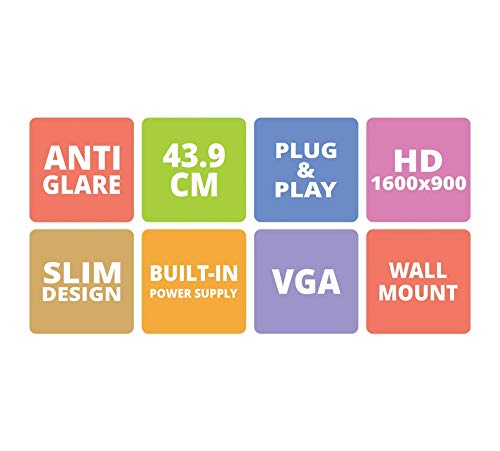
Figure 1: Key features of the Zebronics ZEB-A18 Plus monitor, including Anti Glare, 43.9 CM screen size, Plug & Play functionality, HD 1600x900 resolution, Slim Design, Built-in Power Supply, VGA connectivity, and Wall Mount compatibility.
2. Fiosrachadh Sàbhailteachd
Gus dèanamh cinnteach à obrachadh sàbhailte agus gus casg a chur air milleadh, feuch an lean thu na ceumannan sàbhailteachd a leanas:
- Na cuir an monitor fosgailte do uisge no taiseachd.
- Na fosgail am monitor casing; cuir a h-uile seirbheiseachadh gu luchd-obrach teisteanasach.
- Cuir am monitor air uachdar seasmhach, còmhnard.
- Dèan cinnteach gu bheil fionnarachadh ceart timcheall air an monitor.
- Cleachd dìreach an adapter cumhachd a chaidh a thoirt seachad.
- Disconnect the power cable during lightning storms or when unused for long periods.
3. Suidhich
3.1 A’ cur an t-Seasaimh ri chèile
- Thoir air falbh pàirtean an monitor agus an t-seasamh gu faiceallach bhon phacaid.
- Ceangail bonn an t-seisein ri amhach an stand.
- Secure the assembled stand to the back of the monitor using the provided screws. Ensure it is firmly attached.
3.2 A’ ceangal an monitor
- Ceangal cumhachd: Connect the power adapter to the monitor's power input and then plug the adapter into a power outlet.
- Ceangal bhidio: Ceangail aon cheann den chàball VGA ris a’ phort VGA air cairt grafaiceachd a’ choimpiutair agad agus an ceann eile ris a’ phort cuir a-steach VGA air an sgrìn.
- Ceangal claisneachd (ma tha sin iomchaidh): The monitor has built-in speakers. No separate audio cable is typically needed for VGA connections as audio is not transmitted via VGA. Ensure your computer's audio output is configured correctly.
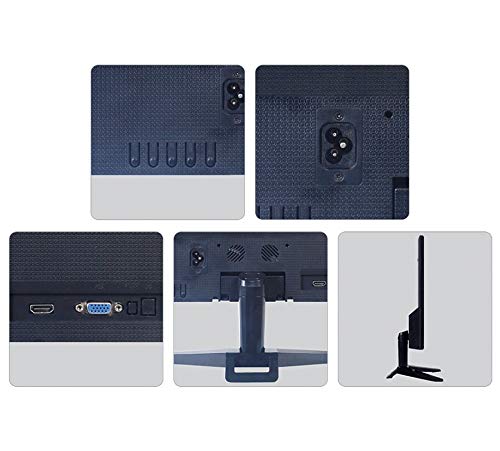
Figear 2: Cùl view of the Zebronics ZEB-A18 Plus monitor showing the power input, VGA port, and side profile. This image illustrates the available connection points for power and video input.
4. Stiùireadh Obrachaidh
4.1 A’ cur cumhachd air/dheth
Brùth am putan cumhachd a tha air an sgrìn gus a thionndadh air no dheth. Lasaidh an solas comharra cumhachd nuair a bhios an sgrìn gnìomhach.
4.2 Basic Display Adjustments
The monitor features an On-Screen Display (OSD) menu for adjusting various settings. Use the control buttons (usually located on the bottom or back of the monitor) to navigate the OSD menu. Common adjustments include:
- Gile: Bidh seo ag atharrachadh soilleireachd iomlan na sgrìn.
- Coltas: Atharraich an eadar-dhealachadh eadar raointean aotrom is dorcha.
- Roghainnean dath: Fine-tune color temperature or individual RGB levels.
- Taghadh a-steach: Manually select the video input source (e.g., VGA).
4.3 Luchd-labhairt Togail a-steach
The ZEB-A18 Plus monitor includes built-in speakers. Ensure your computer's audio output is directed to the monitor if you wish to use them. Volume can typically be controlled via your computer's operating system.
5. Cumail suas
5.1 Glanadh an monitor
- Tarraing am monitor a-mach às a’ phuing cumhachd an-còmhnaidh mus glan thu e.
- Cleachd clò bog gun lint gu h-aotrom dampair a nighe le uisge no le inneal-glanaidh sgrion neo-sgrìobach.
- Na spraeadh inneal-glanaidh gu dìreach air an sgrion.
- Seachain a bhith a’ cleachdadh cheimigean cruaidh, fuasglaidhean, no stuthan sgrìobach.
- Sguab às an casing le clò bog, tioram.
6. A ’dèanamh trioblaid
Ma thachras tu ri duilgheadasan leis an sgrìn agad, thoir sùil air na duilgheadasan agus na fuasglaidhean cumanta a leanas:
- No Display / "No Signal" Message:
- Ensure the monitor is powered on and the power indicator is lit.
- Check that the VGA cable is securely connected to both the monitor and the computer.
- Dèan cinnteach gu bheil an coimpiutair agad air agus nach eil e ann am modh cadail.
- Feuch ri do choimpiutair ath-thòiseachadh.
- If using multiple monitors, ensure the correct display output is selected on your computer.
- Poor Image Quality (Blurry, Distorted, Incorrect Colors):
- Check the VGA cable for damage or loose connections.
- Atharraich roghainnean an rùn air a’ choimpiutair agad gus am bi iad a rèir rùn dùthchasach an sgrìn (1600 x 900).
- Use the OSD menu to adjust brightness, contrast, and color settings.
- Gun fhuaim bho luchd-labhairt togte:
- Ensure the monitor's volume is not muted or set too low via the OSD (if available) or your computer's audio settings.
- Verify that your computer's audio output is correctly configured to send sound to the monitor.
7. Sònrachaidhean
| Brand | ZEBRONICS |
| Ainm Modail | ZEB A18 Plus |
| Modail Àireamh | ZEB-A18 |
| Meud sgrion | 17.2 òirlich |
| Seòrsa Taisbeanaidh | LED |
| Fuasgladh taisbeanaidh as àirde | 1600 x 900 (HD+) |
| Co-mheas taobh | 16:9 |
| Ìre Ath-nuadhachaidh | 60 Hz |
| Àm Freagairt | 8 milliseconds |
| Gile Ìomhaigh | 220 cd / m² |
| Co-mheas coimeas | 400:1 |
| Viewann an Ceàrn | 178 ceum |
| Ceangalachd | VGA |
| Luchd-labhairt togte | Tha |
| Seòrsa stàladh | Srath balla |
| Dath | Dubh |
| Caitheamh cumhachd | 15W |
| Cuideam | 1.1 kg |
| Dimensions with Stand (W x D x H) | 415 x 13 x 340mm |
8. Barantas agus Taic
8.1 Fiosrachadh Barantais
Your Zebronics ZEB-A18 Plus monitor is covered by a limited warranty. Please refer to the warranty card included with your product for specific terms and conditions. Keep your purchase receipt as proof of purchase for warranty claims.
8.2 Taic teachdaiche
For technical assistance, troubleshooting, or warranty inquiries, please contact Zebronics customer support. Contact details can typically be found on the official Zebronics weblàrach no air pacaigeadh an toraidh.