
Propel Zipp Nano 2.0
Propel Zipp Nano 2.0 Drone User Manual
Model: Zipp Nano 2.0
Brand: Propel
1. Ro-ràdh
This manual provides essential information for the safe and effective operation of your Propel Zipp Nano 2.0 Drone. Please read this manual thoroughly before operating the drone to ensure proper usage and to prevent damage or injury.
The Propel Zipp Nano 2.0 is a high-performance 2.4 GHz indoor/outdoor drone designed for stable flight and exciting aerial maneuvers. It features a built-in 6-axis gyroscopic chip for stability, multiple speed settings, and the ability to perform 360-degree stunt rolls.
2. Rùintean Sàbhailteachd
Always prioritize safety when operating the drone. Failure to follow these guidelines may result in injury or damage to the drone or property.
- Do not operate the drone near people, animals, or obstacles.
- Cùm làmhan, falt, agus aodach sgaoilte air falbh bho propellaran rothlach.
- Ensure the drone is fully charged before each flight.
- Na bi ag itealaich ann an gaothan làidir no ann an droch shìde.
- Supervise children during operation. This product contains small parts and is not suitable for children under 3 years due to choking hazard.
- Do not attempt to modify or repair the drone yourself. Contact customer support for assistance.

Image: Back of the product packaging, highlighting features and a warning about small parts.
3. Pasgan-susbaint
Dèan cinnteach gu bheil a h-uile rud anns a’ phacaid agad:
- Propel Zipp Nano 2.0 Drone (Red)
- 2.4 GHz Digital Remote Control
- Càball cosgais USB
- Spare Replacement Parts (Propellers)

Image: The Propel Zipp Nano 2.0 Drone and its remote control visible within the clear retail packaging.
4. Suidhich
4.1 A’ cur cosgais air bataraidh an dròin
The drone is powered by an internal rechargeable battery. Use the provided USB charging cable to charge the drone.
- Ceangail ceann beag a’ chàball cosgais USB ri port cosgais an dròin.
- Connect the large end of the USB charging cable to a USB power source (e.g., computer USB port, USB wall adapter).
- Lasaidh an solas comharra cosgais air a’ chàball USB fhad ’s a bhios e a’ cur cosgais agus cuiridh e dheth e nuair a bhios e làn-chosgais.
- Charging typically takes approximately 30-45 minutes. Do not overcharge.
4.2 A’ cur Bataraidhean Smachd Iomallach a-steach
The remote control requires 2 "AAA" batteries (not included).
- Lorg an roinn bataraidh air cùl an smachd iomallach.
- Fosgail an còmhdach roinn bataraidh.
- Insert 2 "AAA" batteries, ensuring correct polarity (+/-).
- Dùin an còmhdach roinn bataraidh gu tèarainte.

Image: The remote control for the Propel Zipp Nano 2.0 Drone, showing its various buttons and joysticks.
4.3 A’ paidhreachadh an dròin agus an smachd iomallach
To establish a connection between the drone and the remote control:
- Cuir an drone air uachdar còmhnard, còmhnard.
- Turn on the drone by sliding the power switch. The drone's LED lights will flash.
- Tionndaidh air an smachd iomallach.
- Brùth an luing stiùiridh chlì (throttle) fad na slighe suas, agus an uairsin tarraing e fad na slighe sìos.
- The drone's LED lights will turn solid, indicating successful pairing.
5. A’ cleachdadh an dròin
5.1 Smachdan Itealaich
Dèan eòlas air cruth agus gnìomhan an smachd iomallach:
- Luing-stiùiridh Clì (Throttle/Yaw):
- Push up to increase altitude (throttle).
- Push down to decrease altitude.
- Push left/right to rotate the drone (yaw).
- Luing-stiùiridh deas (Pitch/Roll):
- Push up/down to move forward/backward (pitch).
- Push left/right to move left/right (roll).
- Putan Astair: Cycles through 3 different speed settings (slow, medium, high).
- Putan Cleasachd: Press to initiate 360-degree stunt rolls (see 5.4).
- T-Mode Button: Activates T-Mode for beginner pilots, providing more stable and controlled flight.
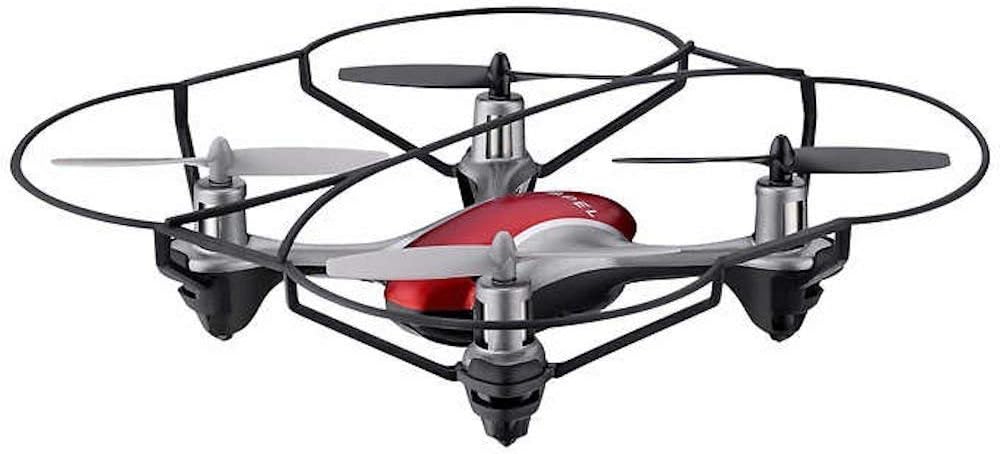
Image: The Propel Zipp Nano 2.0 Drone, showcasing an dealbhadh teann agus na geàrdan propellair aige.
5.2 Togail is Tighinn air Tìr
- Thoir dhìot: After pairing, slowly push the left joystick (throttle) up to lift off.
- A' tighinn air tìr: Slowly pull the left joystick (throttle) down until the drone lands gently.
5.3 Greim Àirde
The Zipp Nano 2.0 features an air pressure sensor that helps lock altitude in mid-air, making it easier to control and hover stably.
5.4 360-Degree Stunt Rolls
To perform a stunt roll:
- Ensure the drone is flying at a sufficient height (at least 6-8 feet).
- Press the dedicated Stunt Button on the remote control.
- Immediately push the right joystick in the desired direction (forward, backward, left, or right) to execute the roll.

Ìomhaigh: Ceàrnach view of the Propel Zipp Nano 2.0 Drone, highlighting its sleek design and protective frame.
6. Cumail suas
- Glanadh: Use a soft, dry cloth to clean the drone and remote control. Do not use harsh chemicals or water.
- Ath-shuidheachadh propeller: If propellers become damaged, replace them with the provided spare parts. Carefully remove the damaged propeller and snap the new one into place, ensuring correct orientation.
- Stòradh: When not in use, store the drone and remote control in a cool, dry place away from direct sunlight.
7. A ’dèanamh trioblaid
| Trioblaid | Adhbhar a dh’fhaodadh a bhith ann | Fuasgladh |
|---|---|---|
| Chan eil an dròn a’ freagairt ri smachd iomallach. | Not paired, low drone battery, low remote control batteries. | Re-pair the drone and remote. Charge drone battery. Replace remote control batteries. |
| Bidh dròn ag itealaich gu mì-rianail no a’ gluasad air falbh. | Not calibrated on a level surface, damaged propeller, strong wind. | Ensure drone is placed on a flat surface for pairing. Check for damaged propellers and replace if necessary. Fly in calm conditions. |
| Drone does not lift off. | Low drone battery, propellers not spinning correctly. | Charge drone battery fully. Check for obstructions around propellers. |
8. Sònrachaidhean
| Feart | Mion-fhiosrachadh |
|---|---|
| Brand | Tilgeil |
| Ainm Modail | Propel 2.4 ghz (Zipp Nano 2.0) |
| Teicneòlas ceangail | Radio Frequency (2.4 GHz) |
| Raon Obrachaidh | Suas gu 200 troigh |
| Gyroscope | Built-in 6-axis gyroscopic chip |
| Suidheachaidhean Luas | 3 (Slow, Medium, High) |
| Feartan sònraichte | 360-degree stunt rolls, Altitude Hold, T-Mode for beginners |
| Seòrsa(an) stuth | Plastic, Carbon Fibre |
| Meudan toraidh | 13.97 x 3.81 x 13.97 cm |
| Cuideam nì | 453.59 g (1 not) |
| Dath | Dearg |
| Ìre Sgilean | Neach-tòiseachaidh |
9. Barantas agus Taic
Propel offers unlimited replacement parts for one year from the date of purchase. For warranty claims, technical support, or to order replacement parts, please refer to the contact information provided on the product packaging or the official Propel weblàrach.
Cùm do chuidhteas ceannach mar dhearbhadh ceannach airson adhbharan barantais.
Ask a question about this manual
Ask about setup, troubleshooting, compatibility, parts, safety, or missing instructions. Manuals+ will review the question and use this page’s manual context to help answer it.