
1. Ro-ràdh
This manual provides instructions for the ROCCAT KONE Aimo Gaming Mouse. The KONE Aimo features an Owl-Eye Optical Sensor, customizable RGB AIMO LED illumination, and 23 programmable keys. It is designed for precision and ergonomic comfort during extended use.
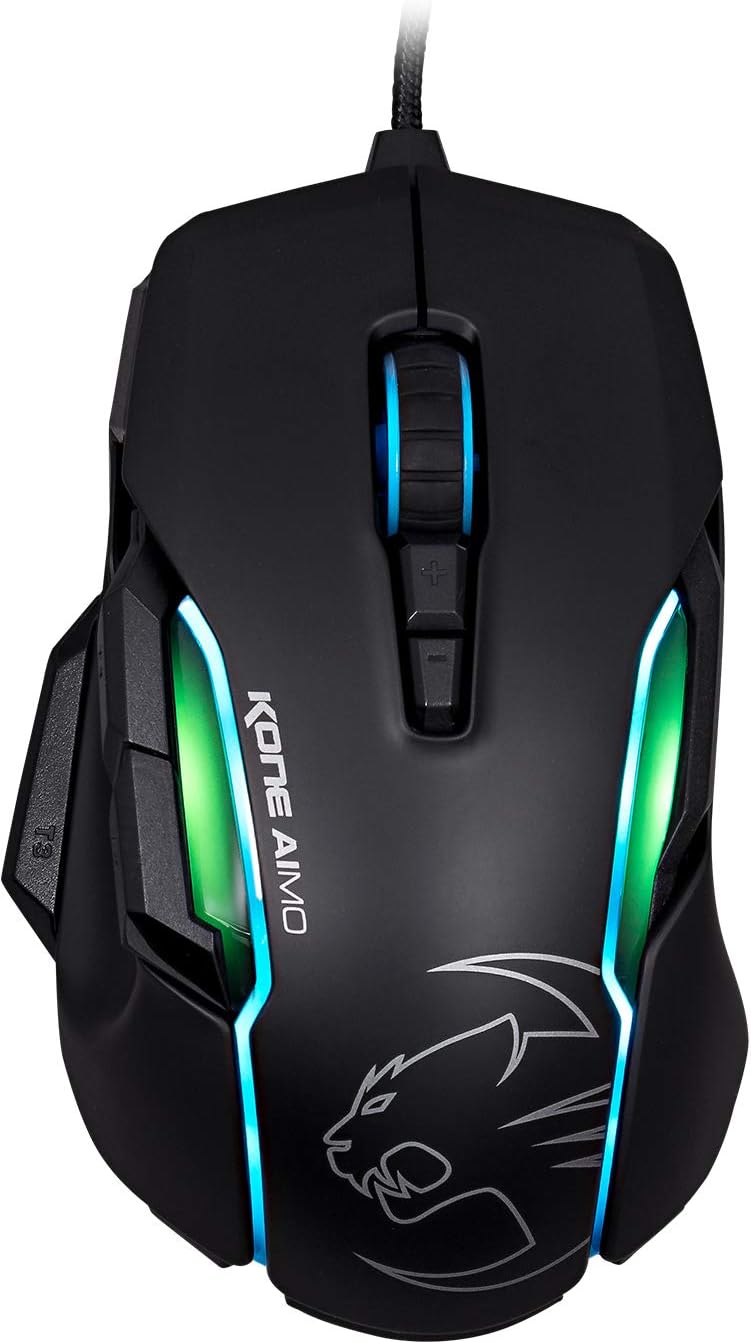
Figear 1: Mullach view of the ROCCAT KONE Aimo Gaming Mouse, showcasing its ergonomic shape and RGB lighting zones.
2. Pasgan-susbaint
Dèan cinnteach gu bheil a h-uile nì anns a’ phacaid:
- KONE AIMO Mouse with Attached Braided USB Cable
- Stiùireadh luath
- Stiogairean ROCCAT

Figure 2: Retail packaging of the ROCCAT KONE Aimo Gaming Mouse.
3. Suidhich
- Ceangail an luchag: Plug the USB cable of the ROCCAT KONE Aimo mouse into an available USB port on your computer.
- Stàladh an dràibhear: Your operating system (Windows 7, 8, 8.1, 10) should automatically detect and install the necessary drivers.
- Stàlaich bathar-bog ROCCAT Swarm: For full customization of DPI settings, button assignments, and AIMO lighting, download and install the ROCCAT Swarm software from the official ROCCAT weblàrach. Leigidh am bathar-bog seo leat pro a chruthachadh agus a riaghladhfiles.

Figure 3: The ROCCAT KONE Aimo mouse in use on a mouse pad, connected to a computer.
4. Stiùireadh Obrachaidh
4.1. Gnìomhan Putan
The KONE Aimo features 23 programmable keys, including a tri-button thumb zone and a 4D tilting Titan wheel. These can be customized via the ROCCAT Swarm software.
- Cliog Clì/Deas: Gnìomhan àbhaisteach na luchaige.
- Scroll Wheel (4D Titan Wheel): Scrolls vertically and can tilt horizontally for additional functions. Also acts as a clickable button.
- Putanan Atharrachaidh DPI: Located above and below the scroll wheel, these buttons allow for on-the-fly DPI sensitivity changes. Settings are configured in the Swarm software.
- Thumb Buttons (T1, T2, T3): Three buttons located on the left side, easily accessible by the thumb. The bottom-most button (T3) is often defaulted to the Easy-Shift[+] function.
- Putan Easy-Shift[+]: This exclusive ROCCAT feature doubles the number of programmable functions for other buttons when held down, effectively expanding the total programmable keys.

Figear 4: Mionaideach view of the programmable thumb buttons (T1, T2, T3) on the left side of the mouse.
4.2. AIMO Lighting System
The AIMO lighting system provides intelligent, reactive RGB illumination across four independently configurable LED light zones and the glowing mouse wheel. It can synchronize with other compatible ROCCAT devices and is programmable through the ROCCAT Swarm software.

Figure 5: The KONE Aimo mouse displaying its multi-zone RGB AIMO illumination.
4.3. Owl-Eye Optical Sensor
The mouse is equipped with the ROCCAT Owl-Eye Optical Sensor, a modified PixArt 3361 sensor, offering adjustable DPI from 100 to 12,000. This sensor provides precise tracking and responsiveness. A built-in tracking distance control unit monitors the lift-off distance for enhanced accuracy.

Figure 6: The bottom of the mouse, highlighting the Owl-Eye Optical Sensor.
4.4. Ergonomics
The KONE Aimo features refined ergonomics designed for comfort during extended use. Its shape provides a natural fit for the hand, with a dedicated thumb rest area.

Figure 7: A hand gripping the KONE Aimo mouse, illustrating its ergonomic design.
5. Cumail suas
- Glanadh: Cleachd clò bog, tioram airson uachdar na luchaige a ghlanadh. Airson salachar stòlda, cleachd clò beagan tioram.amp faodar clò a chleachdadh, a’ dèanamh cinnteach nach tèid taiseachd a-steach do na pàirtean a-staigh.
- Cùram mothachaidh: Keep the optical sensor on the underside of the mouse clean and free of dust or debris to ensure optimal tracking performance.
- Riaghladh càbaill: Seachain lùban biorach no tarraing cus air a’ chàball USB fhighte gus casg a chuir air milleadh.
6. A ’dèanamh trioblaid
- Luchag gun fhreagairt:
- Dèan cinnteach gu bheil an càball USB air a phlugaigeadh gu tèarainte a-steach do phort USB a tha ag obair.
- Try a different USB port or another computer to rule out port or system issues.
- Ath-thòisich an coimpiutair agad.
- Tracking Issues / Inaccurate Movement:
- Glan an sensor optigeach aig bonn na luchaige.
- Ensure you are using the mouse on a clean, suitable mouse pad or surface.
- Check DPI settings in the ROCCAT Swarm software.
- RGB Lighting Not Working / Incorrect:
- Verify that the ROCCAT Swarm software is running and updated.
- Thoir sùil air roghainnean an t-solais taobh a-staigh bathar-bog Swarm.
- Ensure no conflicting software is controlling RGB lighting.
- Putanan nach eil ag obair:
- Check button assignments in the ROCCAT Swarm software.
- Ensure the software is not experiencing issues (try restarting it).
7. Sònrachaidhean
| Feart | Mion-fhiosrachadh |
|---|---|
| Brand | ROCCAT |
| Modail Àireamh | ROC-11-815-BK |
| Brathadair | Owl-Eye Optical Sensor (modified PixArt 3361) |
| Raon DPI | 100 gu 12,000 DPI |
| Putanan prògramaichte | 23 (le Easy-Shift[+]) |
| Soillseachadh | RGBA AIMO LED Illumination (4 independent zones + scroll wheel) |
| Ceangalachd | USB (Wired) |
| Co-fhreagarrachd siostam-obrachaidh | Windows 7, Windows 8, Windows 8.1, Windows 10 (32-bit and 64-bit versions) |
| Cuideam nì | 11.2 unnsa (mu 317.5 gram) |
| Meudan toraidh (LxWxH) | 5.12 x 2.95 x 1.57 òirleach (mu 13 x 7.5 x 4 cm) |
8. Barantas & Taic
For warranty information, technical support, and additional resources, please visit the official ROCCAT website or contact ROCCAT customer service. Keep your proof of purchase for warranty claims.
Faodaidh tu cuideachd tadhal air an Bùth ROCCAT air Amazon airson tuilleadh fiosrachaidh toraidh.