
Ro-ràdh
Tapadh leibh airson ceannachasing the Max Power MPD125L Karaoke DJ Speaker System. This portable 12-inch speaker system is designed to deliver powerful sound and vibrant LED lighting for your entertainment needs. It features a built-in rechargeable battery, multiple connectivity options including USB, SD, AM/FM radio, and Bluetooth, along with a strong ampliifier airson eòlas claisneachd bogaidh.
Please read this manual thoroughly before operating the device to ensure proper use, optimal performance, and to prevent damage.
Fiosrachadh Sàbhailteachd
- Na cuir an aonad fosgailte do uisge no taiseachd gus casg a chur air teine no clisgeadh dealain.
- Na fosgail an casing. Chan eil pàirtean sam bith a dh’ fhaodas an neach-cleachdaidh a chàradh a-staigh. Thoir aire do luchd-obrach teisteanasach airson a h-uile seòrsa seirbheiseachaidh.
- Cuir an aonad air uachdar seasmhach, còmhnard gus casg a chur air tuiteam.
- Cùm an aonad air falbh bho sholas dìreach na grèine, stòran teas, agus cus duslach.
- Dèan cinnteach gu bheil fionnarachadh ceart ann. Na cuir bacadh air fosglaidhean fionnarachaidh.
- Cleachd dìreach an inneal-atharrachaidh cumhachd a tha air a thoirt seachad leis an aonad.
- Unplug an aonad aig àm stoirmean dealanach no nuair nach eilear ga chleachdadh airson amannan fada.
- Seachain a bhith a’ cur nithean troma air a’ chrann cumhachd.
- Na cuir nithean sam bith a-steach do fhosglaidhean an aonaid.
Susbaint pacaid
Dèan cinnteach gu bheil a h-uile nì an làthair agus ann an deagh staid:
- Max Power MPD125L Karaoke DJ Speaker System
- Micreofon gun uèir
- Wireless Remote Control
- Càball Cumhachd/Cosgais
- Leabhar-làimhe cleachdaiche (an sgrìobhainn seo)
Feartan toraidh
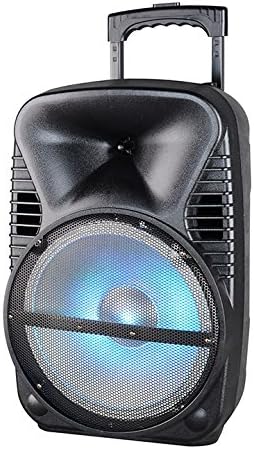
Ìomhaigh: Aghaidh view of the Max Power MPD125L Karaoke DJ Speaker System. It is a black, portable speaker with a retractable handle on top and wheels at the bottom. The front features a large speaker grille with blue LED lights illuminating the woofer, indicating its active state.
- Dealbhadh so-ghiùlain: 12-inch speaker with built-in retractable handle and wheels for easy transport.
- Fuaim cumhachdach: 4000W peak power output for loud and clear sound with good bass.
- Bataraidh ath-thagraidh togte: Provides up to 4 hours of continuous playback. (Battery size: 12V/2.6A)
- LED Dance Lights: Integrated LED lights that flash, transforming any room into a disco club.
- Ioma roghainnean ceangail:
- Bluetooth: Wireless streaming from compatible devices (laptops, smartphones).
- Sliotan USB: Airson claisneachd a chluich files bho dhràibhearan USB.
- Slot SD: Airson claisneachd a chluich files from SD cards.
- Rèidio AM/FM: Built-in tuner for radio broadcasts.
- Gnìomh karaoke: Includes a wireless microphone for karaoke sessions.
- Full-Function Wireless Remote Control: Airson goireasach obrachadh bho astar.
- Impedance: 4 Ohm.
- Freagairt tricead: 40 Hz - 20 kHz.
Suidhich
1. A ’cur cosgais air an Labhraiche
- Locate the DC input port on the speaker (usually on the rear panel).
- Connect the supplied power adapter to the DC input port.
- Plug an inneal-atharrachaidh cumhachd a-steach do ionad dealain àbhaisteach.
- The charging indicator light (if present) will illuminate, typically red, during charging and turn green when fully charged.
- Allow approximately 4-6 hours for a full charge before first use. The speaker can be used while charging.
2. Suidheachadh Micreofon gun Uèir
- Insert appropriate batteries (not included, usually AA) into the wireless microphone.
- Turn on the microphone. It should automatically pair with the speaker.
- Adjust the microphone volume knob on the speaker's control panel to your desired level.
3. Remote Control Setup
- Insert appropriate batteries (not included, usually AAA) into the wireless remote control.
- Point the remote control towards the speaker's IR receiver (usually on the front panel or near the controls) to operate.
Stiùireadh Obrachaidh
1. Cumhachd air / dheth
Locate the Power switch (usually a rocker switch) on the speaker's control panel. Flip it to the "ON" position to power on the speaker. Flip it to "OFF" to power off.
2. Taghadh modh
Press the "MODE" button on the control panel or remote control to cycle through available input modes: Bluetooth, USB, SD, FM Radio, AM Radio, AUX (if available).
3. Càraid Bluetooth
- Turn on the speaker and select Bluetooth mode. The speaker will typically announce "Bluetooth Mode" or display "BT" and enter pairing mode (indicated by a flashing Bluetooth indicator).
- On your smartphone, tablet, or laptop, enable Bluetooth and search for new devices.
- Select "MPD125L" (or similar name) from the list of available devices.
- Once paired, the speaker will confirm with an audible tone or a solid Bluetooth indicator light. You can now play audio wirelessly.
4. Ath-chluich USB/SD
- Insert a USB flash drive or SD card (pre-loaded with MP3 or compatible audio files) a-steach don t-slot iomchaidh.
- The speaker should automatically switch to USB/SD mode and begin playing the first track. If not, press the "MODE" button to select USB or SD mode.
- Use the Play/Pause, Next Track, and Previous Track buttons on the control panel or remote to navigate.
5. Obrachadh Rèidio AM/FM
- Select FM or AM radio mode using the "MODE" button.
- Press and hold the Play/Pause button (often labeled "SCAN") to automatically scan and save available radio stations.
- Use the Next Track and Previous Track buttons to switch between saved stations.
- Extend the telescopic antenna (if present) for better reception.
6. Gnìomh Karaoke
Ensure the wireless microphone is powered on and paired. Play your desired music through any input mode (Bluetooth, USB, etc.). Speak or sing into the microphone. Adjust the microphone volume and echo effects (if available) using the dedicated knobs on the control panel.
7. LED Dance Lights
The LED lights typically activate automatically when the speaker is powered on. There may be a dedicated button (e.g., "LIGHT" or "LED") on the control panel or remote to toggle them on/off or change patterns.
8. Smachd tomhas-lìonaidh
Adjust the master volume using the main volume knob on the speaker's control panel or the volume buttons on the remote control.
Cumail suas
- Glanadh: Cleachd clò bog, tioram gus taobh a-muigh an neach-labhairt a sguabadh. Na cleachd innealan-glanaidh leaghaidh no ceimigean sgrìobach.
- Stòradh: Nuair nach eilear ga chleachdadh airson ùine mhòr, stòraich an neach-labhairt ann an àite fionnar, tioram, air falbh bho sholas dìreach na grèine agus teòthachd anabarrach.
- Cùram Bataraidh: To prolong battery life, avoid fully discharging the battery frequently. Recharge the battery at least once every 3 months if not in regular use.
- Fionnarachadh: Ensure the speaker's ventilation openings are clear of dust and debris to prevent overheating.
Fuasgladh thrioblaidean
| Trioblaid | Adhbhar a dh’fhaodadh a bhith ann | Fuasgladh |
|---|---|---|
| Chan eil an neach-labhairt a’ dol air. | Tha bataraidh air ìsleachadh. Càball cumhachd gun cheangal ceart. | Connect the speaker to a power outlet and allow it to charge. Ensure the power cable is securely plugged into both the speaker and the outlet. |
| Gun fhuaim bhon neach-labhairt. | Tha an tomhas ro ìosal. Modh cuir-a-steach ceàrr air a thaghadh. Device not properly connected (Bluetooth/USB/SD). | Meudaich am prìomh-fhuaim. Press the "MODE" button to select the correct input. Re-pair Bluetooth device, re-insert USB/SD, or check AUX cable connection. |
| Cha bhith an inneal Bluetooth a’ paidhreachadh. | Chan eil an neach-labhairt ann am modh càraideachaidh. Tha an inneal ro fhada bhon neach-labhairt. Tha Bluetooth air an inneal dheth. | Ensure speaker is in Bluetooth mode and indicator is flashing. Gluais an inneal nas fhaisge air an neach-labhairt (taobh a-staigh 10 meatairean). Dèan comas air Bluetooth air an inneal agad. |
| Microphone nach eil ag obair. | Microphone is off or batteries are dead. Microphone volume is too low. | Turn on the microphone and replace batteries if necessary. Increase the microphone volume knob on the speaker. |
| Tha fàilteachadh rèidio truagh. | Comharra lag. Antenna gun a bhith air a leudachadh. | Gluais an neach-labhairt gu àite le comharra nas fheàrr. Leudaich gu h-iomlan an antenna telescopic. |
Sònrachaidhean
| Modail Àireamh | MPD125L |
| Brand | CUMHACHD MAX |
| Toradh cumhachd as àirde | 4000 watt |
| bacadh | 4 Ach |
| Freagairt Tricead | 40 Hz - 20 kHz |
| Meud Bataraidh | 12V / 2.6A |
| Beatha bataraidh | Suas ri 4 uairean a thìde |
| Meudan toraidh (L x W x H) | 33.02 x 38.1 x 58.42 cm (13 x 15 x 23 òirleach) |
| Cuideam toraidh | 15.88 kg (35 lbs) |
| Innealan co-fhreagarrach | Laptop, fòn 'smart' |
| Seòrsa ceangail | USB |
| UPC | 703510623201 |
Barantas agus Taic
Airson fiosrachadh barantais agus taic theicnigeach, thoir sùil air na sgrìobhainnean a chaidh a thoirt seachad aig àm a’ cheannaich no cuir fios chun neach-reic agad. Cùm dearbhadh do cheannach airson tagraidhean barantais sam bith.
For further assistance or inquiries, please visit the official MAX POWER weblàrach-lìn no cuir fios chun roinn seirbheis teachdaiche aca.