Ro-ràdh
Tapadh leibh airson ceannachasing the OontZ Angle 3 Ultra Portable Bluetooth Speaker by Cambridge Soundworks. This manual provides essential information for setting up, operating, maintaining, and troubleshooting your speaker. Designed for superior sound quality and durability, the OontZ Angle 3 Ultra features a 14-watt output, rich bass, IPX7 waterproofing, and an impressive 30-meter Bluetooth range. Enjoy up to 20 hours of playtime on a single charge.

Image: The OontZ Angle 3 Ultra Portable Bluetooth Speaker, showcasing its sleek black, triangular design with control buttons on one end.
Suidhich
1. Rudan air an toirt a-steach
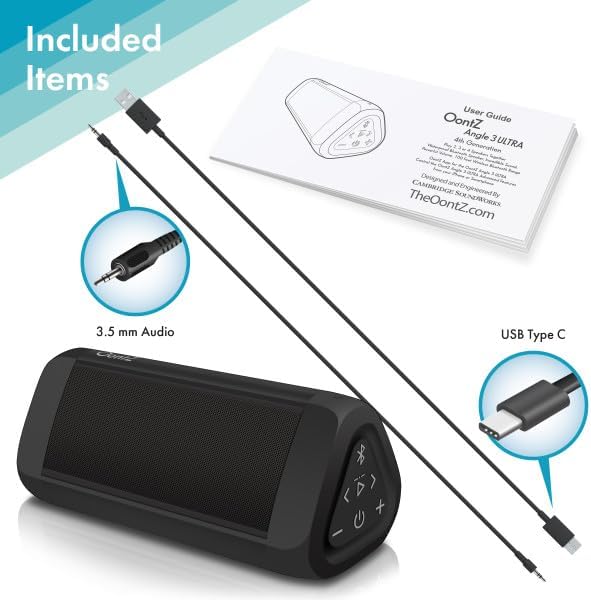
Image: The OontZ Angle 3 Ultra speaker along with its accessories: a Quick Start Guide, a 3.5mm audio cable, and a USB Type-C charging cable.
Before first use, ensure all components are present:
- OontZ Angle 3 Ultra Bluetooth Speaker
- Stiùireadh Tòiseachaidh Luath (Leabhar-làimhe slàn ri fhaighinn air-loidhne)
- Càball claisneachd 3.5mm
- Càball Cìsean USB Type-C
2. A ’cur cosgais air an Labhraiche
The speaker comes with a built-in rechargeable Lithium-ion battery. For optimal performance, fully charge the speaker before first use.
- Locate the charging port on the side of the speaker, protected by a rubber flap.
- Connect the supplied USB Type-C charging cable to the speaker's charging port.
- Ceangail ceann eile a’ chàball USB ri charger balla USB (nach eil air a ghabhail a-steach) no ri port USB coimpiutair.
- The charging indicator light will illuminate. A full charge takes approximately 20 hours for the first charge, and subsequent charges will be faster.

Ìomhaigh: Sealladh dlùth view of the speaker's side, showing the 3.5mm AUX input and the USB-C charging port, typically protected by a waterproof flap.
3. Càraid Bluetooth
Pair your OontZ Angle 3 Ultra with your Bluetooth-enabled device (smartphone, tablet, laptop).
- Tionndaidh air an neach-labhairt le bhith a 'putadh agus a' cumail a 'phutan Power (⏻) until the indicator light flashes blue.
- Air an inneal agad, rach gu roghainnean Bluetooth agus dèan cinnteach gu bheil Bluetooth air a chomasachadh.
- Look for "OontZ Angle 3 Ultra" in the list of available devices and select it.
- Once paired, the speaker will emit a confirmation tone, and the indicator light will turn solid blue.
4. Connecting via AUX Input
You can connect non-Bluetooth devices using the 3.5mm audio cable.
- Connect one end of the 3.5mm audio cable to the AUX IN port on the speaker.
- Ceangail an ceann eile ri jack headphone no toradh claisneachd an uidheim agad.
- Bidh an neach-labhairt ag atharrachadh gu modh AUX gu fèin-ghluasadach.
5. Pairing Two Speakers for Stereo Sound (OontZ Dual Wireless Stereo)
Enhance your audio experience by wirelessly connecting two OontZ Angle 3 Ultra speakers for impressive stereo separation.

Image: Two OontZ Angle 3 Ultra speakers positioned to provide stereo sound, with two individuals enjoying music in an outdoor setting.
- Ensure both OontZ Angle 3 Ultra speakers are charged and powered on.
- Dì-cheangail an dà luchd-labhairt bho innealan Bluetooth sam bith a chaidh a chàradh roimhe.
- On one speaker (this will be the Left Channel), press and hold the Bluetooth button (Ⓑ) for 3 seconds until you hear a tone.
- On the second speaker (this will be the Right Channel), press and hold the Bluetooth button (Ⓑ) for 3 seconds until you hear a tone.
- The speakers will automatically connect to each other. Once connected, you will hear a confirmation tone, and the indicator lights on both speakers will turn solid blue.
- Now, connect your audio device to the Left Channel speaker via Bluetooth as described in "Bluetooth Pairing" above.
- For video audio, connect your device or TV to the Left Channel speaker using the 3.5mm audio cable.
Stiùireadh Obrachaidh
1. Smachdan Tharview
| Putan / Comharra | Gnìomh |
|---|---|
| ⏻ (Cumhachd) | Brùth is cum sìos gus an cumhachd a chur air/dheth. |
| + (Volume Up) | Brùth gus meud a mheudachadh. |
| - (Volume Down) | Brùth gus an tomhas-lìonaidh a lughdachadh. |
| ▷ (Cluich / Stad) | Brùth gus ceòl a chluich/stad. |
| < (An Trac Roimhe) | Brùth airson a dhol chun t-slighe roimhe. |
| > (An ath-òran) | Brùth airson a dhol chun ath cheum. |
| Ⓑ (Fiacail-gorm) | Press to disconnect current Bluetooth device and enter pairing mode. Press and hold for 3 seconds to initiate OontZ Dual Wireless Stereo pairing. |
| Comharra Solais | Flashes blue for pairing, solid blue for connected, red for charging. |
2. Hands-Free Calling
The OontZ Angle 3 Ultra has a built-in microphone for hands-free calls.
- Nuair a thig gairm a-steach, stadaidh an ceòl. Brùth air a’ phutan ▷ putan gus a’ ghairm a fhreagairt.
- Gus crìoch a chuir air gairm, brùth air an iuchair ▷ putan a-rithist.
- Gus gairm a dhiùltadh, brùth agus cùm grèim air an ▷ putan airson 2 diogan.
- To activate Siri or Google Assistant, press and hold the ▷ button for 2 seconds when not on a call.
3. Waterproof Features (IPX7)
The OontZ Angle 3 Ultra is IPX7 certified, meaning it is fully waterproof and can be immersed in water up to 1 meter (3.3 feet) for up to 30 minutes.
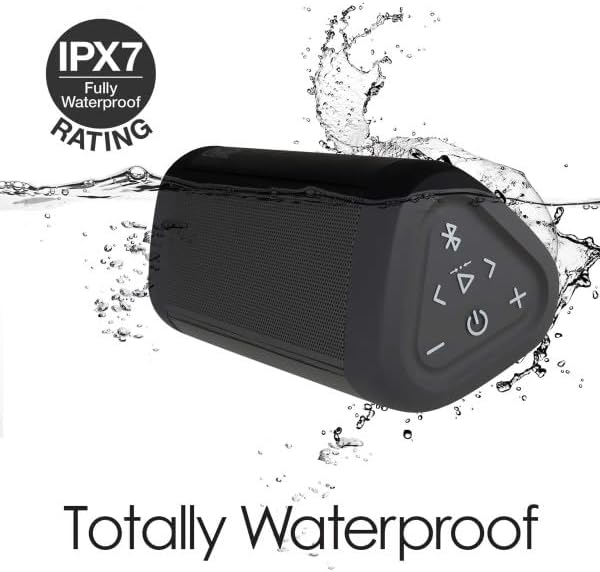
Image: The OontZ Angle 3 Ultra speaker shown partially submerged in water, illustrating its IPX7 waterproof capability.
- Ensure the rubber flap covering the charging and AUX ports is securely closed before exposing the speaker to water.
- Ideal for use by the pool, at the beach, or in the shower.
- Do not expose to salt water or chemicals. Rinse with fresh water after exposure to chlorinated water.
Cumail suas
1. Glanadh
Gus an neach-labhairt agad a ghlanadh, cleachd clò bog,amp aodach. Na cleachd luchd-glanaidh sgudail no solventan.
2. Stòradh
Stòraich an neach-labhairt ann an àite fionnar, tioram air falbh bho sholas dìreach na grèine agus teòthachd anabarrach.
3. Cùram Bataraidh
Gus beatha bataraidh a leudachadh:
- Seachain a bhith a’ leigeil às a’ bhataraidh gu tur gu tric.
- Cuir cosgais air an neach-labhairt gu cunbhalach, fiù mura h-eil e ga chleachdadh, gus slàinte a’ bhataraidh a chumail suas.
- Do not expose the speaker to temperatures above 60°C (140°F).
Fuasgladh thrioblaidean
| Trioblaid | Fuasgladh |
|---|---|
| Cha tionndaidh an neach-labhairt air. | Dèan cinnteach gu bheil am bataraidh air a luchdadh. Ceangail an neach-labhairt ri stòr cumhachd leis a’ chàball USB-C. |
| Gun fhuaim no meud ìosal. | Check the volume level on both the speaker and your connected device. Ensure the speaker is properly paired via Bluetooth or connected via AUX. |
| Chan urrainnear paidhir a dhèanamh tro Bluetooth. | Ensure the speaker is in pairing mode (flashing blue light). Turn off and on Bluetooth on your device. Move the speaker closer to your device. Disconnect from other Bluetooth devices. |
| Saobhadh fuaime aig meud àrd. | Reduce the volume on the speaker or your connected device. Ensure the audio source is not distorted. |
| OontZ Dual Wireless Stereo not connecting. | Ensure both speakers are disconnected from other Bluetooth devices. Follow the pairing steps carefully, ensuring both speakers are in pairing mode for stereo connection. |
Sònrachaidhean
Key technical specifications for the OontZ Angle 3 Ultra Portable Bluetooth Speaker:
- Àireamh Modail: SWOA3UBLK
- Meudan (L x W x H): 16.26 x 7.11 x 7.11 cm (6.4 x 2.8 x 2.8 òirleach)
- Cuideam: 480 gram (1.06 lbs)
- Cumhachd toraidh neach-labhairt: 14 watt
- Tionndadh Bluetooth: 4.2
- Raon gun uèir: Up to 30 meters (100 feet) unobstructed
- Beatha bataraidh: Suas ri 20 uair a thìde (aig 2/3 de mheud)
- Ìre dìon-uisge: IPX7 (So-ruigsinneach suas ri 1 meatair airson 30 mionaid)
- Ceangal: Bluetooth, 3.5mm AUX Input, USB-C Charging
- Co-phàirtean air an toirt a-steach: Speaker, 3.5mm Audio Cable, USB-C Charging Cable, Quick Start Guide

Image: Diagram showing the dimensions of the OontZ Angle 3 Ultra speaker: 6.5 inches in length, 3 inches in width, and 2.75 inches in height.
Barantas agus Taic
For detailed warranty information and customer support, please visit the official OontZ website. The full localized manual is also available there.
Oifigeil Weblàrach: www.theoontz.com
Cambridge Soundworks is committed to providing high-quality audio products and customer satisfaction.