
Comix CS-3302
Comix CS-3302 12-Digit Desktop Calculator User Manual
Model: CS-3302 (P/N: 11821063)
Brand: Comix
1. Ro-ràdh
This user manual provides comprehensive instructions for the Comix CS-3302 12-Digit Desktop Calculator. Please read this manual thoroughly before using the calculator to ensure proper operation and to maximize its lifespan. This calculator is designed for general office and school use, featuring a large LCD display, dual power source, and various calculation functions.
2. Fiosrachadh Sàbhailteachd
- Do not expose the calculator to extreme temperatures, direct sunlight, or high humidity.
- Seachain an àireamhair a leigeil sìos no a chur fo bhuaidhean làidir.
- Do not attempt to disassemble or modify the calculator. This will void the warranty.
- Use a soft, dry cloth for cleaning. Do not use liquid cleaners or abrasive materials.
- Cùm a-mach à ruigsinn clann beaga.
3. Toradh thallview

Figear 3.1: Aghaidh view of the Comix CS-3302 Desktop Calculator, showing the large LCD display and full keypad.
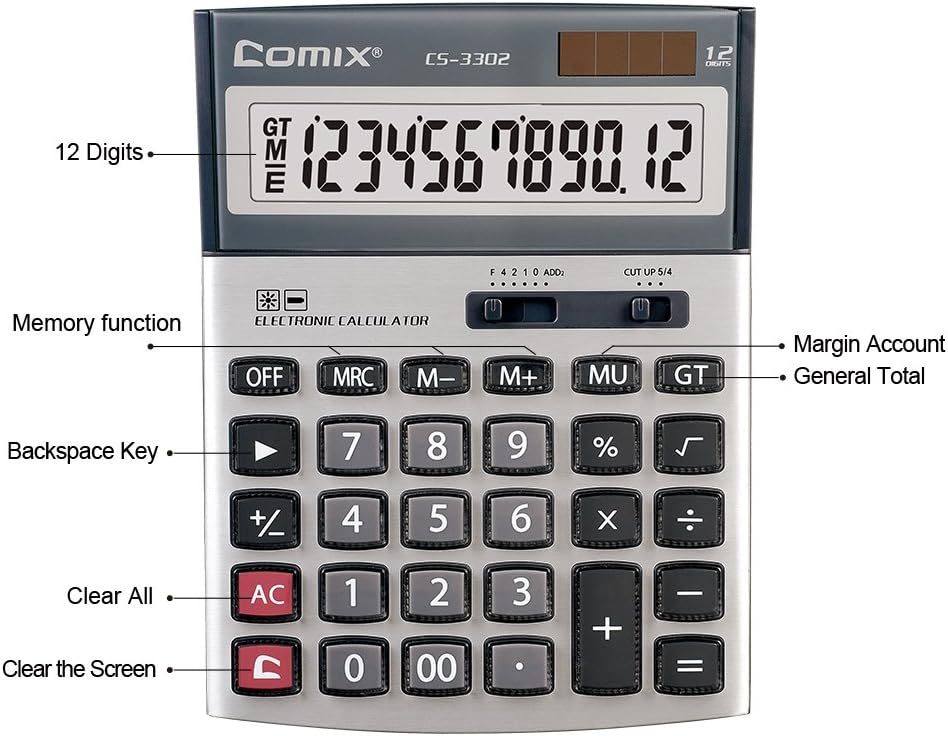
Figear 3.2: Key functions and display features of the Comix CS-3302 Calculator, including 12 digits display, memory functions, and clear keys.

Figear 3.3: Dimensions of the Comix CS-3302 Calculator, showing its compact and ergonomic design.

Figear 3.4: Cearcallach view of the Comix CS-3302 Calculator, highlighting its sleek profile agus cruth iuchair.

Figear 3.5: Taobh profile of the Comix CS-3302 Calculator, showing its slim design.

Figear 3.6: Retail packaging of the Comix CS-3302 Calculator, highlighting key features like 12 digits, dual power, and acrylic keys.
4. Suidhich
Stòr cumhachd 4.1
The Comix CS-3302 calculator operates on a dual power system: solar and battery. The solar panel provides power in well-lit environments, while a single AA battery (not included) serves as an auxiliary power source for low-light conditions or when solar power is insufficient.
- Stàladh bataraidh: Locate the battery compartment on the back of the calculator. Open the cover and insert one AA battery, ensuring correct polarity (+/-). Close the battery compartment cover securely.
- Cumhachd tùsail air adhart: The calculator should power on automatically when sufficient light is available or with the battery installed. If not, press the AIR/AC putan.
5. Stiùireadh Obrachaidh
5.1 Gnìomhan bunaiteach
- Cur-ris (+): Cuir a-steach a’ chiad àireamh, brùth air +, cuir a-steach an dàrna àireamh, agus an uairsin brùth =.
- Thoir air falbh (-): Cuir a-steach a’ chiad àireamh, brùth air -, cuir a-steach an dàrna àireamh, agus an uairsin brùth =.
- Iomadachadh (×): Cuir a-steach a’ chiad àireamh, brùth air ×, cuir a-steach an dàrna àireamh, agus an uairsin brùth =.
- Roinneadh (÷): Cuir a-steach a’ chiad àireamh, brùth air ÷, cuir a-steach an dàrna àireamh, agus an uairsin brùth =.
- Sa cheudtage (%): Cuir a-steach an àireamh, brùth × (no ÷), enter the percentagluach e, an uairsin brùth %. Airson example, to calculate 10% of 200, enter 200 × 10 %.
- Freumh Cheàrnagach (√): Cuir a-steach an àireamh, an uairsin brùth √.
5.2 Gnìomhan Sònraichte
- OFF: Powers off the calculator.
- AC (uile soilleir): Clears all entries and memory, resetting the calculator to its initial state.
- C (Clear Entry): Clears the last entered number or the current display value without affecting previous calculations or memory.
- Backspace (►): Sguabaidh e às an fhigear mu dheireadh a chaidh a chur a-steach.
- M+ (Cuimhne a bharrachd): Cuiridh seo an luach a tha air a thaisbeanadh ris a' chuimhne.
- M- (Cuimhne Lùghdaichte): A’ toirt air falbh an luach a tha air a thaisbeanadh bhon chuimhne.
- MRC (cuimhne cuimhne / soilleir): Press once to recall the memory value. Press twice to clear the memory.
- MU (Mark Up / Margin Account): Used for profit margin calculations. Enter cost, press MU, enter selling price, then press = to get the profit margin.
- GT (Àrd iomlan): Accumulates the results of all calculations. Pressing GT displays the grand total.
- +/- (Atharrachadh Comharra): Changes the sign of the displayed number (positive to negative, or negative to positive).
5.3 Decimal and Rounding Settings
The calculator features two slide switches at the top for controlling decimal places and rounding:
- Decimal Selector (F 4 2 1 0 ADD2):
- F (Floating Decimal): Displays all available decimal places.
- 4, 2, 1, 0: Sets the number of decimal places to 4, 2, 1, or 0 respectively.
- ADD2 (Add Mode): Automatically adds two decimal places to all results, useful for currency calculations.
- Rounding Selector (CUT UP 5/4):
- CUT (Cut Off): Truncates the number, discarding all digits beyond the set decimal places.
- UP (Round Up): Rounds up the last digit if there are any non-zero digits beyond the set decimal places.
- 5/4 (Round Half Up): Rounds up if the first discarded digit is 5 or greater, otherwise rounds down.
6. Cumail suas
- Glanadh: Wipe the calculator surface with a soft, dry cloth. For stubborn dirt, slightly dampen the cloth with water, but ensure no liquid enters the calculator. Do not use chemical cleaners.
- Stòradh: When not in use for extended periods, store the calculator in a cool, dry place away from direct sunlight and extreme temperatures.
- Ath-nuadhachadh bataraidh: If the display becomes dim or unresponsive in low light, replace the AA battery. Ensure the calculator is off before replacing the battery.
7. A ’dèanamh trioblaid
| Trioblaid | Adhbhar a dh’fhaodadh a bhith ann | Fuasgladh |
|---|---|---|
| Tha an taisbeanadh bàn no dorcha. | Gun solas gu leòr airson cumhachd na grèine, no bataraidh ìosal. | Move to a brighter area or replace the AA battery. |
| Toraidhean àireamhachaidh ceàrr. | Incorrect input, incorrect decimal/rounding settings, or memory interference. | Brùth AC to clear all and restart. Check decimal and rounding switch positions. Ensure correct key presses. |
| Chan eil na h-iuchraichean a’ freagairt. | Calculator frozen or physical damage. | Feuch ri putadh AIRSON an uair sin AIR/AC. If problem persists, remove and reinsert battery. If still unresponsive, contact support. |
8. Sònrachaidhean
| Brand | Comix |
| Modail Àireamh | CS-3302 (P/N: 11821063) |
| Taisbeanadh | LCD 12-digit |
| Stòr cumhachd | Dual Power (Solar & 1x AA Battery - not included) |
| Stuth | Acraileach, Meatailt |
| Meudan (L x W x H) | Mu 23.6 x 15.7 x 4.3 cm (9.3 x 6.2 x 1.7 òirleach) |
| Cuideam | Mu 322 g (0.71 lbs) |
| Teòthachd Obrachaidh | -25 ℃ to +60 ℃ (-13 ℉ to +140 ℉) |
| UPC | 842064102524 |
9. Barantas agus Taic
Comix products are designed for quality and durability. This product comes with a Barantas 3-bliadhna bho cheann-latha a’ cheannaich, a’ còmhdach lochdan ann an stuthan agus obair-ciùird fo chleachdadh àbhaisteach.
For warranty claims, technical support, or any inquiries regarding your Comix CS-3302 calculator, please contact Comix customer service through their official website or the retailer where the product was purchased. Please have your proof of purchase and the product model number ready when contacting support.
For more information, visit the official Comix weblàrach: www.comix.com
Ask a question about this manual
Ask about setup, troubleshooting, compatibility, parts, safety, or missing instructions. Manuals+ will review the question and use this page’s manual context to help answer it.