
Ro-ràdh
This manual provides essential information for the safe and efficient use of your SANSUI SCM39-B11 39V High-Vision LCD TV. Please read these instructions thoroughly before operating the television and retain them for future reference. This television features a reliable Japanese design, incorporating a main board developed by Toshiba Visual Solutions Corporation, with evaluation and production management handled by a specialized team in Echizen City, Fukui Prefecture.
The SCM39-B11 model is a 2017 release, designed for terrestrial digital broadcasting, and supports external HDD recording via USB connection.
Fiosrachadh Sàbhailteachd
Lean ceumannan sàbhailteachd bunaiteach an-còmhnaidh nuair a bhios tu a’ cleachdadh an telebhisean seo gus cunnart teine, clisgeadh dealain agus leòn a lùghdachadh.
- Na cuir an telebhisean fosgailte do uisge no taiseachd.
- Na cuir bacadh air fosglaidhean fionnarachaidh. Dèan cinnteach gu bheil àite gu leòr timcheall air an telebhisean airson sruth-adhair ceart.
- Do not place the television on an unstable cart, stand, tripod, bracket, or table.
- Thoir a-mach am pluga bhon telebhisean rè stoirmean dealanaich no nuair nach tèid a chleachdadh airson ùine mhòr.
- Thoir iomradh air a h-uile seirbheis gu luchd-seirbheis le teisteanas.
Susbaint pacaid
Dèan cinnteach gu bheil a h-uile nì anns a’ phacaid:
- SANSUI SCM39-B11 39V LCD TV
- Smachd Iomallach
- Bataraidhean (airson smachd iomallach)
- MiniB-CAS Card
- B-CAS Card Cover (with screws)
- Stand (with screws)
- Leabhar-stiùiridh (an sgrìobhainn seo)
- Cairt Barantais
Stiùireadh rèiteachaidh
1. Stàladh Seas
Carefully place the television screen-down on a soft, flat surface. Attach the included stand to the bottom of the television using the provided screws. Ensure the stand is securely fastened before placing the television upright.

Ìomhaigh: Aghaidh view of the SANSUI SCM39-B11 TV with its stand, showing the display and the two silver-colored feet.
2. Ceangal Càbaill
Refer to the back panel of the television for connection ports.

Ìomhaigh: Cùl view of the SANSUI SCM39-B11 TV, displaying the back panel with various input ports including HDMI, USB, and antenna connections.
- Ceangal antenna: Connect your terrestrial digital antenna cable to the ANTENNA IN port.
- Innealan HDMI: Connect DVD players, Blu-ray players, game consoles, or other HDMI-compatible devices to the HDMI 1 or HDMI 2 ports. This model has 2 HDMI ports.
- USB External HDD: For recording, connect a compatible external USB Hard Disk Drive (HDD) to the USB port.
- Cumhachd: Connect the power cord to the AC inlet on the television and then to a wall outlet.
3. Suidheachadh tòiseachaidh
After connecting all cables and powering on the TV, the initial setup wizard will guide you through the process. This typically includes:
- Taghadh cànain.
- Region selection.
- Automatic channel scan for terrestrial digital broadcasts. Ensure your antenna is properly connected for this step.
Stiùireadh Obrachaidh
Gnìomhan bunaiteach
- Cumhachd air / dheth: Brùth an CUMHACHD putan air an smachd iomallach.
- Taghadh seanail: Cleachd an CH +/- buttons or the number buttons on the remote.
- Atharrachadh tomhas-lìonaidh: Cleachd an VOL +/- putanan.
- Tobar a-steach: Brùth an IOMPACHADH button to cycle through connected devices (TV, HDMI 1, HDMI 2, etc.).
Recording with External HDD
This TV supports recording terrestrial digital broadcasts to an external USB HDD. Ensure your HDD is connected to the USB port.
- Scheduling Recordings: Use the Electronic Program Guide (EPG) to select programs for recording. The EPG supports a 1-week display.
- Automatic Chapter Marking: The TV can detect commercials during recording and automatically set chapter marks, allowing for easier navigation during playback.
Gnìomhan ath-chluich
When playing back recorded content from an external HDD, the following functions are available:
- Ath-chluich: Replay a section or the entire program.
- Chase Playback: Watch a program from the beginning while it is still being recorded.
- 1.5x Speed Playback: Watch recorded content at an accelerated speed.
Leasachaidhean Dealbh is Fuaim
- Blue Light Guard: Activate this function via the remote control to reduce blue light emission by up to approximately 50%, which may help reduce eye strain.
- Picture Enhancer: This feature automatically adjusts the super-resolution processing level according to the input content, ensuring optimal image display at all times.
- Japanese Paper Speakers: The integrated speakers utilize Japanese paper for clear sound reproduction across high to low frequencies.
Feartan a bharrachd
- Screen Freeze Function: Pause the live broadcast or current display.
- HDMI Connected Device Linkage: Control compatible HDMI-connected devices using the TV remote.
- Bi-directional Data Communication: Supports two-way data communication.
Cumail suas
Cleaning the Television
- Sgrion: Sguab an sgrion gu socair le clò bog, tioram, gun lint. Airson comharran stòlda, suath gu socair e.ampen the cloth with water or a specialized screen cleaner (ensure it is safe for LCD screens) and wipe carefully. Do not spray liquid directly onto the screen.
- Corp: Wipe the television body with a soft, dry cloth. Avoid using abrasive cleaners, waxes, or solvents as they can damage the finish.
Cùram smachd iomallach
- Replace batteries when the remote control's response becomes slow or inconsistent.
- Na bi a’ measgachadh bataraidhean sean is ùr, no diofar sheòrsaichean bataraidhean.
- Keep the remote control away from moisture and direct sunlight.
Fuasgladh thrioblaidean
If you encounter issues with your television, refer to the following common problems and solutions before contacting support.
| Trioblaid | Adhbhar / Fuasgladh a dh’fhaodadh a bhith ann |
|---|---|
| Gun chumhachd | Ensure the power cord is securely plugged into both the TV and the wall outlet. Check if the outlet is functioning. |
| No picture / No signal | Verify antenna connection. Check the input source selection (e.g., HDMI 1, HDMI 2, TV). Perform a channel scan if necessary. |
| Gun fhuaim | Check volume level and mute status. Ensure external audio devices are properly connected if used. |
| Chan eil smachd iomallach ag obair | Thoir sùil air na bataraidhean agus cuir nan àite iad. Dèan cinnteach nach eil bacadh sam bith eadar an smachd iomallach agus mothachaire IR an Tbh. |
| External HDD recording issues | Ensure the USB HDD is properly connected and formatted for the TV. Some HDDs may have compatibility issues. Try a different USB port or HDD if available. |
| HDMI device not recognized | Ensure the HDMI cable is securely connected. Try a different HDMI port or cable. Power cycle both the TV and the HDMI device. |
Sònrachaidhean Bathar

Image: A table detailing the specifications of the SANSUI SCM39-B11 TV, including screen size, resolution, tuner type, recording capabilities, connectivity, and power consumption.
| Feart | Sònrachadh |
|---|---|
| Ainm Modail | SCM39-B11 |
| Meud sgrion | 39V-type (39 inches) |
| Teicneòlas taisbeanadh | LCD |
| Fuasgladh | High-Vision (HD 1366 x 768) |
| Tuners | Terrestrial Digital x1, BS Digital: None, CS Digital: None |
| External HDD Recording | Supported via USB |
| puirt HDMI | 2 siostaman |
| Puirt USB | 1 siostam |
| Wall Mount Compatible | VESA 200mm x 200mm |
| Cuideam toraidh | 6.1 kg |
| Meudan (W x H x D) | Approx. 88.8 cm x 57.5 cm x 21.0 cm (with stand) |
| Caitheamh cumhachd | 61W |
| Bliadhna Sgaoilidh | 2017 |

Ìomhaigh: Aghaidh view of the SANSUI SCM39-B11 TV with overlaid measurements for width (88.8cm), height (57.5cm), and weight (6.1kg).

Ìomhaigh: Taobh view of the SANSUI SCM39-B11 TV, illustrating the depth of the television body (9.9cm) and the total depth including the stand (21cm).
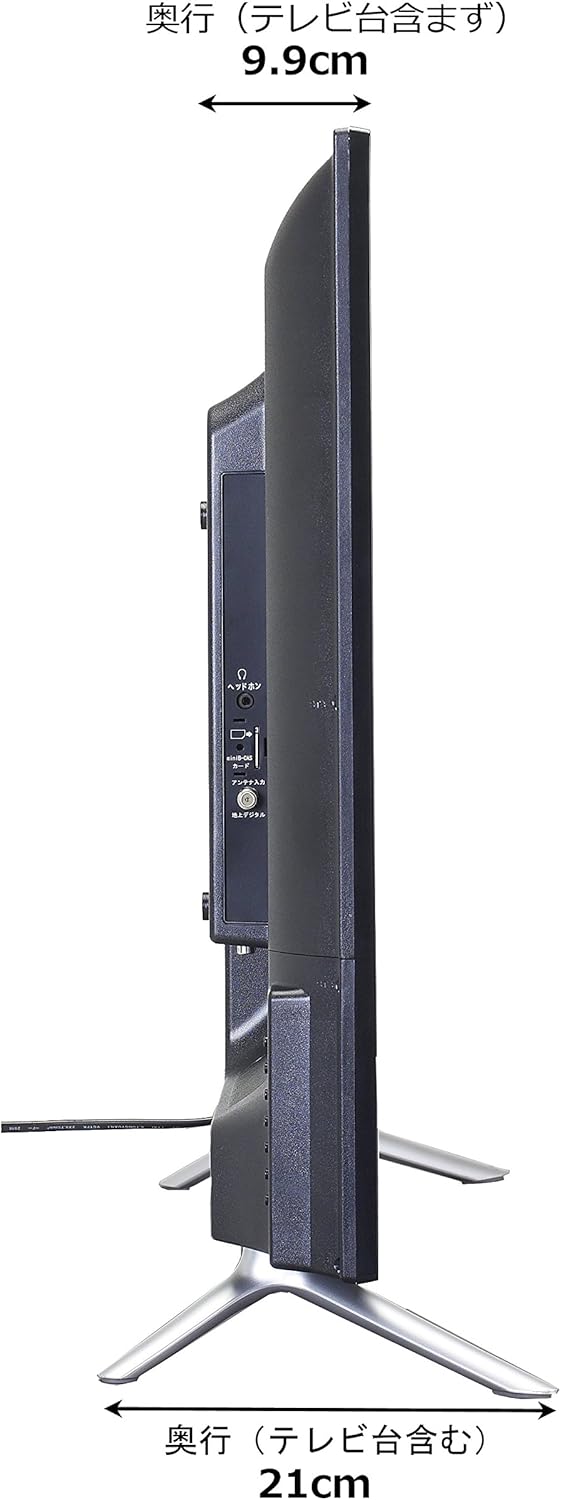
Image: Diagram showing the SANSUI SCM39-B11 TV on a stand next to a human figure (approx. 160cm tall) for visual scale, with TV dimensions indicated.
Barantas agus Taic
Your SANSUI SCM39-B11 television comes with a warranty. Please refer to the included warranty card for details regarding coverage period and terms. Keep your purchase receipt as proof of purchase.
For technical support, service, or inquiries not covered in this manual, please contact SANSUI customer service. Contact information can typically be found on the warranty card or the official SANSUI weblàrach.