
1. Ro-ràdh
Thank you for choosing the BBC Jadel K100 Gaming Keyboard. This manual provides essential information for setting up, operating, maintaining, and troubleshooting your new keyboard. The Jadel K100 is designed for gaming, office, and daily home use, featuring multimedia keys and a mechanical suspension design for a responsive typing experience.
Leugh an leabhar-làimhe seo gu faiceallach mus cleachd thu an toradh gus dèanamh cinnteach gum bi e ag obair gu ceart agus maireannach.
2. Pasgan-susbaint
Nuair a bhios tu a’ fosgladh a’ phacaid, dèan cinnteach gu bheil a h-uile nì an làthair:
- BBC Jadel K100 Gaming Keyboard
- Leabhar-làimhe cleachdaiche (an sgrìobhainn seo)
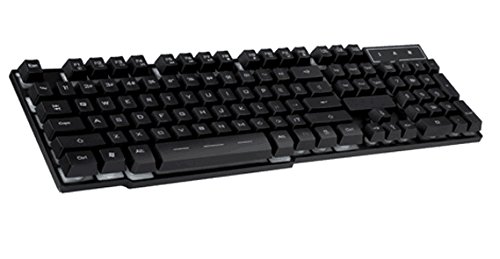
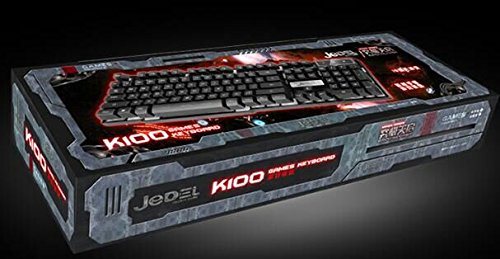
Image 1: The BBC Jadel K100 Gaming Keyboard, showcasina dhealbhadh agus a phacaigeadh.
3. Suidhich
Follow these steps to connect your BBC Jadel K100 Gaming Keyboard to your computer:
- Unpack am meur-chlàr: Thoir am meur-chlàr a-mach às a phacaid gu faiceallach.
- Ceangail ris a’ choimpiutair: Locate an available USB port on your laptop or desktop computer. Insert the USB connector of the keyboard firmly into the USB port.
- Stàladh an dràibhear: The keyboard is plug-and-play. Your operating system (Windows, macOS, Linux) should automatically detect and install the necessary drivers. This process may take a few moments.
- Dearbhaich an ceangal: Once drivers are installed, the keyboard should be ready for use. Test by typing in a text editor or browser.
Thoir an aire: This keyboard is compatible with laptops and desktop computers running standard operating systems.
4. Stiùireadh Obrachaidh
The Jadel K100 keyboard features a standard 104-key layout, including a numeric keypad and function keys. It also incorporates multimedia functions accessible via the FN iuchair.
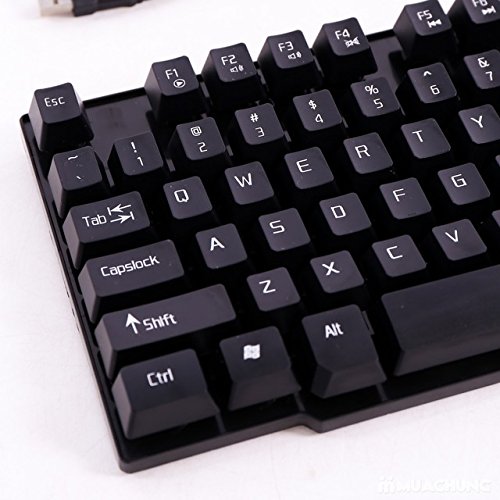
Ìomhaigh 2: Sealladh dlùth view of the BBC Jadel K100 keyboard's main keys, including Esc, Tab, Caps Lock, Shift, Ctrl, and Alt.
4.1. Standard Key Functions
All standard alphanumeric, symbol, and navigation keys operate as expected on a typical keyboard.
4.2. Multimedia Functions (FN Key)
The Jadel K100 includes an FN (Function) key, similar to those found on laptops, to access multimedia controls. To use these functions, press and hold the FN key, then press the corresponding function key (F1-F12) or other designated keys.
Common multimedia functions typically include:
- FN + F1-F12: Control media playback (play/pause, stop, previous/next track), volume (mute, volume up/down), and other system functions (e.g., open default browser, email client, calculator). Refer to the keycap legends for specific functions.
Ìomhaigh 3: Mion-fhiosrachadh view of the BBC Jadel K100 keyboard's F-keys, which often include multimedia shortcuts when combined with the FN key.
4.3. Eòlas Gèam
The mechanical suspension design provides a tactile and responsive feel, enhancing the gaming experience. The keyboard is designed for durability and comfort during extended gaming sessions.
5. Cumail suas
Nì deagh chumail suas cinnteach gum mair am meur-chlàr agad fad-beatha agus gum bi e ag obair gu math.
- Glanadh:
- Dì-cheangail am meur-chlàr bhon choimpiutair agad mus glan thu e.
- Cleachd clò bog, gun lint beagan dampnigh le uisge no le fuasgladh glanaidh tlàth gus na ceapan-iuchrach agus an uachdar a sguabadh às.
- Airson duslach is sprùilleach eadar iuchraichean, cleachd èadhar teannaichte.
- Avoid using harsh chemicals, abrasive cleaners, or spraying liquids directly onto the keyboard.
- Stòradh: Stòraich am meur-chlàr ann an àite fionnar, tioram air falbh bho sholas dìreach na grèine agus teòthachd anabarrach nuair nach eilear ga chleachdadh airson ùine mhòr.
- Làimhseachadh: Avoid dropping the keyboard or exposing it to excessive force, which can damage internal components or key mechanisms.
6. A ’dèanamh trioblaid
If you encounter issues with your BBC Jadel K100 keyboard, refer to the following common problems and solutions:
| Trioblaid | Adhbhar a dh’fhaodadh a bhith ann | Fuasgladh |
|---|---|---|
| Meur-chlàr nach eil a 'freagairt | Ceangal USB sgaoilte, port USB lochtach, duilgheadas leis an draibhear. |
|
| Iuchraichean sònraichte nach eil ag obair | Debris under keycap, physical damage, software conflict. |
|
| Iuchraichean ioma-mheadhain nach eil ag obair | Incorrect usage of FN key, software conflict. |
|
7. Sònrachaidhean
| Feart | Mion-fhiosrachadh |
|---|---|
| Brand | BBC |
| Modail Àireamh | Jadel K100 |
| Tuairisgeul meur-chlàr | Geamannan |
| Àireamh de dh'Iuchraichean | 104 |
| Seòrsa iuchair | Crochadh meacanaigeach |
| Dath | DUBH |
| Innealan co-fhreagarrach | Laptop, PC deasg |
| Ceangalachd | USB |
| Stoidhle | Ùr-nodha |
| Stiùireadh làimhe | Ambidextrous |
| Dèanadair | bbc |
8. Barantas agus Taic
Specific warranty details for the BBC Jadel K100 Gaming Keyboard are not provided in this manual. For warranty information, please refer to the product packaging or contact your retailer at the point of purchase.
For technical support or further assistance, please contact the manufacturer or your retailer. Keep your purchase receipt as proof of purchase for any warranty claims.