
APA 16623
Leabhar-làimhe Cleachdaiche Charger Bataraidh Bùth-obrach Didseatach APA 16623
Model: 16623 | Brand: APA
Ro-ràdh
This user manual provides essential information for the safe and effective operation of your APA 16623 Digital Workshop Battery Charger. This microprocessor-controlled battery charger is designed for various types of lead-acid batteries, including AGM, Gel, Wet, and Maintenance-Free batteries, and aims to extend battery life. It features advanced automatic protection mechanisms against overheating, short circuits, and reverse polarity. The integrated multi-function indicator provides real-time feedback on charging progress and overall battery health. Please read this manual thoroughly before first use and keep it for future reference.
Stiùireadh sàbhailteachd
Cùm na ceumannan sàbhailteachd a leanas an-còmhnaidh gus casg a chur air dochann no milleadh air an inneal:
- Leugh a h-uile stiùireadh mus cleachd thu an charger.
- Na cuir a-mach an charger gu uisge no suidheachaidhean fliuch.
- Cleachd a-mhàin ann an àiteachan le deagh fhionnarachadh.
- Dèan cinnteach gu bheil an charger air a dhì-cheangal bhon t-solar cumhachd mus dèan thu no mus bris thu ceanglaichean ris a’ bhataraidh.
- Seachain sprèadhan no lasraichean faisg air a’ bhataraidh fhad ’s a tha thu gan cur air cosgais, oir faodaidh bataraidhean gasaichean spreadhaidh a thoirt a-mach.
- Cleachd dìon sùla agus aodach dìon nuair a bhios tu ag obair le bataraidhean.
- Cùm a-mach à ruigsinn chloinne.
- Na cuir cosgais air bataraidhean reòta.
- Ma thèid an sreang cumhachd a mhilleadh, feumaidh an neach-dèanamh, an neach-ionaid seirbheis aige, no daoine le teisteanas coltach ris a chuir na àite gus cunnart a sheachnadh.
Bathar seachadview
The APA 16623 charger features a robust design with intuitive controls and a clear digital display.

Figear 1: Aghaidh view of the APA 16623 Digital Workshop Battery Charger with its red and black housing and attached battery clamps.

Figear 2: Faisg air làimh view of the charger's control panel, showing the digital display, various indicator lights for charging status, battery type selection, and current settings.

Figear 3: Cùl view of the charger demonstrating the integrated storage for the power cable and battery clamps, ensuring neat and compact storage.
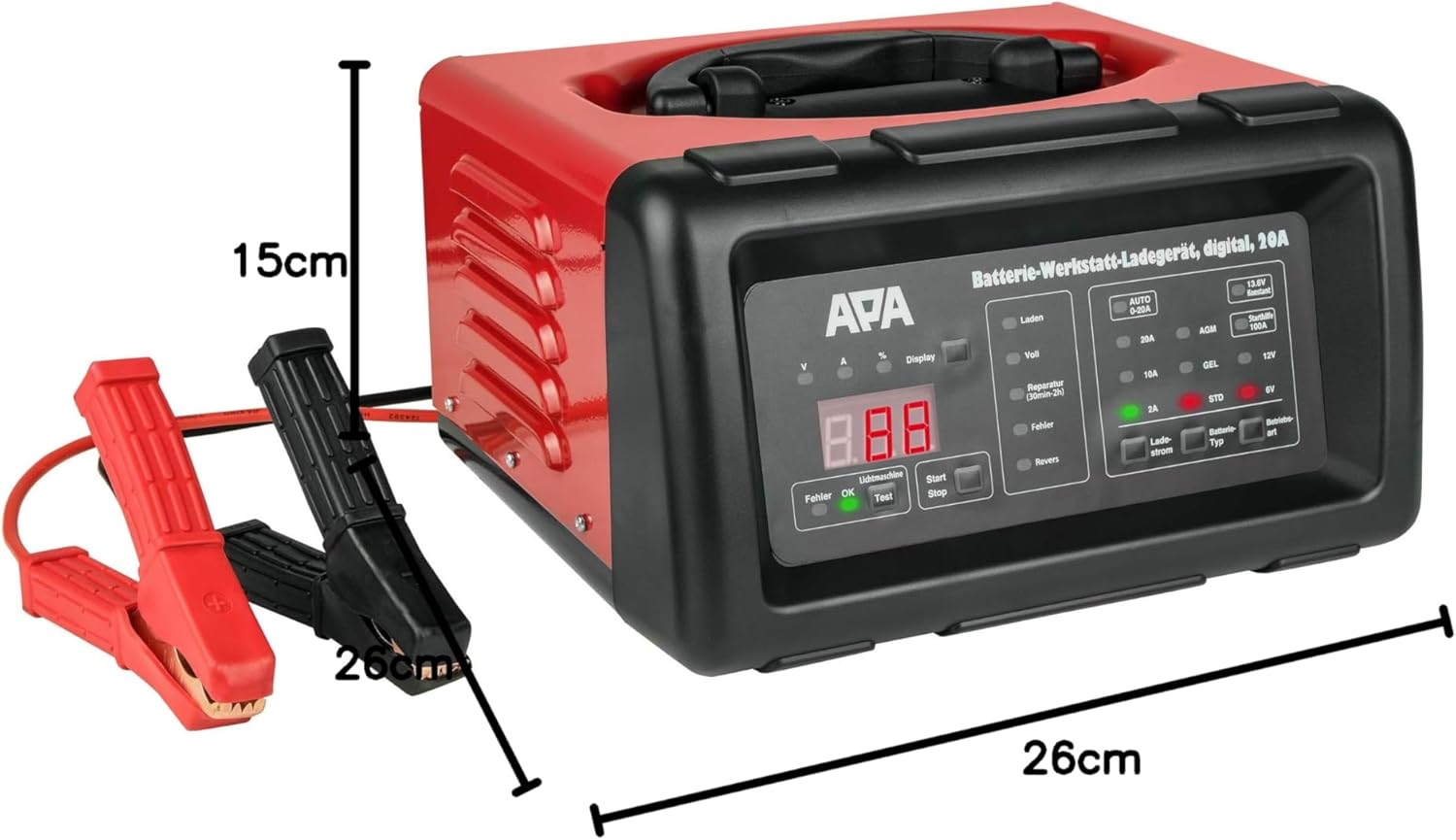
Figear 4: The battery charger shown with its approximate dimensions: 26 cm width, 26 cm depth, and 15 cm height, providing a clear idea of its compact size.
Suidhich
- Unpack: Thoir an charger agus na goireasan uile a-mach às a’ phacaid gu faiceallach.
- Dèan sgrùdadh: Check the charger and cables for any signs of damage. Do not use if damaged.
- Suidheachadh: Cuir an charger air uachdar seasmhach, còmhnard ann an àite le deagh fhionnarachadh, air falbh bho sholas dìreach na grèine, stòran teas, agus taiseachd.
- Ullachadh Bataraidh: Dèan cinnteach gu bheil cinn-uidhe a’ bhataraidh glan agus saor bho chreimeadh. Ma tha sin riatanach, glan iad le bruis uèir.
Stiùireadh Obrachaidh
1. Connecting the Charger to the Battery
- Dèan cinnteach gu bheil an charger air a dhì-phlugachadh bhon t-socaid cumhachd AC.
- Ceangail an CL DEARG (+) deimhinneachamp chun cheann-uidhe bataraidh adhartach (+).
- Ceangail an cla àicheil DUBH (-)amp to the negative (-) battery terminal. For vehicles, connect the black clamp ri chassis a’ charbaid air falbh bhon bhataraidh agus bhon loidhne connaidh ma tha am bataraidh fhathast sa charbad.
- Dèan cinnteach gu bheil ceanglaichean tèarainte.
2. Connecting to Power and Selecting Mode
- Plug the charger's power cord into a standard 240V AC power outlet.
- Soilleirichidh an taisbeanadh didseatach.
- Use the "Battery Type" button to select the appropriate battery type (AGM, GEL, STD) and voltage (6V or 12V). The charger automatically detects the voltage for 12V batteries.
- Use the "Charge Current" button to select the desired charging current (2A, 10A, or 20A). For most applications, the "AUTO 0-20A" mode is recommended, which automatically adjusts the current.
- Press the "Start/Stop" button to begin charging. The display will show charging progress and battery status.
3. Pròiseas Cìsean
The charger features a multi-stage pròiseas cosgais:
- Desulfation: If a deeply discharged or sulfated battery is detected, the charger may enter a desulfation phase (indicated by "Reparatur" on the display, lasting 30min-2h).
- Tòisich bog: Gradually increases current to protect the battery.
- Cosgais mhòr: Charges the battery at the maximum selected current until it reaches approximately 80% capacity.
- Cìs gabhail: Charges at a decreasing current until the battery is fully charged.
- Float/Maintenance Charge: Once fully charged ("Voll" indicated), the charger switches to a maintenance mode, providing a small current to keep the battery at optimal charge.
4. Jump Start Function (100A)
The charger can provide a temporary boost for starting a vehicle with a discharged battery.
- Ensure the charger is connected to the battery and power as described above.
- Select the "Starthilfe 100A" (Jump Start 100A) mode.
- Attempt to start the vehicle. Do not crank for more than 5 seconds. Wait at least 1 minute between attempts.
- Once the vehicle starts, disconnect the charger from the AC outlet first, then disconnect the clamps from the battery/chassis.
5. Disconnecting the Charger
- Press the "Start/Stop" button to stop charging.
- Unplug the charger from the AC power outlet.
- Disconnect the BLACK (-) negative clamp from the battery/chassis.
- Dì-cheangail an RED (+) deimhinneach clamp bhon inneal bataraidh.
Cumail suas
- Glanadh: Clean the charger's exterior with a soft, dry cloth. Do not use abrasive cleaners or solvents.
- Sgrùdadh càball: Dèan sgrùdadh cunbhalach air na càbaill cosgais agus an clampThoir sùil airson comharran milleadh, sgàineadh no creimeadh sam bith. Cuir fear eile na àite ma tha sin riatanach.
- Stòradh: Store the charger in a cool, dry place when not in use. Utilize the integrated cable storage to keep cables tidy.
- Fionnarachadh: Dèan cinnteach gu bheil na fosglaidhean fionnarachaidh saor bho dhuslach is sprùilleach gus casg a chur air cus teasachadh.
Fuasgladh thrioblaidean
| Trioblaid | Adhbhar a dh’fhaodadh a bhith ann | Fuasgladh |
|---|---|---|
| Chan eil an charger a’ tionndadh air. | No power supply; faulty outlet; damaged power cord. | Check power connection; try a different outlet; inspect power cord for damage. |
| "Fehler" (Error) indicator lights up. | Reverse polarity connection; short circuit; battery fault. | Thoir sùil air clamp connections (red to +ve, black to -ve); inspect cables for shorts; test battery condition. |
| Bataraidh gun a bhith a ’togail cosgais. | Incorrect mode selected; poor connection; deeply discharged battery. | Verify battery type and voltage selection; ensure clamps are securely connected; allow time for desulfation mode if applicable. |
| Charger overheats. | Droch fhionnarachadh; cus luchd. | Ensure adequate ventilation around the charger; reduce charging current if possible. |
Sònrachaidhean
| Feart | Sònrachadh |
|---|---|
| Brand | APA |
| Modail | 16623 |
| Input Voltage | 240V AC |
| Toradh Voltage | 6V / 12V DC |
| A 'cur cosgais an-dràsta | 2A, 10A, 20A (Automatic 0-20A) |
| Leum Tòisich an-dràsta | 100A |
| Seòrsa Bataraidh | AGM, Gel, Wet, Maintenance-Free Lead-Acid Batteries |
| Ùine cosgais | Approx. 2 hours (depending on battery size and discharge level) |
| Stuth | Taigheadas plastaig |
| Meudan (L x W x H) | 26 cm x 26 cm x 15 cm (timcheall air) |
| Cuideam | 5783 Grams (approx. 5.78 kg) |
| Gèilleadh Sàbhailteachd | UL (as per specification) |
Barantas agus Taic
For warranty information and technical support, please refer to the documentation provided with your purchase or contact APA customer service. Keep your proof of purchase for any warranty claims.
Manufacturer: EAL GmbH
Ask a question about this manual
Ask about setup, troubleshooting, compatibility, parts, safety, or missing instructions. Manuals+ will review the question and use this page’s manual context to help answer it.