
Ro-ràdh
This manual provides comprehensive instructions for the setup, operation, and maintenance of your GPX Digital AM/FM Clock Radio, model C224B. Please read this manual thoroughly before using the device to ensure proper functionality and to maximize your user experience. Keep this manual for future reference.
Bathar seachadview
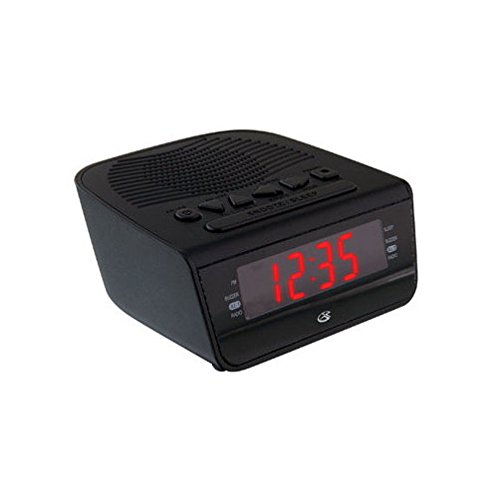
Figear 1: Aghaidh view of the GPX Digital AM/FM Clock Radio. This image shows the compact black unit with its digital display and control buttons.
The GPX Digital AM/FM Clock Radio (C224B) is designed for reliable timekeeping and audio entertainment. Key features include a clear multi-display clock, AM/FM radio tuner, dual alarm functionality, and a battery backup option to ensure continuous operation during power interruptions. Its compact and modern design makes it suitable for various indoor settings.
Suidhich
1. A' dì-phapadh
Carefully remove the clock radio from its packaging. Ensure all components are present: the clock radio unit and the power adapter.
2. Ceangal Cumhachd
- Plug the power adapter into the DC input jack located on the back of the clock radio.
- Plug the other end of the power adapter into a standard wall outlet (AC 120V, 60Hz).
- The display will illuminate, indicating the unit is receiving power.
3. Battery Backup Installation (Optional)
Airson cumhachd cùl-taice rè na h-ùine a-muightages, install batteries (not included).
- Lorg roinn a’ bhataraidh aig bonn an aonaid.
- Fosgail an còmhdach roinn bataraidh.
- Insert the required batteries (e.g., 2 x AAA, check unit for specific type) according to the polarity markings (+ and -).
- Dùin an còmhdach roinn bataraidh gu tèarainte.
Thoir an aire: Batteries are for backup only and will not power the display or radio functions continuously. They preserve time and alarm settings during a power interruption.
Stiùireadh Obrachaidh
1. A ’suidheachadh na h-ùine
- Brùth agus cùm an SEANN TIOMNAIDH putan gus an nochd an taisbeanadh.
- Cleachd an UAIR agus MIONAID putanan gus an ùine atharrachadh.
- Brùth SEANN TIOMNAIDH a-rithist gus dearbhadh agus modh suidheachadh ùine fhàgail.
2. A’ suidheachadh innealan-rabhaidh (Alarm 1 agus Alarm 2)
This unit features dual alarms, allowing you to set two independent wake-up times.
- Brùth agus cùm an ALARM 1 SET (no ALARM 2 SET) button until the alarm time flashes.
- Cleachd an UAIR agus MIONAID buttons to adjust the desired alarm time.
- Brùth ALARM 1 SET (no ALARM 2 SET) again to confirm the time.
- Immediately after confirming the time, use the MODAR ALARM button to select the alarm source: BUISEACH or RADIO.
- The alarm icon (e.g., AL1 or AL2) will appear on the display, indicating the alarm is active.
To turn off an alarm, press the corresponding ALARM 1 AIR/OFF (no ALARM 2 AIR/OFF) button. The alarm icon will disappear.
3. Obrachadh Rèidio AM/FM
- Brùth an RADIO AIR / OFF putan gus an rèidio a chuir air.
- Brùth an BANN putan gus gluasad eadar còmhlain AM agus FM.
- Cleachd an FONN+ or FÒN - putanan gus gleusadh le làimh chun stèisean a tha thu ag iarraidh.
- To automatically scan for the next available station, press and hold FONN+ or FÒN - airson beagan dhiog.
- Atharraich an tomhas-lìonaidh a ’cleachdadh an LUACH + or MEUD - putanan.
- Gus an rèidio a chuir dheth, brùth air an iuchair RADIO AIR / OFF putan a-rithist.
4. Gnìomh Snooze
Nuair a chluinneas tu inneal-rabhaidh, brùth air a’ phutan SNOZE putan gus an inneal-rabhaidh a chur dheth airson timcheall air 9 mionaidean. Seinnidh an inneal-rabhaidh a-rithist às dèidh na h-ùine snooze.
5. Gnìomh cadail
Leigidh an gnìomh cadail leis an rèidio cluich airson ùine shuidhichte mus cuir e dheth gu fèin-ghluasadach.
- Fhad ’s a tha an rèidio a’ cluich, brùth air a’ phutan LAOIDH brùth air a’ phutan a-rithist is a-rithist gus gluasad tro na h-amannan cadail a tha rim faighinn (m.e., 90, 60, 30, 15 mionaidean, dheth).
- Cuiridh an rèidio dheth gu fèin-ghluasadach às dèidh na h-ùine taghte.
Cumail suas
1. Glanadh
To clean the unit, wipe the exterior with a soft, slightly damp cloth. Do not use abrasive cleaners or solvents, as these may damage the finish. Ensure the unit is unplugged before cleaning.
2. Ath-nuadhachadh bataraidh
If the battery backup function is not working, or if the unit loses time during a power outage, the backup batteries may need replacement. Follow the "Battery Backup Installation" steps in the Setup section to replace them.
Fuasgladh thrioblaidean
| Trioblaid | Adhbhar a dh’fhaodadh a bhith ann | Fuasgladh |
|---|---|---|
| Chan eil cumhachd aig an aonad. | Chan eil an inneal-atharrachaidh cumhachd ceangailte no tha an socaid lochtach. | Dèan cinnteach gu bheil an inneal-atharrachaidh cumhachd air a phlugaigeadh gu tèarainte a-steach don aonad agus do phuing-socaid a tha ag obair. Feuch puing-socaid eile. |
| Chan eil an inneal-rabhaidh a’ fuaimeachadh. | Cha deach an inneal-rabhaidh a shuidheachadh, tha meud an inneal-rabhaidh ro ìosal, no tha an inneal-rabhaidh dheth. | Verify alarm time and source (buzzer/radio) are set correctly. Ensure alarm is activated (icon visible). Increase radio volume if alarm source is radio. |
| Fàilteachas rèidio bochd. | Comharra lag no bacadh. | Adjust the position of the unit or the antenna (if external). Move away from other electronic devices that may cause interference. |
| Ùine/roghainnean air chall às dèidh cumhachd a thoirt dhethtage. | Tha bataraidhean cùl-taic marbh no gun a bhith air an stàladh. | Install fresh backup batteries or replace existing ones. |
Sònrachaidhean
- Modail: C224B
- Stòr cumhachd: AC 120V, 60Hz (main); Battery Powered (backup)
- Seòrsa taisbeanaidh: Taisbeanadh Didseatach LED
- Còmhlan Rèidio: AM/FM
- Meudan (Mu thuairmse): 5.12" L x 5.12" À
- Cuideam (mu thuairmse): 3 Punnd
- Dath: Dubh
- Stuth: Plastaig
Barantas agus Taic
Airson fiosrachadh barantais no taic theicnigeach, thoir sùil air a’ chairt barantais a tha air a ghabhail a-steach leis an toradh agad no tadhail air làrach-lìn oifigeil GPX website. Do not attempt to repair this unit yourself, as this may void your warranty.
GPX Official Weblàrach: www.gpx.com