
Instapark PWT-07
Instapark PWT-07 Digital Programmable Water Timer User Manual
Model: PWT-07
Ro-ràdh
This manual provides detailed instructions for the setup, operation, maintenance, and troubleshooting of your Instapark PWT-07 Digital Programmable Water Timer. Please read this manual thoroughly before using the device to ensure proper function and longevity.
Fiosrachadh Sàbhailteachd
- Use only 1.5V AA alkaline batteries. Do not mix old and new batteries, or different battery types.
- Ensure the battery compartment is securely closed to maintain the IP66 waterproof rating.
- Do not expose the timer to extreme temperatures or direct sunlight for prolonged periods, which may affect battery life and device performance.
- Disconnect the timer from the faucet and drain it before freezing temperatures to prevent damage.
- This device is designed for outdoor use with standard ¾” (GHS) threaded faucets.
Susbaint pacaid
Dèan cinnteach gu bheil a h-uile nì anns a’ phacaid:
- Instapark PWT-07 Water Timer
- Leabhar-làimhe cleachdaiche (an sgrìobhainn seo)
- Cairt Barantais
Note: 2 AA alkaline batteries are required and not included.
Feartan toraidh
- Single-station digital programmable faucet water timer.
- Impulse solenoid valve for reliable operation.
- Compatible with standard ¾” (GHS) threaded outdoor hose faucets.
- User-friendly interface with a single oversized rotary dial and 4 pushbuttons.
- Large, easy-to-read LCD display (2.1” x 1”).
- Ìre dìon-uisge: IP66.
- Built-in rain delay function (24, 48, or 72 hours).
- Manual watering option without interrupting programmed schedules.
- Detachable battery compartment for easy battery replacement.
- Low power consumption, up to 4,000 on/off cycles per battery set.
Suidhich
1. Stàladh bataraidh
The Instapark PWT-07 requires two (2) 1.5V AA alkaline batteries (not included).
- Lorg roinn a’ bhataraidh air cùl an timer.
- Sleamhnaich còmhdach roinn a’ bhataraidh sìos gus fhosgladh.
- Cuir a-steach dà bataraidh alcalin AA ùra, a’ dèanamh cinnteach gu bheil am polarachd cheart (+/-).
- Sleamhnaich còmhdach roinn a’ bhataraidh air ais na àite gus an cliog e gu tèarainte.
- The LCD display should illuminate, indicating successful battery installation. If the display shows a low battery indicator, remove the batteries, wait for the screen to go completely dark, then reinsert them.
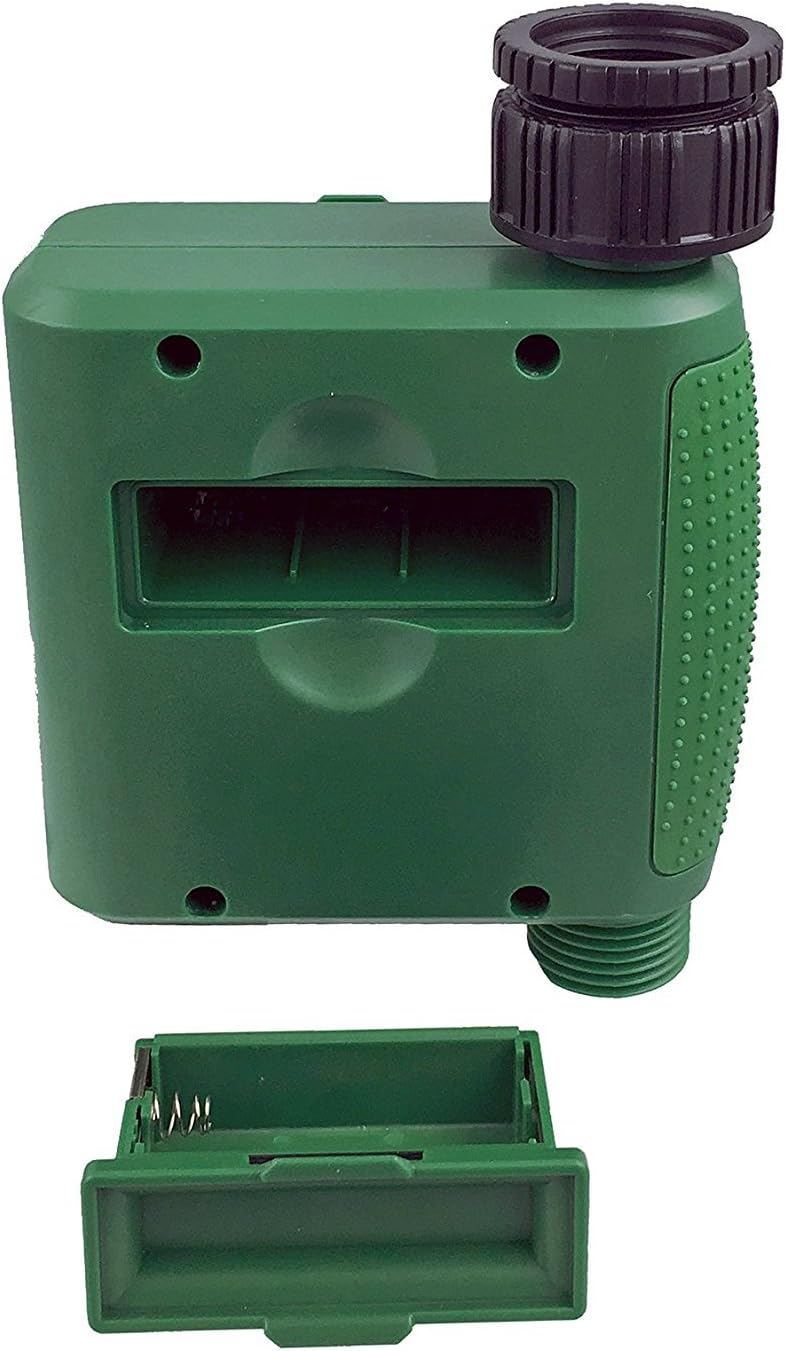
Figear 1: Roinn a’ bhataraidh leis a’ chòmhdach air a thoirt air falbh.
2. Mounting the Timer
Attach the timer to your outdoor faucet:
- Dèan cinnteach gu bheil an faucet glan agus saor bho sprùilleach.
- Screw the timer's inlet (top connector) onto a standard ¾” (GHS) outdoor hose faucet. Hand-tighten only to prevent damage. Do not overtighten.
- Connect your garden hose or irrigation system to the timer's outlet (bottom connector). Hand-tighten securely.
- Turn on the faucet fully. The timer is designed to operate under pressure.

Figure 2: Instapark PWT-07 mounted on a faucet.
Stiùireadh Obrachaidh
The timer features a large rotary dial and four buttons: SET, +, -, agus LAOIDH.

Figure 3: Control panel and LCD display.
1. A 'suidheachadh Àm an-dràsta
- Tionndaidh an dial rothlach gu SET CLOC.
- Cleachd an + agus - buttons to adjust the current hour. Press SET a dhearbhadh.
- Cleachd an + agus - buttons to adjust the current minute. Press SET a dhearbhadh.
2. Programming Watering Schedule
The timer allows you to set a start time, duration, and frequency for watering.
Suidhich àm tòiseachaidh:
- Tionndaidh an dial rothlach gu TIOMNA TIOMNA.
- Cleachd an + agus - buttons to set the desired watering start hour. Press SET a dhearbhadh.
- Cleachd an + agus - buttons to set the desired watering start minute. Press SET a dhearbhadh.
Suidhich Dè Cho Fad (Ùine):
- Tionndaidh an dial rothlach gu DÈ FHAD.
- Cleachd an + agus - buttons to set the watering duration (from 5 seconds to 360 minutes). Press SET a dhearbhadh.
Suidhich Dè Cho Tric (Tricead):
- Tionndaidh an dial rothlach gu CHO TRIC.
- Cleachd an + agus - buttons to select the watering frequency (e.g., every 10 seconds, 30 seconds, 1 minute, 3 minutes, 5 minutes, 1 hour, 2 hours, 4 hours, 12 hours, 1 day, 2 days, 3 days, 4 days, 5 days, 6 days, 7 days). Press SET a dhearbhadh.
After setting all parameters, turn the rotary dial to RUN to activate the programmed schedule.
3. Uisgeachadh le Làimh
To water manually without affecting your programmed schedule:
- Ensure the dial is set to RUN or AIRSON.
- Brùth an LAOIDH button. The display will show a default manual watering duration.
- Cleachd an + agus - buttons to adjust the desired manual watering duration.
- Brùth SET to start manual watering. The timer will run for the selected duration and then automatically shut off.
- Gus stad a chur air uisgeachadh làimhe ro-luath, brùth air a’ phutan LAOIDH putan a-rithist.
4. Gnìomh Moill Uisge
The rain delay function allows you to pause your watering schedule for a set period without losing your program settings.
- Ensure the dial is set to RUN.
- Brùth agus cùm an - button for 3 seconds. The display will show "DELAY" and a default delay duration.
- Cleachd an + agus - buttons to select a delay duration of 24, 48, or 72 hours.
- Brùth SET to activate the rain delay. The timer will resume its programmed schedule after the delay period ends.
- To cancel the rain delay, press and hold the - putan a-rithist airson 3 diogan.
Cumail suas
- Ath-nuadhachadh bataraidh: Replace batteries when the low battery indicator appears on the LCD. Always use new AA alkaline batteries.
- Glanadh: Paisg an timer le adamp aodach. Na cleachd luchd-glanaidh sgudail no solventan.
- Geamhradh: Before the first frost, disconnect the timer from the faucet. Remove the batteries and store the timer indoors in a dry, frost-free location. Failure to do so may result in damage from freezing water.
- Sgrion Filter: Periodically check the filter screen inside the inlet connector for debris. Clean if necessary to ensure proper water flow.
Fuasgladh thrioblaidean
| Trioblaid | Adhbhar a dh’fhaodadh a bhith ann | Fuasgladh |
|---|---|---|
| Timer does not turn on / LCD is blank. | Bataraidhean marbh no air an stàladh gu ceàrr. | Replace with new AA alkaline batteries, ensuring correct polarity. If still blank, remove batteries, wait for screen to fully clear, then reinsert. |
| Water does not turn on at scheduled time. |
|
|
| Water does not turn off. |
|
|
| Uisge a’ sileadh bho cheanglaichean. |
|
|
| Low battery indicator flashes even with new batteries. | Firmware not booting correctly after battery change. | Remove batteries, wait for the LCD screen to go completely dark (may take a few minutes), then reinsert new batteries. |
Sònrachaidhean
| Modail | PWT-07 |
| Stòr cumhachd | 2 x Bataraidhean Alcaileach 1.5V AA (nach eil air an toirt a-steach) |
| Seòrsa bhalbhaichean | Comhla solenoid impulse |
| Brùthadh uisge obrach | 14.5 gu 116 psi |
| Seasmhach an-dràsta | <100 µA |
| Watering Frequency Settings | 10s, 30s, 1m, 3m, 5m, 1h, 2h, 4h, 12h, 1d, 2d, 3d, 4d, 5d, 6d, 7d (16 settings) |
| Watering Duration Settings | 5s, 10s, 15s, 20s, 25s, 30s, 35s, 40s, 45s, 50s, 55s, 1-360m |
| Cruth taisbeanaidh ùine | 24-uair |
| Ìre dìon-uisge | IP66 |
| Stuth | Plastaig ABS |
| Meudan toraidh | 4.25"D x 6"W x 2.6"H |
| Cuideam nì | 14.2 Unns |
Barantas agus Taic
The Instapark PWT-07 Digital Programmable Water Timer is backed by a standard 1-year manufacturer's warranty from the date of purchase. This warranty covers defects in materials and workmanship under normal use.
For warranty claims, technical support, or any questions regarding your product, please contact Instapark customer service. Please have your purchase receipt and product model number (PWT-07) available when contacting support.
Contact information for Instapark customer service can typically be found on the manufacturer's weblàrach-lìn no na sgrìobhainnean ceannach agad.