
1. Ro-ràdh
The Imperial DABMAN i400 is a versatile audio adapter designed to enhance your existing stereo system with modern radio and streaming capabilities. It provides access to thousands of internet radio stations, digital radio (DAB+), and traditional FM radio. Additionally, it supports audio streaming via Bluetooth, UPnP/DLNA, and USB, offering a comprehensive listening experience.
2. Stiùireadh Sàbhailteachd
- Solar cumhachd: Cleachd an inneal-atharrachaidh cumhachd a tha air a thoirt seachad a-mhàin. Dèan cinnteach gu bheil an tomhas-lìonaidhtage co-ionnan ris an t-solar cumhachd ionadail agad.
- Uisge agus Taiseachd: Na cuir an inneal fosgailte do uisge, taiseachd, no lionntan a’ sileadh/a’ frasadh. Na cuir nithean làn lionntan, leithid vasaichean, air an inneal.
- Fionnarachadh: Dèan cinnteach gu bheil fionnarachadh iomchaidh ann. Na cuir bacadh air fosglaidhean fionnarachaidh. Seachain an inneal a chur air uachdar bog a dh’ fhaodadh bacadh a chur air sruth-adhair.
- Stòran teas: Cùm an inneal air falbh bho thùsan teas leithid rèididheatoran, clàran teas, stòbhaichean, no innealan eile a bhios a’ gineadh teas.
- Glanadh: Dì-cheangail an cumhachd mus glan thu e. Cleachd clò bog, tioram. Na cleachd innealan-glanaidh leaghaidh no aerosol.
- Seirbheis: Na feuch ris an toradh seo a sheirbheis dhut fhèin. Thoir sùil air gach seirbheis gu luchd-obrach le teisteanas.
3. Pasgan-susbaint
Feuch an dèan thu cinnteach gu bheil a h-uile nì anns a’ phacaid:
- Imperial DABMAN i400 Internet Digital Radio
- Adapter cumhachd
- Telescopic Antenna with F-connector
- Wire Antenna with F-connector
- Càball RCA
- Càball Fuaime (jack 3.5mm)
- Smachd Iomallach
- Leabhar-làimhe cleachdaiche (an sgrìobhainn seo)

Image: Imperial DABMAN i400 with its power adapter, telescopic antenna, wire antenna, RCA cable, 3.5mm audio cable, and remote control.
4. Toradh thallview
Aghaidh View

Image: The front of the Imperial DABMAN i400, showing its display and control buttons on the top edge.
The front of the DABMAN i400 features a clear 3.2-inch LCD display for navigation and information. Control buttons are located on the top edge of the device for easy access to functions like power, mode selection, volume, and station presets.
Cùl View agus Ceanglaichean
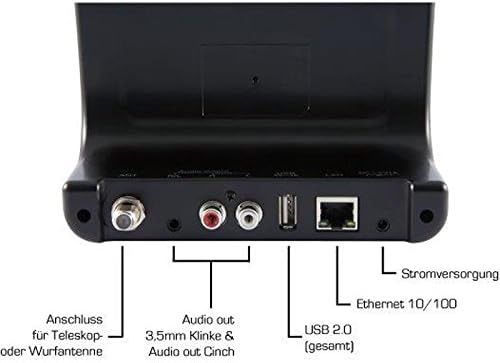
Image: The rear panel of the Imperial DABMAN i400, detailing its various connection ports. From left to right: Antenna connection (ANT), Audio output (RCA L/R and 3.5mm jack), USB 2.0 ports, Ethernet 10/100 (LAN), and Power supply (DC 5V/1A).
- ANT: F-connector for connecting the telescopic or wire antenna for DAB+/FM reception.
- Audio Output (R/L): RCA (Cinch) stereo audio output for connecting to an ampsiostam sgaoilidh no stereo.
- Toradh Fuaime (Seacaid 3.5mm): 3.5mm stereo audio output for connecting to other audio devices.
- USB 2.0: USB port for playing media from a USB storage device.
- LAN: Ethernet port (RJ45) for wired network connection.
- DC 5V/1A: Cuir a-steach cumhachd airson an inneal-atharrachaidh cumhachd a tha air a ghabhail a-steach.
5. Suidhich
- Ceangail Antenna: Screw the telescopic antenna or connect the wire antenna to the ANT F-connector on the rear panel. Extend the telescopic antenna for optimal reception.
- Ceangail ris an t-siostam claisneachd: Use the provided RCA cable to connect the Audio Output (R/L) on the DABMAN i400 to an available audio input (e.g., AUX, CD, LINE IN) on your amplifier or stereo system. Alternatively, use the 3.5mm audio cable if your system has a compatible input.
- Ceangal lìonra:
- Uèirleichte (LAN): Connect an Ethernet cable from your router to the LAN port on the rear of the DABMAN i400.
- Wireless (WLAN): The device will prompt you to set up Wi-Fi during the initial startup wizard. Select your network and enter the password.
- Ceangal cumhachd: Plug an adapter cumhachd a-steach don DC 5V/1A input on the rear panel, then plug the adapter into a wall outlet. The device will power on automatically or enter standby mode.
- Draoidh rèiteachaidh tùsail: Upon first power-on, the device will guide you through an initial setup process, including language selection, time/date settings, and network configuration. Follow the on-screen instructions.
6. Stiùireadh Obrachaidh
Seòladh bunaiteach
Use the control buttons on the top of the device or the remote control to navigate menus, select options, adjust volume, and change modes.
Taghadh Modh
Press the 'Mode' button (or equivalent on remote) to switch between available modes:
- Rèidio eadar-lìn: Access thousands of online radio stations worldwide. Browse by genre, location, or search for specific stations.
- Rèidio Didseatach DAB+: Enjoy high-quality digital radio broadcasts. The device will scan for available stations in your area.
- Rèidio FM: Tune into traditional analog FM radio stations.
- Bluetooth: Sruthaich claisneachd gun uèir bhon fhòn-smart, tablet no coimpiutair agad le comas Bluetooth.

Image: Bluetooth connectivity icon.
To pair: Select Bluetooth mode on the DABMAN i400. On your external device, search for available Bluetooth devices and select 'DABMAN i400'.
- UPnP/DLNA: Ceòl srutha files from compatible devices on your local network (e.g., a network-attached storage (NAS) drive or a computer running a media server).

Image: UPnP (Universal Plug & Play) icon.
- Ath-chluich USB: Cluich fuaim files (e.g., MP3) from a USB flash drive connected to the USB port on the rear of the device.

Image: MP3 music file ìomhaigh.
Presets
Save your favorite stations as presets for quick access. Refer to the on-screen menu for instructions on how to save and recall presets.
Air Music Control App
Control your DABMAN i400 using the Air Music Control App available for smartphones and tablets. This app allows for convenient remote control and browsing of stations.

Image: Air Music Control App icon.
7. Cumail suas
- Glanadh: Sguab an inneal le clò bog, tioram, gun lint. Na cleachd innealan-glanaidh sgrìobach, cèir no fuasglaidhean.
- Ùrachaidhean bathar-bog: Periodically check for available software updates through the device's system settings menu to ensure optimal performance and access to new features.
- Stòradh: Ma tha thu a’ stòradh an inneil airson ùine mhòr, dì-cheangail e bhon chumhachd agus stòraich e ann an àite fionnar, tioram.
8. A ’dèanamh trioblaid
- Gun chumhachd:
- Dèan cinnteach gu bheil an inneal-atharrachaidh cumhachd ceangailte gu tèarainte ris an inneal agus ri socaid cumhachd ag obair.
- Feuch ionad cumhachd eadar-dhealaichte.
- Gun fhuaim:
- Check the volume level on both the DABMAN i400 and your connected audio system.
- Ensure the audio cables are correctly connected to the appropriate input on your audio system.
- Dearbhaich gu bheil an siostam claisneachd agad air a shuidheachadh chun an stòr cuir-a-steach ceart.
- Cannot Connect to Wi-Fi/Internet:
- Dèan cinnteach gu bheil an router Wi-Fi agad air agus ag obair ceart.
- Thoir sùil dhùbailte air facal-faire Wi-Fi.
- Try moving the device closer to your Wi-Fi router or use a wired LAN connection.
- Restart your router and the DABMAN i400.
- Poor DAB+/FM Reception:
- Ensure the antenna is fully extended and positioned for optimal reception.
- Try repositioning the device or antenna.
- Check if you are in an area with good DAB+ or FM coverage.
- Cùisean Paidhir Bluetooth:
- Ensure the DABMAN i400 is in Bluetooth pairing mode.
- Dèan cinnteach gu bheil Bluetooth an inneil taobh a-muigh agad air a chomasachadh agus ri lorg.
- Move your external device closer to the DABMAN i400.
- Feuch ri na h-innealan a dhì-phaidhreadh agus ath-phaidhreadh.
9. Sònrachaidhean
| Feart | Sònrachadh |
|---|---|
| Brand | ìmpireil |
| Modail Àireamh | 22-241-00 |
| Dath | Dubh |
| Meud sgrion | 3.2 òirlich |
| Teicneòlas ceangail | Bluetooth, LAN (Ethernet), WLAN (Wi-Fi), RCA (Cinch) L/R, 3.5mm Audio Jack |
| Feartan sònraichte | Portable (as an adapter), Internet Radio, DAB+, FM, UPnP/DLNA |
| Gu h-iomlan puirt USB | 1 |
| Innealan co-fhreagarrach | Bluetooth devices, UPnP/DLNA compatible devices |
| Stòr cumhachd | AC (via power adapter) |
| Còmhlain Rèidio a tha a’ faighinn taic | FM, DAB, DAB+, Rèidio Eadar-lìn |
| Meudan toraidh | 15L x 8.1W x 14H ceudameatairean |
| Co-phàirtean air an toirt a-steach | Power Adapter, Telescopic Antenna, Wire Antenna, RCA Cable, Audio Cable, Remote Control, User Manual |
| Cànanan le taic | German, English, French, Dutch |
10. Barantas agus Taic
Barantas an Neach-dèanamh
The Imperial DABMAN i400 comes with a manufacturer's warranty. Please refer to the warranty card included in your package or the manufacturer's official website for specific terms and conditions. Spare parts availability is guaranteed for 1 year.
Taic Luchd-cleachdaidh
For technical assistance, troubleshooting beyond this manual, or warranty claims, please contact Imperial customer support. Contact information can typically be found on the manufacturer's weblàrach no ann am pasgan toraidh.