
1. Toradh thallview
The Tenergy 11W Dimmable LED Desk Lamp (Model FY-0001) is designed to provide versatile lighting for various tasks, featuring adjustable brightness, multiple color temperatures, and a convenient USB charging port. Its sleek design and flexible arm make it suitable for home and office environments.

Image: The Tenergy 11W LED Desk Lamp, taisbeanadhasing its modern design and adjustable features.
2. Dè tha sa bhogsa
- Tenergy 11W Dimmable LED Desk Lamp
- Càball cosgais USB
- Adapter cumhachd
- Leabhar-làimhe cleachdaiche (an sgrìobhainn seo)

Image: The Tenergy 11W LED Desk Lamp and its included accessories laid out on a surface.
3. Suidhich
- Thoir air falbh na pàirtean gu lèir bhon phacaid gu faiceallach.
- Cuir an lamp bunait air uachdar seasmhach, rèidh.
- Ceangail an adapter cumhachd ris an lamp's power input port, typically located at the rear of the base.
- Plug the power adapter into a standard electrical outlet. The lamp's indicator light should illuminate, indicating it is ready for use.
4. Stiùireadh Obrachaidh
4.1 Cumhachd air / dheth
Gus an lamp on or off, gently touch the Air / dheth button located on the touch control panel on the lamp'bhunait.
4.2 Ag atharrachadh soilleireachd
An lamp offers 5 levels of brightness. Use the + agus - buttons on the touch control panel to increase or decrease the light intensity.
4.3 Changing Light Modes (Color Temperature)
An lamp features 4 distinct light modes, each with a different color temperature, optimized for various activities:
- Modh Leughaidh: Provides a bright, neutral white light ideal for reading.
- Study Mode: Offers a cooler, more focused light to enhance concentration.
- Modh Relax: Emits a warm, soft light for a comfortable and calming atmosphere.
- Modh cadail: Delivers a very warm, dim light suitable for winding down before sleep.
To switch between these modes, repeatedly touch the corresponding icon on the control panel.

Image: Visual representation of the four adjustable light color temperatures available on the lamp.
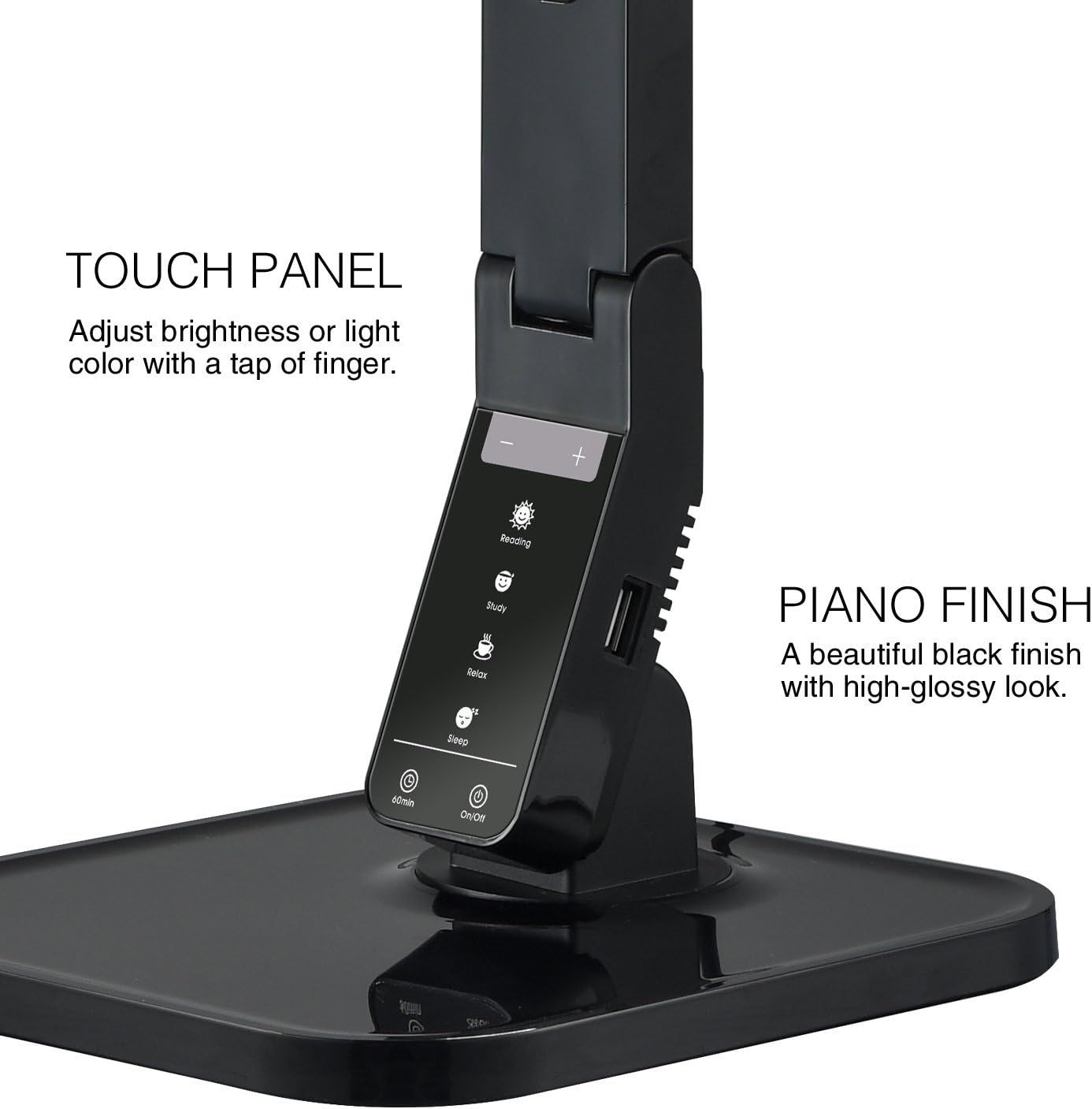
Image: The touch control panel with various light mode and brightness adjustment icons.
4.4 Using the USB Charging Port
A USB charging port is integrated into the lamp's base, allowing you to charge compatible devices such as smartphones or tablets. Simply connect your device's USB charging cable to the port.

Image: A smartphone being charged via the integrated USB port on the lamp'bhunait.
4.5 A’ gleusadh an Lamp Gàirdean
An lamp features an adjustable arm that allows you to direct the light precisely where needed. The arm can be folded, extended, and swiveled to achieve optimal positioning.

Image: Illustrations demonstrating the flexibility and adjustability of the lamp's arm.
4.6 Gnìomh timer
An lamp includes a 60-minute timer function. To activate, press the 60 mionaid button on the control panel. The lamp tionndaidhidh e dheth gu fèin-ghluasadach às deidh 60 mionaidean.
4.7 Bhidio Bathar Oifigeil
Video: An official product video from Tenergy Corporation demonstrating the features and benefits of the 11W LED Desk Lamp, including its adjustable lighting, USB charging, and sleek design.
5. Cumail suas
- Glanadh: Gus an lamp, especially its glossy finish, use a soft, dry microfiber cloth. Avoid abrasive cleaners or harsh chemicals that may damage the surface.
- Stòradh: Nuair nach eilear ga chleachdadh airson ùine mhòr, stòraich an lamp ann an àite fionnar, tioram.
6. A ’dèanamh trioblaid
- Lamp na tionndaidh air: Dèan cinnteach gu bheil an inneal-atharrachaidh cumhachd air a phlugadh gu tèarainte a-steach don dà lamp and a working electrical outlet. Check if the outlet is receiving power.
- USB port not charging: Dearbhaich an lamp is powered on and the USB cable is properly connected to both the lamp and your device. Ensure your device is compatible with USB charging.
- Solas a’ priobadh: If the light flickers, try unplugging the lamp for a few minutes and then plugging it back in. If the issue persists, contact customer support.
7. Sònrachaidhean
| Modail Àireamh | FY-0001 |
| Brand | Teannachd |
| Dètage | 11 watt |
| Seòrsa Stòr Solais | LED |
| Ìrean soilleireachd | 5 |
| Light Colors / Modes | 4 (Reading, Study, Relax, Sleep) |
| Modh smachd | Suathadh |
| Teicneòlas ceangail | USB |
| Stòr cumhachd | Electric Corded |
| Meudan toraidh | 7"D x 6.75"W x 16.7"H |
| Seòrsa Stuth | Plastaig |
| Seòrsa Crìochnachaidh | Snasail |
8. Barantas agus Taic
For warranty information or technical support, please visit the official Tenergy weblàrach-lìn no cuir fios chun roinn seirbheis teachdaiche aca. Cùm do chuidhteas ceannach airson tagraidhean barantais sam bith.
Tenergy Store: https://www.amazon.com/stores/Tenergy/page/5AE2FFA8-E197-4708-9169-C4D8CB488E9E