
1. Toradh thallview
The ADATA HM900 (model AHM900-6TU3-CEUBK) is a 6TB external hard disk drive designed for high-capacity data storage and transfer. This mechanical hard disk drive offers ample space for extensive data needs and supports simultaneous operations without compromising performance. It connects via USB, making it compatible with various devices, including personal computers and televisions.

Figear 1: Aghaidh view of the ADATA HM900 External Hard Drive.
2. Stiùireadh Stèidheachaidh
2.1 Susbaint a’ phacaid
Mus tèid thu air adhart, dèan cinnteach gu bheil a h-uile rud anns a’ phacaid:
- ADATA HM900 External Hard Disk Drive
- Càball dàta USB
- Adapter cumhachd
- Stiùireadh Tòiseachaidh Luath (ma tha e air a ghabhail a-steach)
2.2 A’ ceangal an draibh chruaidh
- Ceangail an adapter cumhachd: Plug the power adapter into the DC IN port on the back of the ADATA HM900. Connect the other end of the power adapter to a wall outlet. The device requires 12 Watts of power.
- Ceangail an càball USB: Insert one end of the provided USB data cable into the USB port (marked 'SS' for SuperSpeed USB) on the back of the hard drive.
- Ceangail ris an inneal agad: Plug the other end of the USB cable into an available USB port on your computer, television, or other compatible device.
- Cumhachd air: The drive should power on automatically. A status indicator light will typically illuminate to show it is active.
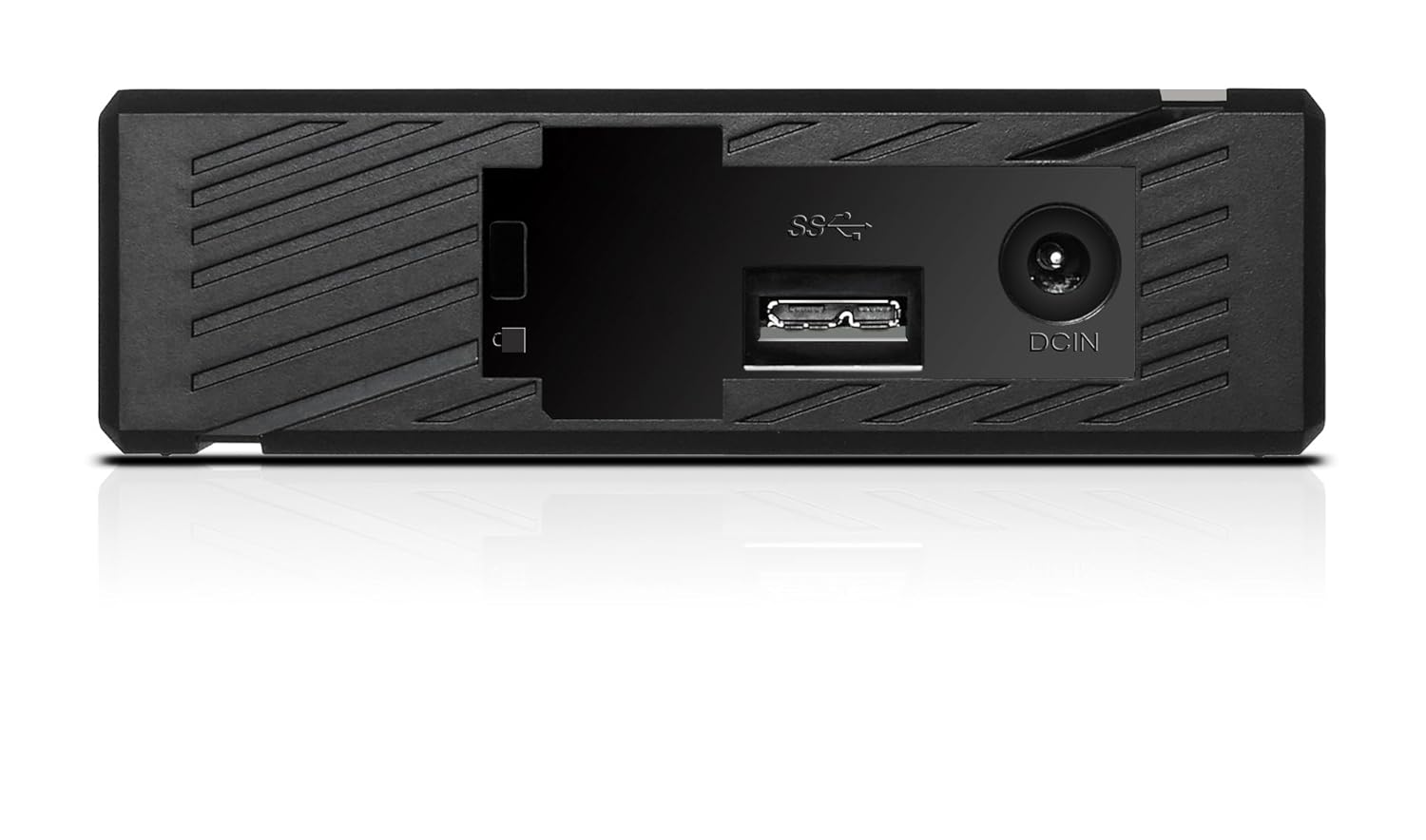
Figear 2: Cùl view of the ADATA HM900, highlighting the USB and DC IN ports for connection.
3. A’ cleachdadh an diosc cruaidh
3.1 Aithneachadh Tùsail
Upon first connection, your operating system (Windows, macOS, Linux) or compatible device (e.g., smart TV) should automatically detect the ADATA HM900. For computers, it may appear as a new drive letter or volume in 'My Computer'/'This PC' or 'Finder'.
3.2 Gluasad Dàta
Gus gluasad files, simply drag and drop them to and from the HM900 drive icon. For larger transfers, it is recommended to use your operating system's copy/paste functions or dedicated backup software.
3.3 Using with a Television
The ADATA HM900 is compatible with televisions that support external storage devices. Connect the drive as described in Section 2.2. Refer to your television's user manual for specific instructions on how to access and play media files from an external USB drive.
4. Cumail suas agus Cùram
Proper care ensures the longevity and reliability of your ADATA HM900 external hard drive:
- Dì-cheangal sàbhailte: Always safely eject or unmount the hard drive from your operating system before physically disconnecting the USB cable or power. This prevents data corruption.
- Dìon corporra: Avoid dropping or subjecting the drive to strong impacts, as it contains a mechanical hard disk that can be damaged.
- Suidheachaidhean Àrainneachdail: Store and operate the drive in a cool, dry environment, away from direct sunlight, extreme temperatures, and high humidity.
- Glanadh: Cleachd clò bog, tioram gus taobh a-muigh an draibh a ghlanadh. Na cleachd innealan-glanaidh leaghaidh no fuasglaidhean.
5. A ’dèanamh trioblaid
5.1 Draibh gun lorg
- Thoir sùil air ceanglaichean: Ensure both the power adapter and USB cable are securely connected to the drive and your device.
- Feuch port USB eile: Connect the drive to a different USB port on your computer or device.
- Dearbhaich cumhachd: Confirm the power adapter is plugged into a working electrical outlet and the drive's indicator light is on.
- Ath-thòiseachadh an inneal: Restart your computer or television and try connecting the drive again.
- Thoir sùil air Riaghladh Diosc (Windows) / Goireas Diosc (macOS): For computers, check if the drive appears in disk management tools, even if it doesn't have a drive letter assigned.
5.2 Astaran Gluasaid Dàta Slaodach
- Cleachd Port USB 3.0: Ensure the drive is connected to a USB 3.0 (or higher) port on your device for optimal speeds. USB 2.0 ports will result in slower transfers.
- Avoid Other USB Devices: Disconnect other high-bandwidth USB devices during large transfers.
- Thoir sùil air slàinte an draibhidh: Run a disk check utility on your computer to ensure the drive is healthy.
6. Sònrachaidhean
| Feart | Sònrachadh |
|---|---|
| Brand | ADATA |
| Modail Àireamh | AHM900-6TU3-CEUBK |
| Comas stòraidh didseatach | 6 TB |
| Tuairisgeul diosc cruaidh | Diosca cruaidh meacanaigeach |
| Factar cruth diosc cruaidh | 2.5 òirlich |
| Teicneòlas ceangail | USB |
| Meudan nì (LxWxH) | 19 x 12.1 x 3.65 ceudameatairean |
| Cuideam nì | 998 g |
| Dètage | 12 watt |
| Innealan co-fhreagarrach | Television, Personal Computers |
| A’ chiad cheann-latha ri fhaighinn | 11 Samhain, 2016 |
7. Barantas agus Taic
For detailed warranty information, please refer to the warranty card included with your product or visit the official ADATA website. Support resources, including drivers and firmware updates, may also be available on the ADATA support portal.