
Ro-ràdh
Tapadh leibh airson ceannachasing the QUMOX L165U 2.4GHz Wireless Gamepad. This high-quality game controller is designed for use with PC and Android devices, offering a reliable 2.4GHz wireless connection for an enhanced gaming experience. Please read this manual carefully to ensure proper setup and operation of your new gamepad.

Figure 1: QUMOX L165U Gamepad with included USB adapter and OTG connection kit.
Susbaint pacaid
Dèan cinnteach gu bheil a h-uile rud an làthair sa phacaid agad:
- 1x QUMOX L165U Gamepad
- 1x 2.4GHz USB Wireless Adapter
- 1x OTG Connection Kit (Micro USB to USB-A adapter)
Suidhich
1. Stàladh bataraidh
The QUMOX L165U Gamepad is powered by 2 AAA batteries (not included). To install the batteries:
- Lorg roinn a’ bhataraidh air cùl a’ gamepad.
- Sleamhnachadh fosgail còmhdach a’ bhataraidh.
- Cuir a-steach 2 bataraidh AAA, a’ dèanamh cinnteach gu bheil iad a’ freagairt gu ceart (+/-).
- Dùin an còmhdach bataraidh gu tèarainte.

Figure 2: Open battery compartment for AAA battery installation.
2. A 'ceangal ri PC
- Plug the 2.4GHz USB Wireless Adapter into an available USB port on your PC.
- Turn on the gamepad by pressing the 'START' button. The gamepad will automatically attempt to connect.
- The PC should recognize the gamepad and install necessary drivers automatically.
- If the gamepad does not connect, press the 'MODE' button on the gamepad to cycle through connection modes until it is recognized by your PC.
3. Connecting to an Android Device (with OTG support)
- Connect the OTG Connection Kit to your Android device's Micro USB port.
- Plug the 2.4GHz USB Wireless Adapter into the USB-A end of the OTG Connection Kit.
- Turn on the gamepad by pressing the 'START' button. The gamepad will automatically attempt to connect.
- Your Android device should recognize the gamepad.
- If the gamepad does not connect, press the 'MODE' button on the gamepad to cycle through connection modes until it is recognized by your Android device.
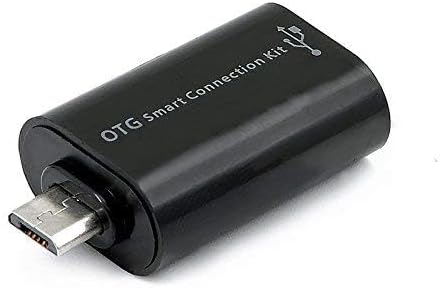
Figure 3: OTG Connection Kit for Android device connectivity.
Stiùireadh Obrachaidh
Once connected, your QUMOX L165U Gamepad is ready for use. The layout is standard for most game controllers.
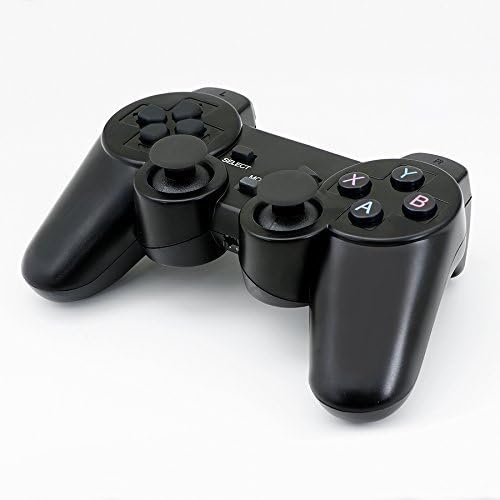
Figear 4: Mullach view of the QUMOX L165U Gamepad, highlighting button layout.
- Pad Treòrachaidh (D-Pad): Airson cuir a-steach stiùiridh mionaideach.
- Luing-stiùiridh Analogach: Dà mhaide analogach airson gluasad 360-ceum agus smachd camara.
- Putanan Gnìomh (A, B, X, Y): Putanan gnìomh àbhaisteach airson òrdughan sa gheama.
- Putanan Gualainn (L1, R1) & Brosnachaidhean (L2, R2): Located on the top of the gamepad for additional actions.
- Putan TAGH/AIR AIS: Mar as trice air a chleachdadh airson seòladh clàr-taice no gnìomhan sònraichte sa gheama.
- Putan Tòiseachaidh: Used to pause games or confirm selections.
- Putan MODE: Cycles through different operating modes (e.g., Android, PC) if automatic detection fails.
Taisbeanadh bhidio
Video 1: A seller-provided overview of a 2-pack wireless controller, demonstrating its features and compatibility. While showing a similar product, it illustrates general wireless controller usage and setup.
Cumail suas
- Glanadh: Cleachd clò bog, tioram airson an gamepad a ghlanadh. Seachain ceimigean cruaidh no stuthan sgrìobach a chleachdadh.
- Stòradh: Stòraich am gamepad ann an àite fionnar, tioram air falbh bho sholas dìreach na grèine agus teòthachd anabarrach.
- Cùram Bataraidh: Remove batteries if the gamepad will not be used for an extended period to prevent leakage.
Fuasgladh thrioblaidean
| Trioblaid | Adhbhar a dh’fhaodadh a bhith ann | Fuasgladh |
|---|---|---|
| Gamepad does not connect. | Low batteries, incorrect mode, adapter not properly inserted. | Replace batteries. Press the 'MODE' button to cycle through modes. Ensure USB adapter is fully inserted into PC or OTG adapter. |
| Chan eil putanan no luing-stiùiridh a’ freagairt. | Connection issue, game incompatibility, physical damage. | Reconnect the gamepad. Check game settings for controller support. If issue persists, contact support. |
| Android device does not recognize gamepad. | Android device lacks OTG support, OTG adapter issue. | Verify your Android device supports OTG. Ensure OTG adapter is functioning correctly. |
Sònrachaidhean
| Feart | Mion-fhiosrachadh |
|---|---|
| Modail Àireamh | L165U |
| Teicneòlas ceangail | 2.4GHz Wireless (via USB Adapter) |
| Innealan co-fhreagarrach | PC, Android (with OTG support) |
| Stòr cumhachd | 2x Bataraidhean AAA |
| Cuideam nì | 5.3 unnsa |
| Meud pacaid | 8.07 x 5.63 x 2.95 òirleach |
| Dath | Dubh |
Barantas agus Taic
Airson fiosrachadh barantais no taic theicnigeach, thoir sùil air na mion-fhiosrachadh conaltraidh a chaidh a thoirt seachad leis a’ cheannach agad no tadhail air làrach-lìn oifigeil QUMOX weblàrach. Cùm dearbhadh ceannach airson tagraidhean barantais sam bith.