
1. Ro-ràdh
Tapadh leibh airson ceannachasing the Metronic Gulli 477148 CD-MP3 Player with USB Port. This portable audio device is designed for ease of use, allowing you to enjoy your favorite music from various sources including CDs, CD-R/RW, MP3 discs, and USB flash drives. This manual provides detailed instructions to help you set up, operate, and maintain your device for optimal performance.

Figear 1: Aghaidh view of the Metronic Gulli 477148 CD-MP3 Player.
2. Fiosrachadh Sàbhailteachd
Leugh a h-uile stiùireadh sàbhailteachd gu faiceallach mus cleachd thu an toradh seo. Cùm an leabhar-làimhe seo airson fiosrachadh san àm ri teachd.
- Stòr cumhachd: Cleachd an inneal-atharrachaidh cumhachd no na bataraidhean sònraichte a-mhàin. Dèan cinnteach gu bheil an tomhas-lìonaidhtage a 'freagairt ri riatanasan an uidheim.
- Uisge agus Taiseachd: Na cuir an inneal fosgailte do uisge, taiseachd agus na cuir ann an uisge e.
- Teas: Cùm an inneal air falbh bho thùsan teas leithid rèididheatoran, clàran teas, stòbhaichean, no innealan eile (a’ gabhail a-steach ampliifiers) a bheir teas.
- Fionnarachadh: Na cuir bacadh air fosglaidhean fionnarachaidh sam bith. Stàlaich a rèir stiùiridhean an neach-dèanamh.
- Glanadh: Glan a-mhàin le clò tioram.
- Seirbheis: Na feuch ris an toradh seo a sheirbheis dhut fhèin. Thoir sùil air gach seirbheis gu luchd-obrach le teisteanas.
- Fòn-cluaise: Seachain a bhith ag èisteachd aig ìrean àrd airson amannan fada gus casg a chuir air milleadh claisneachd.
3. Toradh thallview
Familiarize yourself with the various parts and controls of your CD-MP3 player.
3.1 Front Panel Controls and Ports

Figure 2: Front panel with controls and ports.
- Volume Up/Down Buttons (V+/V-): Atharraich meud an ath-chluich.
- Taisbeanadh LCD: Shows track number, time, mode, and ID3 tag fiosrachadh.
- Putan Modh: Switches between CD, USB, and other available modes.
- Putan Cluich/Pause: A ’tòiseachadh no a’ stad ath-chluich.
- Cuir stad air a ’phutan: A 'cur stad air ath-chluich.
- Putan Roimhe/Ath-fhilleadh: Leumaidh e chun trac roimhe no tillidh e an trac làithreach air ais.
- Putan Air Adhart/Luath Air Adhart: Leumaidh e chun ath thrac no gluaisidh e air adhart gu luath an trac làithreach.
- Jack headphone (3.5mm): Ceangail fònaichean-làimhe airson èisteachd prìobhaideach.
- Input AUX: Ceangail innealan claisneachd taobh a-muigh.
- Port USB: Connect a USB flash drive for MP3 playback.
3.2 Cùl Pannal

Figure 3: Rear panel with power input.
- Cuir a-steach cumhachd AC: Connect the provided AC power adapter.
- Roinn Bataraidh: (Located on the bottom, not visible in this image) Insert batteries for portable use.
4. Suidhich
4.1 A 'toirt cumhachd don inneal
The Metronic Gulli 477148 can be powered by either an AC adapter or batteries.
- Cumhachd AC: Connect the supplied AC power adapter to the AC power input on the rear of the unit and plug the other end into a standard wall outlet.
- Cumhachd Bataraidh: Open the battery compartment (usually on the bottom of the unit). Insert 6 x 1.5V C-type batteries (not included), ensuring correct polarity (+/-). Close the battery compartment securely.
4.2 Cumhachd Tòiseachaidh Air adhart
Brùth an Cumhachd air / dheth button (if available, otherwise the Mode button usually powers it on) to turn on the device. The LCD display will illuminate.
5. Stiùireadh Obrachaidh
5.1 A' cluich CDan
- Fosgail còmhdach roinn an CD.
- Cuir CD (CD, CD-R/RW, no CD MP3) air an dealgan leis an taobh leubail suas.
- Dùin còmhdach roinn an CD gu tèarainte.
- Brùth an Modh putan gus modh CD a thaghadh.
- Brùth an Cluich / Stad putan gus ath-chluich a thòiseachadh.
- Cleachd an Roimhe/Ath-thionndaidh agus Air adhart/Fast Forward putanan gus slighean a sheòladh.
- Atharraich tomhas-lìonaidh a ’cleachdadh an V+/V- putanan.
5.2 A’ cleachdadh a’ phuirt USB
- Cuir a-steach draibhear USB flash anns a bheil MP3 files a-steach don phort USB.
- Brùth an Modh button to select USB mode. The device will automatically scan and begin playing MP3 files.
- Cleachd an Roimhe/Ath-thionndaidh agus Air adhart/Fast Forward putanan gus slighean a sheòladh.
- Atharraich tomhas-lìonaidh a ’cleachdadh an V+/V- putanan.
5.3 Headphone Usage
Connect any standard 3.5mm headphones to the headphone jack for private listening. When headphones are connected, sound will typically be muted from the built-in speakers.
Cuir a-steach 5.4 AUX
Connect an external audio device (e.g., smartphone, tablet) to the AUX input using a 3.5mm audio cable (not included). Press the Modh button to select AUX mode. Audio from the external device will play through the CD-MP3 player's speakers.
5.5 Special Playback Functions
- ID3 Function: Nuair a bhios tu a ' cluich mp3 files from a CD or USB, the LCD display will show information such as album name, artist, and track title.
- Gnìomh ath-aithris: Brùth an Dèan a-rithist button (if available, often combined with Mode or a dedicated button) to repeat the current track or all tracks.
- Gnìomh Prògram: Allows you to program a specific order of tracks for playback. Refer to the device's specific button for programming.
- Gnìomh air thuaiream: A’ cluich thracaichean ann an òrdugh air thuaiream.
- Intro Function: Plays the first 10 seconds of each track on a CD or USB, allowing for quick song preview.
6. Cumail suas
6.1 Glanadh
- Sguab taobh a-muigh an aonaid le clò bog, tioram.
- Na cleachd innealan-glanaidh sgrìobach, cèir no fuasglaidhean oir dh’ fhaodadh iad milleadh a dhèanamh air a’ chrìochnachadh.
- Airson lionsa an CD, cleachd diosc sònraichte airson lionsa CD a ghlanadh.
6.2 Stòradh
When not in use for extended periods, store the device in a cool, dry place. Remove batteries if storing for a long time to prevent leakage.
7. A ’dèanamh trioblaid
| Trioblaid | Adhbhar a dh’fhaodadh a bhith ann | Fuasgladh |
|---|---|---|
| Gun chumhachd | Chan eil an inneal-atharrachaidh AC ceangailte gu ceart; Bataraidhean air an leigeil ma sgaoil no air an cur a-steach gu ceàrr. | Thoir sùil air ceangal an inneal-atharrachaidh AC; Cuir bataraidhean nan àite no dèan cinnteach gu bheil am polarachd ceart. |
| Gun fhuaim | Fuaim ro ìosal; Fònaichean-cluaise ceangailte; Modh ceàrr air a thaghadh. | Increase volume; Disconnect headphones; Select correct mode (CD, USB, AUX). |
| CD gun a bhith a’ cluich | CD inserted incorrectly; CD dirty or scratched; CD compartment not closed; Incorrect mode. | Insert CD with label side up; Clean or replace CD; Close lid firmly; Select CD mode. |
| USB gun a bhith a ’cluich | USB drive not inserted correctly; USB drive not formatted correctly; No MP3 files on USB; Incorrect mode. | Reinsert USB drive; Ensure USB is FAT32 formatted; Transfer MP3 files to USB; Select USB mode. |
| Taisbeanadh nach eil ag obair | Device off; Faulty unit. | Turn on device; If problem persists, contact support. |
8. Sònrachaidhean
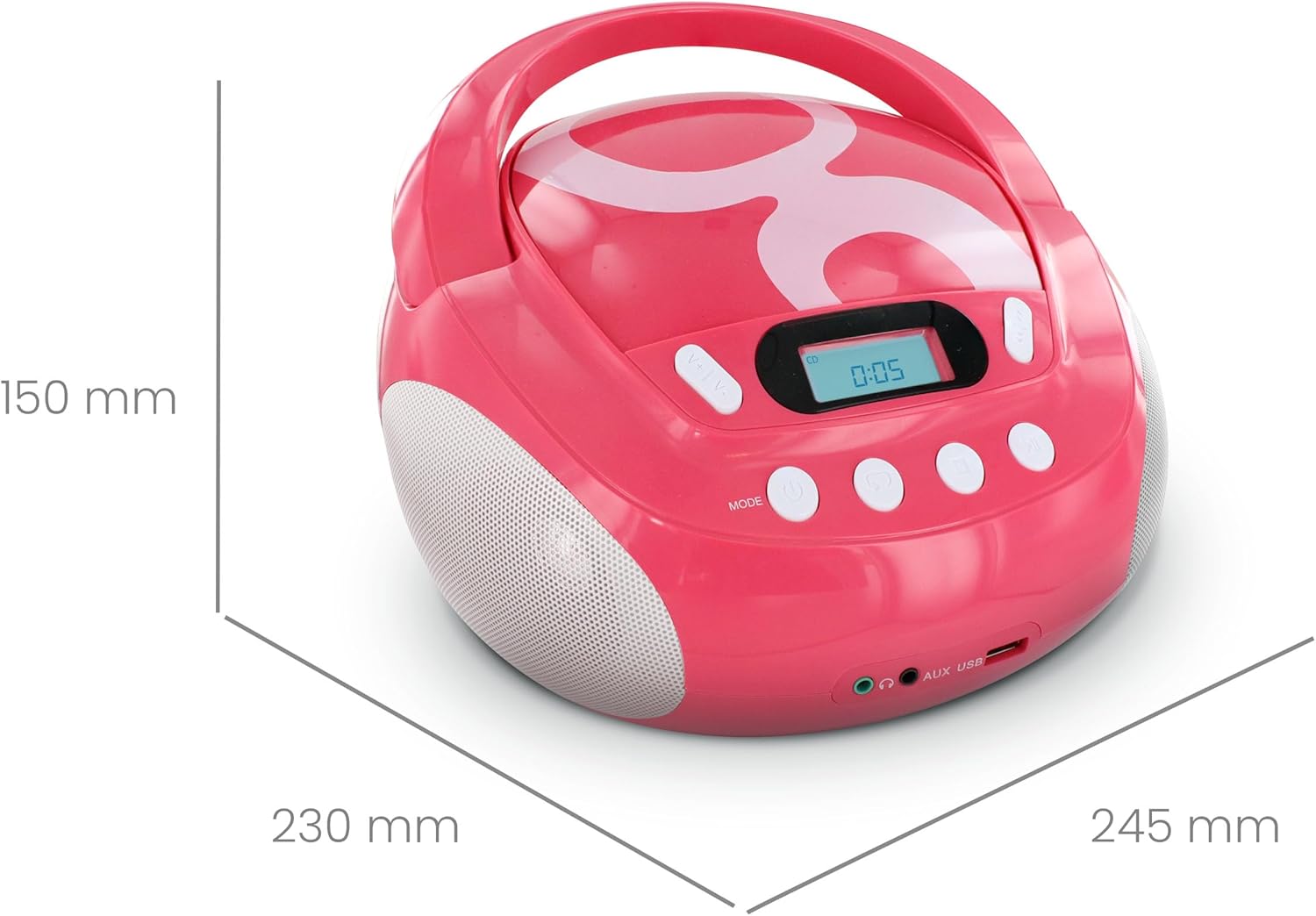
Figear 4: Meudan an toraidh.
| Brand | Metronic |
| Modail Àireamh | 477148 |
| Dath | Gulli Rose |
| Meadhanan co-fhreagarrach | CD, CD-R/RW, MP3-CD, USB (MP3 files) |
| Teicneòlas ceangail | Taic, USB |
| Jack headphone | 3.5 mm |
| Seòrsa neach-labhairt | Stereo |
| Cumhachd Toraidh | 2 watt |
| Stòr cumhachd | AC Powered, Battery Powered (6 x 1.5V C-type batteries) |
| Meudan (L x W x H) | 28 x 24 x 16 cm (mu 11 x 9.4 x 6.3 òirleach) |
| Cuideam nì | 1900 Grams (1.9 kg / 4.19 lbs) |
| Taisbeanadh | LCD le backlight |
9. Barantas agus Taic
9.1 Barantas an Neach-dèanamh
Tha an toradh seo a’ tighinn le a Barantas an neach-dèanamh 2-bliadhna bho cheann-latha a’ cheannaich. Cùm dearbhadh do cheannach airson tagraidhean barantais. Tha am barantas a’ còmhdach lochdan ann an stuthan agus obair-ciùird fo chleachdadh àbhaisteach.
9.2 Taic teachdaiche
For assistance with installation or use of this product, please contact the manufacturer's support line:
Fòn: 0892 350 315
(Note: This number may incur charges depending on your service provider and location.)