
1. Toradh thallview
The Xiaomi Mi Bluetooth Speaker Mini (Model: XMYX02YM) is a compact and portable wireless speaker designed for high-quality audio playback. It features Bluetooth connectivity for seamless pairing with various devices and a durable, waterproof design for versatile use.
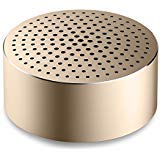
Image: The Xiaomi Mi Bluetooth Speaker Mini, a small, cylindrical black speaker with a mesh grille, showcasing an dealbhadh teann aige.
2. Suidhich
2.1 Unboxing
Carefully remove all components from the packaging. The box should contain the Mi Bluetooth Speaker Mini.
2.2 A’ cur cosgais air an neach-labhairt
The speaker is powered by an internal battery. Before first use, ensure the speaker is fully charged. Connect the appropriate charging cable (not included) to the speaker's charging port and to a compatible USB power source. The charging indicator light will provide status updates.
2.3 Pairing Bluetooth
- Cumhachd air: Press and hold the power button on the speaker until you hear an audible prompt or see the indicator light flash, indicating it is in pairing mode.
- Cuir an gnìomh Bluetooth: On your device (smartphone, tablet, laptop, MP3 player), enable Bluetooth.
- Tagh Neach-labhairt: In your device's Bluetooth settings, search for available devices. Select "Mi Bluetooth Speaker Mini" from the list.
- Dearbhaich an ceangal: Once paired, the speaker will provide an audible confirmation, and the indicator light will change to a steady state.
The speaker is now ready for audio playback.
3. Stiùireadh Obrachaidh
3.1 Cumhachd air / dheth
- Gus cumhachd a thoirt air: Brùth is cum sìos am putan cumhachd airson timcheall air 2-3 diogan.
- Gus cumhachd a thoirt dheth: Press and hold the power button for approximately 3-4 seconds until the speaker powers down.
3.2 Ath-chluich Fuaime
After successful Bluetooth pairing, play audio from your connected device. The sound will be transmitted wirelessly to the Mi Bluetooth Speaker Mini. The speaker supports stereo audio output.
3.3 Smachdan suathadh
The speaker features touch controls for basic functions. Refer to the specific touch areas on your speaker for volume adjustment, play/pause, and track navigation. (Specific touch control details may vary; consult product packaging or quick start guide for exact touch gestures).
3.4 Taic a-steach
While primarily a Bluetooth speaker, the device may support an auxiliary audio input. If available, connect an audio cable (not included) from your device's audio output to the speaker's auxiliary input port for wired audio playback.
4. Cumail suas
4.1 Glanadh
To clean the speaker, use a soft, dry, lint-free cloth. Do not use abrasive cleaners, solvents, or strong chemicals, as these can damage the speaker's surface or internal components.
4.2 Seasmhachd uisge
The Xiaomi Mi Bluetooth Speaker Mini is waterproof. While it can withstand splashes and light exposure to water, it is not designed for prolonged submersion. Ensure all ports are securely closed before exposure to water. After exposure, dry the speaker thoroughly before charging or using it again.
4.3 Stòradh
When not in use for extended periods, store the speaker in a cool, dry place away from direct sunlight and extreme temperatures. It is recommended to charge the speaker periodically to maintain battery health.
5. A ’dèanamh trioblaid
- Chan eil an neach-labhairt a’ dol air: Dèan cinnteach gu bheil am bataraidh air a luchdadh. Ceangail an neach-labhairt ri stòr cumhachd agus feuch ris a-rithist.
- Chan urrainnear paidhir a dhèanamh leis an inneal:
- Dèan cinnteach gu bheil an neach-labhairt ann am modh paidhreachaidh (solas comharrachaidh a’ priobadh).
- Cuir Bluetooth dheth agus air air an inneal agad.
- Gluais an neach-labhairt nas fhaisge air an inneal agad.
- Glan ceanglaichean Bluetooth roimhe air an inneal agad agus feuch ri paidhreachadh a-rithist.
- Gun fhuaim rè ath-chluich:
- Thoir sùil air na h-ìrean fuaime air an dà chuid an neach-labhairt agus an inneal ceangailte agad.
- Dèan cinnteach gu bheil an neach-labhairt air a chàradh gu soirbheachail agus ceangailte ris an inneal agad.
- Feuch ri claisneachd a chluich bho aplacaid no inneal eadar-dhealaichte.
- Càileachd claisneachd truagh:
- Dèan cinnteach nach eil bacadh sam bith eadar an neach-labhairt agus an inneal agad.
- Gluais air falbh bho thùsan bacadh (me, routers Wi-Fi, innealan Bluetooth eile).
- Thoir sùil air càileachd an stòr claisneachd.
6. Sònrachaidhean
| Feart | Mion-fhiosrachadh |
|---|---|
| Modail | XMYX02YM |
| Brand | XIAOMI |
| Seòrsa neach-labhairt | Sgeilp Leabhraichean (So-ghiùlain) |
| Teicneòlas ceangail | Bluetooth, Gun Uèir |
| Teicneòlas conaltraidh gun uèir | Bluetooth |
| Innealan co-fhreagarrach | Laptop, Cluicheadair MP3, Fòn-làimhe, Clàr |
| Stòr cumhachd | Cumhachd bataraidh |
| Modh smachd | Suathadh |
| Modh Toraidh Fuaim | Stereo |
| Seòrsa fuaim driver | Dràibhear Dynamic |
| Rèiteachadh Sianal Fuaim timcheall | 2.1 |
| Cuideam nì | 59 g |
| Meudan toraidh (LxWxH) | 0.43 x 0.43 x 0.2 cm (4 x 4 x 2 Millimeters) |
| Dath | Dubh |
| Uisge-dhìonach | Tha |
| Bataraidhean a dhìth | Yes (Internal, rechargeable) |
| Co-phàirtean air an toirt a-steach | Mi Bluetooth Speaker Mini |
| Dèanadair | Teicneòlas Xiaomi Inc. |
7. Barantas agus Taic
For warranty information, please refer to the documentation included with your purchase or visit the official Xiaomi website. For technical support or service inquiries, please contact Xiaomi customer service through their official channels.