
weBairson 470510
weBoost Drive 4G-X OTR (470210) Truck Cell Phone Signal Booster
Leabhar-làimhe Stiùireadh Cleachdaiche
1. Ro-ràdh
Tha an weBoost Drive 4G-X OTR is a powerful cell phone signal booster designed to enhance cellular connectivity for all types of trucks, including semis and pickup trucks, as well as for off-road enthusiasts in remote areas. This manual provides essential information for the proper installation, operation, and maintenance of your device to ensure optimal performance.
An siostam amplifies cell signals from all major U.S. carrier networks, including Verizon, AT&T, Sprint, T-Mobile, and U.S. Cellular, supporting bands 4, 5, 12/17, 13, and 2. It is engineered to provide fewer dropped calls, better voice quality, faster data speeds, increased hotspot capability, and improved audio and video streaming while on the road.

Figear 1.1: Tha an weBoost Drive 4G-X OTR system components. This image displays the main booster unit, the external trucker antenna, the power supply, and the product box, highlighting its 5G compatibility and U.S. design and assembly.
2. Dè tha sa bhogsa
Dèan cinnteach gu bheil na pàirtean uile an làthair mus tòisich thu air an stàladh:
- Drive 4G-X Booster
- 4G Trucker Mirror Mount antenna
- DC/DC 6V/2A power supply
- Pro caol ìosalfile antenna (internal antenna)
- Suidheachadh 3-shligheach
3. Setup agus Stàladh
Proper installation is crucial for the optimal performance of your weBoost Drive 4G-X OTR. Follow these general steps. For detailed, step-by-step instructions, refer to the official User Guide PDF linked in the Support section.
3.1 External Antenna Placement
Mount the 4G Trucker Mirror Mount antenna on the exterior of your truck. Choose a location that is as high as possible and clear of obstructions. The included 3-way CB antenna mount and mast extension can assist with flexible placement.

Figear 3.1: External antenna mounted on a truck. This image shows the omnidirectional, weather-resistant 17-inch antenna installed on the side of a large truck, emphasizing its ability to provide reliable cell signal wherever work takes you.
3.2 Internal Antenna Placement
Place the slim low profile antenna inside the vehicle, typically on the dashboard or near the area where you will be using your mobile device. Ensure there is sufficient separation between the external and internal antennas to prevent oscillation.
3.3 Booster Unit Connection
Connect the external antenna cable to the designated port on the Drive 4G-X Booster. Then, connect the internal antenna cable to its respective port on the booster unit.
3.4 Ceangal cumhachd
Connect the DC/DC 6V/2A power supply to the booster unit and then plug it into your vehicle's power outlet (e.g., cigarette lighter socket). The booster will power on automatically.
3.5 A ’cleachdadh an weBoost App for Installation
For easier installation and troubleshooting, download the official weBoost App. It provides step-by-step video guides, an antenna positioning guide, and allows you to see before-and-after signal readings.

Figear 3.2: Tha an weBoost App interface. This image illustrates how the app helps users easily install and troubleshoot their weBoost device by providing step-by-step videos, an antenna positioning guide, and signal readings.
4. Stiùireadh Obrachaidh
Once installed and powered on, the weBoost Drive 4G-X OTR operates automatically. The booster will detect available cellular signals, amplify them, and rebroadcast them inside your vehicle.
- Comharra Comharra: The booster unit typically has an LED indicator that shows its operational status. Refer to the full user manual for specific LED patterns and their meanings.
- Suidheachadh inneal: For best results, keep your mobile device within the coverage area of the internal antenna. The closer your device is to the internal antenna, the stronger the boosted signal will be.
- Gnìomh ioma-chleachdaiche: The Drive 4G-X OTR supports multiple users simultaneously, allowing all passengers to benefit from the boosted signal.
5. Cumail suas
Tha an weBoost Drive 4G-X OTR is designed for durability and requires minimal maintenance. However, regular checks can ensure its longevity and optimal performance.
- Ceanglaichean càball: Dèan sgrùdadh bho àm gu àm air a h-uile ceangal càball gus dèanamh cinnteach gu bheil iad tèarainte agus saor bho mhilleadh.
- Suidheachadh antenna: Inspect the external antenna for any physical damage, especially after long trips or exposure to harsh weather conditions. Ensure it remains firmly mounted.
- Glanadh: Clean the booster unit and antennas with a soft, dry cloth. Do not use harsh chemicals or abrasive cleaners.
- Ùrachaidhean bathar-bog: While not typically user-updatable, ensure your device is registered with weBoost for any potential firmware updates or important notifications.
6. A ’dèanamh trioblaid
Ma tha duilgheadasan agad le do chuid fhèin weBoost Drive 4G-X OTR, try the following troubleshooting steps:
- Gun leasachadh air comharran:
- Dèan cinnteach gu bheil a h-uile ceangal tèarainte.
- Verify the power supply is working and the booster is powered on (check LED indicator).
- Increase the separation distance between the external and internal antennas.
- Reposition the external antenna for better signal reception from the nearest cell tower.
- Confirm there is at least one bar of existing signal outside the vehicle for the booster to ampliify.
- Flashing Lights on Booster:
- Refer to the full user manual for specific flashing light patterns, as they often indicate oscillation (feedback loop) or other operational issues.
- Àrdachadhasing antenna separation is a common solution for oscillation.
- Poor Voice Quality or Data Speeds:
- Ensure your mobile device is close to the internal antenna.
- Check for any physical obstructions between your device and the internal antenna.
If problems persist after attempting these steps, please contact weBtaic luchd-cleachdaidh oost.
7. Sònrachaidhean
| Feart | Mion-fhiosrachadh |
|---|---|
| Modail Àireamh | 470510 |
| Meudan toraidh | 21.75 x 1.5 x 3.5 òirleach |
| Cuideam nì | 5 not |
| Teicneòlasan ceangail | Uèirleas |
| Inbhe conaltraidh gun uèir | Tricead rèidio |
| Seòrsa ceangail | SMA Boireann |
| Solar cumhachd | DC/DC 6V/2A |
| Còmhlain le taic | 4, 5, 12/17, 13, 2 |
| Buannachd as motha | Suas gu 50 dB |
| Cumhachd Uplink | Suas gu 24.8 dBm |
| Cumhachd Downlink | Suas gu 2.9 dBm |
8. Barantas agus Taic
weBoost products are designed, engineered, and assembled in the USA, ensuring high quality and reliability. They are certified by the FCC and authorized by every cellular carrier in the US, Canada, and Mexico, and are 5G compatible.
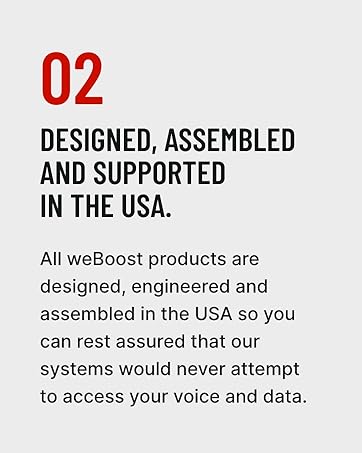
Figear 8.1: Commitment to USA design and assembly. This image highlights weBoost's dedication to designing, engineering, and assembling all products in the USA, ensuring quality and data privacy.
weBoost offers a 30-day money-back guarantee. If you are not satisfied with your purchase, you may return it within 30 days.
For further assistance, detailed user guides, or to contact support, please visit the official weBear website or refer to the documents provided with your product:
- Stiùireadh Cleachdaiche (PDF)
- Leabhar-làimhe Cleachdaiche (PDF)
- Tadhail air an weBoost Store on Amazon
Note: No official product videos with 'creator_type: Seller' were found in the provided data to embed in this manual.
Ask a question about this manual
Ask about setup, troubleshooting, compatibility, parts, safety, or missing instructions. Manuals+ will review the question and use this page’s manual context to help answer it.