
Stiùireadh sàbhailteachd cudromach
Leugh a h-uile stiùireadh gu faiceallach mus cleachd thu e.
- Tarraing am pluga den neach-leantainn a-mach às an t-socaid cumhachd an-còmhnaidh mus glan, mus dèan thu seirbheis no mus gluais thu e.
- Na cuir do chorragan no nithean sam bith eile tron ghriod nuair a bhios an neach-leantainn ag obair.
- Na obraich neach-leantainn sam bith le sreang no pluga millte. Thoir air falbh neach-leantainn no till air ais gu goireas seirbheis ùghdarraichte airson sgrùdadh agus / no càradh.
- Na ruith corda fo bhrat-ùrlair. Na còmhdaich corda le bratan tilgeil, ruitheadairean, no còmhdach coltach ris. Cuir air dòigh sreang air falbh bhon raon trafaic agus far nach tèid e a-null.
- Na cleachd am fanadair ann am fliuch no damp locations such as bathrooms or laundry areas.
- Chan eil an inneal-leantainn seo ach airson a chleachdadh a-staigh. Na cleachd a-muigh.
- Keep the fan away from curtains, drapes, or any objects that may get caught in the fan blades.
- Supervise children when the fan is in use.
Bathar seachadview
The Optimus 18-inch High Velocity Industrial Floor Fan is designed to provide powerful air circulation in various indoor environments. Its robust construction and high-velocity motor make it suitable for workshops, garages, and large rooms.
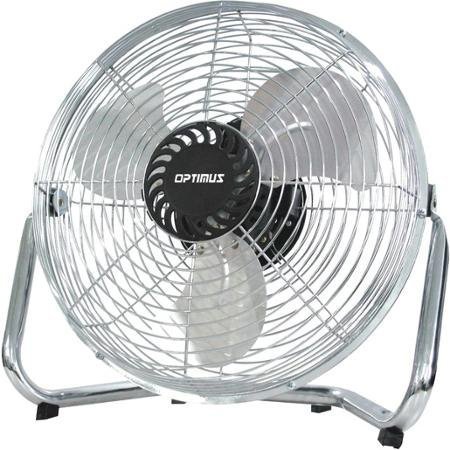
Image: Optimus 18-inch High Velocity Industrial Floor Fan. This image shows the fan with its silver metallic finish and sturdy floor stand.
Prìomh fheartan:
- 18-inch diameter for wide air distribution.
- Industrial-grade high velocity airflow.
- Durable metallic finish.
- Floor standing design for stable placement.
- Multiple power levels for adjustable airflow.
Stiùiridhean rèiteachaidh
- Unpack the Fan: Thoir an neach-leantainn agus na pàirtean uile a-mach às a’ phacaid gu faiceallach. Cùm am pacaigeadh airson stòradh no còmhdhail san àm ri teachd.
- Assemble the Floor Stand:
- Attach the fan head to the floor stand using the provided screws and tools. Ensure all connections are secure.
- Verify the fan head can pivot smoothly on the stand.
- Suidheachadh: Place the fan on a firm, level surface. Ensure there is adequate space around the fan for proper air circulation and to prevent obstruction of the air intake/output. Keep the fan at least 3 feet away from walls or furniture.
- Ceangal cumhachd: Ensure the fan is in the "OFF" position before plugging it into a standard 120V AC electrical outlet.
Stiùireadh Obrachaidh
This fan features push-button controls for easy operation. A remote control may also be included for convenience.
- Cumhachd air / dheth: Locate the power button on the control panel. Press the button once to turn the fan ON. Press it again to turn the fan OFF.
- Ag atharrachadh astar luchd-leantainn: The fan has 4 power levels. After turning the fan ON, repeatedly press the speed control button to cycle through the available speed settings (Low, Medium, High, Max). The fan will operate at the selected speed.
- Ag atharrachadh stiùireadh sruth-adhair: The fan head can be tilted manually to direct airflow upwards or downwards. Gently tilt the fan head to the desired angle. Do not force the fan head beyond its intended range of motion.
Cumail suas
Nì glanadh is cumail suas cunbhalach cinnteach à coileanadh as fheàrr agus leudaichidh e beatha an neach-leantainn agad.
- Glanadh an Fan:
- Always unplug the fan from the power source before cleaning.
- Cleachd bog, damp cloth to wipe the exterior surfaces of the fan. Do not use abrasive cleaners or harsh chemicals, as these may damage the finish.
- To clean the fan blades, carefully remove the front grille (if detachable, refer to assembly instructions for details). Wipe the blades with a soft cloth. Ensure the grille is securely reattached before operating the fan.
- Dèan cinnteach gu bheil a h-uile pàirt gu tur tioram mus cuir thu an neach-leantainn air ais a-steach.
- Stòradh: Nuair nach eilear ga chleachdadh airson ùine mhòr, stòraich an neach-leantainn ann an àite fionnar, tioram. Thathar a’ moladh a stòradh san phacaid thùsail aige gus a dhìon bho dhuslach agus milleadh.
Fuasgladh thrioblaidean
| Trioblaid | Adhbhar a dh’fhaodadh a bhith ann | Fuasgladh |
|---|---|---|
| Chan eil an neach-leantainn a’ tionndadh air. | Not plugged in; power outlet not working; fan switch is off. | Ensure fan is securely plugged into a working outlet. Check household fuse/circuit breaker. Press the power button to turn the fan on. |
| Sruth adhair ìosal. | Fan speed set too low; obstructed intake/output; dirty blades. | Increase fan speed. Clear any obstructions. Clean fan blades and grilles as per maintenance instructions. |
| Fuaim neo-àbhaisteach no crathadh. | Loose parts; fan not on a level surface; foreign object in blades. | Unplug the fan and check for any loose screws or components. Place the fan on a stable, level surface. Carefully inspect for and remove any foreign objects. |
Sònrachaidhean
| Feart | Mion-fhiosrachadh |
|---|---|
| Brand | Optimus |
| Ainm Modail | Luas àrd |
| Àireamh Modail Nì | 306c1b92-f36b-4ccc-ac62-2ad33d5c9efb |
| Trast-thomhas | 18 òirlich |
| Dath | Airgiod |
| Stoidhle | Tionnsgalach |
| Stòr cumhachd | Electric Corded |
| An àireamh de ìrean cumhachd | 4 |
| Modh smachd | Smachd putan |
| Cleachdadh a-staigh / a-muigh | A-staigh |
| Co-phàirtean air an toirt a-steach | Floor Stand, Remote Control |
| Sònrachadh Met | OSHA |
Barantas agus Taic
Optimus products are manufactured to high-quality standards. This product is covered by a limited warranty against defects in materials and workmanship from the date of purchase. Please refer to the warranty card included with your product for specific terms and conditions.
For technical support, troubleshooting assistance, or warranty claims, please contact Optimus customer service. Contact information can typically be found on the product packaging or the official Optimus weblàrach.
Cùm dearbhadh do cheannach airson adhbharan barantais.