
1. Ro-ràdh
The Ikan DS1 Beholder Gimbal is a 3-axis gyro-stabilized brushless motor gimbal designed to provide smooth, stable footage for DSLR and mirrorless cameras. It is engineered for portability and ease of use, supporting cameras weighing up to 3.7 lbs (1.7 kg). This manual provides essential information for the proper setup, operation, and maintenance of your DS1 Beholder Gimbal.

Figure 1.1: The Ikan DS1 Beholder Gimbal with a DSLR camera attached, demonstrating its primary function as a camera stabilizer.
2. Pasgan-susbaint
Dèan cinnteach gu bheil na nithean a leanas uile air an toirt a-steach don phacaid agad:
- Stàbaill Gimbal
- Pleit fuasglaidh luath
- Camera Offset Bracket
- Three Batteries (Type 18650)
- Neach-gleidhidh bataraidh
- Cap bataraidh
- Càball meanbh USB
- Solas LED USB
- Laser Cut Foam Soft Carry Case

Figure 2.1: All components of the Ikan DS1 Beholder Gimbal stored within its protective carry case.
3. Feartan toraidh
- 3-Axis Gyro Stabilized Brushless Motors: Ensures smooth and stable video footage by counteracting unwanted camera movements across pan, tilt, and roll axes.
- Camera Weight Capacity: Supports DSLR and mirrorless cameras weighing up to 3.7 lbs (1.7 kg).
- Lithium Battery Powered: Utilizes rechargeable lithium-ion batteries for extended operation.
- 3/8” - 16 Tripod Mount Socket: Allows for easy mounting on tripods, monopods, or other support systems.
- Illuminated ON-OFF Switch/Battery Indicator: Provides clear indication of power status and remaining battery life.
4. Stiùirich rèiteachaidh
4.1 Stàladh bataraidh
- Unscrew the battery cap from the bottom of the gimbal handle.
- Insert the three 18650 lithium-ion batteries into the battery holder, ensuring correct polarity as indicated.
- Place the battery holder with batteries into the gimbal handle.
- Securely screw the battery cap back onto the handle.

Figure 4.1: The battery holder with three 18650 batteries being inserted into the gimbal handle.
4.2 Stàladh camara
- Attach the quick release plate to the bottom of your camera using the provided screw. Ensure it is securely fastened.
- If your camera setup requires it, use the camera offset bracket to adjust the camera's position for optimal balance.
- Slide the quick release plate with the camera into the gimbal's camera mount.
- Lock the quick release mechanism to secure the camera.
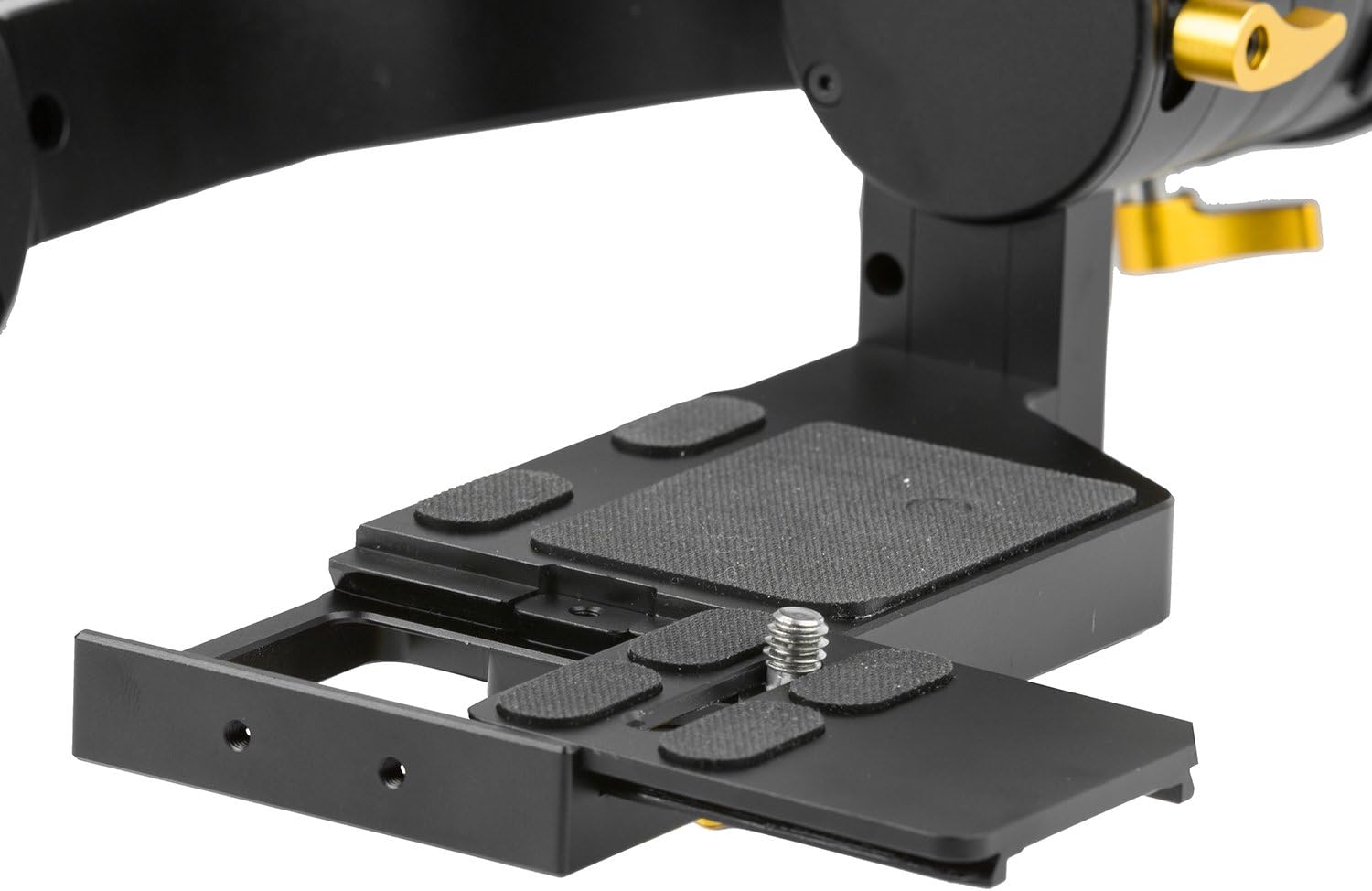
Figure 4.2: The quick release plate and camera mounting area, showing adjustment points for camera placement.
4.3 Cothromachadh a’ Chamara
Proper balancing is critical for optimal gimbal performance and to prevent motor strain. The camera must be balanced on all three axes (tilt, roll, and pan) before powering on the gimbal.
- Cothromachadh Axis Claonadh: Adjust the camera's forward/backward position on the quick release plate until the camera remains level when tilted forward or backward.
- Cothromachadh Axis Rollaidh: Adjust the camera's left/right position until the camera remains level when rotated along its roll axis.
- Cothromachadh Pan-Axis: Hold the gimbal horizontally and adjust the pan arm until the gimbal remains stable without drifting to one side.
Thoir an aire: Cameras with heavy front lenses may require careful adjustment or an offset bracket to achieve proper balance. Ensure the camera can move freely without obstruction from the gimbal body.
5. Obrachadh
5.1 A’ cur cumhachd air/dheth
Press and hold the illuminated ON-OFF switch located on the handle to power the gimbal on or off. The indicator light will show the battery status.
5.2 Modhan Obrachaidh
The DS1 Beholder Gimbal typically features multiple operating modes to suit various shooting scenarios. Refer to the quick start guide or manufacturer's website for specific mode activation and functionality. Common modes include:
- Lean am modh: The camera smoothly follows the operator's pan and tilt movements.
- Modh Lock: The camera maintains a fixed direction, regardless of the operator's movements.
- Modh Inbhirichte: Allows for underslung shots by holding the gimbal upside down.
Gliocas: Practice with the gimbal in a safe environment to familiarize yourself with its controls and modes before critical shoots.
6. Cumail suas
- Glanadh: Cleachd clò bog, tioram airson an gimbal a ghlanadh. Seachain innealan-glanaidh leaghaidh no fuasglaidhean a chleachdadh.
- Stòradh: Store the gimbal in its protective carry case in a cool, dry place when not in use. Remove batteries if storing for extended periods.
- Cùram Bataraidh: Charge batteries fully before each use. Do not overcharge or completely drain the batteries.
- Ùrachaidhean firmware: Periodically check the Ikan weblàrach-lìn airson ùrachaidhean firmware sam bith a tha rim faighinn gus dèanamh cinnteach à coileanadh agus co-chòrdalachd as fheàrr.
7. A ’dèanamh trioblaid
| Trioblaid | Adhbhar a dh’fhaodadh a bhith ann | Fuasgladh |
|---|---|---|
| Gimbal shakes or vibrates uncontrollably. | Improper camera balance; camera weight exceeds limit; motor calibration issue. | Ensure camera is perfectly balanced on all axes. Verify camera weight is within 3.7 lbs. Perform a motor calibration as per manufacturer instructions. |
| Chan eil an Gimbal a’ tionndadh air. | Depleted batteries; incorrect battery installation. | Charge batteries fully. Re-install batteries, ensuring correct polarity. |
| Camera movement is not smooth. | Poor balance; obstruction; low battery. | Re-balance the camera. Check for any physical obstructions. Ensure batteries are sufficiently charged. |
| Gimbal motors make unusual noises. | Overloaded motors due to imbalance or excessive weight. | Immediately power off the gimbal. Re-balance the camera. Reduce camera payload if it exceeds the specified limit. |
8. Sònrachaidhean
| Feart | Mion-fhiosrachadh |
|---|---|
| Modail Àireamh | DS1 |
| Brand | Ican |
| Meudan toraidh | 3.9 x 14.8 x 7.9 òirleach (9.9 x 37.6 x 20.1 cm) |
| Cuideam nì | 4 not (1.8 kg) |
| Innealan co-fhreagarrach | Cameras (DSLRs and Mirrorless up to 3.7 lbs / 1.7 kg) |
| Bataraidhean | 3 Lithium Ion batteries (Type 18650, included) |
| Mount Tripod | 3/8” - 16 Socket |
| Dath | Dubh |
| Dèanadair | Ican |
| UPC | 847983015429 |
9. Barantas agus Taic
For warranty information, technical support, or service inquiries, please contact Ikan customer support directly. Details can typically be found on the official Ikan weblàrach no taobh a-staigh pasgan an toraidh.
Weblàrach: www.ikancorp.com


