
Ro-ràdh
Tapadh leibh airson ceannachasing the SENTRY HPXBT150 Bluetooth Flat Cord Earbuds. This manual provides detailed instructions on how to set up, operate, and maintain your new wireless earbuds. Please read this manual thoroughly before use to ensure optimal performance and longevity of your device.
Susbaint pacaid
- SENTRY HPXBT150 Bluetooth Flat Cord Earbuds
- Cùis Dìon
- USB Charging Cable (Micro-USB)
- Removable Ear Hooks
- Leabhar-làimhe cleachdaiche
Bathar seachadview
The SENTRY HPXBT150 earbuds feature Bluetooth wireless technology, allowing for a cord-free listening experience. They include an in-line microphone for hands-free calls and media control buttons for easy operation. Removable ear hooks provide a secure fit, especially during physical activity.
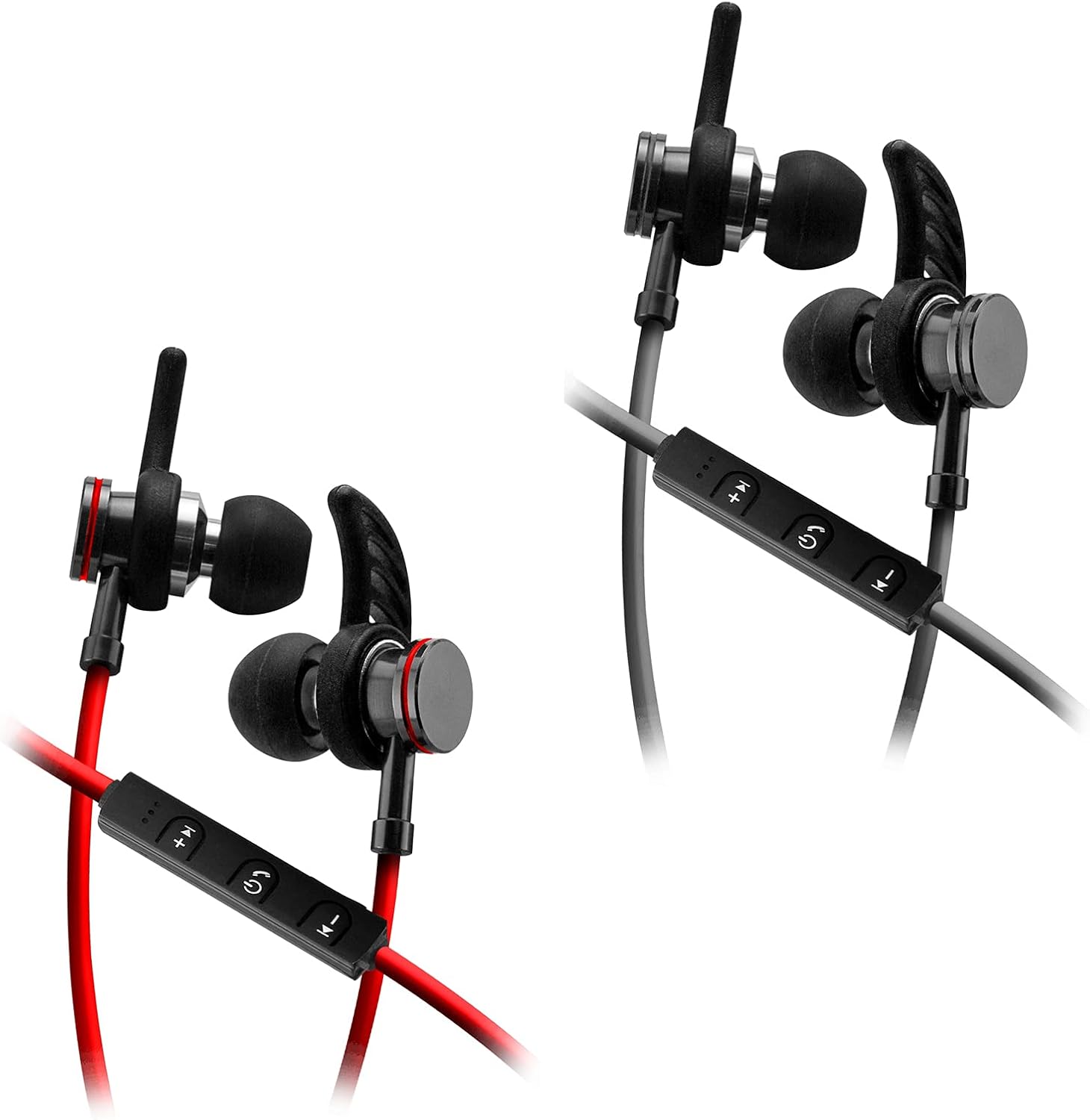
Image: SENTRY HPXBT150 Bluetooth Earbuds showing the in-line control panel and ear hooks. The control panel features volume up/next track, power/multifunction, and volume down/previous track buttons.
Suidhich
1. A' cur cosgais air na Earbuds
- Locate the Micro-USB charging port on the in-line control unit.
- Connect the provided USB charging cable to the earbuds' charging port.
- Cuir ceann eile a’ chàball USB a-steach do thùs cumhachd USB co-chòrdail (me, port USB coimpiutair, inneal-atharrachaidh balla USB).
- The LED indicator light will illuminate during charging. It will change color or turn off once charging is complete. A full charge typically takes approximately 1-2 hours.
2. Càraid Bluetooth
- Dèan cinnteach gu bheil na fònaichean-cluaise làn-luchdaichte mus dèan thu paidhreachadh an toiseach.
- Press and hold the multi-function button (usually the center button on the in-line control) for approximately 5-7 seconds until the LED indicator light flashes red and blue alternately. This indicates the earbuds are in pairing mode.
- Air an inneal agad le comas Bluetooth (fòn cliste, tablet, coimpiutair), rach gu clàr-taice roghainnean Bluetooth.
- Dèan comas air Bluetooth agus lorg innealan a tha rim faighinn.
- Select "HPXBT150" or a similar name from the list of found devices.
- Once successfully paired, the LED indicator on the earbuds will typically flash blue slowly or turn off, and you will hear an audible confirmation.
- Ma thèid iarraidh ort facal-faire a thoirt seachad, cuir a-steach “0000”.
Stiùireadh Obrachaidh
Cumhachd air / dheth
- Cumhachd air: Brùth is cum sìos am putan ioma-ghnìomhach airson timcheall air 3 diogan gus am bi an comharra LED a’ lasadh gorm agus gus an cluinn thu fuaim cumhachd air.
- Cumhachd dheth: Press and hold the multi-function button for approximately 3-5 seconds until the LED indicator flashes red and you hear a power-off tone.
Dealbh-chluich Ciùil
- Cluich / Stad: Brùth am putan ioma-ghnìomh aon uair.
- Meud suas: Brùth am putan ‘+’.
- Meud sìos: Brùth am putan '-'.
- An ath cheum: Brùth is cum sìos am putan ‘+’.
- Rian roimhe: Brùth is cum sìos am putan '-'.
Stiùireadh Call
- Freagairt/Cuireadh Call: Brùth am putan ioma-ghnìomh aon uair.
- Call a dhiùltadh: Brùth agus cum sìos am putan ioma-ghnìomhach airson timcheall air 2 diogan.
- Deasaich an àireamh mu dheireadh: Brùth dà uair air a’ phutan ioma-ghnìomhach.
Cumail suas
- Glanadh: Cleachd clò bog, tioram airson na cluasan-cluaise a ghlanadh. Na cleachd ceimigean cruaidh no stuthan sgrìobach.
- Stòradh: When not in use, store the earbuds in the provided protective case to prevent damage.
- Cùram Bataraidh: Gus beatha bataraidh a ghleidheadh, seachain na fònaichean-cluaise a dhì-luchdachadh gu tur gu tric. Cuir cosgais orra gu cunbhalach, eadhon ged nach tèid an cleachdadh airson ùine mhòr.
- Seachain Tais: Keep the earbuds away from water and excessive moisture.
Fuasgladh thrioblaidean
| Trioblaid | Fuasgladh comasach |
|---|---|
| Chan eil na cluais-fònaichean a’ dol air. | Ensure the earbuds are fully charged. Connect to a power source and allow time to charge. |
| Chan urrainnear paidhir a dhèanamh leis an inneal. | Ensure earbuds are in pairing mode (flashing red/blue). Turn off and on Bluetooth on your device. Move earbuds closer to your device. Forget previous pairings on your device and try again. |
| Gun fhuaim no meud ìosal. | Check volume levels on both the earbuds and your connected device. Ensure earbuds are properly paired. Try re-pairing the earbuds. |
| Ceangal eadar-amail. | Dèan cinnteach nach eil bacadh sam bith eadar na fònaichean-cluaise agus an inneal agad. Gluais nas fhaisge air an inneal agad. Seachain àrainneachdan le Wi-Fi làidir no bacadh gun uèir eile. |
Sònrachaidhean
- Modail: HPXBT150
- Teicneòlas ceangail: Wireless (Bluetooth)
- Aonad dràibhear: 10mm
- Impedance: 32+/-3 Ohms
- Cugallachd: 103dB +/- 3dB
- Freagairt tricead: 20Hz - 20kHz
- Innealan co-fhreagarrach: Phones, Tablets, MP3 Players, Computers, Gaming Consoles
- Seòrsa smachd: Smachd nam Meadhanan
- Feartan sònraichte: Microphone Included, USB Connectivity, Removable Ear Hooks
- Cuideam nì: 2.08 unnsa
Fiosrachadh Sàbhailteachd
- Do not expose the earbuds to extreme temperatures, direct sunlight, or fire.
- Do not disassemble or modify the earbuds. This may void the warranty and cause damage.
- Seachain a bhith ag èisteachd aig ìrean àrd airson amannan fada gus casg a chuir air milleadh claisneachd.
- Cùm a-mach à ruigsinneachd clann is peataichean.
- Cuir às don toradh gu ciallach a rèir riaghailtean ionadail.
Barantas agus Taic
For warranty information and technical support, please refer to the documentation included with your purchase or contact SENTRY customer service directly. Keep your proof of purchase for warranty claims.