
1. Ro-ràdh
This manual provides comprehensive instructions for the setup, operation, and maintenance of the EDUP EP-3701 USB WiFi Disk. The EP-3701 is a portable wireless storage device designed to expand storage and facilitate data sharing for iOS and Android smartphones and tablets without the need for cables or a computer.
Leugh an leabhar-làimhe seo gu faiceallach mus cleachd thu an inneal gus dèanamh cinnteach gu bheil e ag obair ceart agus gus casg a chuir air milleadh.
2. Toradh thallview
The EDUP EP-3701 acts as a bridge between your USB storage devices (like USB flash drives or external hard drives) and your mobile devices via a Wi-Fi connection. It creates its own Wi-Fi hotspot, allowing multiple devices to connect and access stored files aig an aon àm.
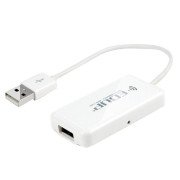
Dealbh 2.1: Aghaidh view of the EDUP EP-3701 USB WiFi Disk, showing the USB host port and the integrated USB cable.
3. Prìomh fheartan
- Wireless Data Access: Ruigsinneachd files on connected USB storage devices wirelessly from smartphones, tablets, and computers.
- Taic ioma-chleachdaiche: Allows multiple users to connect and stream/access data simultaneously.
- Dealbhadh so-ghiùlain: Beag agus aotrom, freagarrach airson siubhal agus cleachdadh air an rathad.
- Stòr cumhachd: Powered via USB, can be connected to a USB wall adapter, power bank, or computer USB port.
- Smachd app: Dedicated mobile application for easy file management and device configuration.
4. Pasgan-susbaint
Dèan cinnteach gu bheil a h-uile nì anns a’ phacaid:
- EDUP EP-3701 USB WiFi Disk
- Stiùireadh tòiseachaidh luath (an leabhar-làimhe seo)
5. Suidhich
5.1. Powering Air an inneal
- Connect the integrated USB cable of the EP-3701 to a USB power source (e.g., a 5V/1A USB wall adapter, a power bank, or a computer's USB port).
- The power indicator light on the device will illuminate, indicating it is powered on.
5.2. Connecting USB Storage
- Insert your USB flash drive or external hard drive into the USB host port on the EP-3701.
- Ensure the USB storage device is properly seated.
5.3. Connecting Mobile Device
- On your smartphone or tablet, go to Wi-Fi settings.
- Locate and connect to the Wi-Fi network named "EDUP_XXXXXX" (XXXXXX will be the last six digits of the device's MAC address).
- The default password is "12345678". It is recommended to change this password after initial setup.
- Download and install the "WiFi Disk" application from your device's app store (App Store for iOS, Google Play Store for Android).
- Open the "WiFi Disk" app. The app will automatically detect and connect to the EP-3701.
6. Stiùireadh Obrachaidh
6.1. File Riaghladh
- Dèan brobhsadh Files: Within the "WiFi Disk" app, navigate through the folders and files on the connected USB storage.
- Luchdaich suas Files: Gluasad files from your mobile device to the USB storage connected to the EP-3701.
- Luchdaich sìos Files: Gluasad files from the USB storage to your mobile device.
- Meadhanan Sruth: Cluich bhideothan, ceòl, agus view photos directly from the USB storage without downloading.
6.2. Roghainnean lìonra
The "WiFi Disk" app allows you to configure network settings:
- Change Wi-Fi Name (SSID): Modify the name of the EP-3701's Wi-Fi network.
- Change Wi-Fi Password: Update the password for the Wi-Fi network.
- Internet Passthrough (Bridge Mode): Connect the EP-3701 to an existing Wi-Fi network to provide internet access to connected devices while still allowing access to the USB storage.
7. Cumail suas
- Glanadh: Cleachd clò bog, tioram gus taobh a-muigh an inneil a ghlanadh. Na cleachd innealan-glanaidh leaghaidh no aerosols.
- Stòradh: Stòraich an inneal ann an àite fionnar, tioram air falbh bho sholas dìreach na grèine agus teòthachd anabarrach.
- Ùrachaidhean firmware: Periodically check the "WiFi Disk" app or the EDUP official weblàrach airson ùrachaidhean firmware gus dèanamh cinnteach à coileanadh agus tèarainteachd as fheàrr.
- Toirt air falbh sàbhailte: Always ensure data transfer is complete before disconnecting the USB storage device or powering off the EP-3701.
8. A ’dèanamh trioblaid
8.1. Inneal gun a bhith a’ tionndadh air
- Ensure the USB cable is securely connected to a working USB power source.
- Feuch port USB no inneal-atharrachaidh cumhachd eile.
8.2. Chan urrainn dhomh ceangal ri lìonra Wi-Fi
- Verify you are selecting the correct "EDUP_XXXXXX" network.
- Double-check the Wi-Fi password (default is "12345678").
- Restart the EP-3701 device and your mobile device.
8.3. USB Storage Not Detected
- Ensure the USB storage device is properly inserted into the EP-3701's USB host port.
- Check if the USB storage device is formatted in a supported file system (FAT32, NTFS, exFAT).
- Some high-power consumption external hard drives may require an external power source.
- Try a different USB storage device to rule out a faulty drive.
8.4. An aplacaid nach eil ag obair gu ceart
- Ensure your mobile device is connected to the EP-3701's Wi-Fi network.
- Close and reopen the "WiFi Disk" app.
- Reinstall the "WiFi Disk" app.
- Thoir sùil airson ùrachaidhean aplacaidean ann an stòr aplacaidean an uidheim agad.
9. Sònrachaidhean
| Feart | Tuairisgeul |
|---|---|
| Modail | EP-3701 |
| Eadar-aghaidh | USB 2.0 (Host), USB 2.0 (Power Input) |
| Inbhe gun uèir | IEEE 802.11b/g/n |
| Còmhlan tricead | 2.4 GHz |
| Tèarainteachd | WPA/WPA2, WPA-PSK/WPA2-PSK |
| Le taic File Siostaman | FAT32, NTFS, exFAT |
| Cuir a-steach cumhachd | DC 5V/1A (via USB) |
| Meudan | (Approximate, based on typical USB dongle size) 60mm x 25mm x 10mm |
| Teòthachd Obrachaidh | 0°C gu 40°C (32°F gu 104°F) |
10. Barantas agus Taic
EDUP products typically come with a limited warranty. Please refer to the warranty card included with your purchase or visit the official EDUP weblàrach-lìn airson teirmichean is cumhaichean barantais mionaideach a tha sònraichte don roinn agad.
For technical support, product inquiries, or warranty claims, please contact EDUP customer service through their official weblàrach-lìn no am fiosrachadh conaltraidh a tha air a thoirt seachad ann am pasgan an toraidh agad.
Weblàrach: www.szedup.com