
Ro-ràdh
This manual provides detailed instructions for the Inateck Bluetooth 4.1 Sport Headset, Model P20 (BH1001). Please read this guide thoroughly before using the product to ensure proper operation and to maximize your listening experience. This headset is designed for active lifestyles, offering wireless audio with a secure fit and integrated microphone.
1. Suidhich
1.1 Susbaint a’ phacaid
Dèan cinnteach gu bheil a h-uile nì anns a’ phacaid:
- Inateck Bluetooth Sport Headset (P20 / BH1001)
- Càball cosgais USB
- Multiple pairs of silicone ear tips (various sizes)
- A 'giùlan Pouch
- Leabhar-làimhe cleachdaiche (an sgrìobhainn seo)
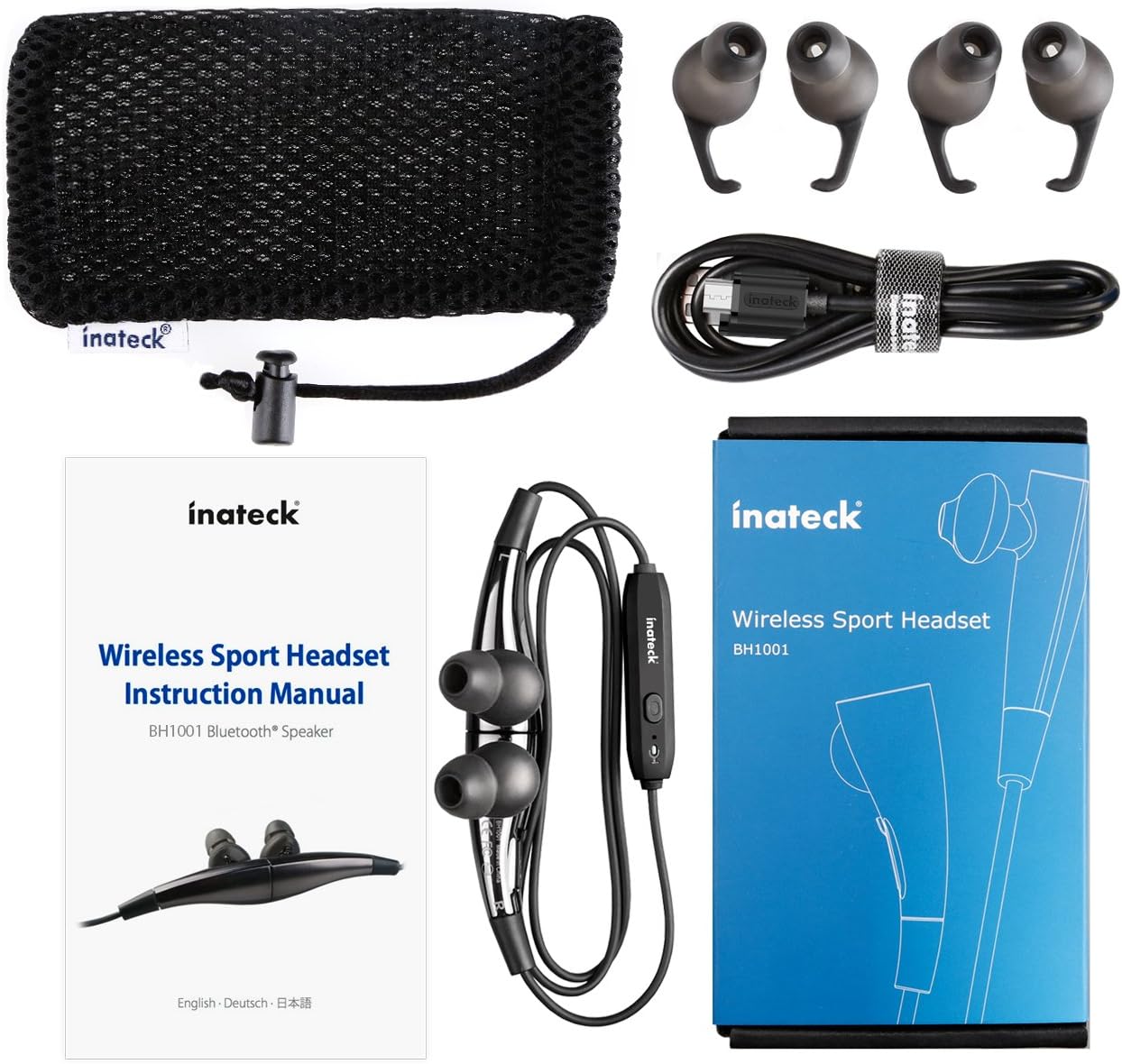
Figear 1.1: Contents of the Inateck Bluetooth Sport Headset package.
1.2 A’ cur cosgais air na fònaichean-cluaise
Before first use, fully charge the headset. A full charge takes approximately 3 hours and provides at least 8 hours of music playback.
- Locate the Micro USB charging port on the headset.
- Connect the small end of the provided USB charging cable to the headset's Micro USB port.
- Ceangail ceann as motha a’ chàball USB ri stòr cumhachd USB (m.e., port USB coimpiutair, inneal-atharrachaidh balla USB).
- The status indicator light will illuminate during charging. It will change color or turn off once charging is complete.

Figear 1.2: Charging the Inateck Bluetooth Sport Headset via Micro USB.
1.3 A’ paidhreachadh le inneal Bluetooth
To connect your headset to a smartphone or other Bluetooth-enabled device:
- Dèan cinnteach gu bheil an headset air a chuir dheth.
- Press and hold the Multifunction Key (MFB) on the inline control unit for approximately 5-7 seconds until the status indicator light flashes red and blue alternately. This indicates pairing mode.
- On your Bluetooth device, enable Bluetooth and search for new devices.
- Select "Inateck BH1001" or "Inateck P20" from the list of available devices.
- Once paired, the status indicator light on the headset will flash blue slowly, and you may hear an audible confirmation.
- The headset will automatically attempt to reconnect to the last paired device when turned on.

Figear 1.3: Inateck Headset paired with a mobile device for music playback.
2. Stiùireadh Obrachaidh
2.1 Smachdan Fònaichean-cluaise
The inline control unit provides easy access to various functions:

Figear 2.1: Thairisview of the Inateck Headset control unit.
- Multifunction Key (MFB):
- Press and hold (5-7s): Power On/Off, Enter Pairing Mode
- Brùthadh goirid: Cluich/Stad ceòl, Freagair/Crìochnaich gairm
- Long press (during incoming call): Reject call
- Àrdaich an tomhas-lìonaidh (+) / An ath thrac:
- Preas goirid: Meudaich meud
- Brùth fada: Air adhart chun ath cheum
- Lùghdaich an tomhas-lìonaidh (-) / An trac roimhe:
- Preas goirid: Lùghdaich meud
- Long press: Go to previous track
- Port Micro USB: Airson headset luchdadh a-nuas.
- Comharra Inbhe: A’ taisbeanadh inbhe cumhachd, paidhreachaidh, agus cosgais.
- Micreofon: Airson gairmean gun làmhan.
2.2 A’ caitheamh a’ chluas-cinn
Select the ear tips that provide the most comfortable and secure fit for your ears. The headset is designed to be worn with the cable behind your neck, ensuring stability during physical activity.

Figear 2.2: Proper wearing of the Inateck Sport Headset for active use.
2.3 Feart Fònaichean-cluaise Magnetic
The earbuds feature integrated magnets. When not in use, you can connect the two earbuds together, forming a necklace around your neck. This action automatically pauses music playback and prevents the headset from falling off.

Figear 2.3: Magnetic earbuds feature for secure wearing around the neck.

Figear 2.4: Headset worn as a necklace using the magnetic feature.
3. Cumail suas
- Glanadh: Sguab na headset le clò bog, tioram. Na cleachd innealan-glanaidh sgrìobach no fuasglaidhean.
- Molaidhean cluas: Regularly remove and clean the silicone ear tips with mild soap and water. Ensure they are completely dry before reattaching.
- Stòradh: When not in use, store the headset in the provided carrying pouch to protect it from dust and damage. Avoid extreme temperatures.
- Seasmhachd uisge: The headset is designed to be water-resistant for sports and exercise (e.g., sweat, light rain). Do not submerge it in water or expose it to heavy rain.
4. A ’dèanamh trioblaid
4.1 Chan urrainn cumhachd a thoirt air adhart
Ensure the headset is fully charged. Connect it to a power source using the USB cable and allow it to charge for at least 30 minutes before attempting to power on again.
4.2 Chan urrainnear paidhir a dhèanamh leis an inneal
- Ensure the headset is in pairing mode (status indicator flashing red and blue alternately).
- Make sure Bluetooth is enabled on your device and it is within range (typically 10 meters or 33 feet).
- Cuir dheth agus air gnìomh Bluetooth air an inneal agad.
- If previously paired, try "forgetting" or "unpairing" the headset from your device's Bluetooth settings and then re-pair.
- Dèan cinnteach nach eil innealan Bluetooth eile a’ cur bacadh air a’ cheangal.
4.3 Gun Fhuaim no Droch Chàileachd Fuaime
- Thoir sùil air an ìre fuaime air an dà chuid an headset agus an inneal ceangailte agad.
- Dèan cinnteach gu bheil an headset air a chàradh gu ceart agus ceangailte ris an inneal agad.
- Move closer to your device to reduce potential interference or range issues.
- Ensure the ear tips are correctly seated in your ears for optimal sound delivery.
- Reboot both the headset and your connected device.
4.4 Ceangal Eadar-amail
- Dèan cinnteach nach eil bacadh corporra sam bith eadar an headset agus an inneal agad.
- Avoid placing your device in areas where the signal might be blocked (e.g., deep pockets, behind thick walls).
- Lùghdaich bacadh bho innealan gun uèir eile (routairean Wi-Fi, innealan Bluetooth eile).
- Keep the headset and your device within the recommended Bluetooth range.
5. Sònrachaidhean
| Brand | Inateck |
| Ainm Modail | P20 |
| Modail Àireamh | BH1001 |
| Teicneòlas ceangail | Bluetooth 4.1 |
| Factor foirm | In-Earrach |
| Suidheachadh cluais | Intra-aural |
| Jack headphone | USB (airson cosgais) |
| Ìre an aghaidh uisge | Waterproof (suitable for sweat/light rain) |
| Feartan sònraichte | Sports and exercise, integrated microphone, magnetic earbuds |
| Cuideam nì | 78 gram |
| Seòrsa smachd | Volume Control, Multifunction Button |
| Stuth | Plastaig |
6. Fiosrachadh Barantais
Inateck products typically come with a limited warranty. For specific warranty terms and conditions applicable to your Inateck Bluetooth Sport Headset, please refer to the warranty card included in your product packaging or visit the official Inateck weblàrach. Cùm dearbhadh ceannach airson tagraidhean barantais.
7. Taic teachdaiche
If you encounter any issues not covered in this manual or require further assistance, please contact Inateck customer support. You can usually find contact information, FAQs, and additional resources on the official Inateck weblàrach:
Weblàrach: www.inatec.com
Please have your product model (P20 / BH1001) and purchase details ready when contacting support.