
1. Ro-ràdh
The Microsoft Surface 3 is a versatile 10.8-inch tablet designed for productivity and portability. Running on Windows 10 and powered by an Intel Atom processor, it offers a full PC experience in a compact form factor. This manual provides essential information for setting up, operating, maintaining, and troubleshooting your device.

Image: Microsoft Surface 3 Tablet with an attached red Type Cover keyboard and a silver Surface Pen. The screen displays a colorful image with digital annotations, demonstrating its versatility.
2. Dè tha sa bhogsa
Upon unboxing your Microsoft Surface 3, verify that all standard components are present:
- Microsoft Surface 3 Tablet
- Power Supply Unit (Charger)
- Stiùireadh Tòiseachaidh Luath (ma tha e air a ghabhail a-steach)
Thoir an aire: The Surface Pen and Type Cover keyboard are optional accessories and are typically sold separately. Ensure you have these if your purchase included them.
3. Inneal thairisview
Familiarize yourself with the physical features and ports of your Surface 3 tablet.
3.1 Puirt agus Putanan
- Port USB 3.0: For connecting USB devices such as external drives, mice, or keyboards.
- Port Cìsean Micro USB: Air a chleachdadh airson an inneal a luchdachadh.
- Mini DisplayPort: Airson ceangal ri taisbeanaidhean no proiseactaran taobh a-muigh.
- Seabhag Jack: Airson toradh claisneachd gu fònaichean-cluaise no luchd-labhairt taobh a-muigh.
- Slot cairt MicroSD: For expanding storage with a microSDXC card.
- Putanan tomhas-lìonaidh: Gus ìrean fuaime atharrachadh.
- Putan Cumhachd: Gus an inneal a thionndadh air/dheth no a chur na chadal.
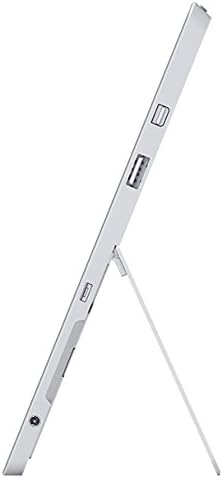
Ìomhaigh: Taobh view of the Microsoft Surface 3, illustrating the various ports including USB, Mini DisplayPort, and the kickstand in an open position.

Ìomhaigh: Dlùth-shealladh view of the microSD card slot on the Microsoft Surface 3, with a microSD card partially inserted, demonstrating storage expansion capability.
3.2 Camara
- Camara cùil: 8 MP for capturing photos and videos.
- Camara aghaidh: 3.5 MP for video calls and selfies.
4. Suidhich
4.1 Cìs tòiseachaidh
Before first use, connect the Surface 3 to the power supply using the Micro USB charging port and allow it to charge fully. The battery indicator on the screen will show charging status.
4.2 Powering On and Windows Setup
- Brùth agus cùm an Putan cumhachd until the Microsoft logo appears on the screen.
- Follow the on-screen prompts to complete the Windows 10 setup process. This includes selecting your language, connecting to a Wi-Fi network, and creating or signing in with a Microsoft account.
- Allow the system to download and install any pending updates for optimal performance and security.
4.3 Attaching Optional Accessories
- Type Cover: Align the Type Cover with the magnetic connector at the bottom edge of the Surface 3 until it clicks into place.
- Peann Uachdar: The Surface Pen can be magnetically attached to the side of the Surface 3 for storage. For initial pairing, follow the instructions provided with the pen or in Windows settings.
5. Obrachadh
5.1 Seòladh
- Sgrion-touch: Use gestures like tap, swipe, pinch-to-zoom for navigation.
- Peann Uachdar: Use the pen for precise input, drawing, writing, and annotating.
- Type Cover (Optional): Provides a traditional keyboard and trackpad experience.

Image: Microsoft Surface 3 in use with a Type Cover keyboard and Surface Pen, displaying a Windows 10 interface with various applications.
5.2 Windows 10 Features
- Clàr-tòiseachaidh tòiseachaidh: Faigh cothrom air aplacaidean, roghainnean, agus roghainnean cumhachd.
- Ionad Gnìomh: Swipe from the right edge of the screen to access quick settings and notifications.
- Tasc View: View open applications and virtual desktops.
- Modh clàr: Switch to Tablet Mode for a touch-optimized interface.
5.3 A’ ceangal ri Wi-Fi
- Fosgail an Ionad Gnìomh by swiping from the right edge of the screen or clicking the icon in the taskbar.
- Tap air an Wi-Fi ìomhaigh.
- Tagh an lìonra a tha thu ag iarraidh bhon liosta agus cuir a-steach am facal-faire ma thèid iarraidh ort.
6. Cumail suas
6.1 Glanadh
- Cleachd clò bog gun lint dampened with water or a screen cleaner specifically designed for electronics to clean the screen.
- Seachain ceimigean cruaidh, stuthan sgrìobach, no cus taiseachd.
- Glan taobh a-muigh an uidheim le clò bog, tioram.
6.2 Ùrachaidhean bathar-bog
Thoir sùil gu cunbhalach airson ùrachaidhean Windows agus stàlaich iad gus dèanamh cinnteach gu bheil na badan tèarainteachd agus na leasachaidhean coileanaidh as ùire aig an inneal agad. Rach gu Roghainnean > Ùrachadh is Tèarainteachd > Ùrachadh Windows.
6.3 Cùram Bataraidh
- Seachain teòthachd anabarrach, oir faodaidh iad beatha bataraidh a mhilleadh.
- For optimal battery longevity, avoid consistently draining the battery to 0% or keeping it at 100% for extended periods.
- The Surface 3 has an average battery life of up to 8 hours under typical usage conditions.
7. A ’dèanamh trioblaid
7.1 Inneal gun a bhith a’ tionndadh air
- Ensure the device is charged. Connect the power supply and wait a few minutes before attempting to power on again.
- Perform a force restart by holding the Putan cumhachd for 10-15 seconds, then release and press it again briefly.
7.2 Cùisean Ceangail Wi-Fi
- Toggle Wi-Fi off and on in the Action Center.
- Restart your Surface 3 and your Wi-Fi router.
- Ensure you are within range of the Wi-Fi network and have the correct password.
7.3 Coileanadh Mall
- Dùin aplacaidean neo-riatanach a tha a’ ruith sa chùlaibh.
- Thoir sùil airson ùrachaidhean Windows sam bith a tha ri thighinn agus stàlaich iad.
- Dèan cinnteach gu bheil àite stòraidh an-asgaidh gu leòr agad.
8. Sònrachaidhean
| Feart | Mion-fhiosrachadh |
|---|---|
| Modail Àireamh | 7G6-00014 |
| Meud taisbeanaidh | 10.8 òirlich |
| Fuasgladh sgrion | 1920x1280 piogsail |
| Pròiseasar | Intel Atom x7-Z8700 (2.4 GHz) |
| RAM | 4 GB |
| Stòradh | SSD 128 GB |
| Siostam-obrachaidh | Windows 10 |
| Grafaigeachd coprocessor | Quad-core Intel Atom x7-Z8700 processor |
| Seòrsa gun uèir | Wi-Fi 802.11ac, Bluetooth 4.0 |
| Puirt USB | 1 x USB 2.0, 1 x USB 3.0 |
| Beatha bataraidh cuibheasach | 8 Uairean |
| Cuideam nì | 1.37 not |
| Meudan toraidh | 14.02 x 8.64 x 1.58 òirleach |
| Cùl WebFuasgladh cam | 8 BP |
| Aghaidh WebFuasgladh cam | 3.5 BP |
9. Barantas agus Taic
Your Microsoft Surface 3 Tablet is covered by a limited manufacturer's warranty. For detailed warranty information, including terms and conditions, please refer to the documentation provided with your purchase or visit the official Microsoft support weblàrach.
For technical assistance, software updates, and additional resources, please visit the official Microsoft Support website or contact their customer service. Keep your device's serial number (located on the back of the tablet or in Windows settings) readily available when seeking support.