
Midiplus Origin 37
midiplus Origin 37 USB MIDI Keyboard Controller User Manual
Model: Origin 37 | Brand: Midiplus
1. Ro-ràdh
The midiplus Origin 37 is a versatile USB MIDI Keyboard Controller designed for musicians and producers. It features 37 full-size sensitive keys, 8 real-time controller knobs, 9 real-time controller sliders, and essential performance controls like pitch bend and modulation wheels. This manual provides detailed instructions for setting up, operating, and maintaining your Origin 37 controller to ensure optimal performance and longevity.
2. Fiosrachadh Sàbhailteachd
- Na cuir an aonad fosgailte do uisge, taiseachd no teòthachd anabarrach.
- Seachain an aonad a chur faisg air stòran teas leithid rèididheatoran, clàran teas, stòbhaichean, no innealan eile (a’ gabhail a-steach ampliifiers) a bheir teas.
- Na cleachd ach ceanglachan / goireasan a chaidh a shònrachadh leis an neach-dèanamh.
- Glan a-mhàin le clò tioram.
- Na cuir bacadh air fosglaidhean fionnarachaidh sam bith. Stàlaich a rèir stiùiridhean an neach-dèanamh.
- Dìon an sreang cumhachd bho bhith air a choiseachd air no air a phronnadh, gu sònraichte aig plugaichean, gabhadan goireasachd, agus an àite far am fàg iad bhon inneal.
- Na cuir a-steach an inneal seo aig àm stoirmean dealanach no nuair nach eilear ga chleachdadh airson ùine mhòr.
3. Pasgan-susbaint
Dèan cinnteach gu bheil na nithean gu lèir a tha air an liostadh gu h-ìosal air an toirt a-steach don phacaid agad:
- midiplus Origin 37 USB MIDI Keyboard Controller
- Càball USB
- Leabhar-làimhe an t-Sealbhadair (an sgrìobhainn seo)
4. Toradh thallview
Familiarize yourself with the various components and controls of your Origin 37 controller.
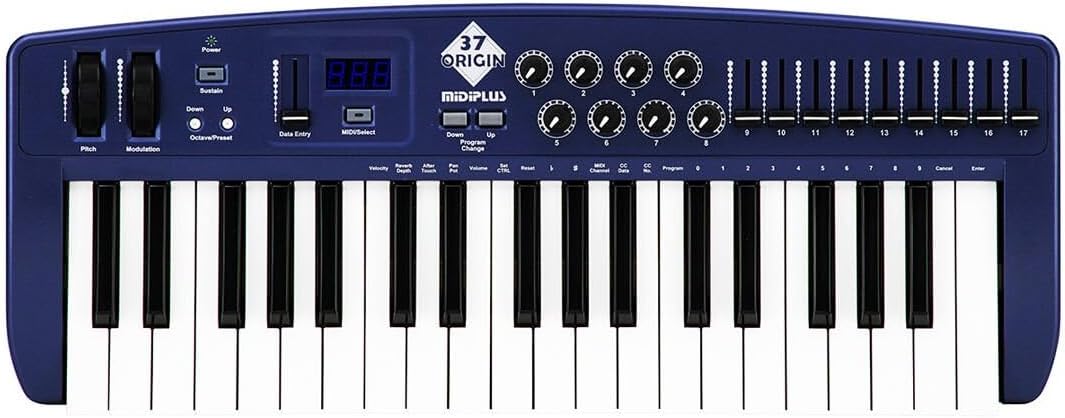
Figear 4.1: Suas gu h-àrd view of the midiplus Origin 37, showing the 37 keys, pitch and modulation wheels, control knobs, sliders, and display.
4.1 Smachdan Pannal aghaidh
- 37 Full-Size Sensitive Keys: Standard piano-style keys for playing notes.
- Cuibhle Pitch Bend: Allows for real-time pitch modulation of notes.
- Cuibhle atharrachaidh: Provides real-time control over various assignable parameters, typically vibrato or other effects.
- Putan Cumhachd: Tionndaidh an aonad air no dheth.
- Putan Seasmhachd: Toggles sustain on/off, mimicking a sustain pedal.
- Putanan Ochdamh Suas/Sìos: Shifts the keyboard's octave range up or down.
- Data Entry Slider: Used for adjusting parameter values shown on the display.
- MIDI/Select Button: Used to enter MIDI configuration mode or select options.
- Program Up/Down Buttons: Navigates through different program or preset numbers.
- 8 Real-Time Controller Knobs (1-8): Assignable rotary encoders for controlling various MIDI parameters.
- 9 Real-Time Controller Sliders (9-17): Assignable faders for controlling various MIDI parameters.
- Taisbeanadh LED: Shows current parameter values, program numbers, and other status information.

Figure 4.2: Detail of the left-side controls, including Pitch Bend, Modulation, Power, Sustain, Octave Up/Down, Data Entry slider, and LED display.
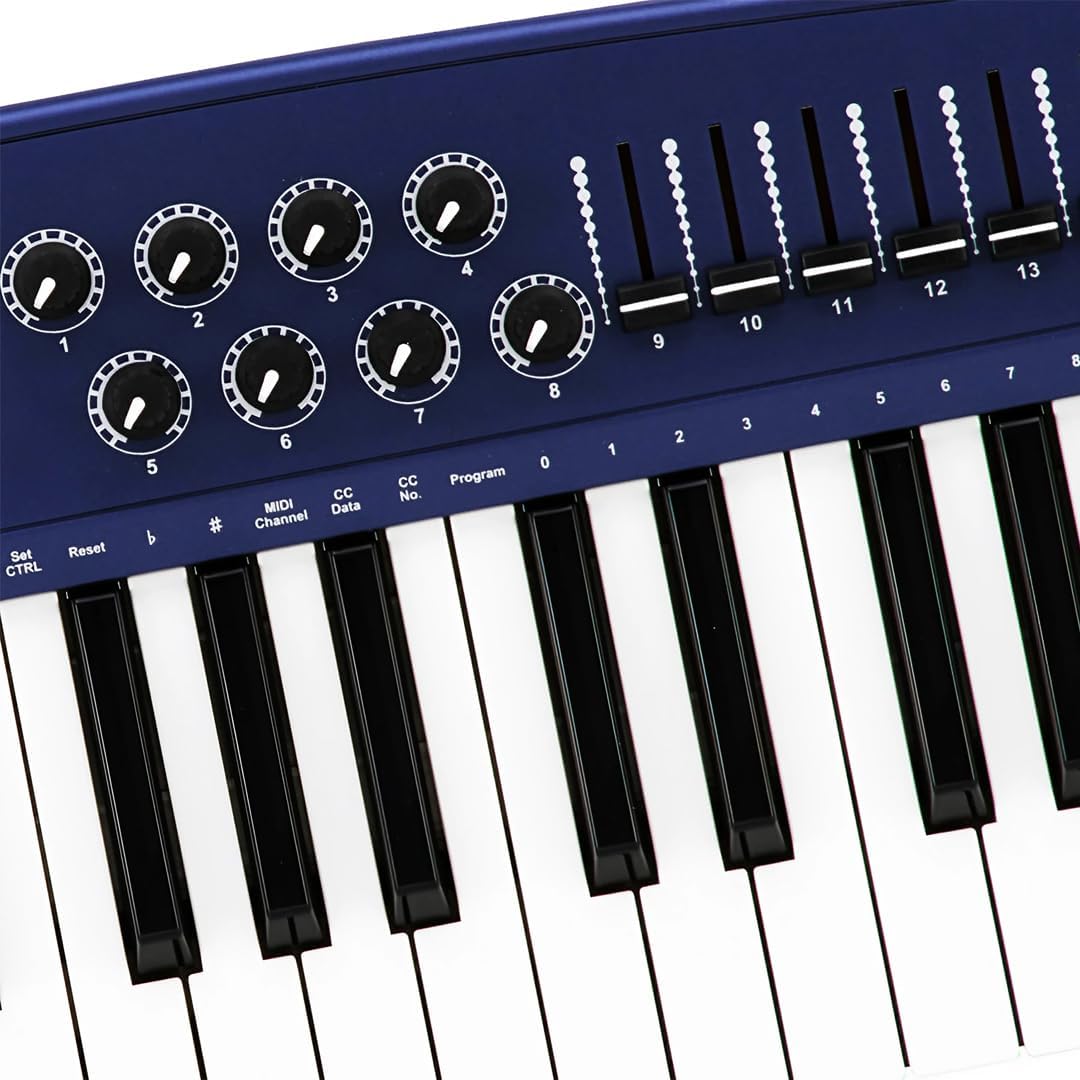
Figure 4.3: Detail of the right-side controls, showing the 8 rotary knobs and 9 faders, along with key labels for MIDI configuration.
4.2 Ceanglaichean pannal cùil
- Sustain Switch Input: 1/4-inch jack for connecting an external sustain pedal (not included).
- KEYBOARD MIDI OUT (5-pin DIN): Standard MIDI output for connecting to other MIDI devices.
- Port USB: For connecting to a computer (PC/Mac) for MIDI communication and power.
- Switch cumhachd: Prìomh tionndadh cumhachd airson an aonaid.

Figure 4.4: Rear panel showing the Sustain Switch input, KEYBOARD MIDI OUT, USB port, and Power switch.
5. Suidhich
5.1 A’ ceangal ri coimpiutair (USB)
- Dèan cinnteach gu bheil cumhachd air a ’choimpiutair agad.
- Connect one end of the supplied USB cable to the USB port on the rear panel of the Origin 37.
- Ceangail ceann eile a’ chàball USB ri port USB a tha ri fhaighinn air a’ choimpiutair agad.
- The Origin 37 is USB class-compliant and does not require special drivers for most operating systems (PC/Mac). It will be powered via the USB connection.
- Turn on the Origin 37 using the Power button on the front panel.
- Your computer should automatically recognize the device. You can then select it as a MIDI input device in your Digital Audio Workstation (DAW) or music software (e.g., Ableton Live).
5.2 Connecting to External MIDI Devices (MIDI OUT)
- Ensure both the Origin 37 and the external MIDI device are powered off.
- Connect a standard 5-pin MIDI cable from the "KEYBOARD MIDI OUT" port on the Origin 37 to the MIDI IN port of your external MIDI device (e.g., synthesizer, sound module).
- Power on the Origin 37, then power on your external MIDI device.
- Configure your external MIDI device to receive MIDI data on the appropriate MIDI channel.
5.3 Connecting a Sustain Pedal
- Connect a standard 1/4-inch TS (mono) sustain pedal (not included) to the "Sustain Switch" input on the rear panel.
- The pedal will function as a sustain control for your MIDI notes.
6. Stiùireadh Obrachaidh
6.1 Gnìomh Bunaiteach
- A’ cluich iuchraichean: Simply press the keys to send MIDI note-on/note-off messages to your connected software or hardware. The keys are velocity-sensitive, meaning the harder you press, the higher the velocity value sent.
- Cuibhle Pitch Bend: Move the wheel up or down to bend the pitch of currently held notes. It automatically returns to the center position.
- Cuibhle atharrachaidh: Move the wheel to apply modulation effects. This wheel typically stays in the position you leave it. The specific effect controlled depends on your software or hardware instrument's settings.
- Putan Seasmhachd: Press to toggle sustain on or off. When active, notes will continue to sound after the key is released, similar to a piano's sustain pedal.
- Octave Up/Down: Use these buttons to transpose the entire keyboard up or down in octave increments. The LED display will indicate the current octave shift.
- Program Up/Down: These buttons are used to send MIDI Program Change messages, allowing you to switch between different sounds or presets on your connected MIDI device or software.
6.2 Assigning Knobs and Sliders
The 8 knobs and 9 sliders are assignable MIDI controllers. They send MIDI Control Change (CC) messages. The specific CC number each knob/slider sends can be configured. Refer to your software's or hardware's manual for how to map these CC messages to parameters.
To assign a knob or slider:
- Brùth an MIDI/Select button to enter configuration mode.
- Cleachd an Inntrigeadh Dàta slider or Octave Up/Down buttons to navigate through parameters on the LED display.
- Select the desired knob or slider to assign.
- Adjust the value (e.g., MIDI CC number) using the Inntrigeadh Dàta sleamhnag.
- Brùth MIDI/Select again to exit configuration mode and save changes.
Note: Specific assignment procedures may vary. Consult the detailed MIDI implementation chart (if available) or your DAW's manual for advanced mapping.
6.3 Data Entry and Display
The LED display provides visual feedback for various settings and parameters. The Inntrigeadh Dàta slider is primarily used to adjust numerical values shown on this display, such as MIDI channel, CC numbers, or program numbers during configuration.
7. Cumail suas
- Glanadh: Use a soft, dry cloth to clean the surface of the unit. Do not use abrasive cleaners, waxes, or solvents.
- Stòradh: Nuair nach eilear ga chleachdadh airson ùine mhòr, stòraich an rianadair ann an àite fionnar, tioram, air falbh bho sholas dìreach na grèine agus teòthachd anabarrach.
- Làimhseachadh: Seachain an aonad a leigeil sìos no a chur fo bhuaidhean làidir.
- Cumhachd: Always disconnect the USB cable when the unit is not in use or during electrical storms.
8. A ’dèanamh trioblaid
| Trioblaid | Adhbhar a dh’fhaodadh a bhith ann | Fuasgladh |
|---|---|---|
| Gun chumhachd/Chan eil an aonad a’ tionndadh air. | Càball USB gun cheangal no lochtach. | Ensure USB cable is securely connected to both the controller and a powered USB port. Try a different USB port or cable. |
| No sound from software/hardware. | MIDI input not selected in software; incorrect MIDI channel; software instrument not loaded. | Verify the Origin 37 is selected as a MIDI input device in your DAW. Check that the MIDI channel on the controller matches the receiving channel of your software/hardware. Ensure a sound-generating instrument is loaded and active. |
| Knobs/Sliders do not control parameters. | Not mapped in software; incorrect MIDI CC assignment. | Ensure the knobs/sliders are correctly mapped to parameters within your DAW or software instrument. Check the MIDI CC numbers being sent by the controller and ensure they match the expected input. |
| Keys are not responding or sending incorrect notes. | Connection issue; software conflict. | Reconnect the USB cable. Restart your computer and DAW. Check for any conflicting MIDI drivers or software. |
| LED display flickering or unstable. | Power fluctuation; internal fault. | Ensure a stable USB power source. Try connecting to a different USB port or a powered USB hub. If the issue persists, contact customer support. |
9. Sònrachaidhean
| Feart | Mion-fhiosrachadh |
|---|---|
| Iuchraichean | 37 full-size, velocity-sensitive keys |
| Luchd-riaghlaidh | Pitch Bend Wheel, Modulation Wheel, 8 Assignable Knobs, 9 Assignable Sliders, Sustain Button, Octave Up/Down, Program Up/Down, Data Entry Slider |
| Taisbeanadh | Taisbeanadh LED |
| Ceanglaichean | USB (Type B), 5-pin MIDI OUT, 1/4" Sustain Switch Input |
| Solar cumhachd | Cumhachd bus USB |
| Co-fhreagarrachd | PC, Mac (USB Class Compliant) |
| Meudan (L x W x H) | 27.56 x 10.24 x 4.13 òirleach (70 x 26 x 10.5 cm) |
| Cuideam | 6.39 not (2.9 kg) |
10. Barantas agus Taic
10.1 Fiosrachadh Barantais
Midiplus products are designed and manufactured to the highest quality standards. For specific warranty terms and conditions, please refer to the warranty card included with your product or visit the official Midiplus weblàrach. Cùm do chuidhteas ceannach mar dhearbhadh ceannach airson tagraidhean barantais.
10.2 Taic teachdaiche
If you encounter any issues or have questions not covered in this manual, please contact Midiplus customer support. You can typically find contact information on the official Midiplus weblàrach-lìn no tron neach-reic agad.
Airson tuilleadh cuideachaidh, faodaidh tu tadhal air an Midiplus Store on Amazon.